Posts tagged with "mac"

Top 5 OmniFocus Applescripts

Top 5 OmniFocus Applescripts

The OmniFocus Extras forum on the Omnigroup user forum is one of the great sources for ready-to-use Applescripts. All you need to do is move them into the right directory on your machine and occasionally modify some of the scripts parameters to fit your needs.

The following AppleScript are those which are extremely handy and I use on a daily basis. There are many others available on the forum and other places, but many of them didn’t really add much value to my workflow, which is a pretty standard one, or solve problems I never encountered.

The “find project” one is a must-have.

Permalink


Alfred 0.8 Adds Clipboard Snippets, Inline Definitions

Here at MacStories, we’re big fans of Mac application launcher Alfred. I stopped using Apple’s Spotlight thanks to Alfred, and the app got a lot of better in the past months with clipboard history, improved keyboard navigation and several new features introduced in the paid version of the app, the Powerpack. For instance, I’m a huge fan of the iTunes Mini Player and the file system browser, which allow me to quickly start playing music from iTunes and browse in a Finder alternative view, respectively. Most of all, I like Alfred because it’s lightweight, blazing fast and entirely keyboard-based. Not to mention that the developers are coming out with updated every few weeks or so. I love it.

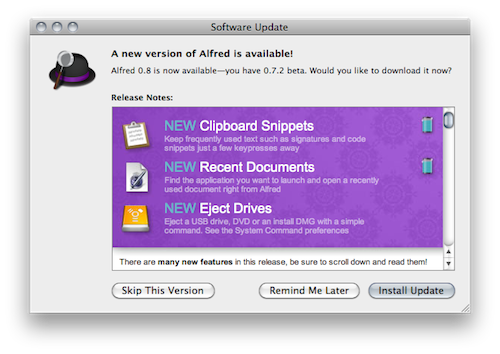
The latest Alfred update, version 0.8, brings lots of general improvements and bug fixes (check them out below) and a couple of new features that are very welcome in my workflow. Alfred can now save test snippets in its clipboard interface: say you have these recurring lines of text you find yourself typing on a daily bases (email addresses, templates, links), you can save them as snippets in Alfred’s preferences and paste them anywhere with a keyboard command. I type “snip” to open the snippet interface, then “keys” and there my snippet with unicode characters goes into the text field my cursor is on. Takes seconds and it just works.

Other new features include inline dictionary definitions, possibility to open recent documents and eject drives with just a few keystrokes. Great stuff for the keyboard geek. In case you still haven’t tried it, Alfred is available for free here.

Full changelog below. Read more


Apple Offering Free iOS Development iBooks

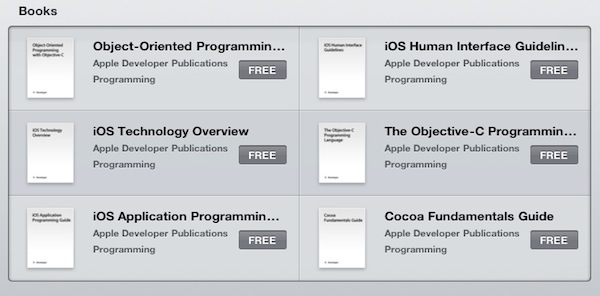
If you’re a Mac or iOS developer and happen to have an iPhone, iPod Touch or iPad running the iBooks app, go open the iBookstore and search for “apple developer”. As you can see, Apple is offering iOS / Mac development iBooks completely for free.

The six books, published by Apple Developer Publications, include “iOS Technology Overview”, “Cocoa Fundamentals Guide” and the popular “iOS Human Interface Guidelines”. Some books report a release date of “November 2010”, but Apple is making sure you’re running the latest iBooks version by writing in each description “This book displays best with iBooks 1.2 or later”.

Indeed the books are elegant and come with a lot of detailed graphics and screenshots. Sure they’re not illustrated books (supported in iBooks 1.2), but I can see why Apple is recommending the latest version of their ebook reading software. Read more


Airfoil 4 Streamlines Audio, Video Experience

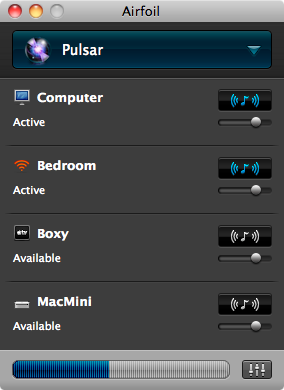
Apple may have introduced AirPlay, but that doesn’t mean Rogue Amoeba is out of the game. In fact, AirPlay is rather limited unless you enjoy hacking your way out of a paper bag, and by no means can it expand its territory outside of iTunes. If you ever wanted to sit back on the couch and watch CNET TV on your 27” Cinema Display through your iPod’s headphones, you’re out of luck. But with Airfoil, streaming audio anywhere allows one to achieve a state of wireless bliss.

Read more


Developers, Submit Your Mac Apps By December 31

With the Mac App Store now officially launching on January 6, it’s no surprise Apple has put a deadline for developers to submit their Mac apps. If you’re a developer and you’d like to have your app ready for the grand opening of the new Store, you’ll have to submit it by December 31.

Submissions for Mac apps opened on November 4th. The first public rejections are already in, and it will be interesting to see what kind of apps will be featured by the official opening of the Mac App Store.


The Mac App Store Will Open On January 6

Apple just announced that the Mac App Store will officially open on January 6. It will be available in 90 countries at launch, and will be based on the simple purchase / download model introduced with the App Store in 2008. The Mac App Store will be available as a free download in Software Update for Snow Leopard users, which suggests that Mac OS X 10.6.6 might be available the same day.

Previous reports confirmed that developers will be able to use the same app names across the iOS and Mac App Store, won’t be able to submit demos and trials and won’t have the possibility to generate promo codes for Mac apps.

Press release below.

Read more