

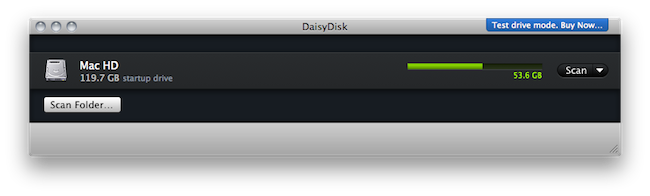
We previewed the new version of Daisy Disk for Mac back in November and I’ve been running the app on my computer since then. At regular weekly intervals, I’ve found myself using Daisy Disk 2 to take a peek into my Mac’s hidden and mysterious locations and see what was eating up all that space. Sometimes it was an iTunes backup. Sometimes it was a folder full of new apps to try. Most of the times it was just junk. Daisy Disk 2, with its gorgeous “sunburst” interface and file deletion functionality, provides a great way to “visually” know what has to be trashed on your machine. Read more
Posts tagged with "mac"
Daisy Disk 2 Public Beta Available
The Mac Orchard Has Lost Its Last Apple

The Mac Orchard (as we know it) is shutting down. Drew Saur, the founder, is closing down his popular Macintosh applications repository. The site hasn’t been updated since July and Saur has decided to say his final good-bye today. The Mac Orchard has been around for 15 years (since 1995) and was a place for Mac users to find Internet software.
Over the years, Internet usage has evolved and many of these older network protocols, like NNTP, now have web-based counterparts. The debut and subsequent improvement of Mac OS X also changed application usage patterns. Mac users no longer need an alternative email client or web browser as the native mail client and Safari web browser are sufficient for most people. The nail in the coffin was Apple’s announcement that it is bringing its App Store to Mac OS X. The Mac App Store will provide a bounty of applications and user reviews, all of which are easily accessible from the user’s desktop. W hen the Mac App Store rolls out sometime next year, there will be little utility in maintaining a dedicated website that has a similar function.
Evernote 2.0 Out Of Beta, Now Available For Mac Users
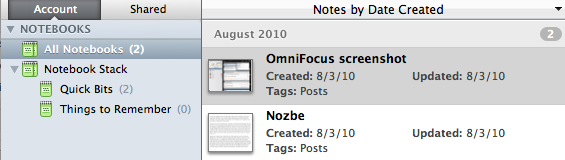
A few weeks ago we reported that Evernote launched a 2.0 beta version for Mac users to test some of the major new features like Stacks and in-app notebook sharing. In spite of the fancy name, stacks are basically folders for your Evernote notebooks that reside in the (redesigned) left panel. Stacks, sadly, are exclusive to the desktop client and won’t show up in the web version of Evernote.
Evernote 2.0 is now out of beta and available for download on Evernote’s website, or through the app’s built-in software update tool. This 2.0 update is pretty huge and comes with a lot of features such as support for up to 250 notebooks, a new attachment button to attach a file to a note and linked notebooks.
You can read about the new features over at Evernote’s official blog.
#MacStoriesDeals - Wednesday

Here’s some great deals for today on iOS & Mac apps that are on sale for a limited time, so get ‘em while they’re hot!
Lastify Brings Additional Last.fm Features to Spotify
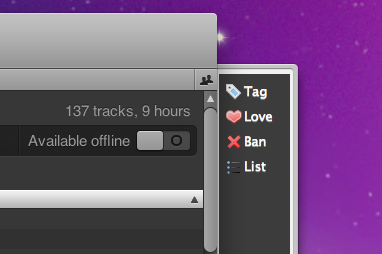
Another week, another SIMBL plugin that brings additional features to a Mac app. This time, instead of adding new functionalities to Tweetie for Mac, we’re going to add some spicy Last.fm integration to Spotify for Mac which, by default, only scrobbles tracks to the popular music service.

Lastify, developed by George Brocklehurst, injects a Last.fm in Spotify for Mac that allows you to “love” and “ban” tracks, tag them and add them to a playlist. Once you’ve downloaded the Lastify bundle, extract it and place the file in /Library/Application Support/SIMBL/Plugins or ~/Library/Application Support/SIMBL/Plugins if you want to install it for all user or just your account, respectively. Restart Spotify after that. To reveal the sidebar, resize the main Spotify window.
The integration with Last.fm is pretty sweet and works as you’d expect. Perhaps SIMBL isn’t the most elegant solution, but it works. Go download the latest Lastify build here.
AirPlay Video From iOS To Mac With AirPlayer
If you’re familiar with AirPlay, you know that it’s a pretty sweet technology that allows you to stream audio and video from any Mac or iOS device to an Apple TV, AirPort Express Station (audio-only) and AirPlay-compatible speakers. That’s the way it works. You can’t stream from Mac to Mac, iOS to iOS, or Mac to iPhone and iPad – although there’s a way to do that via jailbreak.
AirPlay’s streaming is great and almost “magical”, but it has its limitations, possibly due to the fact that Apple introduced it less than a month ago with the release of iOS 4.2. Ever since AirPlay hit the internet with the final public build of 4.2, hackers started working on mods to make it work in any app (video streaming from iOS apps is limited to Apple’s applications), on any device. TUAW’s Erica Sadun, for instance, has been busy working on a solution to make AirPlay work backwards, from iOS to the Mac.
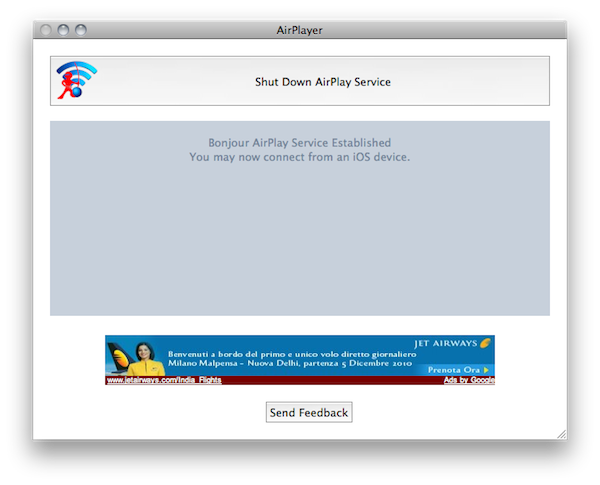
The result is AirPlayer, “a custom Bonjour AirPlay service that pretends to be an Apple TV” that runs on your Mac. It’s a Mac app that can accept incoming AirPlay video streaming from iOS – very simple. Read more
#MacStoriesDeals - Tuesday

In case you missed our announcement yesterday, we started another new feature, and it’s called #MacStoriesDeals. We’ll try our best to update the list throughout each day.
Here’s some great deals for today on iOS & Mac apps that are on sale for a limited time, so get ‘em while they’re hot!
Why The Mac Needs Cydia
There was a time when tweaking OS X was a mostly unknown practice not so many users were willing to dedicate their time to. Modding the basic functionalities and look of the Mac required you to delve deep into forums, tutorials, Terminal hacks, resource packages, manual installations, broken mods on each software update. Modders always had a hard time trying to figure out how to best hack the Mac to make it perform and look the way they wanted.
Cydia for iPhone changed that. The whole jailbreak community changed the approach to modding and hacking on Apple devices. By providing a unified experience that’s similar to the App Store model, but for tweaks, Cydia offers anyone the possibility to create something and release it publicly or privately for free. The “something” mentioned above is mostly made of tweaks, apps, themes and app mods Apple would never accept in its App Store. But that’s fine: Cydia was meant to provide a place for the stuff that couldn’t find its way past the app review team’s gates. A place that, together with the freedom of installations, also grants automatic updates, easy discovery and detailed information about what you’re going to put on your devices.
As you may know, Cydia had such a great run so far that its creator Jay Freeman, a.k.a. Saurik, developed a native version for jailbroken iPads and announced the acquisition of former competitor RockApp. With the help of members of the Dev Team, they updated Cydia in the past weeks to feel even better on the iPad, and eliminate some annoyances such as a laborious queue functionality. From several standpoints, Cydia is even more intuitive than Apple’s own Store. Read more
More On Cydia For Mac→
More On Cydia For Mac
Ok, so Cydia is coming to the Mac. But what will it bring to the OS X platform, which starting January 2011 will have not one, but two ways of installing software? Just as I assumed last week, it’ll bring easy installation of mods and tweaks without having to do those things manually, through the Terminal, and keep them updated after that. The unification of desktop hacks.
Chris Foresman over at Ars Technica reports:
Freeman created a new version of MobileSubstrate which has calls simply “CydiaSubstrate.” This new version can run on both iOS as well as Mac OS X on the desktop. “Just like you can make all these modifications on the iPhone, you can make these same modifications on the desktop,” Freeman said. “Until now, there has never been a way to easily install modifications to the system or third-party applications, as well as keep them updated.
True. Installing themes have been a complete mess (remember Magnifique?), not to mention those neat hacks and mods (to the Finder, for example) that magically disappear on every OS update. But there’s more:
CydiaSubstrate-based modifications can also target a particular application for modification, as well. “For instance, users that have jailbroken iPhones would like to have a modified version of iTunes that does not ask to update iOS when the device is plugged in, since the update might overwrite jailbreak modifications,” Freeman said. “Or perhaps you want to change the frequency that TimeMachine performs backups to something other than the stock settings. CydiaSubstrate makes this possible in an easy way that average users could install and update them.
This is exactly what tinkerers on OS X wanted, and needed. Cydia for Mac will simply be the iOS version brought to the desktop.
Back to the Mac.