Posts tagged with "mac"

Reeder for Mac Vs. Fitts’s Law

Reeder for Mac Vs. Fitts’s Law

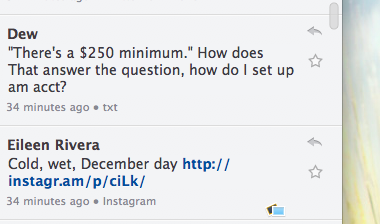
It’s finally happened. Someone came out with a Mac OS application that’s clearly a touch UI crowbarred into a point-and-click universe.

And it doesn’t work.

The application in question is Reeder, a Google Reader client for Mac OS X. Yes, it looks pretty, and I feel kind of bad for making an example of it, especially since it’s in early beta.

The whole analysis is basically about the “misplacement” or “small size” of Reeder’s sharing and feed management buttons. Honestly, I haven’t really ever clicked on the wrong button because of this use of the laws, nor do I know of other users complaining about this very specific problem.

But hey, it’s in early beta. Perhaps Silvio Rizzi will follow Fitts’s Law come the final version. You know, just to prove that with the correct adjustments, apps coming from iOS can work on the Mac. [via Daring Fireball]
Permalink

Is This The Finder You Want in OS X Lion?

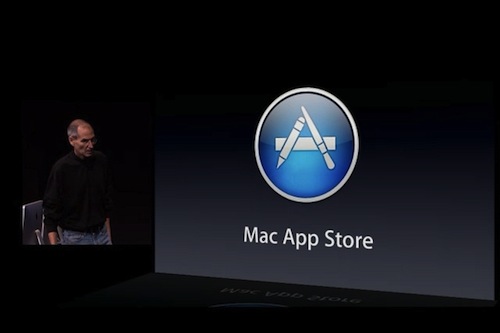
With the Mac App Store reportedly around the corner and OS X Lion set to ship sometimes next summer, we are going to see hundreds of new apps coming to the Mac in the next months. Thanks to a unified purchase system modeled after the insanely successful iOS App Store and all the excitement around a major new version of OS X, developers are jumping to the Mac once again. The interesting apps released in these past weeks confirm that the Mac is far from “dead”.

Still, there’s one application users would like Apple to slightly tweak and / or completely change: the Finder. Some would be fine with a tweaked version inspired by TotalFinder, some claim Apple is going after a Finder-less model just like on iOS. And while we don’t think Apple is going to kill the Finder just yet, we’re definitely playing around with the idea of a massive update to OS X default file manager come Lion next year. Read more


TotalFinder 1.1 Brings Cut & Paste To OS X, Available at $9 on MacUpdate

TotalFinder is a must-have plugin for your Mac’s Finder we reviewed months ago here. TotalFinder, developed by Binary Age, brings a lot of additional functionalities to Apple’s default file manager, including the possibility to open multiple tabs, a “visor” feature to open the Terminal as a transparent layer on top of any window, folders on top, dual mode and many other tweaks.

It’s a massive extension to the original Finder which I’ve been using for months now, and haven’t really looked back. It doesn’t get in the way like many other alternative file managers do, as it perfectly blends with the Finder itself.

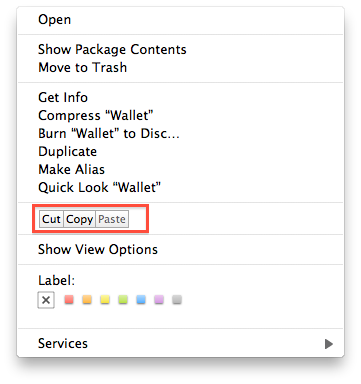
Today Binary Age released a major update to TotalFinder, introducing a variety of bug fixes and improvements but, most of all, a new icon and proper cut & paste support. To activate cut & paste for files in the Finder (which doesn’t ship by default with OS X machines) you just have to open the preferences and check an option. Once activated, you’ll find a cut & paste menu in the Finder’s default contextual menu. The 1.1 update also brings much smoother tabs animations, sidebar tweaks in dual mode, fast toolbar hiding.

TotalFinder was a must-have on its version 1.0, and it still is now that the first major update is out. Actually, I can’t recommend this more now that cut & paste is a go and lots of bugs have been squashed. Plus, the app is available today at $9 on MacUpdate Promo – you can’t miss it.


Mac App Store To Launch Next Week?

According to a rumor posted by Appletell, Apple may launch the Mac App Store as early as next week:

An inside source has just told us that Apple is targeting a Monday, December 13th launch of the Mac App Store. The company apparently told developers to have their software prepared for a launch as early as Monday the 6th of this month, but our contact would be shocked if that happened at this point. Apple has made no official announcements regarding this, and delays could always happen, but there’s a push to be launched before Christmas, well ahead of the previously estimated January release. Guess from where this push has come.

The website claims that Apple is ahead of its schedule for the new store opening, and Steve Jobs wanted a December 6th launch, but it didn’t happen. We didn’t hear anything from developers about a December 6th release, we just know that there’s a deadline for apps to be submitted that should end sometimes later this month.

At the Back to the Mac event on October 20th, Steve Jobs said the Mac App Store would launch in 90 days – which made us think of a late January 2011 opening. Last week, Apple seeded a new build of OS X 10.6.6 to developers to ensure Mac App Store compatibility and even clarified its position on the availability of trials and beta apps in the new Store.

[via MacRumors]


Legendary Transparent Mac SE Doesn’t Last Long On eBay

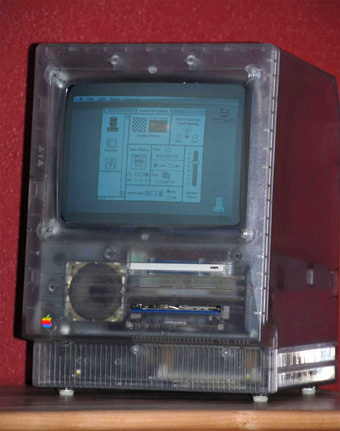
This Mac SE wasn’t meant for public release, it was a special unit designed for Apple’s employees – and most specifically, designers – so they could look at the actual components while using the machine. A transparent Mac SE coming straight from the late ’80s, sold on eBay for more than $25,000.

The item has been sold pretty quickly (heck, Jobs himself might have bought it feeling the nostalgia), and it comes from an ex-Apple employee who worked at the R&D team back in the day. Whoever bought it will have to boot it off of an 800k floppy, as the hard disk boot isn’t working anymore.

So, new transparent Mac SE owner: congratulations. You own a very rare piece of Apple’s history now. [Gizmodo via eBay]


Dropbox For Mac Hits Version 1.0

Dropbox, one of our favorite sync services here at MacStories, just hit version 1.0 on the desktop. The new build, released for Mac, Windows and Linux, it’s available for download on Dropbox official forums here.

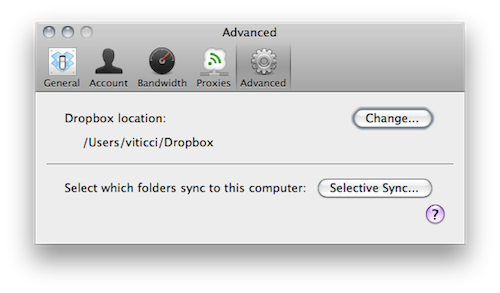
If you’ve been following the development of Dropbox for Mac closely, then you know that this 1.0 build is actually a “remixed” version of the 0.8 that’s been available on the forums for a few months now. Dropbox 1.0 comes with a redesigned preference window that makes it easy to check on your computer’s settings and your account information, but the real new feature is selective sync: located in the Advanced tab in the settings, selective sync allows you to choose which folders already on your Dropbox account you want to sync back to your computer. If you want to keep a folder online but not locally, it will not download or sync to your computer. Very useful for files you just want to keep a backup of, but not an actual local copy.

Dropbox 1.0 is available here. As for what you can do with Dropbox, here’s where to start. Check out the full 1.0 changelog below. Read more


Osfoora Is Coming To The Mac [Screenshots]

Osfoora is an insanely popular Twitter client for iPhone and iPad that has gained thousands of aficionados in the past months. Released on the iPhone last year, Osfoora made its way to the tablet a few months ago with a really nice client that took advantage of the larger screen to offer a landscape “split view”.

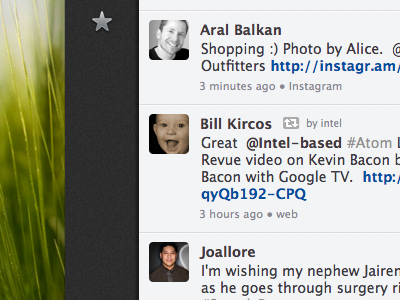
Osfoora is now coming to the Mac, according to a screenshot of the “pre-alpha version” posted by the developer on popular design-sharing website Dribbble. We can’t see much from the teaser, but it looks like the desktop client is going to feature a minimal look with a sidebar that – again, basing on this first small screenshot – looks a lot like Tweetie’s one.

With Tweetie 2 on the horizon, Weet for Mac and now Osfoora – I  guess it ain’t really over for Twitter clients on the Mac. We look forward to seeing more about this new iteration of Osfoora.

Update: we’ve got another screenshot from Osfoora’s developer, showing the timeline with photos indicators. Looks nice to us.


Will Mac App Store Users Really Miss Demos? Probably Not.

The big news this morning is that Apple clarified its position on demos and trials in the upcoming Mac App Store and confirmed what we thought would happen all along: developers can’t have demo versions of their apps in the Mac App Store. Only full-featured retail versions will be accepted. Clearly, Apple doesn’t want to offer limited-time or “half baked” apps in its new Store, and it’s forcing Mac developers to go the iOS way with either free or paid apps.

That is going to cause a few problems and headaches for many, many OS X developers. For years, they have been trained to release demo / trail versions of applications, with a paid version to purchase immediately or after the trial runs out. And indeed Apple suggests just that: keep hosting trial versions on your website, because you’ll be able to insert a link to it in the App Store description page of the app. Just as it’s possible now in the iPhone and iPad App Store. Read more


Borderlands: Game Of The Year Edition for Mac Available

Borderlands: Game Of The Year Edition for Mac Available

Bloodthirsty bandits. Vicious monsters. Tons of loot. Lock, Load and face the madness. Gearbox Software’s acclaimed sci-fi hit comes to the Mac complete with all four expansion packs. Borderlands is a unique hybrid of first person shooter and role-playing game with a super sharp visual style and a compelling 4 player co-op mode.

The game is out on Amazon now, or you can buy it on Feral Interactive’s website. I played this on a PC months ago, it’s a real gem.

Permalink