
Posts tagged with "mac"

Apple Considering Scrollable Menus and Toolbars For Lion and iOS 5?

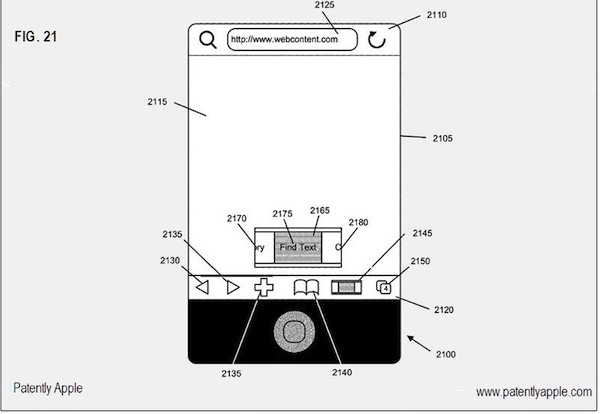
A new European patent filing discovered by Patently Apple details how Apple might implement different interaction methods for menus and toolbars in the next version of OS X, Lion, and in the future iteration of their mobile operating system, iOS. The patent, filed in Q2 1010 and published last week, shows two specific models: scrollable menus and toolbars.

The main concept behind the patent is that menus and toolbars take too much space on screen, and the large majority of users don’t need to look at these elements all the time. To save space and implement multitouch gesture-based navigation in menus, there could be a way to scroll through toolbar icons and dropdown menus both on the desktop and iPhone / iPad. Read more


Reminder: .Mac HomePage Shutting Down Today

As reported in early October, Apple is shutting down the .Mac HomePage service today. The .Mac HomePage service was a feature that allowed users to publish webpages using their .mac account. The feature was first discontinued in July 2009 (users were unable to create new content); today Apple is pulling the plug on the service by disabling viewing of already-published content.

The files won’t be permanently deleted, though. As Apple explains in a support document:

Can friends and family still view my published pages?

After November 8, 2010, all photos, movies, and files shared using .Mac HomePage will be unavailable for viewing on the web. Web Pages published using iWeb or Aperture will not be affected.

Will my content be deleted after November 8, 2010?

No. All of your content is still on your iDisk and can be accessed by going to me.com/idisk and clicking Home in the sidebar. The HTML files that make up your site can be found in the Sites folder, and any pictures or movies you have used for your pages can be found in the Pictures and Movies folders respectively. You must remain an active MobileMe member to access your iDisk.

Apple’s current sync and web publishing solution, MobileMe, retails at $99 per year and comes with a 60-day free trial. We highly recommend it as a way to sync information across devices (bookmarks, settings, email accounts, calendar), although we’re huge fans of Dropbox when it comes to file storage.


“There’s Always Ubuntu”

“There’s Always Ubuntu”

Love them or hate them, this is something that Apple—more than any other company—fundamentally gets. They want a computing experience more like the appliance experience. If this vision “wins” that doesn’t mean there’s no place for geeks; there’s still a need for programmers and web developers and sysadmins and UI designers. But the computers that most of the public increasingly interfaces with will be computers that are not designed to be directly programmable.

And I’m pretty sure this vision will win. For the vast majority of users the model of the app console—think game console, but not just for games—is simply better. The iPad is an app console, and the Macs of next year will be, too. And the PCs of the year after that.

And just like with game consoles, geeks will always be able to tinker.

Permalink

The iMac G4 Lamp

Unfortunately, the following item has already been sold on Etsy– at the price of $125. And it’s no surprise, considering that it’s a desk lamp made out of recycled parts of an old iMac G4, the iMac that made history.

Perhaps Steve and Jony bought it. I wanted one, but I think I’m just going to wait for the Mac Pro closet. [via Giz]


Why Developers Create Apps for iOS

Why Developers Create Apps for iOS

Marco Arment:

The problem is that hardware manufacturers and tech journalists assume that the hardware just needs to exist, and developers will flock to it because it’s possible to write software for it. But that’s not why we’re making iPhone and iPad software, yet those are the basis for the theory.

We’re making iPhone software primarily for three reasons:

Dogfooding: We use iPhones ourselves.
Installed base: A ton of other people already have iPhones.
Profitability: There’s potentially a lot of money in iPhone apps.

With this in mind, think about the installed based of Macs.

Permalink

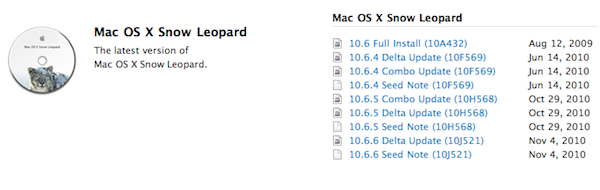
Apple Seeds Mac OS X 10.6.6 To Developers, 10.6.5 Coming Any Day Now

As noted by 9to5mac, Apple just seeded Mac OS X 10.6.6 (build 10J521) to registered Mac developers. 10.6.6, another version of Snow Leopard – we thought the upcoming 10.6.5 would be the last before Lion.

The only information provided in the changelog:

- Contains developer support for fetching and renewing App Store receipts. See “Validating App Store Receipts” for more details.

The release of a first 10.6.6 seed means the 10.6.5 version we’ve been talking about for months could be coming later today, tomorrow – any day. It’s ready, just waiting to be released publicly.


iPhoto 9.1 With Calendars Support Now Available

A few minutes ago Apple released an updated version of iPhoto, which reaches version 9.1 and adds support for Calendars, a feature that mysteriously went missing in the first iteration of iPhoto ‘11. Apple already announced an update with Calendars support was on its way.

Check out the official changelog below:

This update adds several new print product options to iPhoto ‘11. It also improves overall stability and addresses a number of other minor issues.

- Provides the ability to create and order calendars in iPhoto.
- Additional letterpress holiday greeting card themes are now available.
- Fixes an issue that prevented videos downloaded from MobileMe or Flickr from importing correctly into iPhoto events.
- The update is recommended for all users of iPhoto ‘11.

You can download the update in Software Update or at Apple’s support page for iPhoto 9.1.


Custom Styles for Skype 5.0 Beta for Mac

Custom Styles for Skype 5.0 Beta for Mac

A few hours back, a new Beta of Skype for Mac hit the interwebs. The twitter was going all crazy for it. This new Beta of Skype for Mac included some drastic UI changes. (read: 100% of the UI has changed)

One of the most noticeable visual changes was the amount of whitespace. Because the window looked like it was a Web View, and I saw something about Chat Styles in the settings, I decided to dig into the Skype.app package.

Also check out Panamerica Mini.

Permalink