

We here at the MacStories institute of app reviews have a feeling that your stack of Dōjinshi, Green Latern, and The Walking Dead comics have been dwindling at an alarming pace. Surely you could fulfill all your Hentai Manga needs online, but what fun is downloading RAR files just to peep JPEGs when you could get with the times and scoop some CBZ or CBR files from your favorite digital vendors? And no doubt you’ve been pulling shenanigans like scanning Super Man covers into PDFs for easy reading in iBooks instead of faxing ass photos to your boss in Italy. While there’s nothing like tearing the plastic off Wonder Woman, flipping pages is best left for the DC fanatics who have a thing for glossy covers and tongue inspired paper crinkling. It’s time to give comics a quick swift kick in the rear and bring the treasure trove of paneled heroism into the 21st century. That’s what Danger Duck would have wanted right?
Posts tagged with "mac"
How to Read Comics Like a Pro on the Mac & iPad
iTunes 10.1 and OS X 10.6.5 Coming Tomorrow, iOS 4.2 On Friday at 10 AM PST

An inside source at AT&T told MacStories that Apple is planning to release iOS 4.2, a major OS update for iPhones, iPods and iPads, on Friday November 12th at 10 AM PST. We also learned that updates to iTunes and Mac OS X will be released sometime tomorrow – iTunes will be reaching version 10.1 and Mac OS X will jump to the long-awaited 10.6.5 version. Read more
MacGraPhoto Bundle: 9 Mac Graphics Apps, $39.99

It looks like bundles of OS X software are back and this time their creators are really focused on providing quality, rather than mere quantity. The MacGraPhoto bundle, launched yesterday, features 9 popular Mac graphics applications worth $444 at the affordable price of $39.99. That’s not a bad deal, is it?
Among the included applications, some real gems I’ve used in the past and reviewed here on MacStories. Sketch by Bohemiam Coding, for example, which we reviewed here. With the bundle you’ll also get Hydra, Posterino, Snapshot, ImageFramer, Layers, AtomicView, Swift Publisher, Sandvox and the bonus app DVD Library.
You can go buy the MacGraphoto bundle here. Again, we think it’s a great deal featuring some really neat apps for OS X.
Courier 1.1 Adds MobileMe Support, Plays Nice With Large Uploads
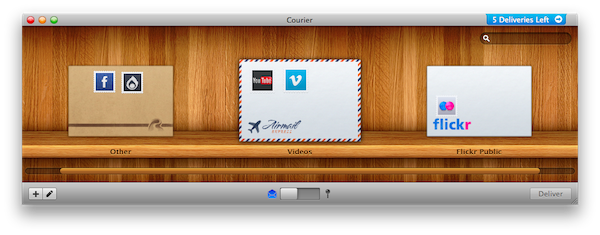
Courier is the latest Mac app by the guys over at Realmac Software which we reviewed 2 months ago here. Through a highly custom and beautiful interface, it allows you to upload files to a variety of online services such as Flickr, Facebook, Ember, Vimeo and Youtube. The first version of the app also allowed you to send files to your FTP server and Amazon S3. All is achieved via “envelopes”, packages the app sends to your selected sources.
Courier 1.1, released today, adds the much requested MobileMe support and improves reliability with large uploads – which could take longer than usual on the older version. In spite of the added functionality, the app is still intuitive and easy to use.
Courier is available at $19.95 on Realmac’s website, with a free trial available as well. We look forward to seeing Courier in the Mac App Store.
Audition for Mac Public Beta Now Available
Five months ago we saw a first video of Adobe Audition for OS X. Today, Adobe released the first public beta for the software, which is based on a new architecture capable of editing both single files and multi-track mixes.
The OS X version of Audition offers a new engine with improved performances, and seems to be geared towards the broadcast and audio post-production market.
From the official beta page:
Adobe Audition for Mac offers:
- Fast start-up, high performance multi-threaded processing, and parallel workflows
- Powerful audio editing and multitrack mixing views
- Superior noise reduction capabilities
- Native 5.1 Surround support and multi-channel effects, plus other new effects
- Optimized audio post-production workflows
You can go download Audition for Mac beta here. [hat tip to The Loop]
15 Secrets of Transmit 4→
15 Secrets of Transmit 4
Transmit 4. It’s easy to use, but there’s a whole lot under the surface. And while we try to design apps for the majority, sometimes we throw in some power user features for the pros. As the Finnish always say, “always add a few extra blood dumplings when cooking mykyrokka for a tonttu-ukko!”
So here are 15 “secrets” of Transmit 4.
If you still haven’t changed your Favorite icons, now is a good time to do it. Great tips.
Rumor: iWork ‘11 Is Ready, Will Debut In The Mac App Store

According to AppleInsider, iWork ‘11 is basically ready, but Apple doesn’t want to let it out of the cage. They received information from “people familiar with the matter” that the productivity suite was ready to be announced at October’s Back to the Mac event, but it was scrapped at the last minute.
It appears that Apple might hold it back until the grand opening of the Mac App Store, which should happen sometime next January.
People familiar with the matter say development of iWork ‘11 wrapped up this fall and the software was initially slated for an introduction alongside iLife ‘11 last month, but was held back at the last minute for undisclosed reasons.
Apple’s revised plans currently call for the company to launch the new productivity suite alongside the forthcoming Mac App Store, these same people say. The applications included in the bundle – Pages, Numbers and Keynote – will be available for purchase individually when the Mac App Store debuts.
AppleInsider also speculates that Apple might remove the retail box option for iWork ‘11 and sell the suite solely on the Mac App Store as single applications priced at $19.99 – pretty much like they do for the iWork apps for iPad. With the promise of the Mac App Store as the best way to discover and install applications on a Mac, the option surely seems likely.
Apple started accepting submissions for the Mac App Store last week. Promo material for the Mac App Store showed individual iWork apps sold at $19.99 each.
DEVONthink Pro: 50% Off→
DEVONthink Pro: 50% Off
In today’s world, everything is digital. From shopping receipts to important research papers, your life often fills your hard drive in the form of emails, PDFs, Word documents, multimedia files and more. Questions eventually pop up, like where do you store all of this stuff?
If you haven’t yet, now is a great time to get your hands on DEVONthink – in my opinion the must-have information organizer / file manager / anything bucket for Mac. The iPad app came out two weeks ago and I’m finally working on a comprehensive review of the suite. If you purchase the app through this link, we also get a small kickback.
Itsy Twitter Client for Mac Adds Custom Themes, Gesture Navigation
We have covered Itsy, a minimal Twitter client for Mac by mowglii, quite a few times in the past. What’s great about Itsy is that it’s simple and focused, taking the clutter way to let you concentrate on what really matters: the tweets.
The old 1.x version was falling under the weight of Twitter incompatibilities and different APIs – it needed a major update.
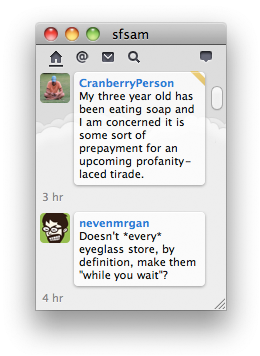
Last week developer mowglii released the long-awaited 2.0 version of the app, which adds support for custom themes (you can select them in the Preferences), tweet deletion, support for three-finger swipe gesture to navigate (Snow Leopard-only) and lots of bug fixes and overall improvements. Itsy was indeed very popular thanks to its community of designers and users who came up with stunning mods of the original interface. Now theming is officially supported in the app. Great news.
Itsy is free. You should give it a try.