Posts tagged with "mac"

Nuance Releases Dragon Dictate 2.5, Adds Word 2011 And iPhone As Microphone Support

Nuance has today released an upgrade to their Mac-based dictation software, Dragon Dictation 2.5. The new version focuses on refining features and adding minor features that will make dictation tasks simpler. A big feature addition is support for dictation in Microsoft Word 2011, which also allows users to seamlessly mix typing and dictation. Also new is the ability to use the iPhone as an input microphone for Dragon Dictate using the Dragon Remote Microphone app that was recently released for the iPhone and iPod Touch.

Also new are Facebook and Twitter commands which will allow users to easily post tweets or create a status update in Facebook by saying “Tweet [speak text]” and “Post to Facebook [speak] text” or a similar command. As Peter Mahoney of Nuance explains, they heard requests for “more flexibility” and responded with more formatting controls which allow users to have more control over how data such as dates are formatted and how abbreviations are used. Users can also delete entries from the Dragon dictionary if it conflicts with other words and there is now a dedicated numbers mode which only dictates numbers and commands – helpful for database entry.

The Dragon Dictate 2.5 update is free for all users of the Dragon Dictate 2.0 version, whilst new users can purchase the new version now for $179.99. Jump the break for Nuance’s full press release.

Read more


An Overview of Automator Improvements In Lion

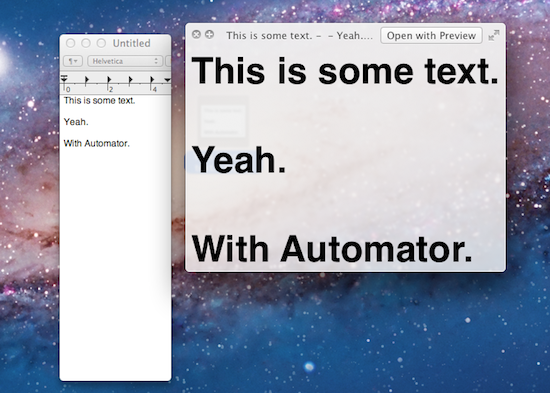
Automator, the suite of automation tools for OS X that can create user workflows, services or apps, has received a series of interesting improvements in Lion, some of them useful additions that will likely eliminate the need for certain kinds of third-party software for many users. In spite of Lion being described as a “user-friendly” OS thanks to the implementation of gestures or full-screen apps, as we’ve seen in our review and other articles following the Mac App Store launch it’s clear there’s still much room for tweaking and “taking control” of the OS when you want to get the most out of it. Take the Option key for example: Option has been capable of reversing certain behaviors in Mac apps for quite some time, but in Lion it gets a whole new usage as it can reverse the entire Resume system, show the Library in the Finder’s menubar, or change the Finder’s “Arrange By” feature to “Sort By”. And that’s just the Option key. Personally, I disagree on the assumption that Apple is “dumbing down” the operating system only by introducing functionalities that make interacting with a computer easier. The way I see it, Lion is the most powerful and feature-rich version of OS X to date (and several developers, from a technical standpoint, agree with this) and, actually, the gestures themselves can appease any power user when correctly mastered. Lion may look simpler on the surface (and to an extent, I can see why the addition of the Launchpad doesn’t help as far as this argument goes), but it’s a very powerful entry in the OS X family once you take a peek under the hood. Read more


Mono, Beautiful Growl Theme, Updated for Lion

Mono by Christopher Lobay is a beautiful theme for Growl, the popular notification system for OS X, that I’ve been using on my MacBook Pro and iMac since it was first released last year. Of all the Growl themes I’ve used, Mono was the one that provided a good compromise of gorgeous interface and usability – I like my Growl themes to be informative, beautiful to look at, unobtrusive and definitely not “sticky” on screen. I typically set my Growl preferences to display a notification for 1.5 seconds, which plays very well with Mono’s animation that makes alerts slide into your Mac’s screen from the side.

Mono has been updated to version 2.0, and while this update doesn’t bring any major visual change from Mono 1.0, it does add full Lion compatibility. Indeed I tried to configure Mono with Growl on Lion last week, but couldn’t get it to work – that was particularly unfortunate for me as my favorite theme couldn’t be tested with GrowlMail, which has been updated to version 1.3 to, again, work with Lion and the new Apple Mail. With Mono 2.0, everything works: notifications show up correctly on Lion, as do new messages from Mail. As a side note, I noticed I had to manually restart the Growl process and all associated apps to get notifications to work on OS X Lion.

Meanwhile, the Growl developers are busy building a new Mac App Store version that won’t be free, and it’s supposed to come out soon with several enhancements and new features. While waiting for the all-new Growl, you can download Mono 2.0 here.


OS X Lion: AirDrop Overview

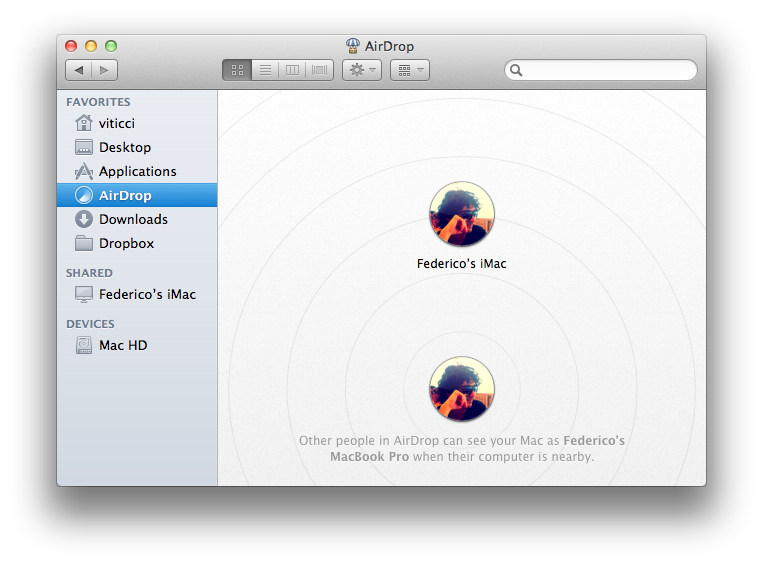
Among the new features of Lion that Apple touts on the Mac App Store and the OS’ official webpage, there is a new peer-to-peer file sharing functionality called AirDrop, which uses the Finder as a way to share files with Macs nearby through drag & drop. Acting as a replacement to the omnipresent USB stick and providing an easier approach to wireless file sharing than the Mac’s default “Drop box” feature, AirDrop wants to replace any physical media and alternative software solutions used to share documents with your friends, family, or colleagues that happen to have a Mac next to your machine. I can’t tell you how many times in the past I found myself using my MacBook next to a friend’s MacBook, and doing something as simple as sharing an .mp3 file required us to either go through the Mac’s Sharing settings in System Preferences, upload it online for a one-time usage, or rely on the typical USB thumb drive.

AirDrop is aimed at making file sharing easy, and secure at the same time. Before I delve deeper into its feature set though, here’s the list of computers Apple says are compatible with Lion’s AirDrop:

  • MacBook Pro (Late 2008 or newer)
  • MacBook Air (Late 2010 or newer)
  • MacBook (Late 2008 or newer)
  • iMac (Early 2009 or newer)
  • Mac mini (Mid 2010 or newer)
  • Mac Pro (Early 2009 with AirPort Extreme card, or Mid 2010)

Read more


Miscellaneous Lion Tips and Tricks

Lion is a solid update to OS X and it comes with several new features as we’ve outlined in our review, however there are so many little touches and minor features it is possible some of them will go unnoticed, leaving a user wondering whether something he thought would be possible was removed by Apple. In this post, we’ve collected some of the best tips and tricks we’ve received from our readers and Twitter followers since Lion came out yesterday, as well as stuff that didn’t make it to the review. More will follow throughout the next days, but in the meantime check them after the break.

Note: Part 2 is now online.

Read more


Apple Releases OS X Lion, USB Thumb Drive Coming at $69

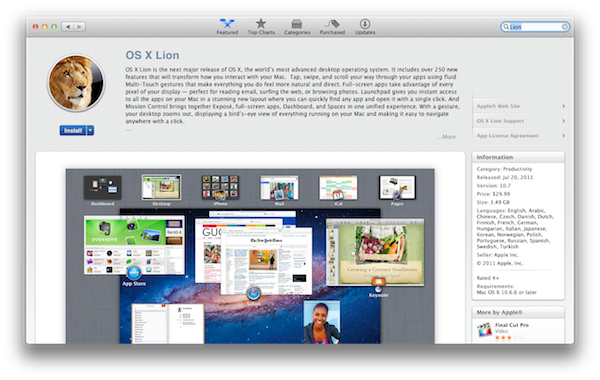
As widely expected, Apple released the next major version of OS X, Lion, on the Mac App Store today. The new OS is now available at $29.99 as digital-only download and is propagating through all the international App Stores at the moment of writing this.

You can download OS X Lion here. OS X Lion Server is available as a separate add-on here.

Lion is a major upgrade to Apple’s desktop OS that introduces over 250 new features and blends several typical desktop UI elements with design concepts and implementations first explored on the iPhone and iPad. Indeed, at the “Back to the Mac” event in October 2010, Apple described Lion as “OS X meets the iPad”. The Launchpad, for example, is a new way to install, organize and launch apps that’s heavily inspired by iOS’ Springboard, which lays out app icons in a grid against a default background with possibility of creating, moving, and deleting folders. Mission Control, a new way to manage app windows, combines the best elements of Snow Leopard’s Exposè and Spaces to create a new experience that unifies windows, desktops and full-screen apps in a single, easy to use interface. Lion brings hundreds of changes and subtle refinements, most of them delightfully added throughout the whole operating system in apps like iChat and System Preferences, others immediately visible like “All My Files” and “AirDrop”, two new Finder features to browse all documents and share files locally with others, respectively.

Lion brings new functionalities and APIs that should make users and developers alike excited to try out the new OS. For instance, developers can enable the new Automatic Termination and Resume APIs in their applications to make sure the “state” of an app is always saved upon quitting, and resumed on the next OS boot or app launch. This behavior can be reversed, but it’s enabled by default to put the emphasis on an operating system capable of saving your work and “app state” without you even thinking about it – app state means anything from open windows to position on screen and mouse cursor. Similarly, the new Auto Save when combined with Lion’s Versions will allow you to never worry about “saving” a document again, and have the OS perform continuos versioning in the background that you can access from a new Time Machine-like UI. Versions allow you to restore a document’s previous changes and edits from any point in time since you first created it.

Lion is a milestone in Apple’s desktop OS history, and we’ll have a complete review, as well as a detailed installation guide, in a few minutes on our site’s homepage.

Update: In the official press release, also embedded below, Apple confirms that Lion will be made available on a USB thumb drive at $69 for users without broadband access.

Mac OS X Lion is available as an upgrade to Mac OS X version 10.6.6 Snow Leopard® from the Mac App Store for $29.99 (US). Lion is the easiest OS X upgrade and at around 4GB, it is about the size of an HD movie from the iTunes Store®. Users who do not have broadband access at home, work or school can download Lion at Apple retail stores and later this August, Lion will be made available on a USB thumb drive through the Apple Store® (www.apple.com) for $69 (US). Mac OS X Lion Server requires Lion and is available from the Mac App Store for $49.99 (US).

Read more