


Here are today’s @MacStoriesDeals on iOS, Mac, and Mac App Store apps that are on sale for a limited time, so get them before they end!
Posts tagged with "mac"
#MacStoriesDeals - Monday
Alfred for Mac Gets Extensions, Growl Support, New Lion Theme
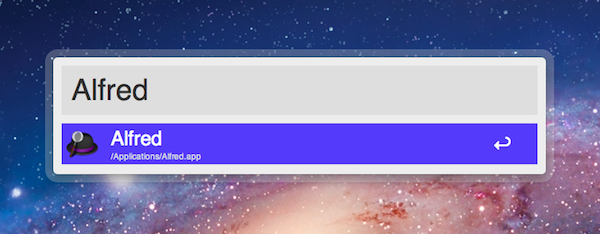
Alfred, the application launcher for the Mac, received a fairly substantial update today which brings important new functionalities such as extension support, Growl integration for action outputs, a new theme inspired by OS X Lion, and several bug fixes. Personally, I’ve been a big fan of Alfred since its first release last year, and I’ve followed the development closely as I switched from Quicksilver (which came back from a long hiatus a few months ago) and started looking into the customizable search and launch environment offered by Alfred. In the past months, in fact, Alfred evolved into a minimal, yet powerful application launcher capable of doing a bunch of other things such as filesystem navigation, clipboard management, AppleScript launching and dictionary. I was particularly impressed with the 0.9 version, which allowed users to assign a keyboard shortcut to any AppleScript on your machine, similarly to how the popular FastScripts lets you pair a shortcut with a script.
Whilst the developers are still planning a major 1.0 release that will likely see the Powerpack (a set of premium additional features) become available as in-app purchase on Lion’s Mac App Store, Alfred 0.9.9 has been publicly released today and, in spite of what the version number suggests, it is a milestone release that sets the path for future Alfred versions and the kind of integration with the system the developers are willing to bake into their application launcher . Read more
#MacStoriesDeals - Friday

Here are today’s @MacStoriesDeals on iOS, Mac, and Mac App Store apps that are on sale for a limited time, so get them before they end!
#MacStoriesDeals - Thursday

Here are today’s @MacStoriesDeals on iOS, Mac, and Mac App Store apps that are on sale for a limited time, so get them before they end!
Sidekick Automates Your Mac’s Settings Based On Your Location
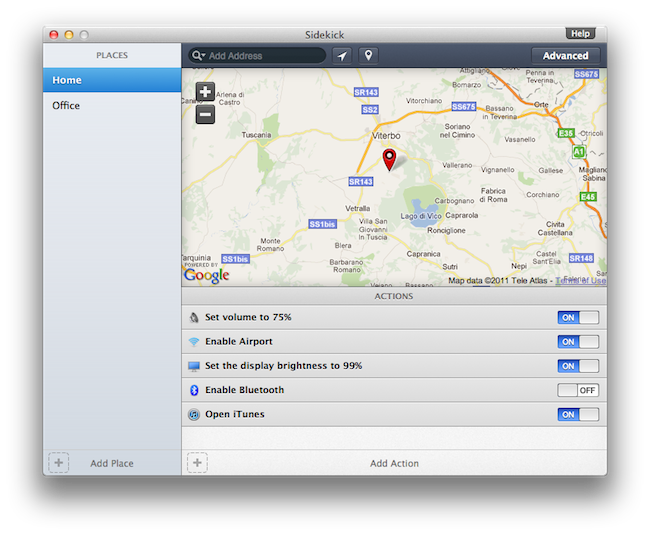
Last week, I ordered a new MacBook Air from Apple’s website. My MacBook Pro was getting old, so I decided it was time for an upgrade – and the new MacBook Airs looked like a worthy upgrade. As with the Apple online store’s tradition, the computer showed up at my doorstep in roughly three days. As soon as I got it, I opened it up, set up my personal information, and connected it to the Internet to start downloading my first apps. I was at my office, and in less than two hours I had my new MacBook Air up and running with my favorite applications, Dropbox, work documents, and so forth. A few hours later, when it was time to go home for dinner, I took my MacBook Air, got home, and placed it on the desk in my room. Thirty minutes later, I opened the MacBook’s lid again, fired up Spotify and Google Chrome, launched MacStories’ internal chat URL, and opened iTunes to check for app updates. Sure, the computer was new, but the pattern of actions that followed the opening of the lid wasn’t uncommon: this is what I do every day after dinner. I fire up some music, talk to my co-workers overseas, and browse iTunes. My laptop may be changing location travelling from my office to my house and everything in between (usually a coffee shop downtown), but the workflow is the same.
Sidekick, a new app by Oomph, aims at automating the tedious process of changing your Mac’s settings basing on the location of your computer. Read more
#MacStoriesDeals - Wednesday

Here are today’s @MacStoriesDeals on iOS, Mac, and Mac App Store apps that are on sale for a limited time, so get them before they end!
Screens for Mac Makes VNC Easy and Organized
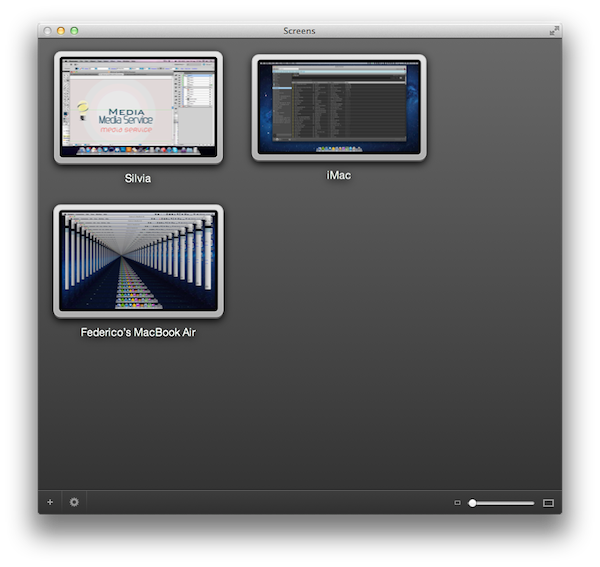
I’m a big fan of Edovia’s Screen VNC client for the iPhone and iPad. Whilst I still use LogMeIn when I need to access my computer’s filesystem remotely and I enjoy the service’s social features and network-recognition capabilities (when combined with Hamachi), my basic VNC needs can be easily satisfied with Screens, which provides a very intuitive interface to set up new computers, connect to them, and use them. I don’t recall a single time I haven’t used Screens at least once a day in the past few months to quickly connect to my iMac while I’m on the couch, and fire up some Spotify through the room. For quick connections, Screens is a great app – it even works on 3G and remote Wi-Fi networks thanks to a companion desktop app that will make your Mac available outside your local network.
In my overview of the improved Screen Sharing app in OS X Lion, I detailed how Apple enhanced the system utility with new clipboard features, per-user login, and possibility of grabbing a screenshot of the connected machine. With Screens for Mac, released last week, Edovia offers an alternative to Apple’s default Screen Sharing app that doesn’t have new breakthrough functionalities, but dramatically improves the organization of your remote desktops, and gives you more control over what you’re connecting to. Read more
Miscellaneous Lion Tips and Tricks, Part 2

In our first “Miscellaneous Lion Tips and Tricks” article we collected the best tips we received soon after Lion’s launch on the Mac App Store last Wednesday. Lion was being welcomed with positive reviews, Mac users finally got their hands on the much anticipated upgrade, and people started digging deeper into the OS to discover functions and tricks not publicized by Apple in its marketing material and Mac App Store description page. Less than a week into Lion, the web has exploded with new Lion tips, Terminal hacks, and app tweaks. Once again, we have collected the best tips sent to us by our readers and Twitter followers in an article that will (hopefully) help you discover new things Apple didn’t talk about at its developer events or in Lion’s promo video. Jump after the break for a second list of Lion tips and tricks you can try right now. Read more
#MacStoriesDeals - Monday

Here are today’s @MacStoriesDeals on iOS, Mac, and Mac App Store apps that are on sale for a limited time, so get them before they end!