Posts tagged with "mac"

Amazon Launches Mac App Store Competitor: Mac Download Store

Amazon has it’s eyes set on Apple again. Today they have launched the Mac Download Store. It features over 250 titles like from Microsoft Office (which the Mac App Store does not have), Adobe Elements and Call of Duty 4. The games are available for purchase via “an install-less download process.” Amazon says for Mac downloads, you don’t need to install any software, the Downloader will launch within the browser. It also appears that the Amazon Mac Download Store will also support trial versions of software that can be upgraded within the app unlike the Mac App Store.

Amazon is even launching a special with the Mac Download Store. “Save $5 on Mac Software and Game Downloads” - Celebrate our new Mac downloads stores and save $5 on any Mac game or software product through June 1, 2011. To save, click the “Buy and download” button on the product you have chosen, then enter the code SAVE5MAC in the “Gift Cards and Promotions” box. Limit 1 discount per customer.

There is no official press release from Amazon yet, but The Loop and All Things D have both confirmed that the Mac Download Store is here.

Update: We’re hearing the new Amazon Mac Download Store currently offers no way for independent developers to submit their applications – we’re told Amazon simply worked with existing, established sellers like Microsoft, Adobe and others to set up the new web interface and download system. No indie dev channel has been implemented yet, apparently.



Kickoff For Mac Aims To Simplify Teamwork

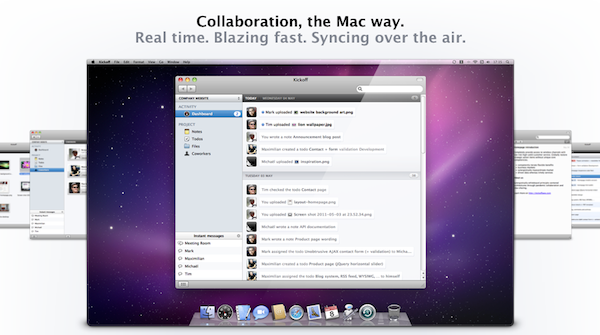
Working and communicating effectively in a group for a project can be quite painful and difficult, but Kickoff is a new group collaboration tool that aims to make it much easier for Mac users.

Designed for small teams of people, Kickoff gives users three integral features required for effective teamwork – chat, file management and to-do’s/notes. What makes Kickoff look really interesting is that each of these core functionalities are fully featured and thought through. For example it doesn’t just store files, because it also has built-in versioning and transfers within chat, whilst to-do’s can be allocated to certain people and a dashboard provides an overall glance at everything in the project.

It syncs everything over the air in real-time and because it’s a Mac app you can easily drag files, use Quick Look on files and receive dock notifications. Unfortunately pricing will probably be a bit prohibitive for many, starting at 20€ a month for up to three users, whilst for up to 15 users it is 50€ per month, although there is a two week free trial. Jump the break for some more screenshots.

Read more


Sparrow 1.2 Now Available

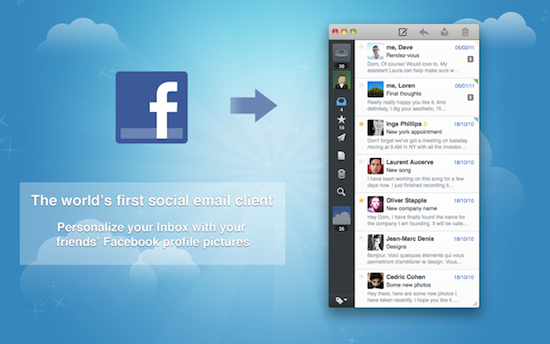
Teased earlier today at TechCrunch Disrupt in New York City, Sparrow 1.2 is now available for download on the Mac App Store. As previously reported, the new version adds a number of bug fixes and improvements, most notably enabling Facebook integration through Facebook Connect to automatically add profile pictures to contacts found in your social graph. Facebook support in Sparrow 1.2 is very straightforward: upon first run, you’ll be asked to connect with your Facebook account so Sparrow will be able to fetch your friends’ profile photos; according to the release notes, Sparrow 1.2 is also capable of letting you add new friends within the application, though I haven’t been able to test the new feature just yet. In the Settings, a new Facebook panel will allow you to disconnect from the service at any time and see friends that are also using the app.

Sparrow 1.2 brings many other functionalities such as a revamped dock icon that lets you write a new message with a right-click, new font options in the compose window and an overall interface refresh that’s quite welcome. Taking clues from Lion and other Mac apps like Twitter, Sparrow sports iOS-like scrollbars and free resizing on the message list. As I mentioned today, there’s a new Unified Inbox option that, just like iOS, allows you to see all your incoming messages from all accounts in a single tab; if you’re accustomed to this feature on your iPhone or iPad, you’ll feel right at home using Sparrow 1.2. Alongside these new options, bug fixes and localization in 8 more languages, Sparrow 1.2 brings the following changes as well:

  • Gravatar support
  • Threading by subject
  • Preference to hide Inbox selection bar
  • Account names appear faster on hover

With Twitter and LinkedIn support coming in the near future and new email functionalities likely in the works, Sparrow is shaping up to be a very interesting client for OS X that has a chance deeply change the way we think of social communication on our desktops. Go download the update here.


Sparrow Unveils Unified Inbox and Facebook Integration in Version 1.2

Sparrow, the minimal email client for the Mac that was born as a mix between Mail.app and Tweetie for Gmail and eventually evolved into a full-featured IMAP email application, has just announced version 1.2 at TechCrunch Disrupt, which will add a number of new features including the long-awaited unified inbox and a new social layer for your contacts. Since the app was first revealed as beta in October, Sparrow saw a terrific rise in popularity throughout the release of the various betas, and especially after the launch of a Mac App Store version and lite edition, Sparrow has quickly become many people’s favorite way to access Gmail and any other email provider with a convenient, simple interface that follows the latest trends set by apps like Twitter and Reeder for Mac. With the 1.1 update, the developers added IMAP support and integration with Google’s Priority Inbox, thus turning Sparrow from a lightweight client into a serious alternative to more complex apps like Mail and Postbox. The 1.2 update will bring the possibility to see all email messages in a single inbox without switching between accounts, as well as Facebook Connect integration to automatically add profile pictures to contacts. It’s not clear now if this new Facebook feature will also add photos to people that have emailed you using standard IMAP and Gmail accounts, but CEO Dom Leca says they’re “not adding social layers mail for the sake of it”, and Facebook Connect will let you add people as Facebook friends within the app.

Victor Ageda, Jr. from TUAW further reports Sparrow 1.2 will also add some kind of Tumblr integration. The Sparrow team has raised $250,000 in funding over the last months (funders include Twitter’s Loren Brichter), and the developers are looking forward to bring Twitter and LinkedIn support to Sparrow in future versions, turning an email client into a complete social messaging experience like no other on the Mac. The idea of grouping all kinds of social communication into a single app has always attracted users and developers, but no one really quite nailed it. Hopefully Sparrow will manage to blend it all together, yet retaining its nature of simple and powerful email client.

Sparrow 1.2 should be available later today or tomorrow on the Mac App Store at the regular price of $9.99. We’re looking forward to the update and the full list of changes in version 1.2.


Twelve South’s BookBook Case Now Available for MacBook Air

We love Twelve South’s Mac and iOS accessories, they make some of the most beautiful third-party accessories for Apple devices. We’ve previously talked about the Compass mobile stand, the BookArc for iPad and MacBook Air. Today we’re showing you the BookBook for MacBook Air.

Twelve South’s new BookBook case was designed for the MacBook Air (11 & 13-inch 2nd Gen). The genuine leather case is only 13.5 ounces and has two hardback covers with reinforced corners and a tough spine for impact protection. The inside of the case is lined with a velvet-like soft padded interior as well. Read more


ConvertIt Makes Image Conversion Simple From The Menubar

If your work consists of dealing with lots of image files on a daily basis, you know how much time is usually spent converting images from one format to another. While OS X provides a great built-in application called Preview that takes care of converting and swapping formats with a few clicks (alongside many other features), you’ll still need to open multiple files in it, manually select a new format, choose a destination, hit save, make sure the conversion went correctly, and trash the original files. Could the process be more straightforward, especially when trying to batch-convert multiple files at once? ConvertIt, a $0.99 utility from the Mac App Store, offers a simple solution to the problem.

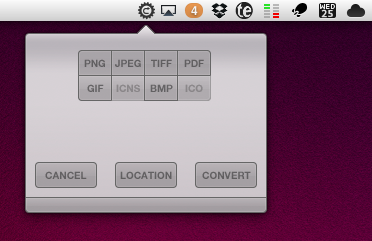
Now, I’m sure there are hundreds of free and paid utilities for Mac out there that can handle image conversion just fine, and even offer batch-processing for when you need to get things done faster. However, I was impressed by ConvertIt’s super-simple interface that lives in the menubar, doesn’t get in the way when you don’t need it, and is capable of converting images to different formats with drag & drop. With ConvertIt, you can drag as many images as you want from the Finder onto the app’s menubar icon, and choose from a popover a new format for the files. The default location for the new files is the Desktop, but you can change this in the Preferences. To convert, you just have to select a new image format, wait a few seconds, and you’ll end up with the new files in your desired location; it works with a single file, as well as multiple ones dragged at the same time. Unfortunately, ConvertIt doesn’t have an option to delete the original files once conversion is over – I’d also like an option to convert existing files, rather than creating new ones. However, it was very nice to see ConvertIt could easily transform a PNG in a PDF document in a matter of seconds.

ConvertIt does one thing well, and it’s available at $0.99 on the Mac App Store. Go get it here.