

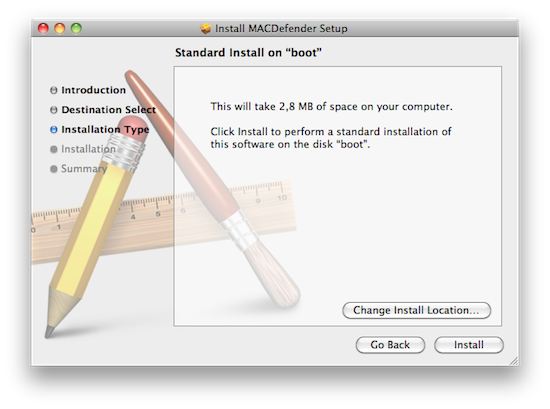
According to several discussion threads posted on Apple Support Communities, a new malware called MacDefender.app is quickly spreading among Mac users using the Safari browser to visit certain websites, especially Google Images. The application, disguised as a virus scanning tool and completely unrelated with the official MacDefender software, gets installed automatically without a user’s consent upon opening a webpage, although it’s not clear what kind of websites allow this kind of installation, and whether MacDefender “phones home” once running on a Mac to download additional pieces of code (like most malwares on Windows do). Some users are reporting they found the app installed on their Macs after visiting webpages linked on Google Images, some say it’s only happening with the Safari desktop browser, others claim the app can’t be removed with a simple drag & drop to the system’s Trash as, once installed, the process will beging running automatically on OS X. Again, it’s not clear what kind of malware MacDefender.app is and the proportion of this “spreading” across Mac OS X machines, but the number of threads on Apple Support Communities seems to suggest at least hundreds of people have experienced the issue in these past few days. Read more
Posts tagged with "mac"
New “MacDefender” Malware Targets Mac Users
#MacStoriesDeals - Friday

Here are today’s @MacStoriesDeals on iOS, Mac, and Mac App Store apps that are on sale for a limited time, so get them before they end!
#MacStoriesDeals - Thursday

Here are today’s @MacStoriesDeals on iOS, Mac, and Mac App Store apps that are on sale for a limited time, so get them before they end!
#MacStoriesDeals - Wednesday

Here are today’s @MacStoriesDeals on iOS, Mac, and Mac App Store apps that are on sale for a limited time, so get them before they end!
The MacLegion 2011 Spring Bundle

A week or so ago, I discovered a new bundle/sign-up page on twitter. I added my email address and patiently awaited to hear more. They have been teasing followers with tweets but last night at midnight EST, MacLegion was revealed. I checked out the site and am very pleased with its offerings. MacLegion’s 2011 Spring Bundle is 10 quality Mac apps for $49.99 (a $552 value). We’ve seen many bundles similar to this price point, but this one really stands out.
The inaugural Spring bundle contains an arsenal of apps aiming at productivity and usefulness of your Mac. There are no games or social media apps, only rich and powerful tools to help you take on your project goals, and better enhance the way you use your Mac. Read more
TenFourFox: Firefox 4.0 For 10.4 PowerPC Macs

If you’re still rocking a PowerPC Mac with a G3, G4 or G5 processor running OS X Tiger and you’re willing to try the new Firefox 4.0, you’re out of luck. With the latest major update to their Windows / Mac / Linux browser, Mozilla dropped support for Mac OS X 10.4 and PowerPC architecture, and while it’s pretty obvious that, going forward, older machines and operating systems will be left behind by software vendors, it’s always nice to find alternatives and hacks that enable users who are “stuck” on these systems to enjoy the recent advancements in technology, although with some compromises. TenFourFox, a new project from the creators of the Classila browser for classic Mac OS, is a fork of Mozilla’s Firefox 4.0 that runs on older Macs powered by Tiger and PowerPC CPUs.
But if there’s one thing we’ve learned from our years of using Macs, it’s that they outlast anything else out there. Why shouldn’t an iBook be able to look at embarrassing pictures on Facebook, or Twitter about our lunch break? These are our computers, dang it. We paid good money for them. They still work. There’s no technical reason they can’t do everything that a MacBook can. So if you want something done, you do it yourself, and we did. The result is TenFourFox.
The browser, available for download here, is a very niche product, but we’re sure it’ll manage to build a loyal following over the next months: it uses almost the same code of the official Firefox 4.0, but it’s been entirely rebuilt to add specific improvements for OS X 10.4 as it “restores the glue necessary to get most of Firefox 4’s advanced features working on our older computers” with separate builds for G3, G4 and G5 processors. TenFourFox includes most of the features of Firefox 4.0 you know and love: extended HTML5 and CSS3 support, faster Javascript rendering, WebM video, Firefox 4 add-on compatibility. According to the developers, the custom code deployed in TenFourFox granted faster Javascript performances than both Safari 5 and Firefox 3.6 through SunSpider and Dromaeo benchmarks. Apparently the code has been sent back to Mozilla so anyone could enjoy the improvements made by the team, and the devs also claims TenFourFox is by far the fastest web browser available on PowerPC Macs running Tiger. As for the requirements:
TenFourFox requires a G3 Power Macintosh, Mac OS X v10.4.11 or Mac OS X v10.5.8, 100MB of free disk space and 256MB of RAM. Video playback will be poor on systems slower than 1.25GHz; we recommend a G5. Intel Macintoshes are not supported (and will be mercilessly mocked).
You can find more information about TenFourFox here, and download the various builds on the project’s official Google Code page.
#MacStoriesDeals - Tuesday

Here are today’s @MacStoriesDeals on iOS, Mac, and Mac App Store apps that are on sale for a limited time, so get them before they end!
Evernote 2.1 for Mac Brings Faster Search and Audio Notes
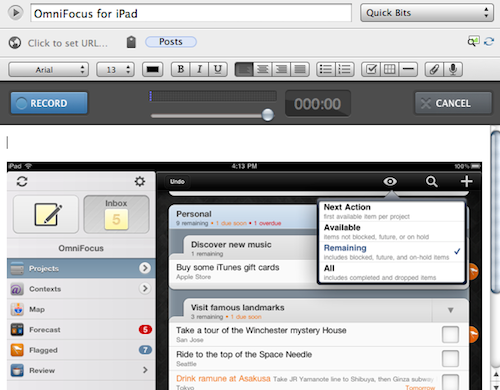
Evernote’s CEO Phil Libin said Apple users are the most valuable to the service, and you might remember the release of the Mac App Store version months ago more than doubled Evernote’s new userbase. For these reasons, it appears that Evernote is now seriously committed to delivering full-featured updates for the OS X and iOS clients – Evernote 2.1 for Mac, available today, brings several new functionalities and improvements to the popular “memory tool” including faster search, audio notes for free and premium users, as well as social sharing options for Twitter, Facebook, and email.
It’s no secret that Evernote for Mac used to become really slow with hundreds of rich notes in the database, constantly backed up to the app’s cloud for web, desktop and mobile access. The improved search functionality in version 2.1 makes sure looking through all your notes is a fast and reliable process – if you consider that several users keep thousands of notes into Evernote, you can understand how important it is for the company to implement a stable search algorithm that returns accurate results in seconds. For academics, students, and journalists who keep track of everything through Evernote, improved search is quite possibly the single biggest reason to update to 2.1. This update, however, doesn’t stop at search: the Evernote team also implemented a new sharing feature to send notes off to Twitter and Facebook, but you can share a note via email or copy the URL to the system’s clipboard, too. Our writer Graham Spencer – a huge Evernote fan – says he’s not sure how much the sharing aspect of Evernote will improve his workflow, but I’m pretty sure the option will be loved my millions of users anyway.
Last, Evernote 2.1 brings audio notes: whilst free users can record audio up to 25 MB per note, premium Evernote subscribers can create audio recordings up to 50 MB, which is roughly 4 hours of recoding time. The audio recording UI is nice, and all you have to do to activate it is hit the microphone button in the toolbar. You can create new audio notes or add new audio to existing files in your Evernote account.
Evernote 2.1 is propagating now through Software Update, or you can download it direct from the company’s website. The Mac App Store version (still reporting 2.0.5 as the latest update) will receive the 2.1 facelift “soon.”
Evernote’s Most Valuable Users Are On Apple Platforms

There has been some discussion in recent times about whether iOS users are more valuable to a company than Android users may be. Evernote CEO Phil Libin weighed into the debate yesterday and talked about how their revenue varied from platform to platform. Libin used three metrics in evaluating each platform; revenue, users gained and revenue per developer. In all three, iOS was the leading platform with nearly a third of all Evernote’s revenue coming from that platform. It’s where Evernote has gained a large chunk of its users and is perhaps one of the best success stories of the iOS app platform.
Evernote is also a big fan of its Mac users who generate more revenue growth than their Windows counterparts and also stick with the service for longer – although Windows still currently brings in 24% of revenue compared to the Mac’s 20%. Libin is unsure of why Apple users are more willing to pay for their service and additionally notes that the desktop should not be ignored, reflecting upon the fact it still brings in 44% of Evernote’s revenue.
In Libin’s speech at VentureBeat’s Mobile Summit he also noted that most users of his service don’t return after a short period of using the service, but those that do bring in a lot of revenue to Evernote. For example of the 31,334 users who registered in March 2008 only 11,000 remained three months later. In that month those users only brought in $700 to Evernote but by January of 2011 they ended up bringing in over $10,000. Libin attributes this to the fact that as users stick with the service they find it more valuable and end up subscribing for the premium features.
[Via VentureBeat]