John is MacStories' Managing Editor, has been writing about Apple and apps since joining the team in 2015, and today, runs the site alongside Federico.
John also co-hosts four MacStories podcasts: AppStories, which covers the world of apps, MacStories Unwind, which explores the fun differences between American and Italian culture and recommends media to listeners, Ruminate, a show about the weird web and unusual snacks, and NPC: Next Portable Console, a show about the games we take with us.
This week on AppStories, we spent time with the visionOS simulator and consider the design of the Apple Vision Pro system apps and what to expect from third-party developers.
Sponsored by:
Zocdoc – Find the right doctor, right now with Zocdoc. Sign up for free.
CleanMyMac X – Your Mac. As good as new. Get 5% off today.
Notion – Do your most efficient work with Notion AI. Try it free today.
This week, Federico and John spend time with the visionOS simulator and consider the design of the Apple Vision Pro system apps and what to expect from third-party developers.
I’m a little late to the iPhone 15 party. I was out of town the Friday that new iPhones arrived on doorsteps worldwide, so I delayed my order. As a result, I’m only on day five with my new iPhone 15 Pro Max, but I wanted to share a few first impressions from what has...
Zoë Schiffer has an excellent interview on The Verge with Taylor Lorenz about Extremely Online, Lorenz’s recently published book chronicling online culture that Schiffer originally wrote for Platformer. (Link) Artifact has been releasing updates rapidly lately, with the latest iteration of the news app allowing users to generate images using AI for their link...
Playpen Playpen is a new app from Josh Holtz for parents looking for kid-safe activities for their children on the iPhone and iPad. The app lets parents pick from activities like the selfie camera, preconfigured YouTube videos that don’t give kids access to the entire service, and pre-selected Photos albums. There is also a...
Every year, one of the most anticipated iPhone hardware announcements is changes to its camera. This year, the iPhone Pro Max’s new telephoto lens was the center of attention. However, there were other notable tweaks to the camera hardware and software across the iPhone lineup, too. Plus, we got a hardware bonus in the form of the iPhone 15 Pro and Pro Max’s Action button, which can perform some interesting tricks. Now, with the new iPhones in the hands of people around the world, we’re starting to see what that hardware can do in practice, and I’ve got three examples I’d like to share.
Source: Lux.
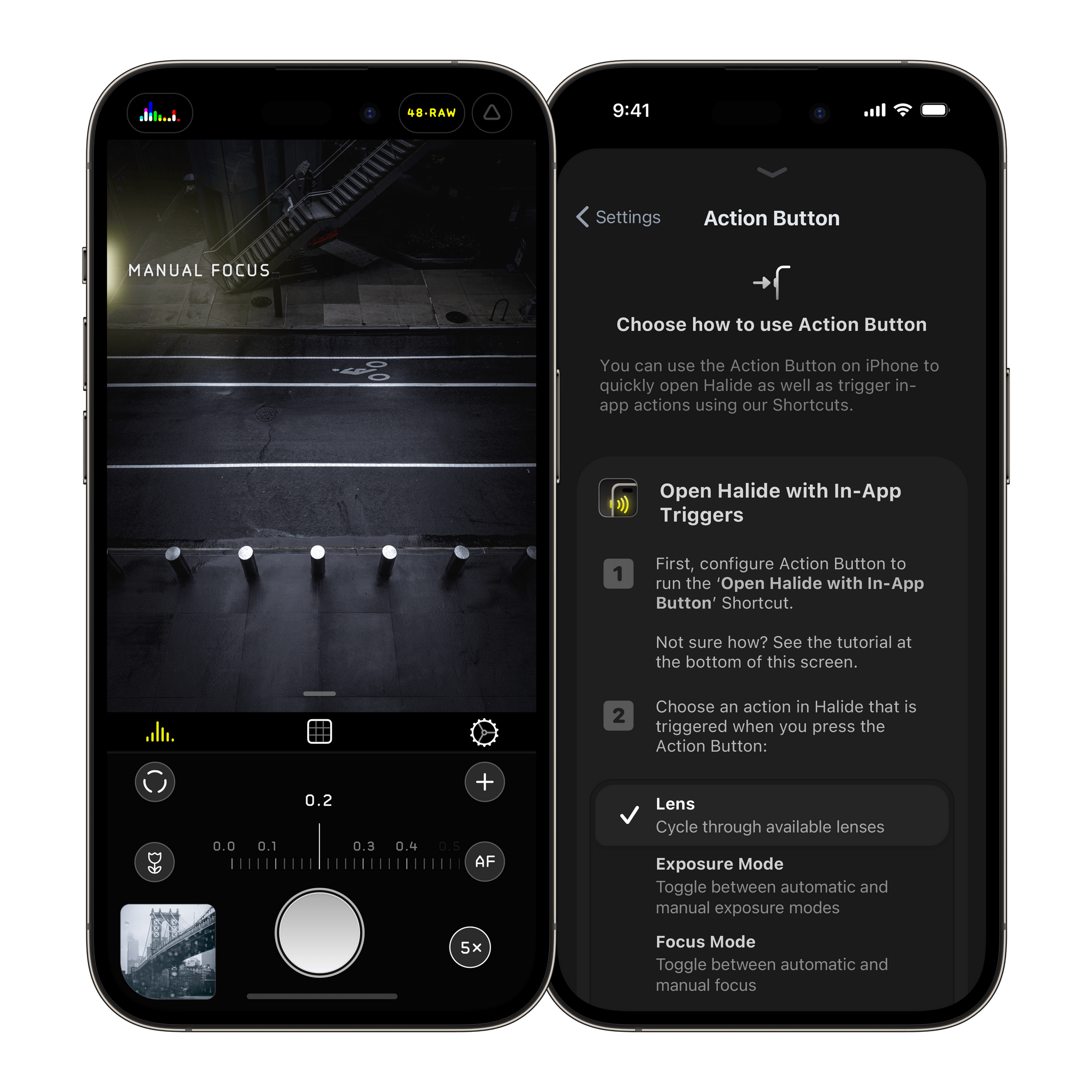
The first is an update to the camera app Halide that does something incredibly clever. Built into version 2.13 of the app is a shortcut that can be tied to the Action button to open Halide with a single press. That’s something you can do with any app using an Open App action, but Halide goes a step further by offering in-app functionality if you tie the button to its app. In the app’s settings, you can choose to tie the Action button to any of the following options:
Do nothing
Lenses
Exposure Mode
Focus Mode
RAW
Resolution
Capture
After using the Action button to open the app, pressing the button again will perform whichever action you picked in its settings. For example, if you chose Lenses, the first press of the Action button from outside the app will open Halide, and subsequent presses will cycle through each of the available camera lenses. I love this use of the Action button and hope other developers do the same, adding contextual actions to more apps.
With iPhone 15 Pro Max’s default 24 megapixel resolution, added ‘lenses’ under the main camera lens, automatic depth capture for portraits, and that 5× lens, this release might not blow away on a spec sheet, but is massive for everyone who uses an iPhone to take photos.
There’s a lot of ground to cover between the hardware and processing changes happening behind the scenes. Plus, de With is an excellent photographer whose shots do a fantastic job illustrating what is possible with the iPhone 15 Pro Max. So be sure to check out the full review.
Finally, the iPhone’s camera takes amazing video, too. This year saw the introduction of Log encoding for Pro Res 4K footage. That opens up a wider range of editing control using apps like Final Cut Pro, which Joey Helms used to create this amazing video of Chicago:
I’ve had my iPhone 15 Pro Max for just four days, and already, I’m enjoying taking photos as I walk around my neighborhood and playing with features like adding Portrait mode after the fact to images like the one below.
Before (left) and after (right) applying Portrait mode.
The result is a lot more creative freedom that’s more accessible than ever, not only because your iPhone is usually in your pocket but because the tools Apple has created for taking great photos and videos are so easy to use.
Developers have come up with endlessly clever uses for interactive widgets. I love testing them all, but one type is beginning to stick more than others. It’s the widgets for apps that require quick interactions when you’re in the middle of something else. Turning off the lights in my home office when I’m finished working for the day, toggling work timers as I switch from task to task, and then checking off those tasks as I complete them are all perfect interactions for widgets that require minimal switching away from whatever I’m doing. Hopefully, that means fewer distractions and, in turn, a more productive day.
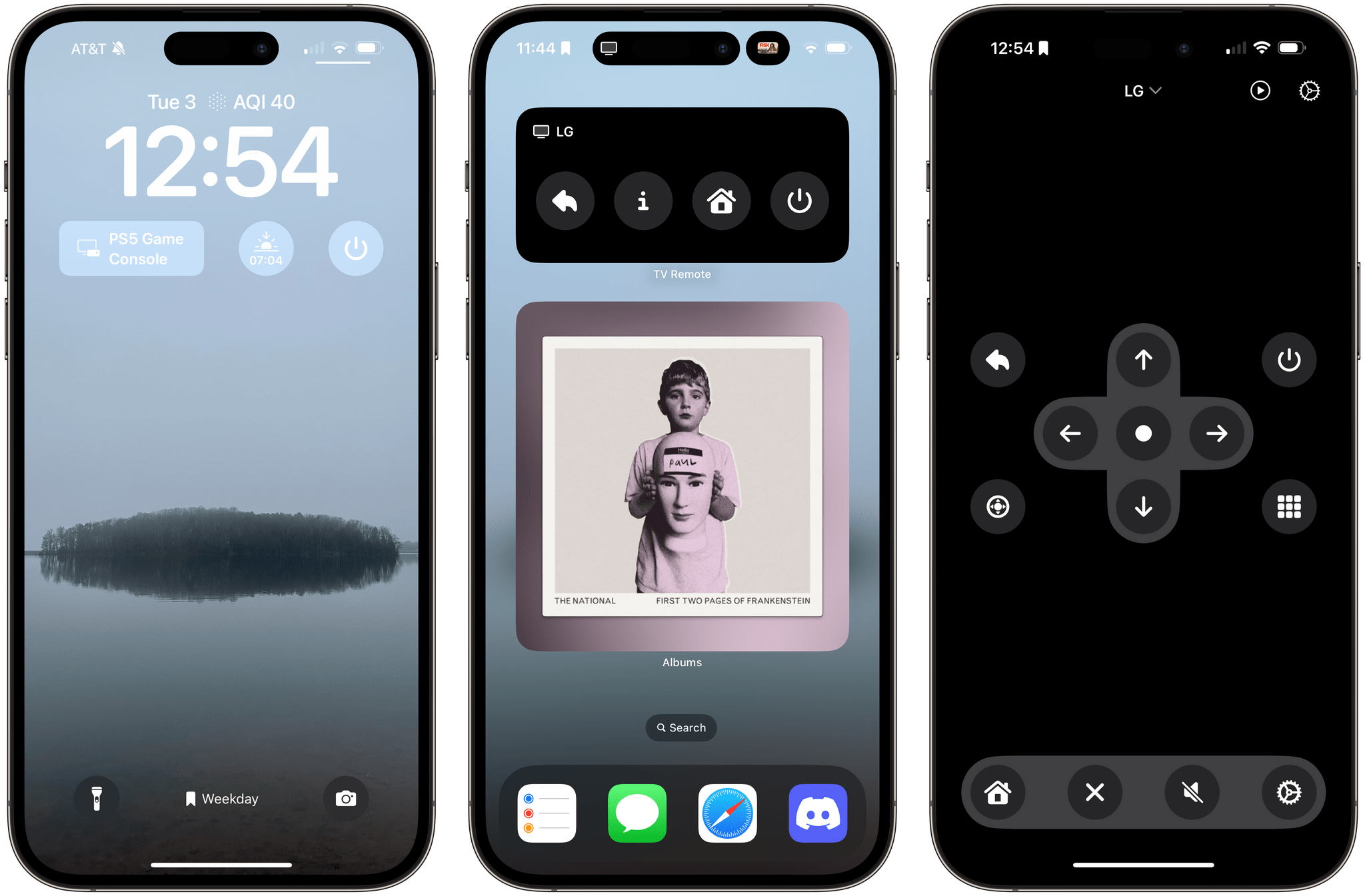
But not everything is about peak efficiency and checklists. Sometimes, you just want to relax, which widgets can help with, too. One of my favorite apps to help with that, which recently added interactive widget support, is TV Remote by Adam Foot. Foot’s app is one I already used with my LG C2 TV, but it’s the app’s new widgets that have graduated it to a regular part of my TV routine.
This week on AppStories, we are joined by tvOS expert Sigmund Judge, who just finished writing his tvOS 17 review for MacStories, to understand what has changed in tvOS and where it might be heading.
Sponsored by:
TV Forecast – Track, Explore and Discover Your Favorite Shows and Movies









](https://cdn.macstories.net/banneras-1629219199428.png)

 Federico