John Voorhees

5429 posts on MacStories since November 2015

John is MacStories' Managing Editor, has been writing about Apple and apps since joining the team in 2015, and today, runs the site alongside Federico. John also co-hosts four MacStories podcasts: AppStories, which covers the world of apps, MacStories Unwind, which explores the fun differences between American and Italian culture and recommends media to listeners, Ruminate, a show about the weird web and unusual snacks, and NPC: Next Portable Console, a show about the games we take with us.

CNET Interviews Phil Schiller About the New MacBook Pro, iPad Pro, and More

To mark the release of the new 16-inch MacBook Pro, Roger Cheng of CNET interviewed Apple’s Phil Schiller. The interview begins with a discussion of the laptop’s new keyboard but covers the role of the iPad Pro in Apple’s hardware lineup as well as Macs in education too.

According to Schiller, Apple spent a lot of time talking to pro users in the wake of criticisms of the MacBook Pro’s butterfly keyboard and was told that pro users wanted something like the Magic Keyboard available for desktop Macs. Of that process Schiller told CNET:

There’s a bunch of learning that happened. Some because of moving the desktop keyboard to the notebook and some because we just learned more along the way and wanted to further advance the technology.

Conspicuously absent from the interview though is any mention of changing the keyboard in response to the hardware failures that many users reported.

Cheng also asked Schiller where the iPad Pro fits in Apple’s pro lineup and whether there are plans to merge it with the Mac lineup. As Apple executives have told CNET for years, Schiller was clear that the compromises that a hybrid touch-based Mac would require wouldn’t benefit either platform. Specifically with respect to the iPad Pro, Schiller said:

It was literally to create a different product category. A couple years ago, we split off and created the iPad Pro. This has been a wonderful thing because it allowed us to create two models where we can push the technology. It really accelerated the use cases for iPad.

So now there are a lot of cases where people will use iPad, especially with Pencil, as an artist-creation tool or as a field-compute tool. What we find is there’s a fair number of people who actually spend more of their compute time on their iPad than personal computer. They didn’t choose one or the other. That’s just where they spent a lot of their time.

It’s refreshing to hear Schiller push back on the notion that Macs and iPads will inevitably merge or that consumers need to choose between the two. As someone who uses a Mac and an iPad Pro, I know that’s nonsense, but I also understand that a ‘winner-takes-all’ narrative is more entertaining.

The interview closes with a short discussion of the Mac in the education market where it has struggled at times against Chromebooks. As a parent who’s seen two of my kids learn to code on a Mac while a cheap, locked-down Chromebook sits idle in my house, except when it’s used to turn in assignments and take tests, this from Schiller resonated with me as true:

Kids who are really into learning and want to learn will have better success. It’s not hard to understand why kids aren’t engaged in a classroom without applying technology in a way that inspires them. You need to have these cutting-edge learning tools to help kids really achieve their best results.

Yet Chromebooks don’t do that. Chromebooks have gotten to the classroom because, frankly, they’re cheap testing tools for required testing. If all you want to do is test kids, well, maybe a cheap notebook will do that. But they’re not going to succeed.

Don’t miss Roger Cheng’s full interview on CNET with Schiller. It’s one of the best articulations of Apple’s pro hardware perspective and the place of the iPad in the company’s hardware lineup that I’ve read in a long while.

Permalink

Game Day: NABOKI

NABOKI, a brand new puzzle game by Maciej Targoni, is a masterpiece of mobile game design. Targoni is the developer of klocki, which I previously reviewed, and several other games that feature a similar minimalist aesthetic that I love.

I started NABOKI for the first time on a recent early-morning flight to California. I couldn’t have picked a better game to make my uncomfortable surroundings melt into the background.

The game has no tutorial and virtually no UI. Instead, NABOKI relies on exploration and the player’s curiosity to propel it forward. Coupled with a soothing nature-inspired soundtrack, NABOKI creates a calming environment of thoughtful concentration that’s a great way to relax.

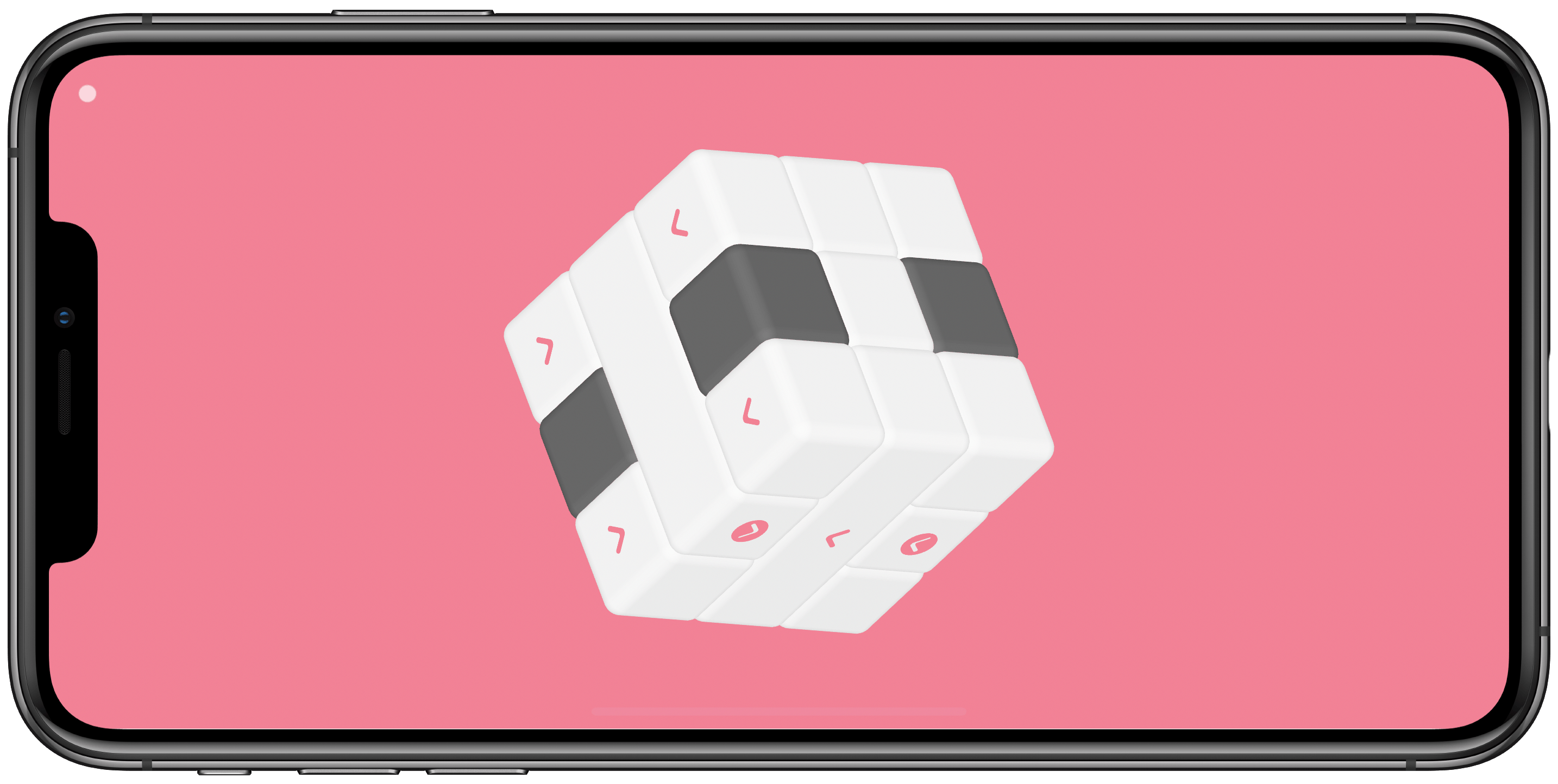
NABOKI opens with a single white cube with rounded edges and a red arrow-like character on one side. Swiping on the screen spins the cube in three dimensions. Tapping on the cube provided immediate audio feedback, playing one tone when I tapped a blank side of the cube and another when I tapped the side with the arrow, causing the cube to launch itself offscreen.

The early levels of the game introduce the basic concept of tapping the arrow side of cubes to clear them from the screen and rotating the puzzle to consider your options from all angles, as you would a Rubik’s cube. As the puzzles become more complex, featuring blocks of several contiguous cubes, you need to clear pieces in a particular order to clear a path for others, and often to expose the arrows you need to reach before they can be cleared.

After several more levels, NABOKI begins to introduce different behaviors to cubes. There are circles that rotate cubes, switches that shift cubes and blocks of cubes, unclearable blocks, and blocks with patterns that have to be matched to clear them, for instance. Each puzzle builds on the new types of blocks introduced, combining them in clever ways that amp up the difficulty gradually in a way that isn’t frustrating.

Each type of cube also provides different audio feedback, which I enjoy, but I’d like to see haptic feedback added to interactions. NABOKI is the kind of game that I’m far more likely to play on my iPhone, and I think haptic feedback would draw players into the game’s world even more quickly and deeply.

NABOKI should be played with headphones because the soundtrack is a fantastic synthesis of instrumentation and sounds from nature. The soundtrack reminds me a little of the Brain.fm music. It’s a wonderful complement to a puzzle game like NABOKI, that creates a relaxed, contemplative environment in which it’s easy to lose yourself.

The single dot in the top-left corner reveals navigation buttons to replay solved puzzles and a button to turn the soundtrack on and off. There’s no scoring, leaderboards, or other competitive aspect of NABOKI. It’s just you against the puzzles.

Crammed into a narrow seat with a tray that was too small to use my iPad Pro, and with no WiFi, NABOKI was the perfect way to pass a big chunk of my weekend flight. A few levels are also a great way to unwind after a long day. I highly recommend NABOKI to anyone who’s a fan of puzzle games.

NABOKI is available on the App Store for $0.99.


Apple Announces New 16” MacBook Pro with Redesigned Keyboard, Thinner Display Bezels, and Updated Processors

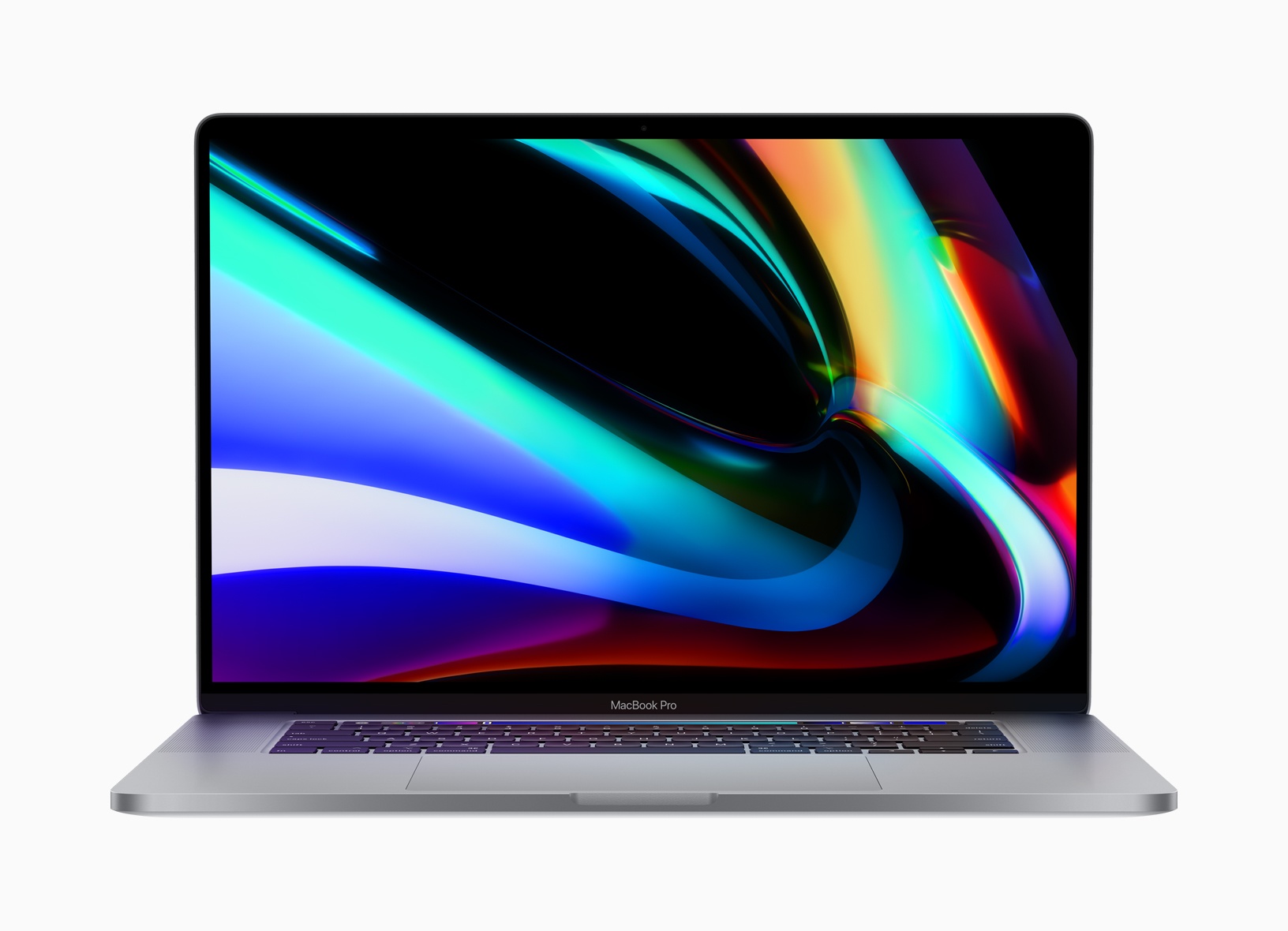
Apple has announced a new 16-inch model of the MacBook Pro that features a redesigned keyboard with keys that use a scissor mechanism, a larger screen with thinner bezels, and 9th generation Intel Core i7 and i9 processors. The new model replaces the existing 15-inch MacBook Pro.

Rumored since early this year, the new laptop is almost identical in size to the 15-inch MacBook Pro, which is 0.61 inches (1.55 cm) tall, 13.75 inches (34.93 cm) wide, and 9.48 inches (24.07 cm) deep. In contrast, the new 16-inch model is 0.64 inches (1.62 cm) tall, 14.09 inches (35.79 cm) wide, and 9.68 inches (24.59 cm) deep. The new MacBook Pro is also heavier, weighing in at 4.3 pounds (2.0 kg) compared to the 15-inch laptop, which is 4.02 pounds (1.83 kg).

The slight increase in size is thanks primarily to the reduction of the new MacBook Pro’s display bezels, which have been virtually eliminated. The laptop features a new high-resolution display too, which Apple lists as 3072 x 1920 pixels with a 226 ppi pixel density. The display is driven by new AMD Radeon Pro 5000M series graphics. Also, the MacBook Pro boasts significantly-improved 6-speaker setup and high-quality microphones to capture less background noise when recording.

Apple has also returned to a scissor mechanism for the new MacBook Pro’s keyboard. It remains to be seen whether the updated design is an improvement over the butterfly mechanism used for the past few years in Apple’s laptops. Before the company moved to the butterfly mechanism, which allowed for reduced key-travel and, consequently, thinner devices, a scissor keyboard mechanism was used in the MacBook Pro.

The keyboard on Apple’s latest pro-level laptop is also notable because it features the return of a physical escape key. The escape key was eliminated in Touch Bar-enabled MacBook Pros in favor of a software escape key on the Touch Bar, but the latest model shortens the Touch Bar to make room for a physical escape key, which many users missed. The new keyboard also features an inverted-T arrow key layout. Apple says:

The 16-inch MacBook Pro features a new Magic Keyboard with a refined scissor mechanism that delivers 1mm of key travel and a stable key feel, as well as an Apple-designed rubber dome that stores more potential energy for a responsive key press. Incorporating extensive research and user studies focused on human factors and key design, the 16-inch MacBook Pro delivers a keyboard with a comfortable, satisfying and quiet typing experience. The new Magic Keyboard also features a physical Escape key and an inverted-“T” arrangement for the arrow keys, along with Touch Bar and Touch ID, for a keyboard that delivers the best typing experience ever on a Mac notebook.

The 16-inch MacBook Pro also features an updated Intel 9th generation i7 and i9 processors with up to 8 cores. The base model runs at 2.6 GHz, which users can upgrade. RAM starts at 16GB and is configurable up to 64GB. Storage starts with a 512GB SSD, which can be increased to as much as 8TB.

To learn more about the new MacBook Pro, listen to episode 271 of Upgrade from Relay FM where Six Colors founder Jason Snell interviews Apple’s MacBook Pro Product Manager Shruti Haldea.

The new laptops are already available to order on apple.com and with the Apple Store app starting at $2,399, the same price as the old 15-inch model, with deliveries beginning later this week. Apple also notes that the Mac Pro will be available to order in December.


FoodNoms: A Privacy-Focused Food Tracker with Innovative New Ways to Log Meals

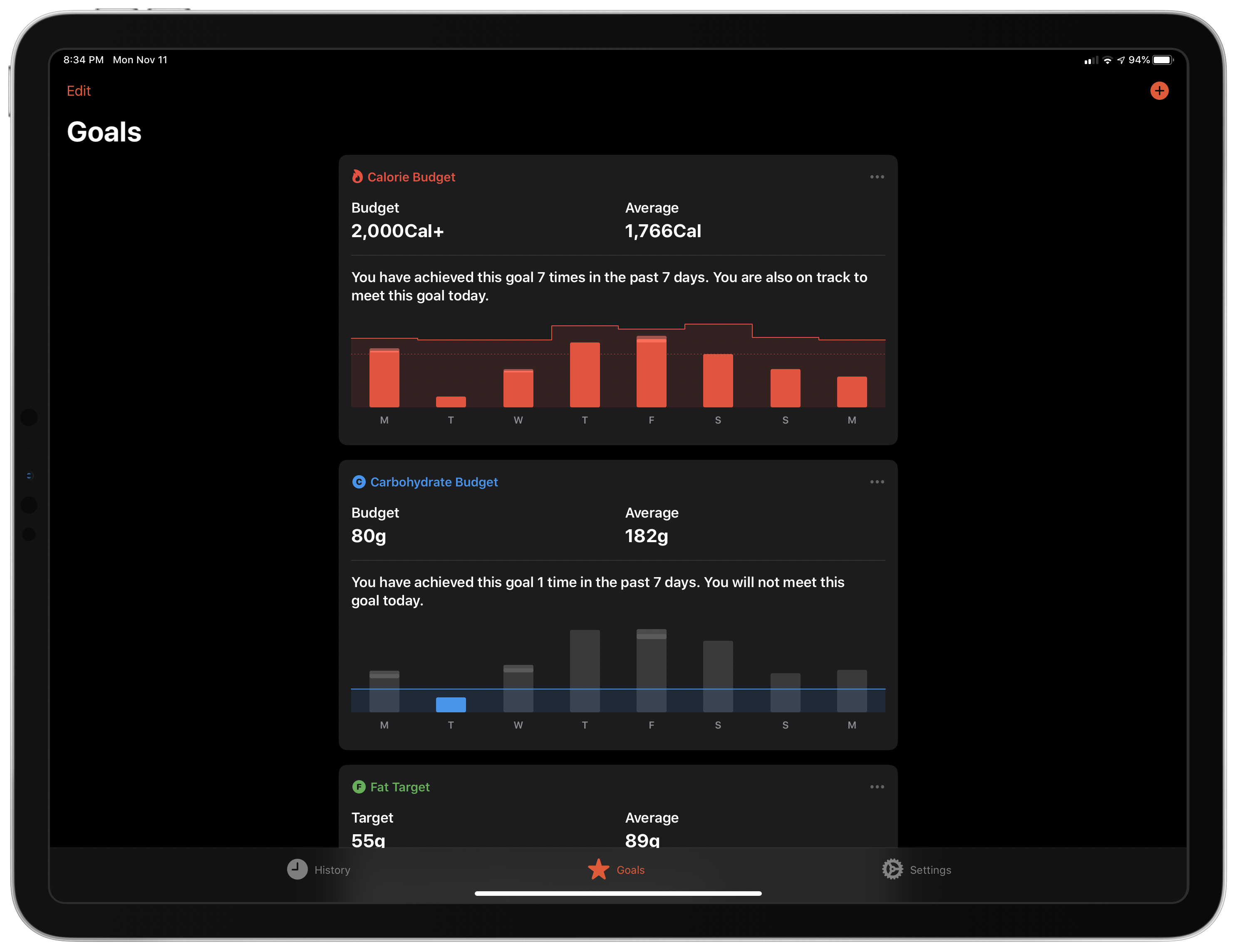
FoodNoms is a new privacy-oriented food tracking app that tackles the tedium of logging what you’ve eaten in innovative ways that make it one of the most promising apps in this category that I’ve seen in a long time.

Too often during the year, I find myself eating what’s easy, not what’s healthy. When I sense that happening, the first step I take is to open a food tracking app and log what I’ve been eating. The process imposes the discipline to help get me back on track with healthier eating habits. However, I don’t usually stick with food tracking long, mostly because I find the process tedious.

With FoodNoms, I’ve found it easier to stick with food tracking than ever before. The app’s database of foods seems a little limited compared to other apps I’ve used, and I’d like to see more ways to visualize trends over time added to the app. Still, those limitations are largely made up for by the ability to log portion accuracy and scan nutrition labels, along with the multitude of other ways to log meals. Add FoodNoms’ privacy focus, and I expect it’s going to win over a lot of people.

Read more


AppStories, Episode 138 – Rethinking Apple’s TV App in Light of TV+

On this week’s episode of AppStories, we share our thoughts on Apple’s new TV+ video streaming TV app, including what works, what doesn’t, and ways we think it could be improved.

Sponsored by:

  • Linode – High-performance SSD Linux servers for all of your infrastructure needs. Get a $20 credit.
  • Kensington: The Professionals Choice. Find the right docking solutions for your organization today.

https://staging.macstories.net/podcasts/appstories/episodes/138/embed/

Permalink

Rethinking Apple’s TV App in Light of TV+

AppStories+ Deeper into the world of apps

AppStories Episode 138 - Rethinking Apple’s TV App in Light of TV+

0:00
39:30

AppStories+ Deeper into the world of apps

This week, Federico and John share their thoughts on Apple’s new TV+ video streaming TV app, including what works, what doesn’t, and ways they think it could be improved.

Read more


Apple Reveals Major Update to Its Privacy Webpage

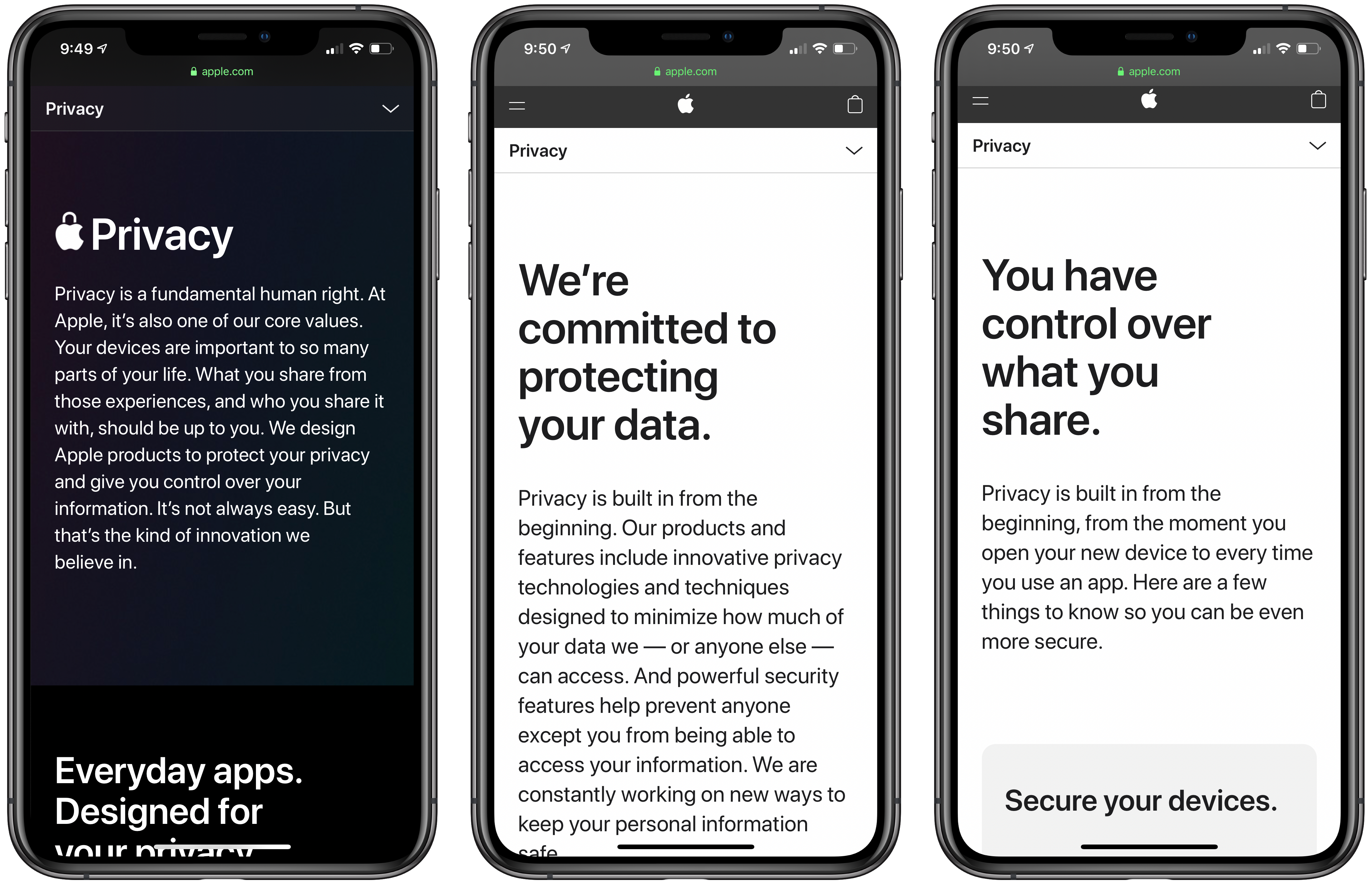
Privacy and everything it entails is not easy to explain. Under the hood, it’s driven by complex mathematics and code. However, in practice, app privacy starts with how apps are designed. Some are designed to collect information about you, and others aren’t. With Apple’s update to its privacy page today, the company has created a site that explains how privacy drives the design of its apps in clear, concise language. However, for anyone who wants to understand the nitty-gritty details, Apple has also published white papers and linked to other materials that provide a closer look at the issues that the main page addresses.

Apple’s Privacy webpage starts with a declaration of the company’s position on privacy:

Privacy is a fundamental human right. At Apple, it’s also one of our core values. Your devices are important to so many parts of your life. What you share from those experiences, and who you share it with, should be up to you. We design Apple products to protect your privacy and give you control over your information. It’s not always easy. But that’s the kind of innovation we believe in.

What follows is an app-by-app explanation of how each is designed to give users control over what they share and limit what Apple collects. Safari, Maps, Photos, Messages, Siri, News, Wallet, Health, Sign On with Apple, and the App Store are all covered with playful animations and a short explanation of what they do to protect your privacy.

Additional information about each app, their underlying technologies, plus iCloud, CarPlay, Home, education and children’s privacy, and other features follow under the Features tab. Included among the more detailed materials are white papers that go even deeper on Safari, Location Services, differential privacy, iOS security, and Face ID security. There is also a tech brief on Photos and links to additional materials about Ask Siri, Siri Suggestions, Apple Pay, ResearchKit and CareKit, Apple News, Apple Music, the Apple TV app, Apple Arcade, iCloud, Screen Time, Family Sharing, security in education, Apple’s student privacy pledge, and your data and privacy page. That’s a lot of information, but it’s presented in a thoughtful, compelling way that lets you go deeper if you want without being confusing or difficult to navigate.

The final new tab is called Control. Some of these tips and guides were available before, but the page has been updated with new practical suggestions on how you can make your Apple devices more secure. The page covers passcodes, Touch ID and Face ID, two-factor authentication, Find My, the alerts that explain the information third-party apps request, using your data and privacy page, advertising, analytics, and more. It’s an excellent place for users looking for ways to take command of the security of their devices.

I know that a lot of MacStories readers care strongly about their privacy and the security of their devices, and many are aware of at least some of what’s covered on Apple’s privacy page. However, it’s still worth a visit because privacy and security are part of so much of what Apple does now, that I expect there are at least a few tidbits on this new page that will be new to everyone. It’s also a great page to share with family members and friends who may not be as aware of the privacy issues related to their devices.