
John Voorhees

5429 posts on MacStories since November 2015

John is MacStories' Managing Editor, has been writing about Apple and apps since joining the team in 2015, and today, runs the site alongside Federico. John also co-hosts four MacStories podcasts: AppStories, which covers the world of apps, MacStories Unwind, which explores the fun differences between American and Italian culture and recommends media to listeners, Ruminate, a show about the weird web and unusual snacks, and NPC: Next Portable Console, a show about the games we take with us.

Apple Will Replace Faulty MacBook Keyboards Free of Charge

It wasn’t long after Apple changed the mechanisms of its MacBook keyboards that reports of sticky keys and other problems surfaced. Over time as anecdotal evidence mounted, it became apparent that the problem was widespread, but of course, only Apple knew exactly how common the issues were.

Now, in response to the keyboard problems, Apple has begun a keyboard service program to fix or replace keyboards with faulty butterfly switch mechanisms. From Apple’s support page about the program:

Apple has determined that a small percentage of the keyboards in certain MacBook and MacBook Pro models may exhibit one or more of the following behaviors:

  • Letters or characters repeat unexpectedly
  • Letters or characters do not appear
  • Key(s) feel “sticky” or do not respond in a consistent manner

The program covers MacBooks and MacBook Pro models from 2015 onward. Service is free of charge for four years after the first retail sale of the computer. To check if your model is covered, visit Apple’s support page for a complete list of eligible models.

My MacBook Pro’s keyboard hasn’t failed, but I know several people whose keyboard has, and I’ve had a few occasions where keys would become sticky for a short period. If my keyboard ever fails, I expect it will be at the most inopportune time, but at least that hassle and frustration won’t come with a big price tag too.
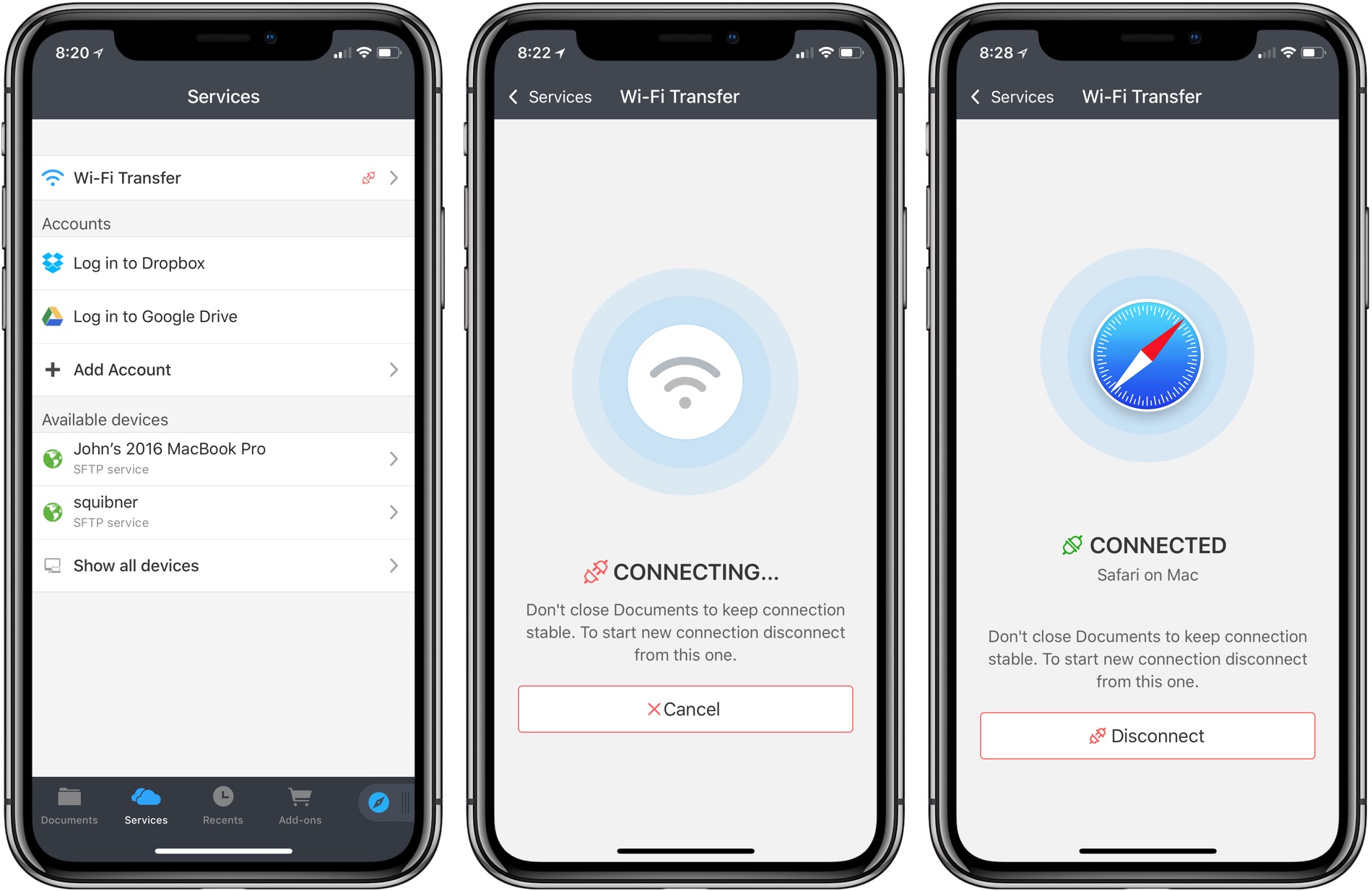




Documents Adds WiFi File Transfer

Documents by Readdle has been on the App Store a long time. Before Apple released its Files app, Documents filled the gap with features that made it indispensable for accessing files on iOS devices and doing things like unzipping an archived folder. Although the stock Files app has taken over many of my day-to-day needs for file handling, Documents continues to evolve and adapt, providing tools that aren’t in Files.

Today, for instance, Readdle added WiFi file transfers between a Mac and iOS device to Documents. The system is easy to use and more flexible than AirDrop, making it something to keep in mind, especially when you are moving large numbers of files between a Mac and iOS device.

Read more


Instagram Launches IGTV Video App Featuring Longer-Form Video

Instagram announced a video service today that is available as a standalone app called IGTV. The new service will be available soon from a button in the top right-hand corner of the Instagram app’s main screen too.

IGTV features vertical video that is longer than is available in Instagram’s Stories feature. Currently, channels created by new accounts and ones with fewer followers are limited to uploading videos that are 15 seconds to 10 minutes long, but TechCrunch reports that eventually all accounts will be able to upload videos up to one hour long.

When you first open the app, it opens to a ‘For You’ section of videos from people you follow on Instagram along with a selection of popular content. The currently-selected video dominates the top two-thirds of the screen. The bottom third of the screen is a horizontally-scrolling, tabbed thumbnail interface for picking other videos. The included tabs are ‘For You,’ ‘Following,’ ‘Popular,’ and ‘Continue Watching,’ which are self-explanatory. You can also swipe between videos in a tab the same way you would in Instagram Stories.

Swiping down dismisses the thumbnails and other UI, so the video dominates the screen. A tap on the video reveals play/pause controls, a scrubber to advance or rewind the video, and buttons to mark videos as favorites, comment, share it with other Instagram contacts, copy a link to the video, report it, or hide it. Tapping the title of the video displays its description, which can include URLs that open in Safari View Controller. TechCrunch says users will be able to subscribe to channels, though that doesn’t seem to be implemented in this initial release.

Although there is currently no advertising in the app, that is coming based on Instagram CEO Kevin Systrom’s comments during the event today. According to the TechCrunch report on the event:

“There’s no ads in IGTV today,” says Systrom, but he says it’s “obviously a very reasonable place [for ads] to end up.” He explained that since creators are investing a lot of time into IGTV videos, he wants to make that sustainable by offering them a way to monetize in the future.

Overall, I like what I’ve seen in the short time I’ve been using IGTV. Only a couple of the accounts I follow have posted videos so far, but I expect that will change as creators experiment with this new outlet. One big disappointment from a design standpoint though, is that the app does not support full-screen iPhone X video.

IGTV is available on the App Store as a free download.


AppStories, Episode 60 – The Apps of WWDC 2018

On this week’s episode of AppStories, we discuss the new and updated apps announced at WWDC 2018.

Sponsored by:

  • 1Password - Go ahead. Forget your passwords.
    1Password remembers them all for you.
  • DEVONthink – Document management reinvented for Mac and iOS.
    • Get 10% off DEVONthink Personal, Pro, or Pro Office for the Mac with the coupon code APPSTORIES.

https://staging.macstories.net/podcasts/appstories/episodes/60/embed/

Permalink

The Apps of WWDC 2018

AppStories+ Deeper into the world of apps

AppStories Episode 60 - The Apps of WWDC 2018

0:00
38:39

AppStories+ Deeper into the world of apps

Federico and John discuss the new and updated apps announced at WWDC 2018.

Read more


iOS 12 Will Add New Emergency Calling Feature

Apple has announced a new emergency calling feature for iOS 12, which wasn’t revealed at WWDC two weeks ago. The new functionality will provide automatic, precise location information to first responders when iOS 12 users call 911 in the United States. According to Apple’s press release:

Approximately 80 percent of 911 calls today come from mobile devices, but outdated, landline-era infrastructure often makes it difficult for 911 centers to quickly and accurately obtain a mobile caller’s location. To address this challenge, Apple launched HELO (Hybridized Emergency Location) in 2015, which estimates a mobile 911 caller’s location using cell towers and on-device data sources like GPS and WiFi Access Points.

Apple today announced it will also use emergency technology company RapidSOS’s Internet Protocol-based data pipeline to quickly and securely share HELO location data with 911 centers, improving response time when lives and property are at risk. RapidSOS’s system will deliver the emergency location data of iOS users by integrating with many 911 centers’ existing software, which rely on industry-standard protocols.

The FCC has mandated that mobile phone carriers locate callers within 50 meters 80% of the time by 2021. According to Apple’s press release, Apple’s HELO technology is capable of meeting and exceeding those standards today, and with the adoption of RapidSOS’s protocol this fall in iOS 12, those benefits will be enjoyed by 911 call centers too.