John Voorhees

5429 posts on MacStories since November 2015

John is MacStories' Managing Editor, has been writing about Apple and apps since joining the team in 2015, and today, runs the site alongside Federico. John also co-hosts four MacStories podcasts: AppStories, which covers the world of apps, MacStories Unwind, which explores the fun differences between American and Italian culture and recommends media to listeners, Ruminate, a show about the weird web and unusual snacks, and NPC: Next Portable Console, a show about the games we take with us.

Google Launches Major Gmail Redesign

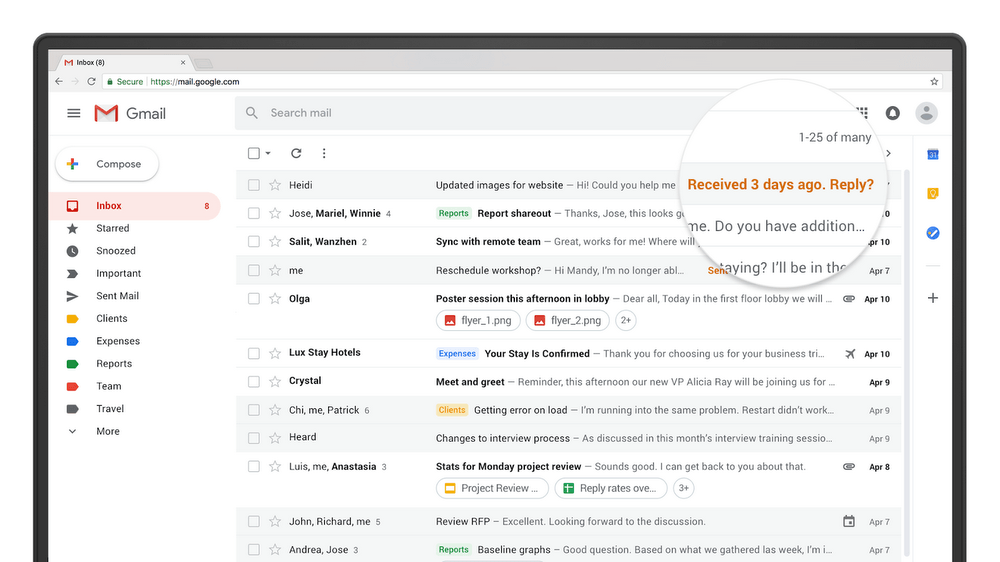
Today, Google announced a long list of updates to Gmail. The new features, which are beginning to roll out worldwide are focused primarily on security, artificial intelligence, and the incorporation of modern email features, some of which were first tested in the company’s Inbox app.

Google has addressed phishing with new, prominent warnings in the Gmail update. For sensitive information, Google is adding a ‘confidential mode’ in the coming weeks that will let users set expiration dates for messages and even revoke previously-sent messages. Google is also implementing per-message level two-factor authentication, which requires authentication via text message. Finally, users will be able to preclude message recipients from forwarding, copying, downloading, or printing messages.

Google is adding AI-powered functionality to Gmail. Nudging is a feature that will remind you of messages you haven’t responded to yet, so they don’t get lost. Gmail is also adding quick replies, which suggest responses based on the contents of the messages you receive.

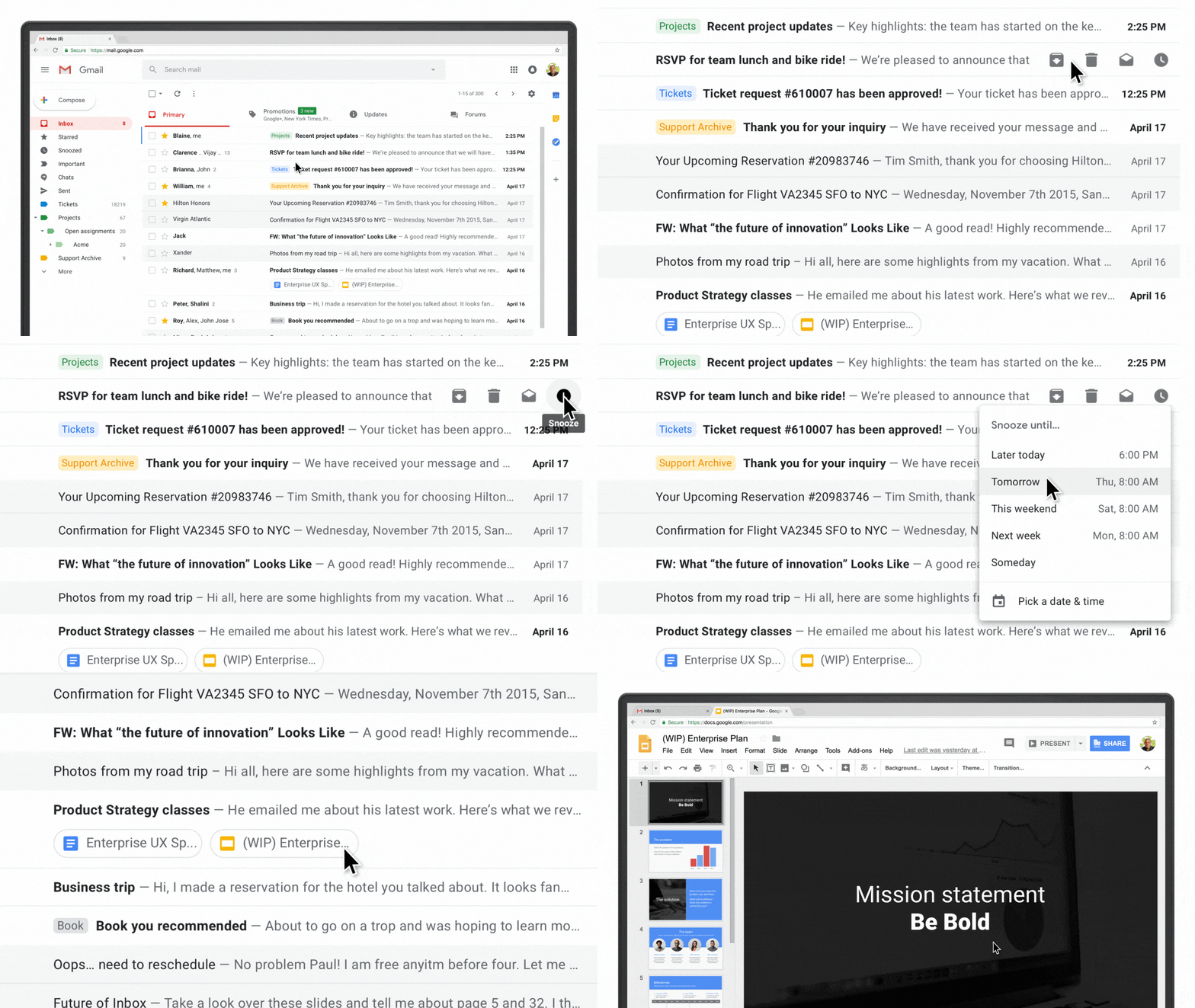
The web interface of Gmail is getting several new features too. There’s a sidebar on the right-hand side of the screen for quick access to several Google apps and Gmail Add-Ons from third parties. A hover-over menu lets users RSVP to meeting invitations, archive message threads, and snooze messages. You can also view attachments without opening the message to which a document is attached. A new offline mode is available too, which will be a welcome addition for travelers when an Internet connection is unavailable.
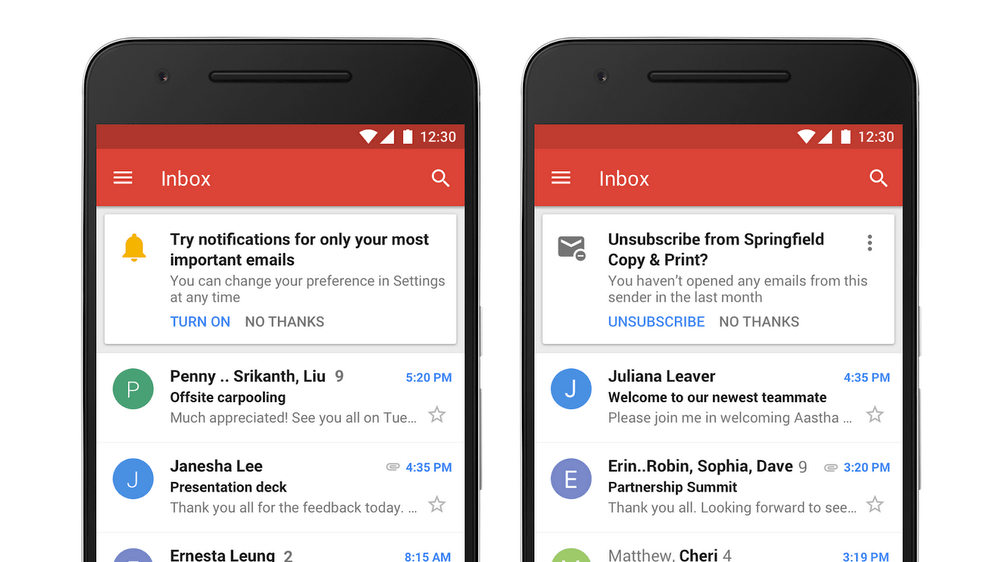
Most of the changes to Gmail are to its web interface, but a couple of changes are coming to Gmail’s mobile apps in the coming weeks including high-priority notifications that only notify users of important messages and a one-tap unsubscribe feature.
Many of the new Gmail features are being rolled out globally in phases, so you may not see them right away. Google says others will be available in the upcoming weeks. Individual Gmail users can check the Settings menu for the updates and pick ‘Try the new Gmail’ to activate the new functionality. If you use G Suite, the new functionality can be turned on by participants in the G Suite Early Adopter Program from the Admin console.
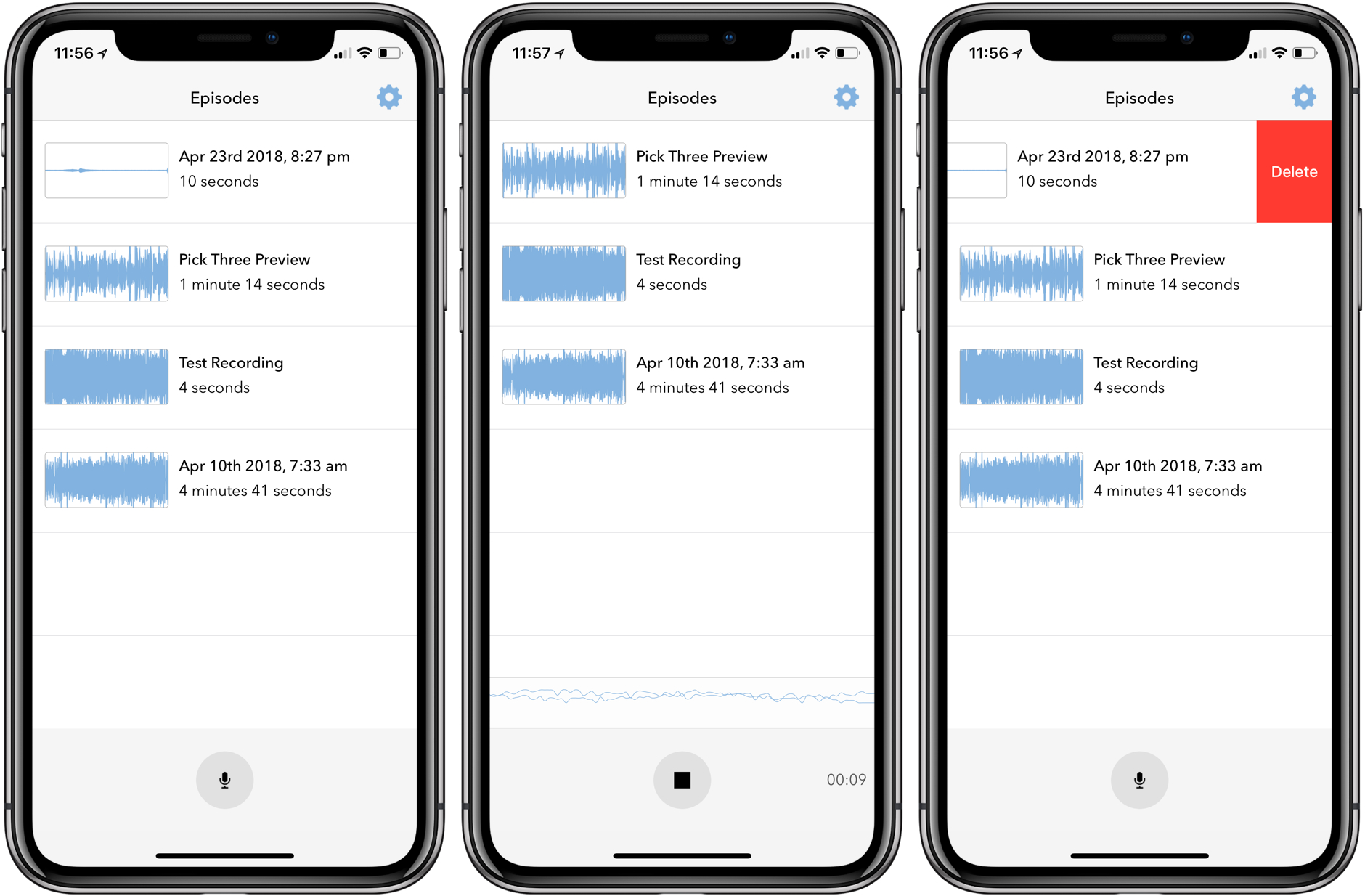


Microcasting on Micro.blog with Wavelength

Last month I covered the return of Sunlit, the iOS photo blogging app from Manton Reece that works with Micro.blog and blogging platforms like WordPress. Reece is back with another iOS app that’s aimed at bringing microcasting, which is short-form podcasting, to Micro.blog. Wavelength is an end-to-end solution for recording, editing, and publishing audio using nothing but an iPhone. It’s an interesting approach to podcasting designed to lower the barriers to entry by simplifying the workflow, while also creating new uses for Micro.blog.

Read more


Clean Up Your Inbox Today (and Keep It That Way Forever) with SaneBox [Sponsor]

What if you had someone who would sort through your email and find only the important messages? That is exactly what SaneBox does. After you set it up, SaneBox leaves your important messages in your inbox and moves the rest to a SaneLater folder for reviewing later. That initial inbox purge is powerful because it reduces your inbox to a manageable number of messages. With additional training to tell SaneBox what’s important to you, it only gets better at dealing with the daily deluge of messages.

There’s much more to SaneBox than shuffling unimportant messages into a designated folder, though. If there’s something you never want to see ever again, send it to the SaneBlackHole, which is much easier than unsubscribing to unwanted messages.

You can also set up SaneReminders by sending messages to an address that sends a reminder to you at a later date if the recipient of your message hasn’t responded after a certain amount of time. Or forward messages to SaneReminders to have them pop back into your inbox at a later date when you are ready to deal with them.

SaneBox works on top of your existing email setup. There’s no app to download or new email account to set up. It all works server-side so you can use any email client you want.

Sign up today for a free 14-day SaneBox trial to take back control of your email. MacStories readers can receive a special $25 credit automatically by using this link to sign up.

Our thanks to SaneBox for sponsoring MacStories this week.


Apple Marks Earth Day with Donations, Daisy the Recycling Robot, and an Apple Watch Challenge

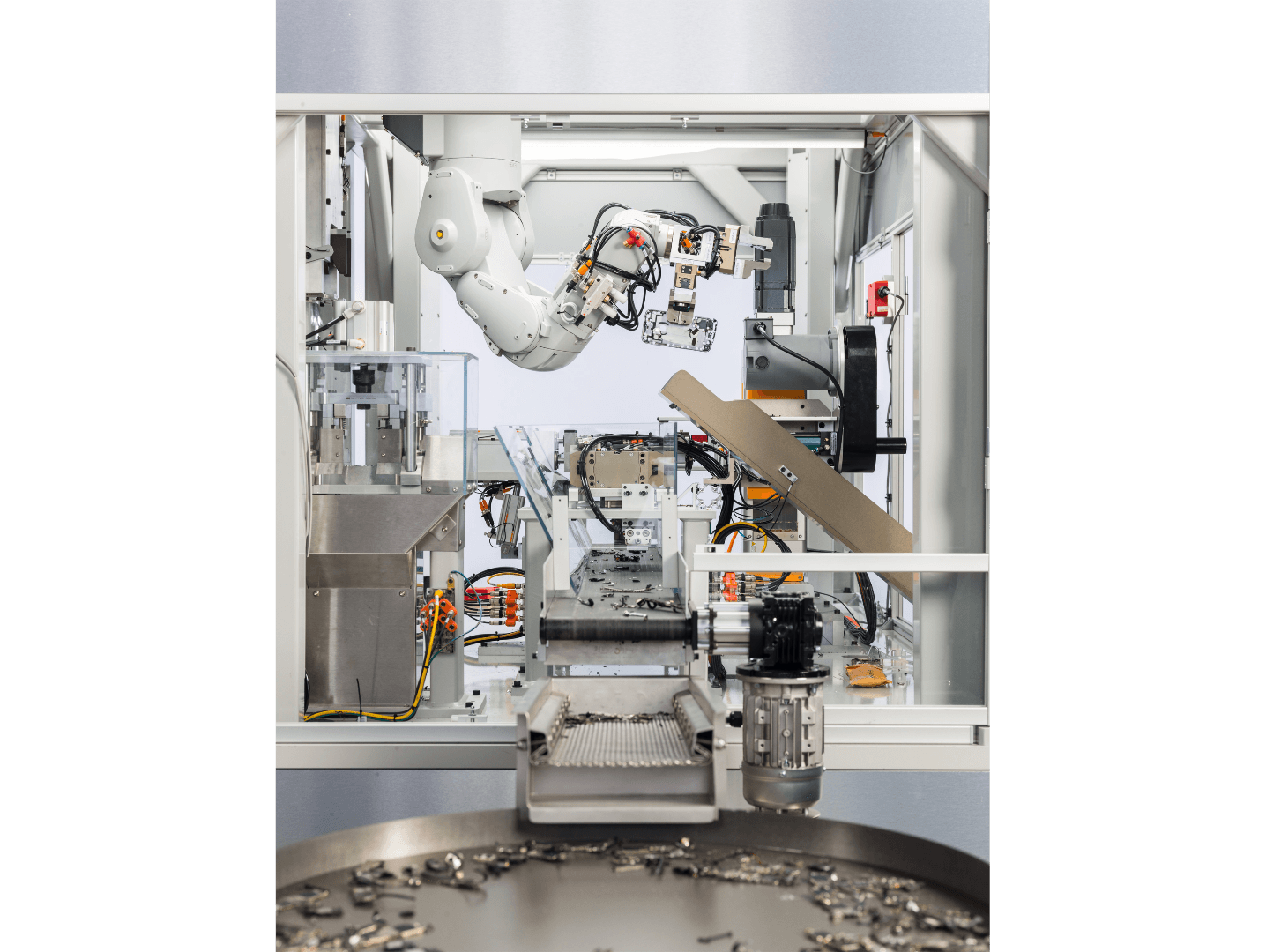
Apple has issued a press release announcing that from today through April 30th, the company will make a donation to Conservation International for each device turned in for recycling through Apple’s GiveBack program. The company also took the opportunity to introduce Daisy, its next-generation iPhone recycling robot.

Through Apple GiveBack, devices can be recycled in person at an Apple Store or using apple.com. In exchange for eligible devices, customers will receive in-store credit or an Apple gift card and Apple will donate to Conservation International, which:

…uses science, policy and partnerships to protect the natural world people rely on for food, fresh water and livelihood. Founded in 1987, the organization works in more than 30 countries on six continents to ensure a healthy, prosperous planet.

Apple introduced the world to its iPhone disassembly robot dubbed ‘Liam’ in 2016. According to Apple, its successor Daisy:

…is the most efficient way to reclaim more of the valuable materials stored in iPhone. Created through years of R&D, Daisy incorporates revolutionary technology based on Apple’s learnings from Liam, its first disassembly robot launched in 2016. Daisy is made from some of Liam’s parts and is capable of disassembling nine versions of iPhone and sorting their high-quality components for recycling. Daisy can take apart up to 200 iPhone devices per hour, removing and sorting components, so that Apple can recover materials that traditional recyclers can’t — and at a higher quality.

Apple’s press release includes a video showcasing Daisy in action too.

Finally, notifications are being sent to Apple Watch users today announcing an Earth Day fitness challenge. Users who complete a 30-minute workout this Sunday, April 22nd will earn a special badge in the Apple Watch and iOS Activities apps and iMessage stickers.