John Voorhees

5429 posts on MacStories since November 2015

John is MacStories' Managing Editor, has been writing about Apple and apps since joining the team in 2015, and today, runs the site alongside Federico. John also co-hosts four MacStories podcasts: AppStories, which covers the world of apps, MacStories Unwind, which explores the fun differences between American and Italian culture and recommends media to listeners, Ruminate, a show about the weird web and unusual snacks, and NPC: Next Portable Console, a show about the games we take with us.

Spark for macOS Adds Improved Email Search

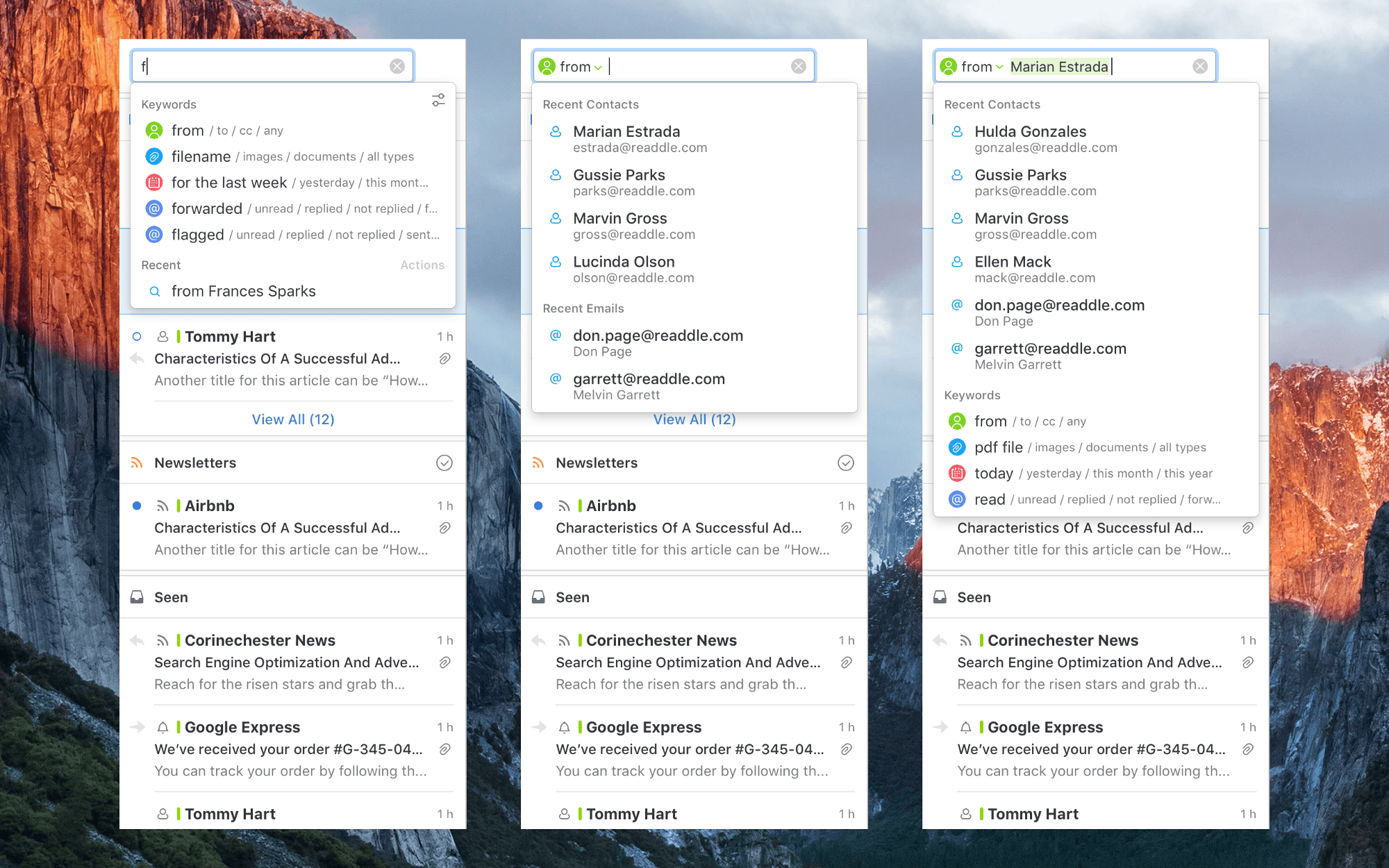
Search isn’t the forte of many email clients. Too often I find myself resorting to gmail.com or the Gmail app on iOS to find a message because Google’s search is so good. However, a downside of Google’s approach is that it requires you to recall or look up special syntax to narrow your search using date, attachment, sender, and other parameters. An update to Readdle’s Spark for macOS avoids that pitfall with improvements to its search functionality that detect keywords in your searches as you type queries in plain English.

I haven’t used Spark’s improved search enough yet to give it a thorough review, but I like what I’ve seen so far. As you type a search query, Spark looks for keywords. For example, start typing ‘att…’ and Spark will suggest searching for attachments. Smart keywords include things like ‘to,’ ‘from,’ ‘attachment,’ ‘flagged,’ ‘forwarded,’ and dates. The parameters can be batched in plain English too, so I can type ‘emails from Federico from yesterday with PDF attachments’, and Spark knows to apply the sender, date, and attachment filters returning results almost instantly.

Spark is already a popular email client with a host of modern features, but the improvements to search have the potential to make a lot of new converts to the app.

Spark for macOS is available on the Mac App Store.


Apple Q3 2017 Results: $45.4 Billion Revenue, 41 Million iPhones, 11.4 Million iPads Sold

Apple has just published its financial results for Q3 2017. The company posted revenue of $45.4 billion. Apple sold 11.4 million iPads, 41 million iPhones, and 4.3 million Macs during the quarter.

“With revenue up 7 percent year-over-year, we’re happy to report our third consecutive quarter of accelerating growth and an all-time quarterly record for Services revenue,” said Tim Cook, Apple’s CEO. “We hosted an incredibly successful Worldwide Developers Conference in June, and we’re very excited about the advances in iOS, macOS, watchOS and tvOS coming this fall.”

Read more


Evolving the iMessage App Store

AppStories+ Deeper into the world of apps

AppStories Episode 16 - Evolving the iMessage App Store

0:00
28:19

AppStories+ Deeper into the world of apps

Federico and John discuss the current shortcomings of the iMessage App Store and what Apple is changing in iOS 11 to address some of its problems.

Read more


Making Peace with a Little Clutter

I’m not a neat person by nature. I don’t care that cables snake all over the floor under my desk. I can’t see them, and they’re not in my way. I also have hundreds of apps on my iPhone even if you don’t count the iMessage sticker packs. However, if an app isn’t on...


1Blocker: Make Safari Browsing Fast, Safe, and Productive [Sponsor]

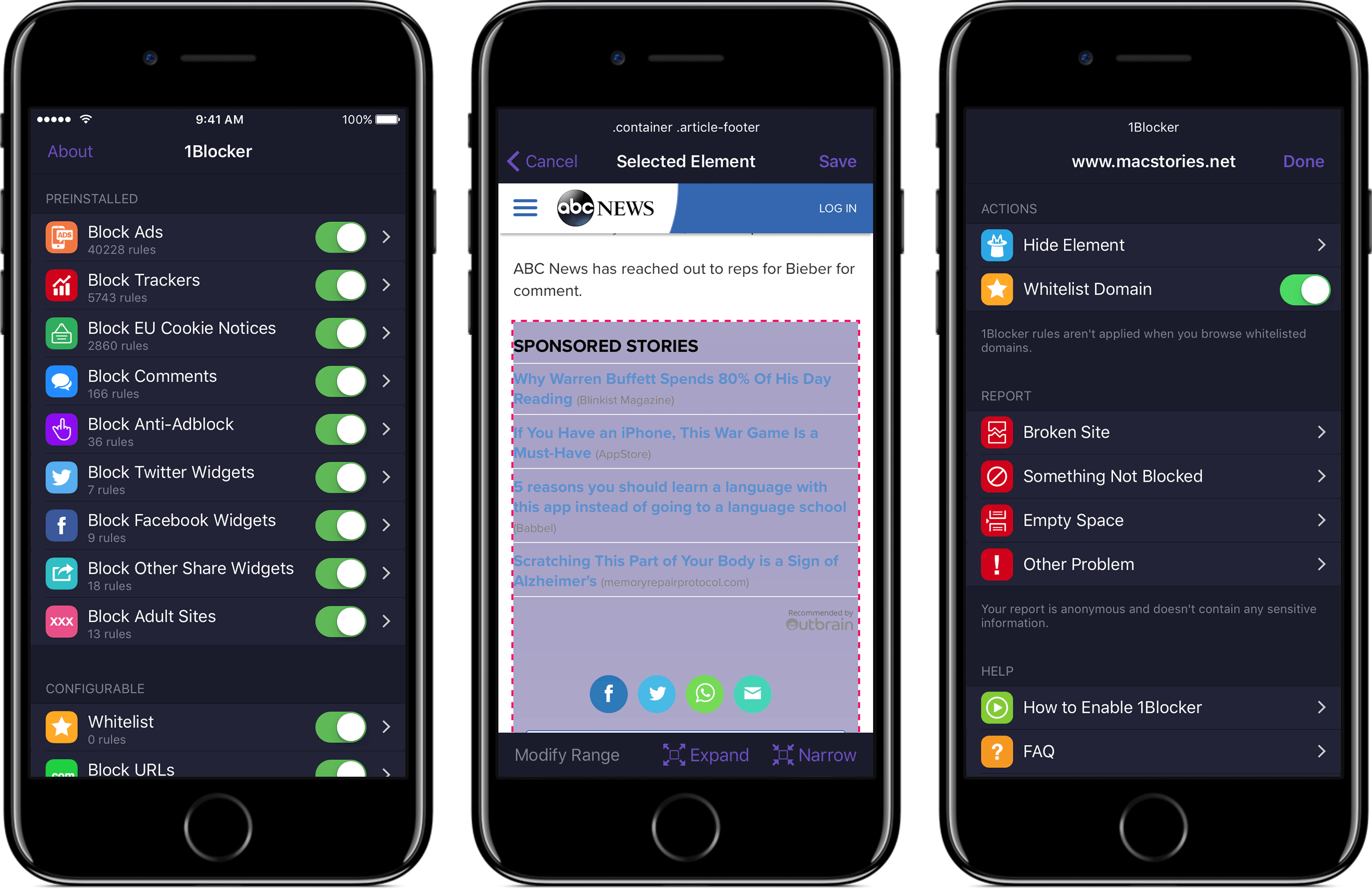
Advertising and trackers have gotten out of hand on many sites. Pages load slowly wasting your time, draining your battery, and using up your mobile data. Even worse, ads sometimes serve up malware to unsuspecting users. To take back control, you need 1Blocker.

1Blocker fights back by putting fine-grained controls in the hands of its users. The app has rules that block tens of thousands of common ads, trackers, social buttons, and other junk. The ad blocking category alone includes over 40,000 rules. On top of that, there are eight other categories with thousands of additional rules that will make you more productive online by reducing distractions. In the unlikely event that 1Blocker doesn’t have a rule you need, you can add your own too.

You can even hide individual elements on a webpage with 1Blocker’s powerful action extension on iOS. All you have to do is invoke the extension, tap what you want to hide, and then save. It’s incredibly simple and effective for page elements that aren’t already blocked by 1Blocker’s extensive built-in rules.

1Blocker is available on macOS too and syncs with the iOS version via iCloud to keep your blocking rules up-to-date across both platforms. Head on over to 1Blocker’s website for more information about how it can make your browsing better.

Our thanks to 1Blocker for sponsoring MacStories this week.


Game Day: Linelight

Linelight, an award-winning minimalist puzzle game by My Dog Zorro, debuted on iOS this week. The game was released for Windows and macOS earlier this year and is available on Sony’s PS4, but this is the first time the game has made its way onto a mobile, touch-based platform. Many games bill themselves as ‘minimalist,’ but few are as elegantly simple as Linelight. The result is a game that is easy to play and understand, highlighting the game’s perplexing and fun puzzles over its mechanics.

You play as a dash of light traversing a line. You guide your dash along the line that splits and branches in different directions by dragging your finger across the screen of your iOS device. To stop and consider how to solve a puzzle, just pick up your finger and your dash stays put. Linelight works so well as a touch-based game, it’s hard to believe that it was designed for keyboards and controllers first.

As you advance your dash along the line, you encounter puzzle after puzzle. In total, there are over 200 puzzles split across six separate spacey worlds. As with any good puzzle game, Linelight introduces new challenges gradually. There are sections of lines that shift depending on whether your dash passes over a switch, keys to be picked up and delivered to designated spots, red dash enemies that you need to avoid because colliding with one means starting that puzzle over, and much more.

There is no up or down in Linelight, so it doesn’t matter if you play in portrait or landscape, which is a nice departure from the many games that require you to play in one orientation or the other. Add a soothing piano-based soundtrack to its tricky puzzles and Linelight is one of the most relaxing and absorbing games I’ve played this year. If you’re a fan of puzzle games, Linelight is a must-play.

Linelight is available on the App Store.


Album

![](http://Chubby Emoji](https://itunes.apple.com/us/app/chubby-emoji/id1260960647?mt=8&uo=4&at=11lBfL&ct=weekly) Chubby Emoji These round-faced characters are take-offs on classic emoji smilies. Just watch out because these jovial smilies are big, screen-filling stickers. Summer Is Now It’s the middle of the summer in the Northern Hemisphere, which makes these pastel colored stickers featuring summertime iconography perfect for sharing as you plan fun in...


Q&A

Question: I have been using TextExpander on my Mac, but I am not sure I want to keep paying for it month after month. Are there good alternatives to this app? (Raul Jimenez, @Rul_ex)

I use TextExpander myself, but there are good alternatives. I’d suggest looking at two apps in particular. The first is...


App Debuts

NYTimes The New York Times’ official app, after several years, has gone Universal with a major update that runs on both the iPhone and iPad. The app now supports Split View and makes 360-degree videos compatible with the iPad. In addition, drag and drop can be used to rearrange your favorite sections, prioritizing the...