


Prisma is a camera and photo filter app with a social network baked in. When you open Prisma you’re presented with a camera view from which you can take still images or video. There are also controls for setting the flash, whether you are using the front or rear camera. Beneath the shutter button...
MacPaw Acquires The Unarchiver→
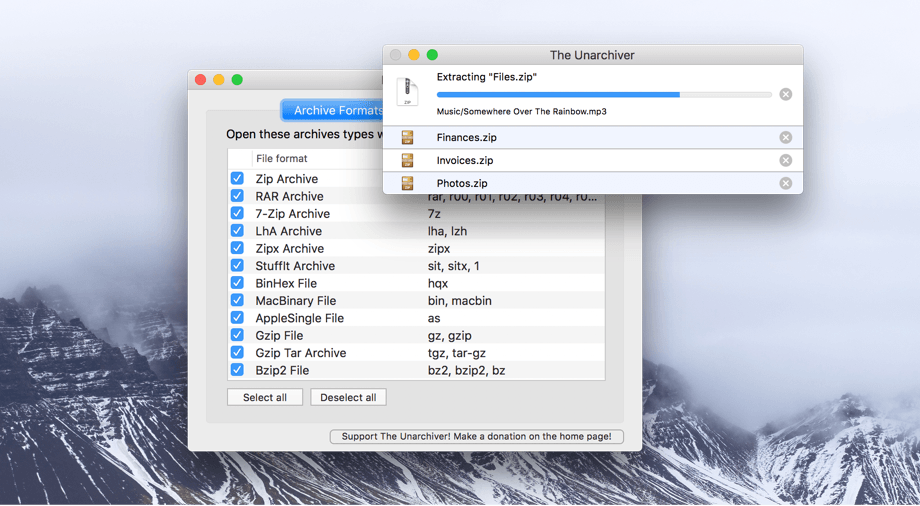
The Unarchiver has been around for more than a decade unpacking a wide array of archive file types. Today MacPaw announced it acquired The Unarchiver, which will become part of its stable of Mac utilities, which include CleanMyMac and Gemini II. According to MacPaw’s blog post about the acquisition:
MacPaw developers hope to not only maintain, but improve The Unarchiver. We plan a major facelift and a couple of new features. The app is going to get prettier and we’ll keep it updated for the upcoming macOS. Naturally, it will always stay free for all users.
In recent years The Unarchiver hasn’t received many updates, so it’s good to see the app find a new home where it should fit right in with MacPaw’s other products.
Capo touch 2.5 Review

I don’t play guitar as often as I used to, but I’ve always enjoyed trying to pick out the chords of my favorite songs. The trouble is, that can be hard to do unless you have a well-trained ear, which I don’t. That is exactly where Capo touch can help. The app can analyze a song, pick out the chords and help you practice it a little at a time at a comfortable pace until you figure out how to play it. This week, Capo touch got a big update that streamlines the learning process and brings powerful features over from Capo for macOS.
Streaks 3 Review
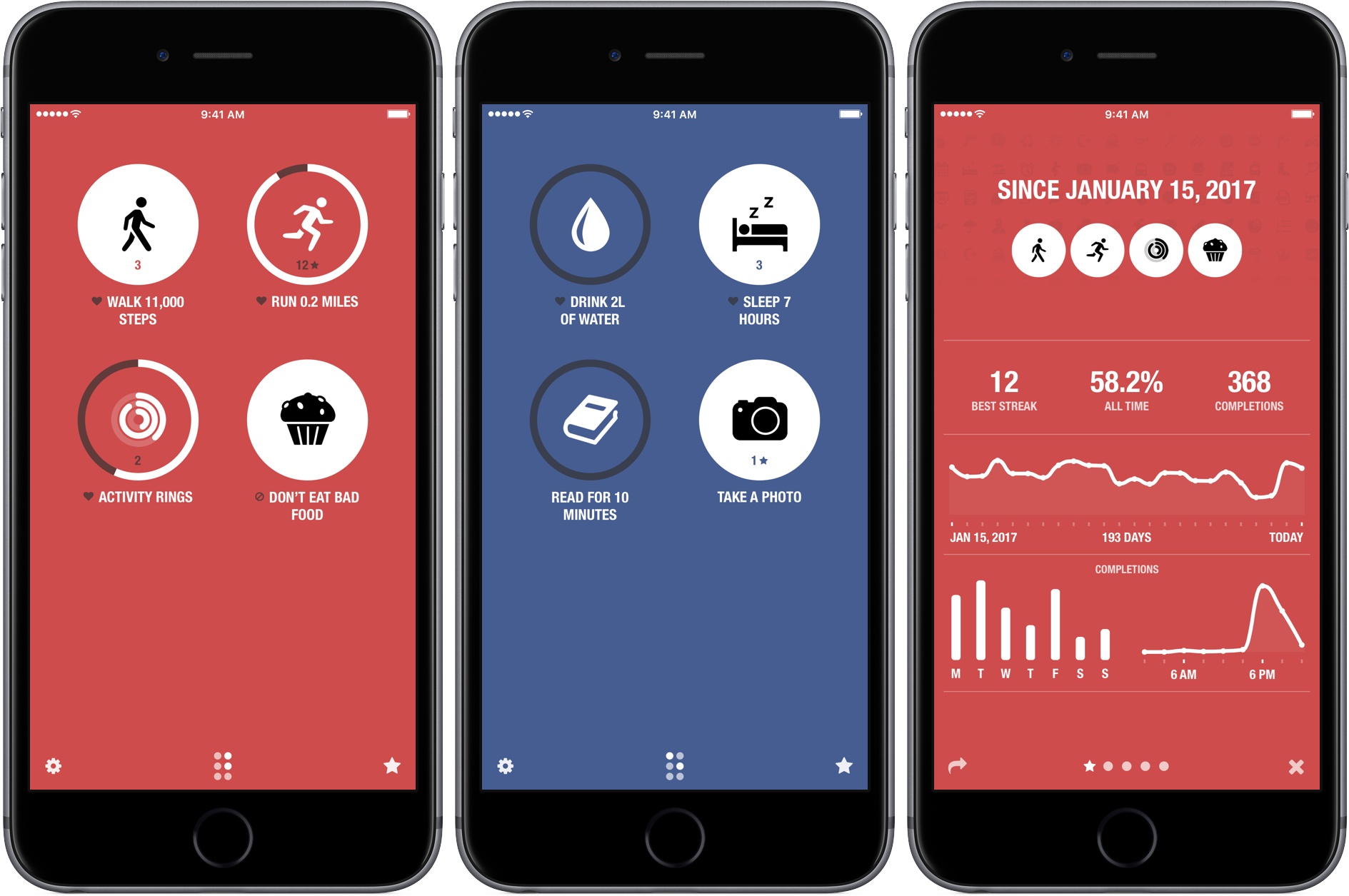
Streaks helps you set personal goals and stick to them using a combination of reminders and tracking. One of the hallmarks of the app, and what undoubtedly won it an Apple Design Award in 2016, is its obsessive attention to ease-of-use. By the very nature of its mission, Streaks is an app in which you shouldn’t spend a lot of time. Whether it’s in the main app, widget, or Apple Watch app, Streaks is designed to remove the friction of turning goals into habits by tracking tasks in a way that doesn’t become tedious, which makes it important to be able to mark items as completed quickly and easily.
It’s been interesting to watch Streaks evolve. As Streaks has added functionality and customization options with each version, the simplicity of its design has remained the app’s core design principle. One of the app’s most opinionated design decisions from the start was to limit users to tracking just six goals. Limiting the number of goals was meant to constrain users to an achievable number of goals and helped reduce complexity.
When I heard that Streaks was doubling the number of goals that can be tracked and adding in-depth statistics and other customizations, I immediately wondered whether that could be pulled off while maintaining Streaks’ signature design. The answer is a resounding ‘yes.’ Version 3.0 of Streaks not only remains true to its roots, but it’s also the best version of the app yet.
AppStories, Episode 15 – iOS 11’s Files App→
On this week’s episode of AppStories, we dive into the new Files app that’s coming to iOS 11 in the fall and discuss the history of file management on iOS, the shift in approach taken by the Files app, and how it works.
Sponsored by:
https://staging.macstories.net/podcasts/appstories/episodes/15/embed/






Mailbutler - To Increase Your Email Productivity [Sponsor]

No one has ever said ‘I want to spend more time on my email.’ Staying on top of important messages is critical, but managing your inbox can quickly become an unproductive time sink. Mailbutler is a productivity tool that supercharges your email client so you can get through your email messages quickly and efficiently.
Just because you are catching up on email messages at 1:00 AM doesn’t mean you want your message to hit someone’s inbox at that hour. With Mailbutler, you can schedule your emails to be sent during normal working hours and then track whether the recipient opened your message. Mailbutler also helps you put your best foot forward with beautifully-designed, professional message templates and signature management.
Mailbutler is just as effective at managing messages you receive. When you need to focus on your work, you can pause your inbox until you are ready to deal with it. Mailbutler also makes unsubscribing from unwanted email much faster than hunting for that tiny ‘unsubscribe’ link buried at the bottom of a message. As you process messages, Mailbutler can even turn them into tasks or Evernote or OneNote notes, which is a more effective way to handle actionable and reference items than letting them sit in your inbox.
Everyone could use help with email. Mailbutler has already conquered Apple Mail and is working on even more tools to help you tame your inbox. Try Mailbutler for free today.
Our thanks to Mailbutler for sponsoring MacStories this week.
 iOS 11’s Files App
 Federico
Federico and John dive into the new Files app that’s coming to iOS 11 in the fall and discuss the history of file management on iOS, the shift in approach taken by the Files app, and how it works.
Siri Featured in Apple Ad Starring The Rock

Apple released an advertisement showcasing Siri starring former pro-wrestler turned film star, Dwayne (‘The Rock’) Johnson. Teased yesterday by Johnson on Twitter and Facebook, the video, posted to Apple’s YouTube channel, features Johnson accomplishing a long list of life goals with the help of Siri during a single day. The tongue-in-cheek spot highlights several Siri features such as:
- reading Johnson’s schedule;
- creating a reminder;
- scheduling a Lyft ride;
- getting the weather forecast;
- reading email;
- displaying photos;
- texting someone;
- converting measurements;
- playing a playlist;
- starting a FaceTime call; and
- taking a selfie.
The Siri ad is a clever and entertaining way of explaining the breadth of tasks that can be accomplished with Siri, from the basics like weather forecasts to less well-known features like taking a selfie.
Game Day: Color Magnet
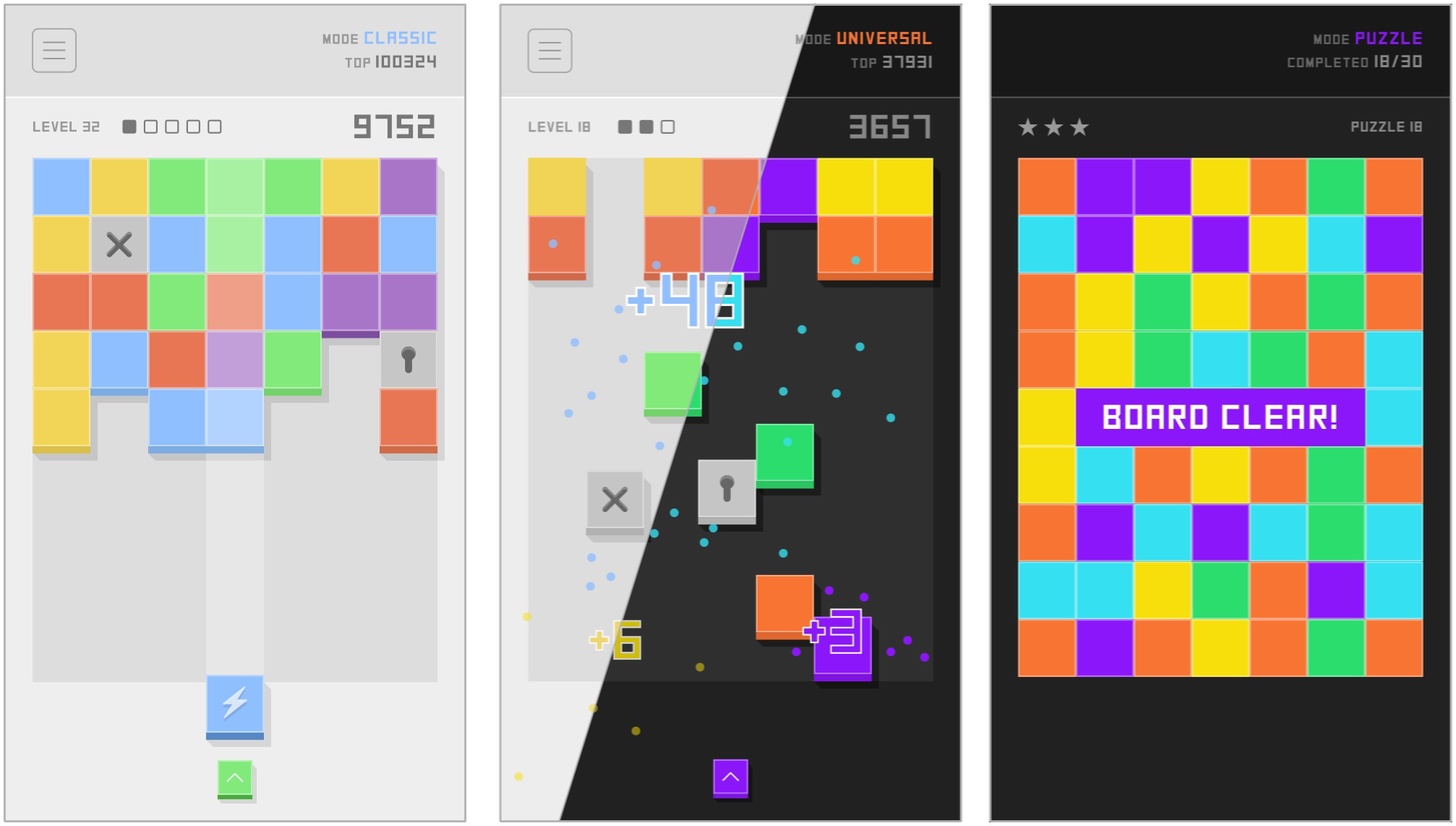
Color Magnet, by The One Pixel, is a classic color-matching puzzle game with a twist. A grid of colors blocks advances down the screen as you drop in strategically placed new blocks to make color matches. The blocks are magnetically attracted to other blocks of the same color. When placed on the grid, the blocks between the newly placed piece and the closest piece horizontally or vertically of the same color change to match the color of the block you placed. Match five or more blocks to clear them and the ones below them on the board.
Gameplay is complicated by locked and cross blocks. A locked block is unlocked by matching colors nearby or clearing a cluster of blocks next to it. Once unlocked, a block becomes a random color. Cross blocks can only be destroyed by clearing blocks above them in the stack. It’s not nearly as complex as it sounds, though it requires careful planning and strategy.
Color Magnet looks and sounds great, pairing a palette of pastel colors with a playful soundtrack. There are also light and dark themes for comfortable late-night binge playing in bed.
Replay-value is enhanced by three game modes. Classic mode challenges players to beat their high score. Universal mode pits you against the rest of the Color Magnet-playing world with the same sequence of puzzles presented to everyone. Puzzle mode has 30 unique puzzles that challenge you to clear the entire board.
The magnet mechanic and depth added by the trio of gameplay modes takes what might have been a ‘me-to’ matching puzzle game and gives it a unique spin that’s fun and addicting in the same way Threes is. If games like Threes are your thing, Color Magnet won’t disappoint.
Color Magnet is available on the App Store.