John Voorhees

5429 posts on MacStories since November 2015

John is MacStories' Managing Editor, has been writing about Apple and apps since joining the team in 2015, and today, runs the site alongside Federico. John also co-hosts four MacStories podcasts: AppStories, which covers the world of apps, MacStories Unwind, which explores the fun differences between American and Italian culture and recommends media to listeners, Ruminate, a show about the weird web and unusual snacks, and NPC: Next Portable Console, a show about the games we take with us.

Dropbox Introduces Smart Sync for Business Customers and Paper Emerges from Beta

Last April, Dropbox announced Project Infinite, a way to see all of your Dropbox files without having to store local copies. Today, Dropbox released the renamed feature as Smart Sync, which is available exclusively to Dropbox Business customers.

An interesting thing happened in the transition to SSD storage. File space on computers began to shrink after growing year after year. The shift posed a problem for Dropbox. By default, Dropbox syncs all of the files it stores to your local drive. Suddenly, customers’ storage on Dropbox could be larger than their local storage. Add to that increases in file sharing and users were left picking and choosing which files to sync, adding friction to what is otherwise a nearly invisible service.

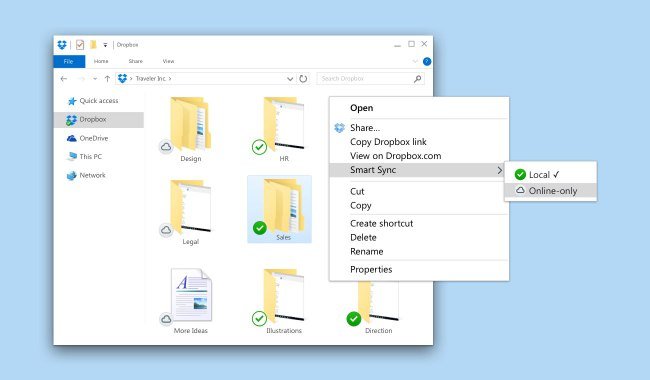
Smart Sync solves that problem for Dropbox Business customers by eliminating the need to store all of your Dropbox files on your local drive. Every file is visible in Finder and can be previewed with Quick Look, but if it has a cloud icon in the corner, the file is stored in the cloud, not on your local drive. As Dropbox explains it:

Users working with just 128 GB of hard drive space can easily comb through terabytes of files to find exactly what they need—right from Windows File Explorer or macOS Finder. Now, they won’t need to take extra steps—like switching to a web browser—just to view files. And whenever they need to access files stored in the cloud, users can download them with a quick double click.

Removing documents looks just as easy: highlight files, right-click, and choose ‘Remove’ from the contextual menu.

Dropbox also announced today that its collaborative document creation product called Paper is officially out of beta. Paper, which is available as an iOS and web app, has come a long way since first entered beta in late 2015, although it still lacks many of the more advanced features of products like Google Docs and Quip.

Dropbox is positioning Smart Sync and Paper as collaboration tools for sharing knowledge with colleagues. As Scott Rosenberg of Backchannel explains in an in-depth piece on Dropbox’s strategy:

Dropbox … think[s] Paper could become a sort of universal glue that connects teammates working together on updating a spreadsheet, designing a web page, reviewing code, or editing a press release. Once in place, it will save you from having to be “an archaeologist,” in [Dropbox CEO Drew] Houston’s phrase, putting an end to excavations of long email threads and chats, treasure hunts for the latest version of a file, and reconstructions of who said what.

That’s the same problem that companies like Slack are trying to solve but from a very different angle. Instead of approaching collaboration from the perspective of messaging, like Slack, Dropbox is approaching it from a content-centric point of view. Also from the Backchannel article, Dropbox’s CTO Aditya Agarwal says:

… the jury’s still out on whether, as he puts it, “everything is going to be keyed off a unit of communication, or communication is going to be keyed off some core unit of content.”

That’s an interesting way of approaching collaboration and one that turns business customers’ love/hate relationship with email on its head in a way that plays to Dropbox’s strengths.

For now, Smart Sync is only available to Dropbox Business customers, though Harry McCracken reports for Fast Company that Dropbox ‘is actively considering how to roll the feature out to consumers,’ which strikes me as an important next move for Dropbox. After all, as Rosenberg points out, Dropbox Business began with ‘engineers and other early adopters [who] embraced Dropbox… [and] started smuggling it into the workplace.



Starbucks Adds Voice with iOS Beta and Alexa Skill

Starbucks has started a limited beta test of voice-assisted ordering via its iOS app. The beta is currently limited to 1000 users but will expand through the summertime. Android support is slated for later this year.

The feature, called My Starbucks barista, is part of the Starbucks iOS app and gives customers the ability to order, make changes to their order, and pay via voice. The feature’s interface is reminiscent of a messaging app and lets you interact by typing into a text field if you prefer that to voice.

Starbucks also announced the Starbucks Reorder Skill for the Amazon Echo. Customers can say ‘Alexa, order my Starbucks’ to order items designated as their ‘usual’ food and beverage order.

What Starbucks is implementing in its iOS app isn’t possible with Siri yet. Hopefully, this sort of experimentation will push Apple to open Siri faster to avoid the fragmentation that could result in multiple solutions being implemented across many vendors.


Game Day: Red’s Kingdom

Red’s Kingdom is the complete package. The action-puzzle game is fun, looks fantastic, and is brimming with style and personality. Red’s isn’t breaking new gameplay ground, but it integrates tried and true elements in a way that makes it feel fresh throughout and scales seamlessly from the iPhone to the Apple TV.

Red is a squirrel. One night, the evil king and his henchmen break into Red’s house, steal his supply of nuts, and kidnap his father. Your goal as Red is to collect your nuts and save your father.

The game mechanics are straightforward. Red’s world has a grid-based layout that you view from an isometric perspective. To navigate around each area, you swipe in the direction you want Red to go. Red rolls somersault-style in the direction you swipe until he runs into an object like a rock or tree. It’s a mechanic that turns Red’s environment into the puzzle. You need to find ways to leverage the obstacles in Red’s world to help you collect nuts and other items.

Red’s Kingdom is linear and level-based, but not in the traditional sense. Instead of moving from one self-contained level to the next, you navigate a far-flung map. You only advance to the next section of the map by reaching an exit. It’s an environment that creates the feeling that you are simultaneously completing discrete levels and exploring an open world.

The difficulty of the puzzles advances at a good pace, introducing new challenges as you go. Eventually, you have to contend with obstacles that can lead to your demise like lava pits, and with enemies you must defeat. Along the way, there are also items to collect that add an extra dimension to the game that keeps it interesting and gives you a reason to explore areas again.

Red’s Kingdom scales exceptionally well. I played the game on my iPhone 7 Plus, iPad Pro, and Apple TV and enjoyed it on every platform. That’s rare. Some games that work well on an iPad or TV feel cramped on an iPhone, and some great iPhone games, feel stretched and blown up on an iPad or TV. Red’s Kingdom’s simple controls and bright, cartoony graphics work well on all three platforms. I especially liked playing Red’s on the Apple TV where it has joined a small but growing number of games that succeed on that platform, despite the Apple TV’s constraints as a game system.

Red’s is not without a couple of rough spots. The soundtrack is pleasant, but unremarkable, and feels a little too much like generic background music you might hear when walking around a mall. I also wish Red’s synced game progress among devices, especially given how well it plays on each. The game does have three save slots, which is great if you have a shared device, but I’d like to be able to advance the same game whether I’m at home in front of my TV or on my iPhone.

Notwithstanding those limitations, however, Red’s Kingdom is a clear standout among recent games. The game’s artwork ties the entire package together with a style that imbues Red and the other characters with personalities that take the game beyond the puzzles and makes it feel more like a story. It’s that personality that I expect will appeal to a broad audience and could make Red’s a franchise we see more of in the future.

Red’s Kingdom is available on the App Store for $1.99, which is a limited time 50% discount.


The Battle to Control Home Automation


Reuters reports on the on-going battle among Apple, Amazon, and Google for control of the home automation market. The article focuses on the different approaches taken by Apple and Amazon, which are in stark contrast. Reuters explains what’s at stake for Amazon:

The strategic importance of the “connected home” niche looms large: Amazon wants a way to own its customer interactions -mainly shopping online - without an Apple phone or a Google Web browser as an intermediary.

In contrast to Apple’s relatively slow, security-conscious approach to HomeKit, Amazon has lowered the barrier to entry to Echo support, which has given it a lead over Apple in terms of the number of compatible devices, which may be hard to overtake. Yet,

Amazon acknowledges that unlike Apple, it can’t guarantee the security of third-party devices. A company spokeswoman did note that sensitive commands like unlocking doors have an extra layer of security such as a voice-controlled PIN.

Still, it’s not clear whether Apple’s elaborate but slow-to-develop system will have enough advantages to overcome Amazon’s widening lead.

That’s precisely where things get interesting. Amazon’s strategy has captured device manufacturer support faster, but it’s a risky one. One well-publicized, mainstream security scare story could ruin Amazon’s home automation aspirations. At the same time, if that moment never occurs, the Echo’s lead could effectively bury HomeKit.

Permalink

Album

Wolfy The Dog Wolfy likes to have fun whether he’s listening to his boombox, having ice cream, or partying and works well when you want to send a quick reaction to something to a friend. Pixel Presidents Pixel Presidents features excellent black and white pixel portrait for every US president through former President Obama....


Recommends

Textastic is one of the geekier text editors available on iOS. The app is not a simple Markdown editor like iA Writer or Byword. Textastic has more in common with text editors designed for programmers like BBEdit and Textmate on the Mac. However, that doesn’t mean that it isn’t also appropriate for someone writing...


App Debuts

Readder for Reddit Readder is a new Reddit client that’s also available on the Apple TV and as an iMessage app. Readder supports multiple Reddit accounts, 3D Touch to preview links and images, gestures to navigate between links and images, and tons of other settings to tailor the Reddit experience to your needs. If...


Twitter Moves Trending, Moments and Other Features to New Explore Tab

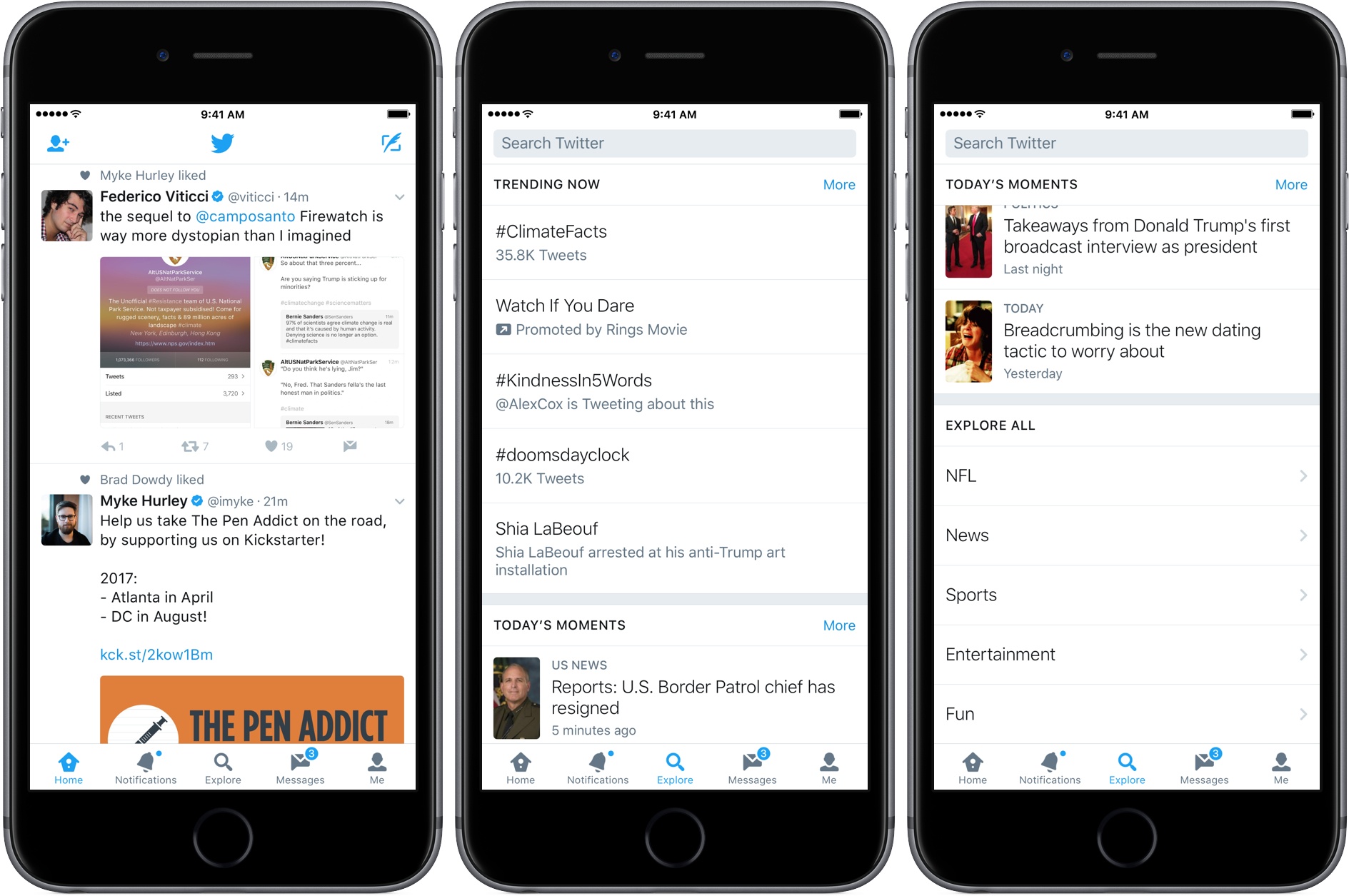
Twitter has replaced the Moments tab in its official app with an Explore tab. Moments are collections of tweets on a particular topic that are picked by Twitter editors. Moments haven’t gone away, but they’ve been moved under the new Explore tab along with ‘Trending Now’ and ‘Explore More’ sections, and live video. Explore is also where you go if you want to search Twitter.

According to Twitter’s blog:

Over the past year, we’ve been exploring different ways to make it simpler for people to find and use trends, Moments, and search. During our research process, people told us that the new Explore tab helped them easily find news, what’s trending, and what’s popular right now.

Although the Explore tab is only now being rolled out to all Twitter users, it has been in testing and available to some users for a few months. Twitter says the new Explore tab is being made available to iOS users today and will be available to Android users in the coming weeks.


Mac App Subscription Service Setapp Goes Live

MacPaw, makers of CleanMyMac, Gemini, and other apps, launched a public beta subscription service of hand-picked Mac apps last December called Setapp. Today the service, which aims to become the ‘Netflix of apps,’ was officially launched with a stable of 61 Mac apps.

For a flat subscription fee of $9.99 per month, customers can download any of the 61 apps and use them as long as they continue to make monthly payments. After MacPaw receives a 30% cut of customers’ subscription fees, developers who participate in Setapp are paid based on a formula that accounts for the price their apps are sold for outside the service and whether customers use the apps each month, which MacPaw tracks.

Read more