

John:This is a simple tip, but one that will come in handy for any longtime iPhone user. Holding down the power button and Home button simultaneously for a few seconds has been how you restart an iPhone for years. With the iPhone 7 and 7 Plus, which have solid Home buttons, restarting is accomplished by...
 CarPlay Entertainment Apps
Apps that work well with CarPlay only fall into a few categories like messaging, voice, entertainment, and mapping. Of those, entertainment apps have enjoyed the longest CarPlay support and, consequently, the greatest number of apps from which to choose. Here are some of my favorites. Overcast Overcast, which has been my primary podcast player...
Q&A
Question: In the most recent newsletter, there was a workflow story about sharing a playlist with someone – is this a shared playlist in the sense that the people you’ve shared it with get updates? That’s what the story seems to imply but I didn’t think that was supported. (Jay McCormack, @jaymcc)
 Federico
Indeed it...
Prisma Filters Extended to Video→
Prisma is a popular free photo app with bold filters in the style of famous artists. With an update today, Prisma filters can also be applied to video. According to BuzzFeed:
Prisma uses AI to “repaint” still images in the styles of famous painters. It debuted in June and already has 70 million users, according to co-founder Aram Airapetyan.
Check out BuzzFeed’s article for some great examples, like this one, of what Prisma can do with video:

TableFlip Takes the Pain Out of MultiMarkdown Tables
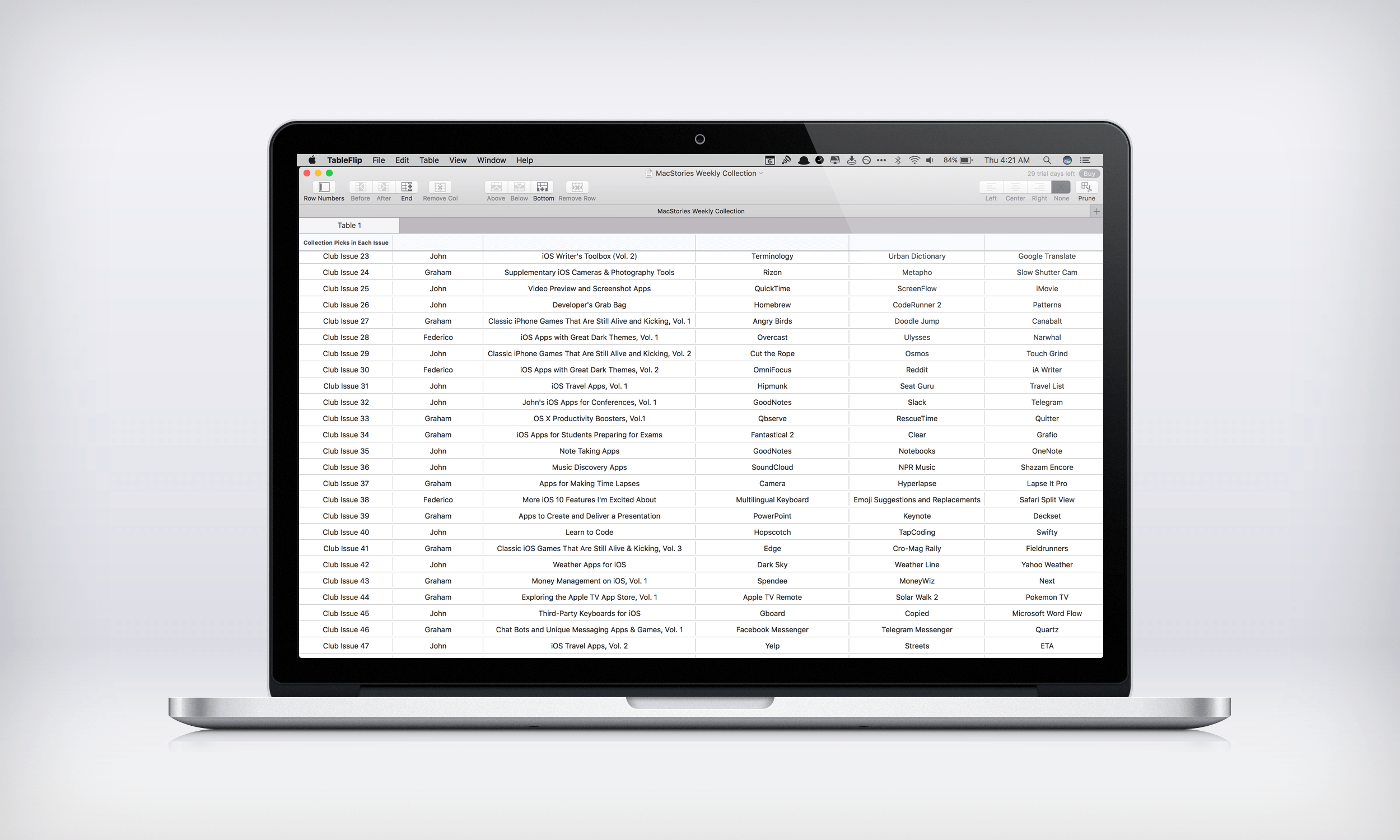
TableFlip, by indie developer Christian Tietze, does something no other Mac app I know of does – it lets you create and edit Markdown tables in a familiar spreadsheet-like interface. Table syntax is part of Fletcher Penny’s MultiMarkdown extension of John Gruber’s Markdown format for displaying HTML in easily readable plain text. MultiMarkdown’s syntax for tables is handy for short tables, but can get unwieldy and complex with larger tables. TableFlip fixes that by letting you flip between a plain text document and a fully-rendered and editable version of your table.
Recode’s Compilation of Steve Jobs’ Best D: All Things Digital Moments→
Steve Jobs didn’t grant many interviews after his return to Apple in 1997. However, he did make several appearances at the D: All Things Digital conference from 2003 to 2010 that was hosted by Wall Street Journal reporters Walt Mossberg and Kara Swisher. On the fifth anniversary of Jobs’ death, Recode, which was co-founded by Mossberg and Swisher, has complied a selection of the most memorable moments from those interviews into a short video.
The full interviews are available as a podcast in iTunes.
Automatic macOS Downloads Begin→
Jim Dalrymple of The Loop was told by Apple that beginning today, Macs with automatic downloads turned on for the Mac App Store will auto-download updates of macOS Sierra. As Jim emphasizes though,
It’s important to note that this is not an automatic installer—this process will only download the update in the background, and then alert you that it is available to install. You can choose to install it when its convenient. You can also choose to ignore the update.
In addition, Sierra updates will not auto-download if your Mac doesn’t support the update or doesn’t have enough free storage.
Automatic OS updates make a lot of sense as a way to encourage adoption of the latest version of macOS and should help spread critical security updates more quickly. The change is not without its downsides though. For instance, updates can be large, which could be an issue for people with limited data plans as Stephen Hackett points out on 512 Pixels. Notwithstanding that sort of issue, I think the change strikes a good balance between automation and requiring intentional user interaction to update macOS, which should work well for most users.
Mophie Introduces Modular Magnetic Cases for iPhone→
Mophie introduced a new line of modular cases today with what it calls Hold Force technology. The system lets you pick a thin base case for your iPhone 7 or 7 Plus and add optional accessories like a 4000 mAh Powerstation battery or a credit card wallet. The accessories connect to the case with magnets.
A case with a removable parts that extend its utility is an interesting approach. With respect to the Powerstation, MacRumors says:
the Hold Force Powerstation Plus Mini can provide up to 12 hours of extra battery life for average smartphones, thanks to its integrated 4,000 mAh battery. The accessory’s basic charging system is focused on micro-USB, so an included Lightning adapter allows for support of recharging the iPhone 7 and 7 Plus.
I like the idea behind this modular design. I don’t generally use a case on my iPhone, but if I did, the ability to swap accessories depending on what I need on a particular day would be nice. I do wonder how well that lightning to Micro-USB dongle required for the Powerstation will hold up over time though.
Telegram Adds SiriKit Support and Game Bots
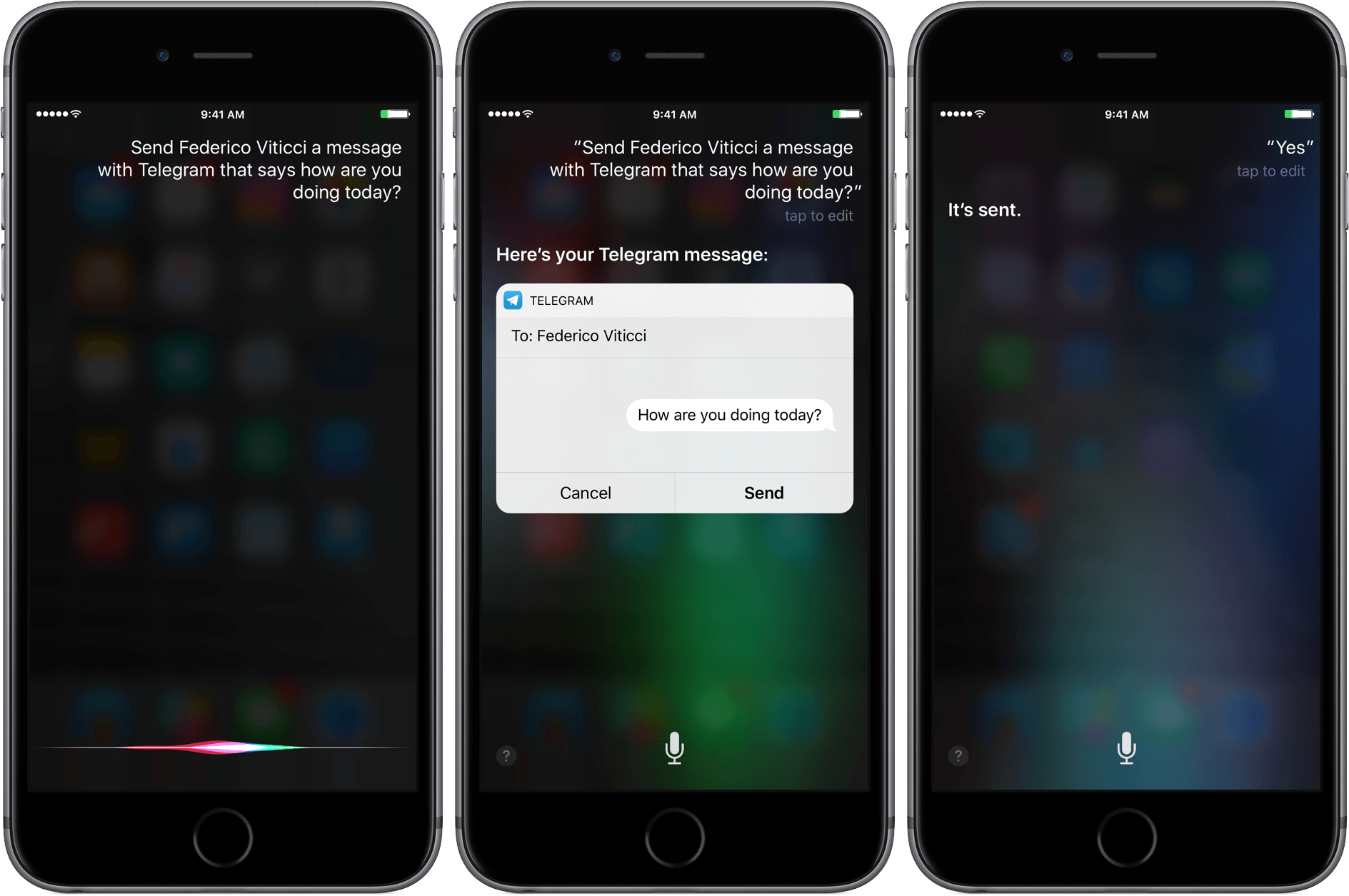
Telegram received a significant update today that adds SiriKit support for sending messages and upgrades its bot platform. Both features will help keep Telegram closer in line with the features available in Apple’s own Messages app.
By integrating with Siri, messages can be sent with Telegram using commands like ‘Send Federico a Telegram message that says what’s the weather like in Rome today?’ Similar to Messages, Siri interprets your instructions and presents you with a draft message before sending it. In my tests, the feature worked to send messages to individuals, but I couldn’t send a message to The MacStories Lounge channel, which broadcasts messages to everyone who subscribes to that channel.

Telegram also updated its bot platform to support games made using HTML5. The iOS release notes for Telegram also suggest that the changes to bots could be used for other rich media experiences, but for now, Telegram has chosen to focus on games. According to Telegram’s blog:
The best part of the Telegram Gaming Platform is the competition across all your existing chats. We save high scores for every game played in every chat, and you can instantly check out how you and your friends are doing against each other. Every time there’s a new leader in the game, other playing members of the chat are notified that they need to step it up.
I took a quick look at a few of the thirty games available at launch from Gamee and they were fairly basic games, but it’s a good start, and it will be interesting to see what developers do with the new APIs.