

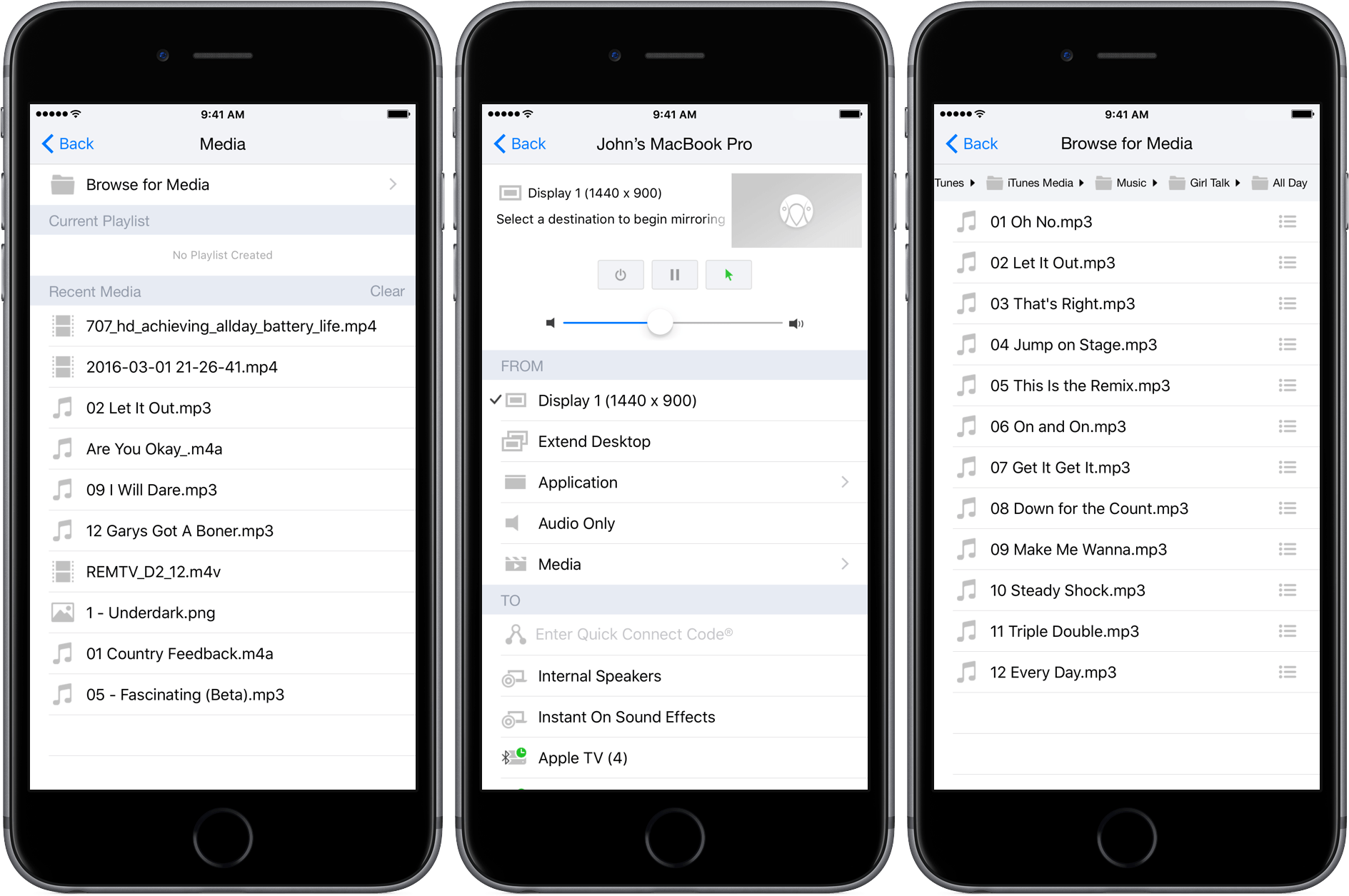
Shortly after reviewing AirFoil for Mac, which acts as a hub for routing audio to multiple devices and has an iOS remote control app, I heard that Squirrels was planning something similar for its AirParrot product. AirParrot 2 for Mac acts as a hub for sharing your Mac’s screen, apps, and media to devices like the Apple TV. With an update to AirParrot and the release of AirParrot Remote for iOS, you can now control the streaming of your Mac’s screen, apps, and media remotely from your iPhone or iPad.
Clipper Chip Redux→
Steven Levy writing on Backchannel:
Is it any wonder that the government is rebooting the crypto wars? For the first time, it’s really struggling with the results of the first war, as more information is now encrypted, increasingly in a manner the government finds really hard (or impossible) to decode.
[…]
As with the first round of the crypto wars, the stakes could not be higher. Once again, the government is seeking to control that genie first released by Diffie and Hellman. But the physics of computer security have not changed. Last July, a panel of fifteen eminent security specialists and cryptographers — many of whom are veterans of the first crypto war — released a report confirming there was no way for the government to demand a means of bypassing encryption without a dire compromise of security. It just doesn’t work.
The crypto wars, as Steven Levy calls them, are not new. In his excellent 2001 book Crypto: How the Code Rebels Beat the Government – Saving Privacy in the Digital Age, Levy recounted the struggle during the 90s between a small group academics who developed public key encryption and the US government, which was determined to outlaw encryption or mandate a back door. Sound familiar?
Memories are short, especially on the Internet. With the Department of Justice’s insistence that Apple unlock a terrorist’s iPhone, we are facing the same issues that were addressed in the 1990s. The difference is that the stakes are higher now. For individuals, there has never been more private data stored electronically, whether on a device like an iPhone or in the cloud. For governments, we have reached a point where some information is too hard, or impossible, for them to recover thanks to cryptography. As the struggle over the future of encryption plays out, it’s useful to keep in mind the perspective of those like Levy who were there the first time around.
Wikipedia’s New Focus on Discovery

For a long time, Articles by Sophiestication Software was my favorite Wikipedia app on iOS. But Articles is showing its age because it hasn’t been updated since September 2013 when developer Sophia Teutschler took a job on the UIKit Frameworks team at Apple.
Wikipedia has had its own official app for years, but for much of that time it wasn’t very good. Apps like Articles filled the gap, presenting a cleaner, better-designed experience. After years of using Articles, I lost track of Wikipedia’s iOS app, but was pleasantly surprised when I downloaded the just-released version 5, which has evolved into a great all-around Wikipedia utility.
 Desktop Cleanup
Question: Hi, could you highlight some of the lightweight stuff Hazel can help with that could be useful for time-saving? Like keeping a clean desktop, unzip and delete zip-files etc. What are some of the best hacks that could suit a lot of people? (Joakim)
Hazel, by Noodlesoft, is a versatile rule-based utility for...
iOS Writer’s Toolbox, Vol. 2
iOS text editors are great, and some, like Editorial, have vast amounts of power built in that allow you to do amazing things with your writing. But there is also a rich world of other apps on iOS that fill the specific needs of writers and that don’t tie you to one particular editor....
Ongoing Development
In issue #21 of MacStories Weekly, I focused on finding gaps in the App Store, which is an inherently app-centric perspective on the topic of attention. Today, I am going to flip things around and look at customers and addressing their needs as another component of attention. I’m sure you have read an interview with...
iTunes Connect Adds Weekly Analytics Reports

Last night emails were sent to develpers by the App Store team announcing a new iTunes Connect feature – weekly App Analytics email reports. This is a welcome addition to iTunes Connect. I check App Analytics occassionally, especially after a significant app release or marketing push, but getting analytics data on a regular schedule is a nice way to keep on top of analytics more regularly.
You can opt into emailed reports with the link provided in the email you receive from the App Store team, or go to iTunes Connect and opt in under the Users and Rolls section.

Pixelmator as a Screenshot Editor→
Gabe Weatherhead at Macdrifter highlights something that puzzled me when I wrote a roundup of screenshot apps last December:
While there’s a wealth of options on the Mac for image annotation, there are very few complete options on iOS. PointOut is wonderful for creating magnifier callouts but not much else. Pinpoint has really easy redaction, annotation and arrows but nothing more. Omnigraffle has everything plus a great deal of control but it’s too many taps to do anything basic.
The problem is compounded by the fact that many screenshot apps on iOS are unable to detect a screenshot once it has been edited by another app. As a result, there is often no good way to pass a screenshot from one app to another to apply multiple edits.
Gabe’s solution is clever. He uses Pixelmator, one of the most powerful image editors available on iOS, to create call-outs, redact sections of a screenshot, and draw arrows. I use Screenshot++ and Pinpoint regularly, but it’s good to have Pixelmator as an option for more complicated combinations of edits. Check out Gabe’s post to see how it’s done.
iOS Writer’s Toolbox (Vol. 1)
Text and Link Utilities iOS text editors are great, and some, like Editorial, have vast amounts of power built in that allow you to do amazing things with your writing. But there is also a rich world of other apps on iOS that fill the specific needs of writers and that don’t tie you...