

Page Layers,Getting Things Done Together, in part 3 of his Reading List shortcuts series, Federico sharesa shortcutfor searching saved Reading List highlights, plus the usual Weekly Q&A, Links, App Debuts, a recap of MacStories articles, and a preview of next week’s episode of AppStories....
 Up Next on MacStories’ Podcasts
Next week on AppStories, Federico and John compare how each of them are using iOS and apps in their cars....
A Club MacStories Subscription Makes a Great Gift
Last year, we introduced gift memberships to Club MacStories, and with the holidays coming up, we wanted to remind readers that the Club is a terrific gift option for friends and family members who who are MacStories readers. Club MacStories extends what we publish at MacStories, which makes it the perfect gift for anyone who wants more of our app, automation, news, tip, and other coverage.
Club MacStories offers exclusive content delivered every week including:
- MacStories Weekly, a newsletter that is sent every Friday and is packed full of our favorite apps, themed collections, tips, automation, answers to reader questions, featured Home screens, interviews, and much more.
- the Monthly Log, a monthly newsletter that includes long-form and behind-the-scenes stories.
- Access to giveaways, discounts, and other treats like a special members-only edition of our podcast called AppStories Unplugged and ebook versions of Federico’s annual iOS review and other long-form stories.
- The full archive of over 180 issues of MacStories Weekly and the Monthly Log.
All told, that’s around 60 newsletters and lots of other perks over the course of a year.
So, if you have a MacStories reader on your holiday shopping list this season, consider a Club MacStories membership that they can enjoy all year long. Monthly ($5/month) and annual ($50/year) memberships can be given using the following links:
Also, thanks to all our loyal Club members who have joined since the Club’s debut over three years ago. You’re an essential part of what we do here at MacStories, and we hope you’ve enjoyed the Club as much as we enjoy creating it for you.
Happy Holidays!
– The MacStories Team
Interview: Marco Arment

Twitter: @marcoarment. Creator of Overcast, co-host of ATP, Top Four, and Under the Radar. With watchOS 5 you added standalone Apple Watch playback support to Overcast. What hardware and/or OS limitations would you like to see addressed by Apple next to make the experience better for users and make your job easier? watchOS 5 brought...
Interesting Links
The Verge has an eye-opening look at Night Sight mode, which brings amazing low-light photography to Google’s Pixel phones. (Link) Engadget has a review of the entry-level Mac mini from the perspective of a video editor. (Link) The Verge reviewed a higher-end Mac mini from the perspective of an upgrading 2014 mini owner. (Link) Facebook...
Up Next on MacStories’ Podcasts
Next week on AppStories, Federico and John dive back into a discussion of working on the iPad Pro, including John’s move back after several months and his efforts to replicate his core Mac workflows on the iPad....
In This Issue
Picsew, Part 2 of Federico’s Reading List highlights archive shortcuts, an interview with Marco Arment, Ryan’s iPad Pro first impressions in The Extension, plus the usualWeekly Q&A, Links, App Debuts, arecap of MacStories articles, and a preview of next week’s episode of AppStories....
Previously, On MacStories
iPad Diaries: My First 48 Hours with the New 12.9″ iPad Pro Getting the iPad to Pro Broadway Ditches Age-Old Processes To Run Shows with iPads Reminder and GoodTask: Third-Party Upgrades to Apple’s Reminders Spotify Debuts on Apple Watch, Promising Advanced Features Still to Come Front-End Web Development on an iPad Pro in 2018 La...
Vectornator: Graphic Design for the iPad and iPhone Reimagined [Sponsor]
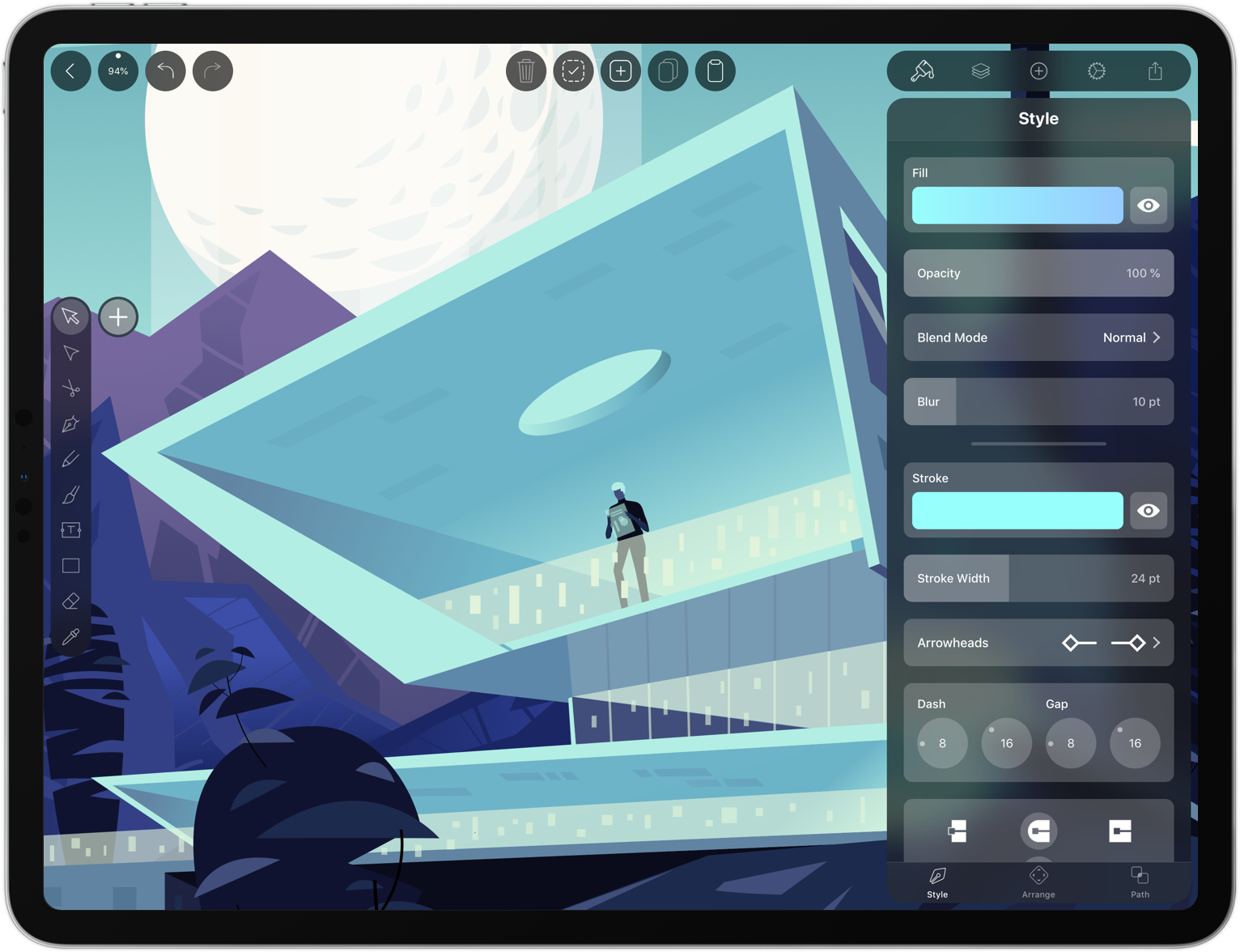
Vectornator unlocks the power of vector graphic design for everyone by bringing a high-performance rendering engine and a unique, user-friendly interface to iOS. It’s exactly what you need to create stunning artworks from anywhere.
Vectornator integrates with the Adobe Creative Cloud, so you can work seamlessly between a Mac and your iOS devices. Of course the app supports the Apple Pencil, but it also works with several third party input devices too.
What makes working in Vectornator fast and delightful is its one-of-a-kind interface that gets out of the way and puts the focus on your artwork. With the latest release of Vectornator, the user interface has been completely reimagined for simplicity and speed. Among other things, there’s a new color picker and a slick new toolbar. The toolbar now has contextual options which allow you to tweak path smoothing for example. There’s also a context-aware inspector panel, so what you need is always available where you need it.
The user interface is also a pleasure to the eye. Through the use of translucency it appears to float on top of the canvas. This way you get an immersive experience and what appears to be a much bigger canvas to work on.
Their new design philosophy is inspired by their users’ workflows, built with amateurs and professionals in mind. Vectornator is the perfect place for new users to learn graphic design and grow their design skills. At the same time it offers a great environment for professionals to work for extensive hours on their next masterpiece.
Vectornator adopts the latest iOS technologies to bring users the power they need to create compelling designs. For example, image layers are automatically named using CoreML and paths are rendered live with a Metal-accelerated engine. The app also includes CMYK color previews, color profiles, and integrates with Icons8, which makes over 80,000 free icons available to users. To learn more, visit vectornator.io.
Best of all, Vectornator is completely free to download from the App Store. So don’t delay, download Vectornator today.
Our thanks to Vectornator for sponsoring MacStories this week.