


Twitter: @BrianMueller333. The maker of CARROT Weather, To-Do, Alarm, Fit, and Hunger. What’s your approach for the upcoming Siri shortcuts in iOS 12? How did you decide which CARROT features to make available as shortcuts? I wanted to make it possible to use CARROT via Siri exclusively, so that you wouldn’t even need to launch...
 In This Issue
Morning Reader, Mac photo utilities, Oisin Prendiville’s home screen, an interview with Brian Mueller, plus the usualWorkflow Corner, Weekly Q&A, Tip, Links, a recap of MacStories articles, and a preview of next week’s episode of AppStories....
Up Next on MacStories’ Podcasts
Next week on AppStories, Federico and John discuss Twitter clients, other Twitter apps, and how they use them....
Tap Forms: The Digital Filing Cabinet for Your Life [Sponsor]
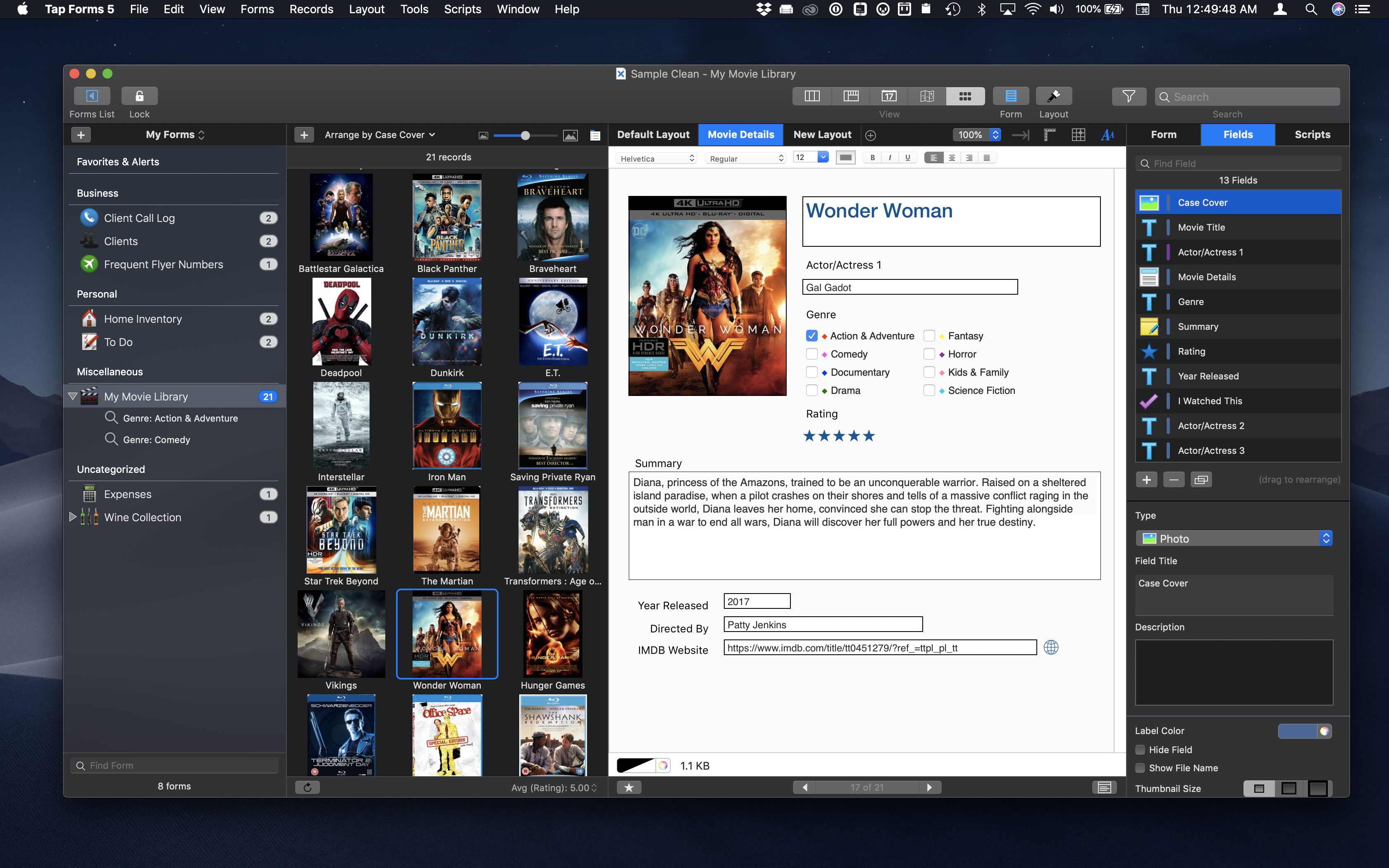
Tap Forms is a powerful Mac and iOS app for organizing anything and everything in one place. It’s a customizable database app that’s simple to use, but best of all, scales to fit your needs as they grow.
Whether you’re organizing your comic book collection, recipes, work documents, or business inventory, Tap Forms can help. The app is secure, searchable, and accessible from any Mac or iOS device via iCloud, IBM Cloud, Apache CouchDB, and WiFi sync, so you always have your data with you. Tap Forms also features support 7 days a week via email and its forums.
To get you started quickly, Tap Forms has dozens of pre-made, customizable forms. Of course, you can also build a form from scratch too. There are also 26 built-in field types that can be added to forms including Text, Number, Note, Calculation, Script, Photo, Location, Contact, Table, and Link to Form.
Tap Forms is just as powerful at using the data it collects. Records can be viewed in List, Multi-Column, Map, Calendar, and Photo Grid views. You can also generate 24 types of barcodes and print labels.
This fall, when macOS Mojave and iOS 12 ship, Tap Forms will gain fantastic new features including:
- Dark Mode and Apple Script support on the Mac
- JavaScript support for scripting actions on your form data
- A Script field type
- Siri Shortcuts on iOS 12 for running Form Scripts in Siri without launching Tap Forms
For this week only, Tap Forms 5 is available for 30% off the Mac and iOS versions. Don’t miss this chance for a great deal and to get organized today with Tap Forms.
Our thanks to Tap Forms for sponsoring MacStories this week.
In This Issue
HoudahSpot,a PopClip Tip and giveaway, Matt Birchler’s home screen, plus Federico automates GoodTask 3 subtasks, Ryan highlights his favorite parts of watchOS 5, Weekly Q&A, Links, a recap of this week’s MacStories articles, and a preview of next week’s AppStories episode....
Interesting Links
Tesla has launched its own Qi charger, featuring a 6000mAh battery and an integrated USB-C cable. The charging pad is compatible with modern iPhones and shares the same design aesthetic of Tesla’s Powerwall. (Link) Apple has selected Led Zeppelin-inspired Michigan rock band Greta Van Fleet as their newest ‘Up Next’ artist on Apple Music. (Link)...
Perks

PopClip Exclusively for Club MacStories members, we have 10 copies of PopClip, agreat Mac utility that puts powerful text and URL actions in a contextual menu for highlighted text. Enter to win by noon New York time on September 7, 2018. Winners will be selected at random and contacted within 7 days of entries closing....
Previously, On MacStories
Day One 3.0: Three Headline Features Make the Journaling App Better Than Ever Game Day: Donut County Google Introduces YouTube Digital Wellbeing Features Panic to Publish Untitled Goose Game by House House in Early 2019 on Switch, Mac, and PC Instagram Updates Two-Factor Authentication and Verification Process Apple Updates AirPort Express Firmware with AirPlay 2...
Up Next on MacStories’ Podcasts
Next week on AppStories, Federico and John talk about Apple’s Reminders app and the third-party apps built on top of it that they have been using this summer....