Ryan Christoffel

991 posts on MacStories since November 2016

Ryan is an editor for MacStories and co-hosts the [Adapt](https://www.relay.fm/adapt) podcast on Relay FM. He most commonly works and plays on his iPad Pro and bears no regrets about moving on from the Mac. He and his wife live in New York City.

Microsoft Office and the Files App Finally Play Nice Together

Today Microsoft updated its Office suite for iOS, with Word, Excel, and PowerPoint all reaching version 2.12. Office updates rarely receive detailed release notes, and today was no exception, but user Teddy Svoronos discovered that the updates brought ‘Open In’ capabilities to the share sheet, which previously only enabled making a copy of an Office document. The ‘Copy to’ option has now been removed, replaced by the more convenient ‘Open in.’

After seeing Teddy’s tweet, I did a little playing around in the Files app and discovered that, while Excel and PowerPoint documents accessed in Files will load Quick Look previews and require tapping ‘Open in’ from the share sheet, the experience is even better with .docx files. Those Word-associated documents open directly in the Word app with just a single tap from the Files interface – no need to open the share sheet first.

It’s possible this disparity in behaviors between file types only exists because I view Word documents far more regularly than Excel or PowerPoint files. Perhaps heavy Excel or PowerPoint users will see a different behavior because the Files app has enough data to know which app you want to open certain file types in. It’s also possible, though, that the behavior I’ve seen is true for everyone, and Microsoft simply made a somewhat perplexing design decision.

In any case though, whether a Files document opens in its correct app with a single tap, or you use the share sheet and ‘Open in’ first, this is still a huge improvement for Office users. Previously any documents stored in Files would need to be accessed by going to either Word, Excel, or PowerPoint, tapping the ‘More’ button in the ‘Open’ menu, then locating the file from there. Now, iOS users can go straight to the Files app, locate the appropriate document, and open it directly with only a tap or two.

Update: One of the developers working on Office has confirmed my suspicions: the reason Word files open for me with a single tap while Excel and PowerPoint files do not is that I haven’t opened those files enough for iOS to know that I would prefer to bypass the share sheet.

In theory, a system where iOS knows what you want every time could be great, but in reality, I sure would like having the option to set default apps per document type.



The Mac Pro Is Coming in 2019, Shaped by Apple’s New Pro Workflow Team

In a follow up of sorts to last year’s Mac roundtable, Matthew Panazarino of TechCrunch was invited back to Apple HQ for an update on the long-awaited Mac Pro, which Apple shared will not launch until 2019:

“We want to be transparent and communicate openly with our pro community so we want them to know that the Mac Pro is a 2019 product. It’s not something for this year.”

Other than the 2019 date, the lone detail about the new Mac Pro was confirmation that it will be a modular system. Though what exactly that means, we still don’t know.

The other main interesting note from Panzarino’s report is that Apple has assembled a new internal Pro Workflow Team (not to be confused with the iOS app Workflow) which aims to guide and improve Apple’s pro-targeted products. The team is under the oversight of John Ternus, Apple’s VP of Hardware Engineering, and a great deal of its focus is learning the workflows of real pro users so it can optimize its hardware and software to make those workflows better. Panzarino writes:

To do that, Ternus says, they want their architects sitting with real customers to understand their actual flow and to see what they’re doing in real time. The challenge with that, unfortunately, is that though customers are typically very responsive when Apple comes calling, it’s not always easy to get what they want because they may be using proprietary content. John Powell, for instance, is a long-time logic user and he’s doing the new Star Wars Han Solo standalone flick. As you can imagine, taking those unreleased and highly secret compositions to Apple to play with them on their machines can be a sticking point.

So Apple decided to go a step further and just begin hiring these creatives directly into Apple. Some of them on a contract basis but many full time as well. These are award-winning artists and technicians that are brought in to shoot real projects (I saw a bunch of them walking by in Apple park toting kit for an outdoor shoot on premises while walking). They then put the hardware and software through their paces and point out sticking points that could cause frustration and friction among pro users.

This work has started in the specific areas of visual effects, video editing, 3D animation, and music production, and Apple plans to expand it out from there.

The efforts of the Pro Workflow Team serve to benefit all of Apple’s pro-related hardware and software, and even popular third-party software as well. It’s one way Apple is showing its commitment to serving professional users.

In the last year, Apple’s output for pro users seems to have made a complete turnaround. Back then we were wondering if the company had become content focusing on the average consumer and letting pros leave for other platforms. That’s certainly not the story anymore. With the iMac Pro, continued updates to Apple’s pro software, and now the forthcoming Mac Pro and the ongoing investment of the Pro Workflow Team, Apple is positioning itself again as a company committed to serving the pro market.

Permalink

The Shrinking App Store

Sarah Perez, reporting for TechCrunch:

The App Store shrank for the first time in 2017, according to a new report from Appfigures. The report found the App Store lost 5 percent of its total apps over the course of the year, dropping from 2.2 million published iOS apps in the beginning of the year to 2.1 million by year-end.

Appfigures speculated the changes had to do with a combination of factors, including stricter enforcement of Apple’s review guidelines, along with a technical change requiring app developers to update their apps to the 64-bit architecture.

With the previously announced App Store cleanup and iOS 11’s 32-bit purge, it’s no surprise at all that the App Store shrank during the year. To the average user though, a store with 2.1 million apps is no different than one with 2.2 million. Plus, in theory the apps that remain are of a higher overall quality than what was removed, so this should turn out to be a net gain for users.

Another way users benefit: the App Store’s search engine has long had a reputation for being ineffective, so a smaller App Store should mean it’s easier to find what you’re looking for.

Permalink

Scanbot 7 Adds Customizable Filters, Document Merging, Improved Search, and New Themes

Scanbot 7 was released today, the latest update to the popular document scanning app for iOS. This is the first major version bump for Scanbot since Apple introduced its own scanning feature into the built-in Notes app, making it especially of interest. Every time Apple introduces a free app or feature that competes with existing third-party options, the impetus falls on those developers to prove their app’s continued value. Scanbot already offered a variety of features that Notes’ scanning doesn’t, but it adds to those in today’s update with a handful of thoughtful enhancements that make a great app even better.

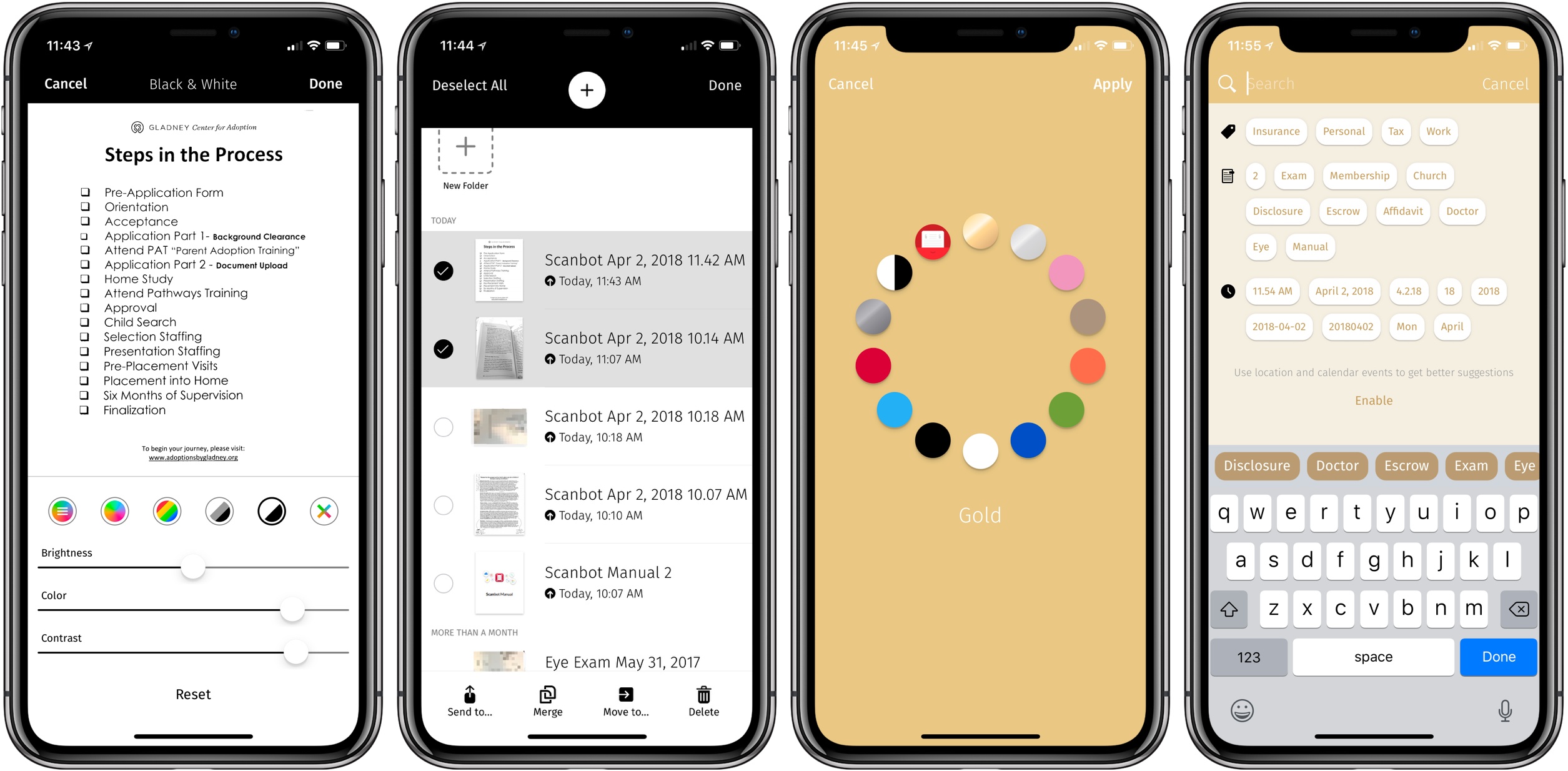
In Scanbot 7, each of the app’s five color filters for scans can be tweaked to your exact preferences. There are sliders included to make three types of adjustments for each filter. On most filters, those options are Brightness, Color, and Contrast, and with the Gray filter they’re Brighter, Darker, and Color. Not every scan is the same; a good scan depends on the type of document being captured and your lighting conditions, so it’s great having more control over filters to make every scan look as good as possible.

A second new feature is the ability to merge multiple existing scans into a single PDF. This is done by hitting the checkmark in the top-right corner when browsing previous scans, then selecting multiple scans and hitting Merge. You’ll then be able to rearrange the page order of the soon-to-be-merged documents, and choose whether to replace the original documents altogether, or keep them intact post-merge. This kind of task can be accomplished in other apps, such as PDF Expert, but it’s nice to bring it in-app, especially in situations when you need to consolidate scans to send to someone else.

Search has been upgraded in Scanbot 7, with auto-complete suggestions that appear even before you’ve typed a single character. These make Scanbot’s search screen one of the best I’ve used in any app. Also added in today’s update are five new theme options, my favorite of which is High Contrast: it uses true black and white to provide beautiful contrast in the interface, especially on the iPhone X’s OLED display.

If you’re in the market for a scanning solution, and want more power and customizability that Apple Notes provides, Scanbot 7 makes the app a better option than ever. All its power features are easy to use, and the app is full of thoughtful design touches that make for a delightful experience.

Scanbot 7 is available on the App Store.