Federico is the founder and Editor-in-Chief of MacStories, where he writes about Apple with a focus on apps, developers, iPad, and iOS productivity. He founded MacStories in April 2009 and has been writing about Apple since. Federico is also the co-host of AppStories, a weekly podcast exploring the world of apps, Unwind, a fun exploration of media and more, and NPC: Next Portable Console, a show about portable gaming and the handheld revolution.
Federico gives a status report about life in Italy, then Stephen tries to cheer people up by talking about the HomePod. After that fails, Myke tells a story and the gang wade through a sea of iOS 14 rumors, including stories on iMessage, PencilKit, iOS wallpaper apps and more.
You can listen below (and find the show notes here).
0:00 01:16:50
Connected, Episode 285
AppStories+ Deeper into the world of apps
Sponsored by:
Pingdom: Start monitoring your website performance and availability today, and get instant alerts when an outage occurs or a site transaction fails. Use offer code CONNECTED to get 30% off. Offer expires on January 31, 2021.
Direct Mail: Create and send great looking email newsletters with Direct Mail, an easy-to-use email marketing app designed exclusively for the Mac.
Indeed: Post your job today and get a free sponsored job upgrade.
Fantastic column by Jason Snell, writing for Macworld, on the rumor that Apple may bring a trackpad to the Smart Keyboard and update the iPadOS UI to support external pointing devices this year:
What makes the iPad great is its ultimate flexibility. When I write about iPad keyboards, people inevitably say: Why don’t you just use a MacBook, already?
But the iPad lets me tear off the keyboard when I’m not using it, and a MacBook doesn’t. I can use my same iPad Pro, and all the same apps, when my iPad Pro is completely naked, when it’s attached to a keyboard, when I have an Apple Pencil in my hand, and yes, even when I’ve got a Bluetooth mouse attached.
This is why I love the iPad so much. It’s everything I want it to be, when I want it to be that—and not when I don’t. Yes, there are definitely tasks my Mac is much better at performing, and in those cases using an iPad can be a compromise. But using a MacBook that can’t be transformed into a light touchscreen tablet is also a compromise. And unlike the current Windows experience, I don’t have to retreat into a weird faux-Mac interface to get real work done.
As I’ve argued many times before, the iPad’s greatest strength is its ability to transform into different types of computer depending on what you need. Here’s how I concluded my Beyond the Tablet story last year:
At a fundamental level, after seven years of daily iPad usage, I believe in the idea of a computer that can transform into different form factors. The iPad is such a device: it gives me the freedom to use it as a tablet with 4G while getting some lightweight work done at the beach, but it becomes a laptop when paired with a keyboard, and it turns into a workstation when hooked up to an external display, a USB keyboard, and a good pair of headphones. For me, the iPad is the ultimate expression of the modern portable computer: a one-of-a-kind device that morphs and scales along with my habits, needs, and lifestyle choices.
A few years ago, I described the iPad as a “liberating” experience that married power to portability and allowed me to work from anywhere. I stand by that concept, but I’ll revise it for 2019: the iPad is a liberating device that transcends its form factor. Its range of configurations, combined with a new generation of powerful iOS apps, delivers a flexible experience that eludes classification.
Adding a trackpad and native support for external pointing devices to UIKit wouldn’t turn the iPad into a laptop: it would just add to the list of potential, optional configurations for the device. That’s been true for a while with other accessories; I don’t see why mice and trackpads shouldn’t be next.
Inspired by a report that the iPad Pro’s Smart Keyboard will gain a trackpad this year, Federico and Ryan imagine what that would mean for the future of the iPad.
You can listen below (and find the show notes here), and don’t forget to send us questions using #AskAdapt and by tagging our Twitter account.
0:00 01:04:30
Adapt, Episode 20
AppStories+ Deeper into the world of apps
Sponsored by:
TextExpander, from Smile: Unlock your productivity with TextExpander. Get 20% off with your first year.
Sanebox: Clean up your inbox in minutes. Sign up for a two-week free trial and a $25 credit.
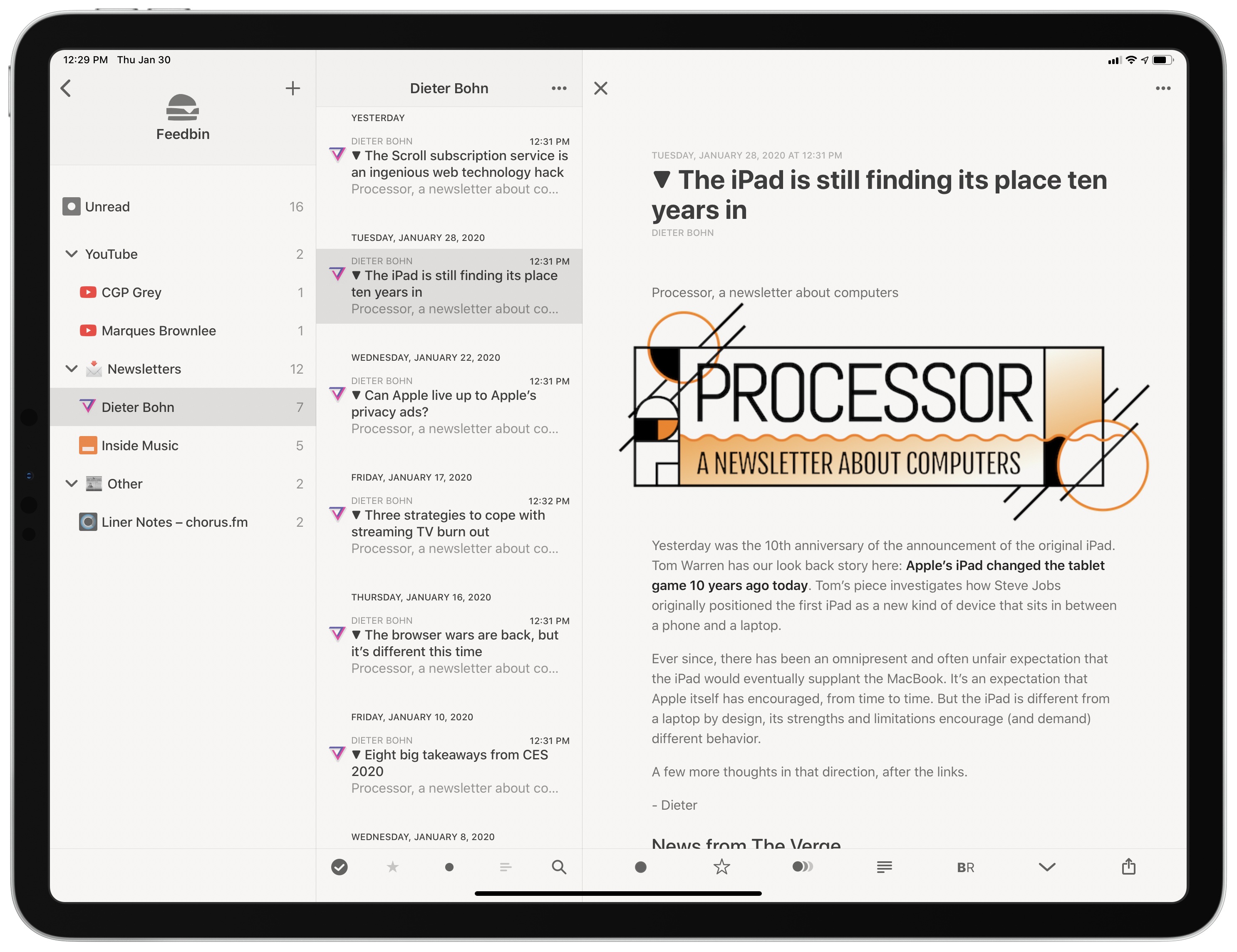
As I’ve mentioned in previous Club MacStories newsletters as well as my Must-Have Apps story, I used the holiday break as an opportunity to do some cleanup of various kinds of digital cruft on my devices. I reorganized apps on my Home screen; I deleted old shortcuts with LaunchCuts and installed custom icons for my frequently used ones; I fixed metadata for certain albums on my Sony Walkman (a process I want to write about on the site) and moved all my Pokémon links to Raindrop.io. When I was done with apps and links, I turned my attention to email – specifically, newsletters.
It should come as no surprise that I love newsletters. I (partially) make a living out of sending two of them on a regular basis! Obviously, I believe in the strength, convenience, and personal approach of the medium, especially because my favorite writers – whether Jason Tate from Chorus.fm or Jason Snell from Six Colors or Dieter Bohn from The Verge – all tend to have a casual, looser writing style in their newsletters that feels like they’re writing directly to me.
The problem: despite automatic filing of newsletters performed by SaneBox into a folder called ‘SaneNews’ in my Gmail account, I realized that I don’t really like reading newsletters in an email client. I don’t like spending time in an email client these days, period. For professional reasons, I receive a lot of email on a daily basis, so I find it hard to concentrate and read a longform newsletter in an app that is filled to the brim with messages and not exactly built around focused reading.
As I was thinking about ways to improve this (I considered using a second email app just for newsletters, for instance), I remembered that Feedbin, my RSS service of choice, offers the ability to give you a unique email address you can send newsletters to. Emails sent to your personal Feedbin email address will end up in the service’s queue alongside your other regular RSS subscriptions, and you can then choose to file the “source” behind a newsletter however you see fit – for example, by creating a folder in Feedbin called ‘Newsletters’. Feedbin has more details on this functionality here. Given how I’ve been trying to consolidate all my reading into Reeder by way of the app’s support for RSS and a read-later account, I thought it’d be interesting to try throwing newsletters at it as well.
Myke and Federico discuss the difficulties of connecting HomeKit to the internet, consider better solutions for iPad multitasking, feel disappointment for the Files app, and see what their boy Buffet is up to.
You can listen below (and find the show notes here).
Pingdom: Start monitoring your website performance and availability today, and get instant alerts when an outage occurs or a site transaction fails. Use offer code CONNECTED to get 30% off. Offer expires on January 31, 2021.
Indeed: Post your job today and get a free sponsored job upgrade.









 John
John