John
John
AppStories Episode 152 - App Subscriptions Revisited
0:00
49:37
49:37
This week, Federico and John revisit the topic of app subscriptions and what they’ve learned in the nearly three years since they covered subscriptions in episode 5.


 App Subscriptions Revisited
 First-time guest Federico Viticci joins the show. Topics include how the coronavirus outbreak might affect WWDC, speculation on a possible March Apple event, the state of iPad keyboard (and trackpad) support, and iPadOS multitasking.
It was my pleasure to join John Gruber on this week’s episode of The Talk Show. Don’t miss the links in the show notes for the additional context regarding iPad apps and multitasking.
 Opening Documents in Third-Party Apps from Files
App Debuts
Opening Documents in Third-Party Apps from Files
App Debuts Over the past few weeks, I’ve been on a quest to discover the best iPhone and iPad apps to collect and edit various bits of text I come across every day. The result of this research was a collection in Issue 211 of our Club-exclusive newsletter MacStories Weekly, in which I rounded up the six most interesting plain text apps I’d found browsing the App Store. Members can check out the full collection in the newsletter archive, but, for context, here’s how I led the story:
I often find myself wanting to store random bits of plain text in a document, which I don’t want to save in Apple Notes or iA Writer where my more important notes and documents live. I just want a quick way to stash random, disposable pieces of text – phone numbers, addresses, URLs, etc. – that I will discard shortly after. Inevitably, my research led me to discover a bunch of apps I wasn’t familiar with.
[…]
For the purpose of this roundup, I have excluded apps like iA Writer, 1Writer, Drafts, and other, more complex text editors that go beyond the simple act of just saving text in a scratchpad. While it is possible to use those apps for that kind of task – and I believe plenty of folks use Drafts like that – I was effectively looking for iPhone and iPad alternatives to Apple’s TextEdit for Mac.
I use Apple Notes for general-purpose note-taking, but I’ve started moving some of my videogame-related documents and notes that require heavier formatting to Noto (which Ryan reviewed here). All my writing happens in iA Writer, where I do not want to store any other plain text (Markdown) content that won’t end up either on MacStories or Club MacStories. Lately, however, I’ve found myself searching for a tool that lets me jot down (or otherwise collect from Safari or Mail) random bits of text that are important for the moment, but ephemeral, and as such not a good fit for the richness of editing tools available in Notes or Noto. You may be familiar with this problem: maybe it’s a phone number you need to keep handy for a couple minutes, or a list of three items you need to buy at the supermarket, or a URL to a webpage you need to share with a colleague. To me, using Apple Notes or Drafts for this kind of plain text content expiring soon feels excessive; I just want a scratchpad that frees my brain of the responsibility to hold this text with as little friction as possible.
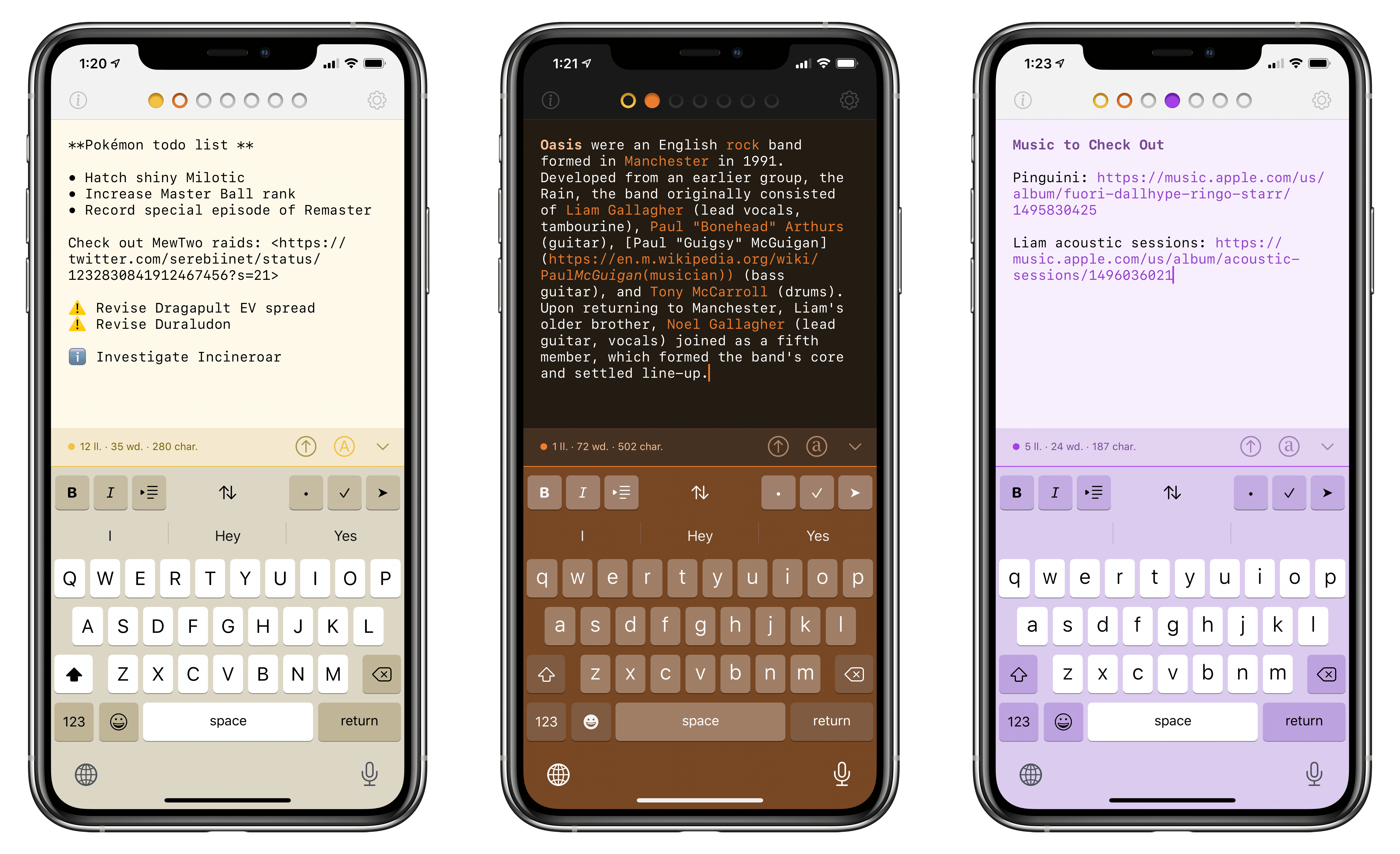
Enter Tot, the latest release from The Iconfactory. At a high level, Tot is a plain text editor that lets you swipe across seven documents from a single view; each document is represented by a colored dot, and the color is also used for the document’s background to make it visually stand out from the other six. You can switch between plain text and rich text editing modes with the tap of a button; there are word and character counts above the keyboard; when you’re done editing, you can share your text as .txt or .rtf documents with other apps. On a superficial analysis, Tot may not seem that different from the plethora of lightweight Markdown or rich text editors available on the App Store. What sets The Iconfactory’s latest app apart, however, is the combination of embracing constraints and adopting system technologies with a thoughtful, balanced design. Allow me to explain.
On last week’s episode of Connected:
Stephen shares a prepared statement. Myke suggests some games and Federico envisions a March iPad Pro event. Also: more Qi chargers have come on the market and a discussion about the HomePod’s future.
You can listen below (and find the show notes here).




Sponsored by:
Apple’s Blending of Apps and Services
This week, Federico and John explore how Apple is increasingly blending services with its apps, where the mix has worked, where it hasn’t, and where they expect the trend will lead next.
On this week’s episode of Adapt:
Federico walks through the tasks that he still has to turn to a Mac to accomplish, then Ryan details how iPad apps do handling large text or PDF files.
You can listen below (and find the show notes here), and don’t forget to send us questions using #AskAdapt and by tagging our Twitter account.
Sponsored by:
Experimenting with New Tools and Workflows