
Federico Viticci

10804 posts on MacStories since April 2009

Federico is the founder and Editor-in-Chief of MacStories, where he writes about Apple with a focus on apps, developers, iPad, and iOS productivity. He founded MacStories in April 2009 and has been writing about Apple since. Federico is also the co-host of AppStories, a weekly podcast exploring the world of apps, Unwind, a fun exploration of media and more, and NPC: Next Portable Console, a show about portable gaming and the handheld revolution.

Developer Demos HomeKit’s New Integration with Smart TVs

Benjamin Mayo, writing for 9to5Mac:

Developer Khaos Tian hacked the HomeKit protocol to simulate adding a smart TV accessory to the Home app. He shared some screenshots and videos of these features ‘in action’ …

By essentially faking the existence of a HomeKit-compatible Smart TV accessory on his network, he was able to add a television tile into his Home app.

This reveals new interfaces for controlling the TV. You can tap on the tile to turn it on or off and access the Details menu to change input.

Tian has posted a series of examples of this new HomeKit integration on his Twitter account, including one where he was able to control his LG TV running webOS from the iPhone’s Home app.

Interestingly, Tian has already contributed an update to homebridge – the third-party plugin to add all kinds of different accessories and platforms to HomeKit – with support for HomeKit’s new TV control APIs. Here’s where this gets really interesting for me: despite the launch of an online petition, LG has only confirmed that their latest 2019 TV sets will receive official HomeKit support. Thanks to homebridge, however, it should be possible to add native HomeKit integration to older LG televisions (such as my 2017 model) with plugins that bridge the webOS API to HomeKit’s new endpoints. This is precisely what Tian is doing for his demo.

Now, as someone who’s been running homebridge and the homebridge-webos-tv plugin for the past few months (and I promise I will write about this eventually), I’m excited about the idea of having a native interface for controlling my TV from the Home app (and, ideally, Siri too). As you can see, the plugin I’m currently using can only “fake” controls in the Home app by adding switches. It can get…confusing:
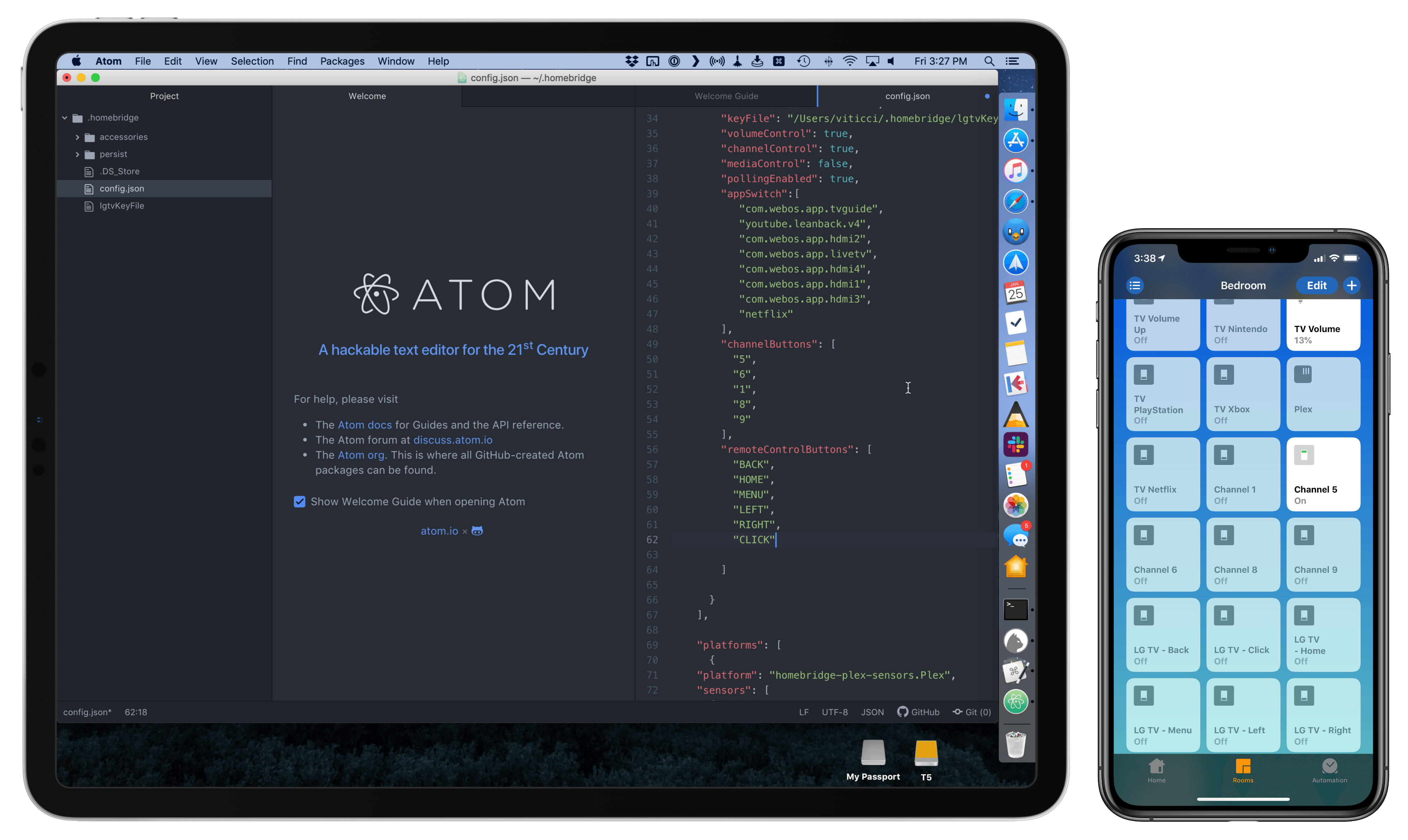
Configuring homebridge plugins (left) requires working with a JSON document.

Configuring homebridge plugins (left) requires working with a JSON document.

But it works. I’ve been running homebridge and this plugin without issues for months now, and I’ve gotten so used to asking Siri to change inputs on my TV, I can’t imagine not having these integrations anymore. A recent update to homebridge-webos-tv even added support for individual channel input and more remote control buttons. For this reason, assuming that the folks at LG don’t change their mind and ship a HomeKit software update for older TV sets, I think I’m going to experiment with a dual setup for webOS TV support in HomeKit: some controls based on the official HomeKit API, and others provided as custom switches – both based on homebridge plugins. But that’s a story for another time.

Permalink


Connected, Episode 227: Caveats Ruin People

After Stephen ruins the intro, Federico finally gets around to talking about his second iPad Pro and Myke shares a secret.

On this week’s episode of Connected, I finally addressed why I bought a second (11”) iPad Pro last December. You can listen here.

Sponsored by:

  • TextExpander, from Smile: Multiply your team’s productivity.
  • Pingdom: Start monitoring your websites and servers today. Use offer code CONNECTED to get 30% off.
  • Luna Display: The only hardware solution that turns your iPad into a wireless display for your Mac. Use promo code CONNECTED at checkout for 10% off.
Permalink

Interview: Directing Animated Feature Films Using an iPad Pro with Yarrow Cheney

AppStories+ Deeper into the world of apps

AppStories Episode 95 - Interview: Directing Animated Feature Films Using an iPad Pro with Yarrow Cheney

0:00
44:15

AppStories+ Deeper into the world of apps

This week, Federico and John interview Yarrow Cheney, whose animated feature film credits include directing The Grinch and The Secret Life of Pets and production design for the Despicable Me movies and The Lorax, about the role the iPad plays in his filmmaking process.

Read more


Connected, Episode 226: The Instagram Secret Society

The boys discuss a bunch of Apple products that may be receiving refreshes after years of neglect, including the iPad mini and iPod touch, then are taught how to edit photos like pros by Tyler Stalman.

If you want to get better at taking pictures on your iPhone, you don’t want to miss the second half of this week’s Connected. I learned a lot from Tyler and now have a handful of new apps to play with. You can listen here.

Sponsored by:

  • PDFpen, from Smile: The ultimate tool for editing PDFs. Click here to learn more.
  • Away: Travel smarter with the suitcase that charges your phone. Get $20 off with the code ‘connected’.
  • Squarespace: Make your next move. Enter offer code CONNECTED at checkout to get 10% off your first purchase.
Permalink

Interview: iOS Game Design with Edwin Smith of Feral Interactive

AppStories+ Deeper into the world of apps

AppStories Episode 94 - Interview: iOS Game Design with Edwin Smith of Feral Interactive

0:00
37:16

AppStories+ Deeper into the world of apps

This week, we interview Edwin Smith of Feral Interactive, the developer and publisher of Mac and iOS games about the design challenges of bringing complex desktop games to the iPad and iPhone.

Read more
