Federico Viticci

10804 posts on MacStories since April 2009

Federico is the founder and Editor-in-Chief of MacStories, where he writes about Apple with a focus on apps, developers, iPad, and iOS productivity. He founded MacStories in April 2009 and has been writing about Apple since. Federico is also the co-host of AppStories, a weekly podcast exploring the world of apps, Unwind, a fun exploration of media and more, and NPC: Next Portable Console, a show about portable gaming and the handheld revolution.

Connected, Episode 220: Numeric Professional

Stephen and Federico walk through their new Mac mini setups, then Federico fights with iCloud in Radar #46282145. Please help.

On this week’s episode of Connected, Stephen and I discuss our new Mac minis and I explain how I’ve started using it for automation. You can listen here.

Sponsored by:

  • Linode: High performance SSD Linux servers for all of your infrastructure needs. Get a $20 credit with promo code ‘connected2018’
  • Luna Display: The only hardware solution that turns your iPad into a wireless display for your Mac. Use promo code CONNECTED at checkout for 10% off.
  • PDFpen, from Smile: The ultimate tool for editing PDFs. Click here to learn more.
Permalink

Amazement at iOS Cursor Movement Shortcut Says a Lot About Discoverability

Dan Moren, writing on Six Colors last week:

Over the past few days, I’ve seen a ton of people on Twitter (including plenty of folks I’d describe as pretty tech savvy) have their mind blown by a tweet explaining how to move the cursor on the iOS keyboard.

[…]

This points to a larger, more fundamental issue cropping up with iOS as the platform becomes more mature: how do you add functionality and make it easily discoverable?

Some of the challenge here is simply because of iOS’s constraints: Where on the smaller screen can you add more features that would be easy to discover? But another challenge is how the OS is architected. The Mac nearly always treated the menu bar as a “safe” zone to which you could always retreat if you needed to find a command. There’s no real analogue to that on iOS, with the exception perhaps of the status bar, which isn’t, aside from the aforementioned “jump to the top” feature, an interactive element.

I think this is a big part of the challenge Apple is dealing with as it continues to evolve and push iOS forward. iOS has made easy so many things that used to be difficult or require a lot of technical know-how, but as we ask more from our devices and as developers deliver it, we lose some of that initial pared-down elegance that Apple sought.

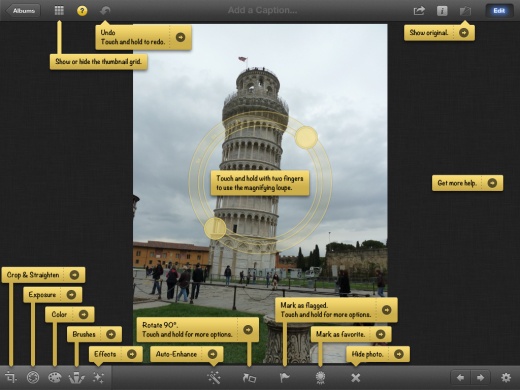
Sometimes I wonder if we’ll eventually end up with a tooltips-everywhere approach again, iPhoto for iOS-style.

See also: Fixing 3D Touch, from June 2018.

Permalink

What Happened to 5K Displays?

Adam Engst, writing for TidBITS:

Although the 27-inch iMac with 5K Retina display and iMac Pro both have 5K displays built in, Apple doesn’t currently make a standalone 5K display, or, in fact, an external display of any sort. When Apple dropped its 27-inch Thunderbolt Display (see “Apple Discontinues Thunderbolt Display with No Replacement in Sight,” 27 June 2016), the company worked with LG on a replacement: the $1299 LG UltraFine 5K Display.

So you could buy an LG UltraFine 5K Display, but you might not want to. That’s because the availability of that monitor seems to be in decline, with AppleInsider reporting that Apple Stores say it hasn’t been restocked in a while and that it’s not available for in-store pickup when ordered online. With luck, its availability is dropping because LG is replacing it with a new model, but LG could just be running down stock before discontinuing it.

The Wikipedia page for 5K resolution lists a small number of other 5K displays, including screens from Dell, Philips, and HP, but as far as I can tell, none are currently for sale, apart from a handful of ultra-wide monitors with unusual aspect ratios like 64:27 and 32:9. Also on that list is the Iiyama ProLite XB2779QQS, but its page on Amazon says it ships directly from Japan and has absolutely no ratings or reviews, which is suspicious.

Good overview of the current state of 5K displays for Macs, which seemingly haven’t taken off because the industry has settled on 4K for now and 8K for the next generation.

Toward the end of his post, Engst assumes that the Apple-branded display coming next year with the Mac Pro will likely rely on Thunderbolt 3. My hope, however, is that Apple can figure out a way to offer a 4K or 5K display that works via Thunderbolt 3 and USB-C with support for ProMotion refresh rates at 120Hz. The 2018 iPad Pros can only connect to USB-C displays (not Thunderbolt 3), which is why I ended up buying a 4K UltraFine display that works with both macOS and iOS via a single USB-C cable. I want to believe that Apple’s external display comeback will support both pro Macs and pro iPads; as the owner of a new Mac mini and iPad Pro used with the same LG display, an integrated Apple solution would be the dream setup.

Permalink

iOS and Apps in the Car

AppStories+ Deeper into the world of apps

AppStories Episode 89 - iOS and Apps in the Car

0:00
36:52

AppStories+ Deeper into the world of apps

This week, Federico and John take iOS for a car ride covering CarPlay, Do Not Disturb, in-car dongles, and automation.

Read more


Connected, Episode 219: Your Best Friend, Base64

Stephen formalizes a new show segment, Federico is making magic in Shortcuts and Myke has thoughts about picture frames.

On this week’s episode of Connected, I detailed the backstory of Home Screen Icon Creator and we covered a whole bunch of other topics. You can listen here.

Sponsored by:

  • Pingdom: Start monitoring your websites and servers today. Use offer code CONNECTED to get 30% off.
  • Hover: Show the world what you’re passionate about with 10% off your first purchase
  • Luna Display: The only hardware solution that turns your iPad into a wireless display for your Mac. Use promo code CONNECTED at checkout for 10% off.
Permalink


My Markdown Writing and Collaboration Workflow, Powered by Working Copy 3.6, iCloud Drive, and GitHub

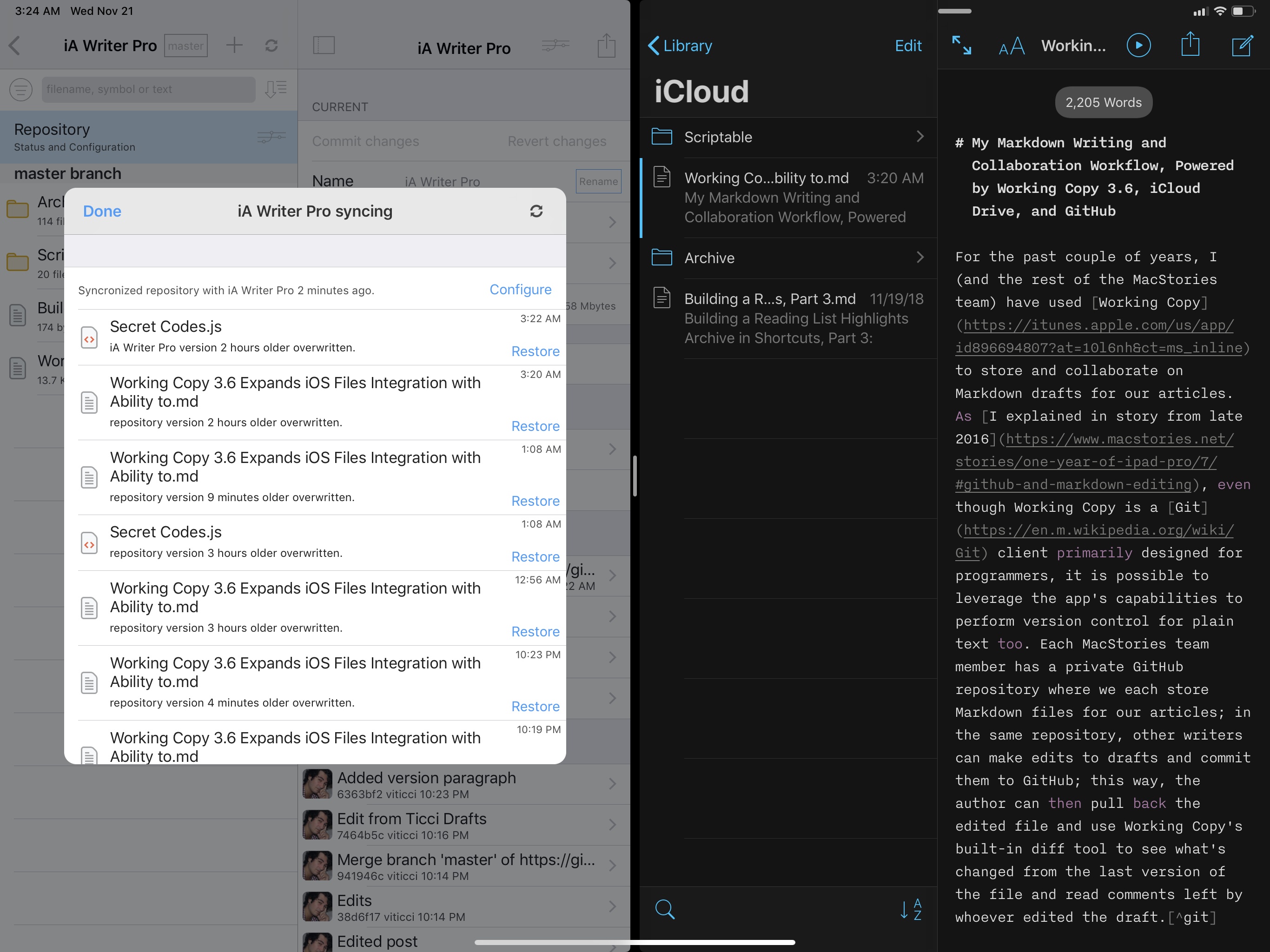
For the past couple of years, I (and the rest of the MacStories team) have used Working Copy to store and collaborate on Markdown drafts for our articles. As I explained in a story from late 2016, even though Working Copy is a Git client primarily designed for programmers, it is possible to leverage the app’s capabilities to perform version control for plain text too. Each MacStories team member has a private GitHub repository where we store Markdown files of our articles; in the same repository, other writers can make edits to drafts and commit them to GitHub; this way, the author can then pull back the edited file and use Working Copy’s built-in diff tool to see what’s changed from the last version of the file and read comments left by whoever edited the draft.1

As I mentioned two years ago, this system takes a while to get used to: GitHub has a bit of overhead in terms of understanding the correct terminology for different aspects of its file management workflow, but Working Copy makes it easier by abstracting much of the complexity involved with committing files, pushing them, and comparing them. This system has never failed us in over two years, and it has saved us dozens of hours we would have otherwise spent exchanging revised versions of our drafts and finding changes in them. With Working Copy, we can use the text editors we each prefer and, as long as we overwrite the original copies of our drafts and keep track of commits, the app will take care of merging everything and displaying differences between versions. From a collaboration standpoint, using Working Copy and GitHub for file storage and version control has been one of the best decisions I made in recent years.

Read more


Home Screen Icon Creator: A Shortcut to Create Custom Icons for Apps, Contacts, Solid Colors, and More

Update: Thanks to MacStories reader Thomas, I was able to remove the need to upload image assets to Dropbox. The shortcut is now much faster to run (takes about 5 seconds instead of 20) and doesn’t need to save any file in your Dropbox account. You can get the updated shortcut at the end of this post.


I’ve always been intrigued by Workflow’s implementation of ‘Add to Home Screen’ – a feature that Apple kept in the transition to the Shortcuts app, and which allows users to create home screen icons to launch their favorite shortcuts. So earlier this month, I decided I wanted to learn how Shortcuts was handling the creation of home screen icons.

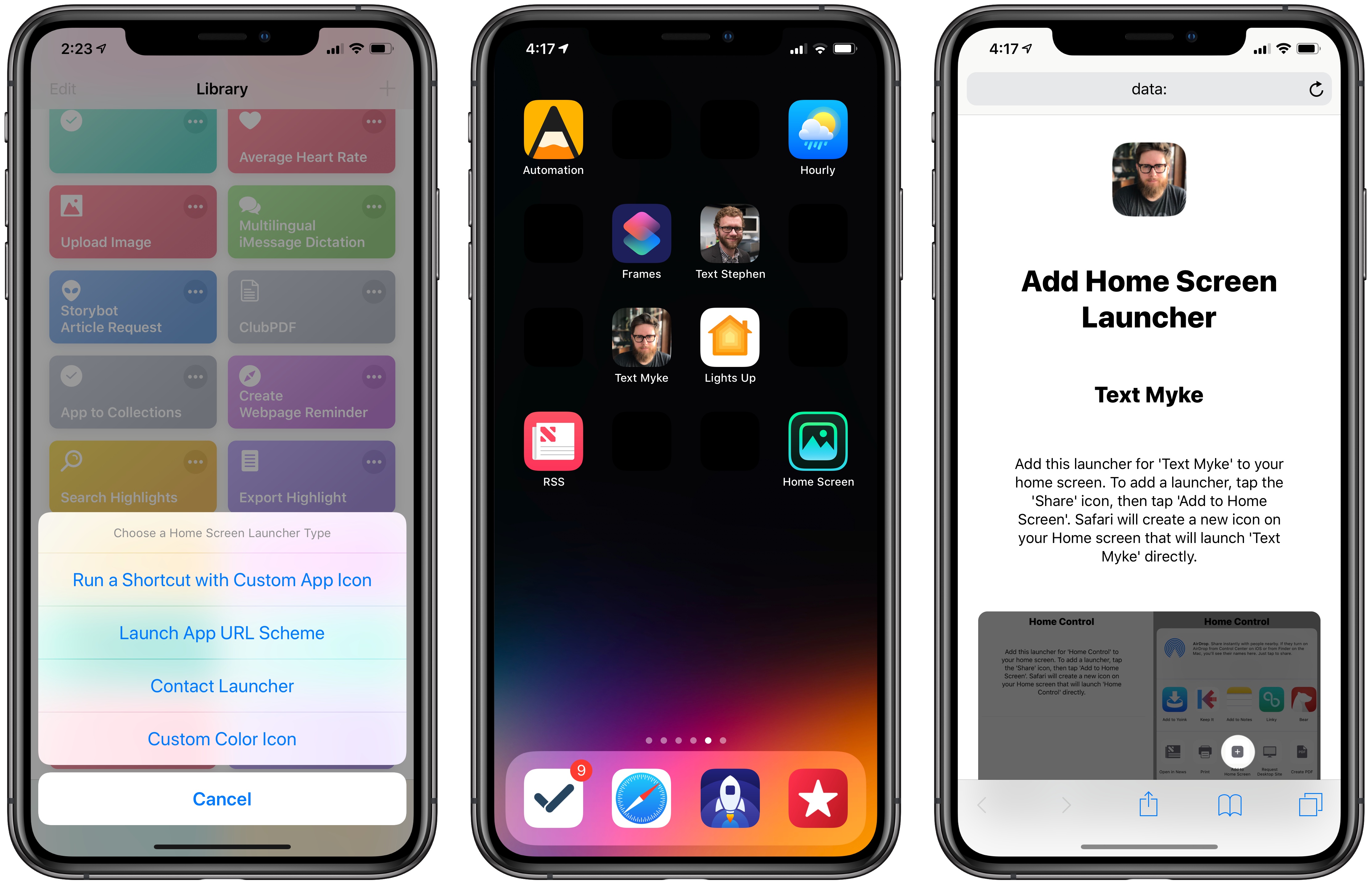
After a few weeks of experiments and refinements, I ended up reverse-engineering Shortcuts’ ‘Add to Home Screen’ implementation, which turns out to be an evolution of Workflow’s existing hack based on Safari and web clips. The result is Home Screen Icon Creator, an advanced shortcut that lets you create custom home screen icons to launch apps, custom shortcuts from the Shortcuts app, or specific actions for any of your contacts; the shortcut can also generate icons with solid colors, which you can combine with matching wallpapers to create custom home screen layouts.

This shortcut is, by far, the most complex piece of iOS automation I’ve ever put together for MacStories, and I’m happy with the final product. It fully replicates a native Shortcuts feature while giving you the freedom to create icons and launchers for anything you want. There is no configuration necessary on the user’s end: it’ll take you 20 seconds to create your first custom icon, complete with onscreen instructions. Allow me, however, to offer more context on how this shortcut came to be, how it works behind the scenes, and what you can build with it.

Read more


Apple’s New iPad Pro Ad

Fun new iPad Pro commercial by Apple. The ad follows the company’s recent marketing strategy to establish the iPad Pro as “a computer unlike any computer”. That may be a difficult message to get across, but Apple used a mix of features that highlight the unique nature of the iPad well: power, apps, portability, multitouch, and Apple Pencil.

Of these five categories, it is pretty obvious which is the one that Apple should focus on more going forward.

Permalink