
Federico Viticci

10804 posts on MacStories since April 2009

Federico is the founder and Editor-in-Chief of MacStories, where he writes about Apple with a focus on apps, developers, iPad, and iOS productivity. He founded MacStories in April 2009 and has been writing about Apple since. Federico is also the co-host of AppStories, a weekly podcast exploring the world of apps, Unwind, a fun exploration of media and more, and NPC: Next Portable Console, a show about portable gaming and the handheld revolution.

GoodTask’s Smart Lists for Reminders

I’ve been playing around with GoodTask, a Reminders client for iOS, as part of my experiments with Shortcuts and Reminders for this year’s iOS review. GoodTask is a powerful utility that extends Reminders in ways that I’d love for Apple to consider whenever they decide to update their own Reminders app. GoodTask has grown a lot since its debut four years ago; I recommend reading Tim’s review of version 3.0 to get an idea of its capabilities. The app has got a bit of a learning curve, but it’s much more powerful than Reminders while retaining its key advantages (such as Siri integration and immediate background sync between every Apple device).

Today’s update to GoodTask brings a couple of features that I suggested to its developer a while back. The first one is a quick action to reopen a web link (or URL scheme) contained in a reminder, if any. This makes it easier to use GoodTask as a repository for links saved from Safari (perhaps through the Shortcuts extension). I like the way GoodTask automatically extracts URLs from the Notes field of a reminder, and this quick action speeds up the process of reopening links a lot.

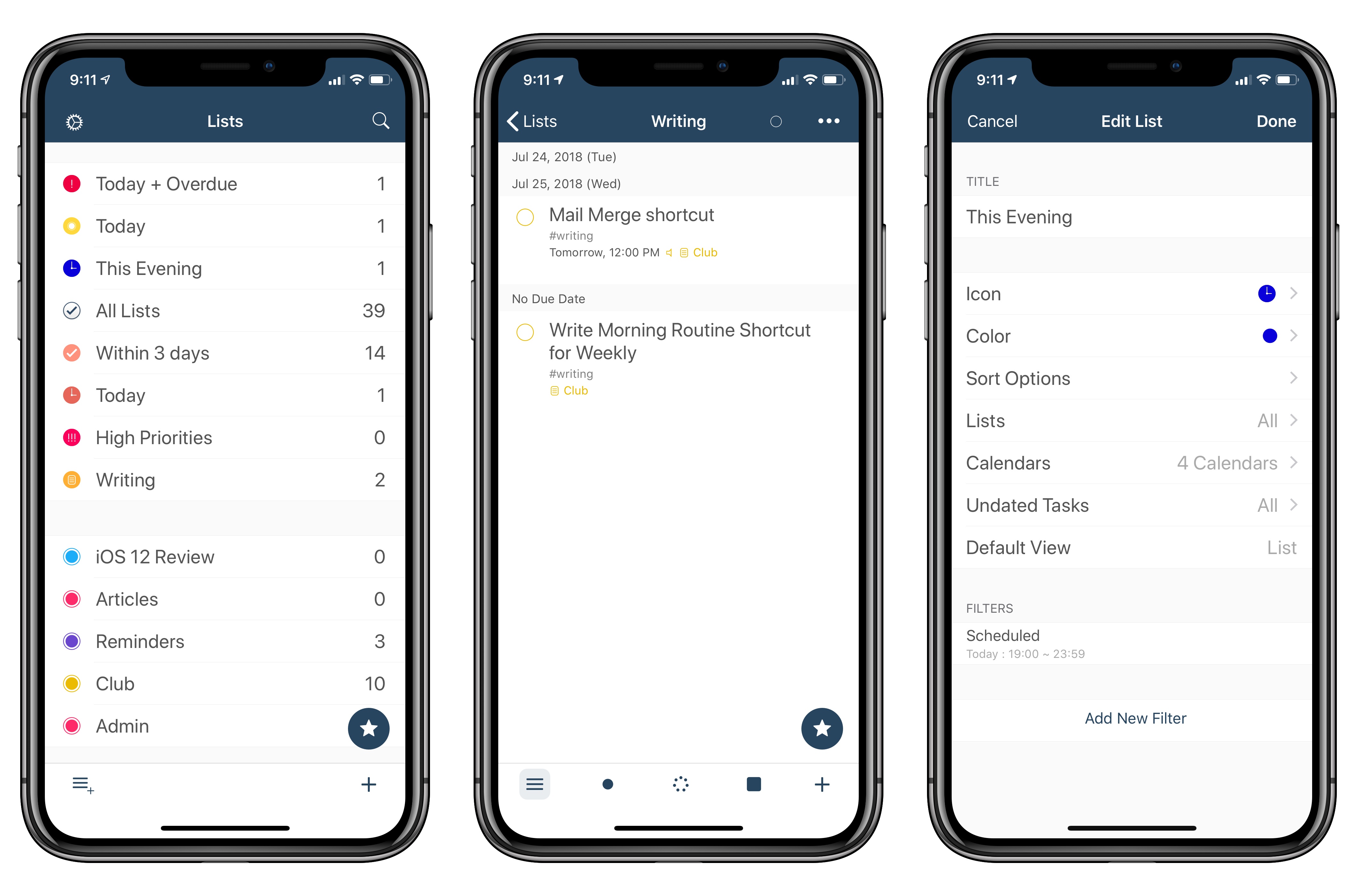
The second feature is a change to the ‘Scheduled’ filter for smart lists, one of the best ideas in GoodTask. Smart Lists are liked saved searches for reminders: they let you create custom lists (which you can only view in GoodTask) to manage a subset of reminders based on specific filtering criteria. For example, you can create smart lists for reminders with a specific tag (another GoodTask-only option), items that are overdue, or reminders that are due within 3 days and have a high priority. In the latest version of the app, you can create smart lists for reminders that are due between specific start and end times of the day. Essentially, I wanted to replicate Things’ fantastic Today/This Evening feature in GoodTask. With smart lists in version 3.9.1 of the app, I can now use the ‘Scheduled’ filter to show me reminders due today (between 6 AM and 7 PM) and in the evening (between 7 PM and 11:59 PM). It’s not quite as elegant as Things’ native feature, but it lets me have a similar scheduling setup in GoodTask as well.

I’ll have more to share about GoodTask over the summer as I continue to experiment with Reminders and Shortcuts in iOS 12. In the meantime, if you’re looking for a great alternative to the Reminders app on iOS, you should take GoodTask for a spin.


PDF Apps

AppStories+ Deeper into the world of apps

AppStories Episode 71 - PDF Apps

0:00
33:04

AppStories+ Deeper into the world of apps

Federico and John discuss the world of apps for viewing, organizing, marking up, editing, and creating PDFs.

Read more


Connected, Episode 201: An Internal Fortnite

Federico bought an iPod touch, Nest and Instapaper both have new bosses and the world is finally getting the leg emoji it deserves.

On this week’s Connected, I also shared a status update on my iOS 12 review and the apps I’m using to put it together. You can listen here.

Sponsored by:

  • Pingdom: Start monitoring your websites and servers today. Use offer code CONNECTED to get 30% off.
  • Simple Contacts: Contact lens prescriptions from home: Use offer code CONNECTED20 for $20 off your contact lenses
  • Timing: The automatic time tracking app for macOS. Use this link to save 10% on your purchase.
Permalink

Sharecuts

Fun new project by iOS developer extraordinaire Guilherme RamboSharecuts is a (so far, beta and invitation-only) directory to browse and install custom shortcuts created by other users. Sarah Perez has more details at TechCrunch:

But by the time iOS 12 releases to the public later this fall, Sharecuts’ directory will be filled out and a lot more functional.

The premise, explains Sharecuts’ creator Guilherme Rambo, was to make an easily accessible place where people could share their shortcuts with one another, discover those others have shared, and suggest improvements to existing shortcuts.

“I was talking to a friend [Patrick Balestra] about how cool shortcuts are, and how it should be easier for people to share and discover shortcuts,” says Guilherme. “He mentioned he wanted to build a website for that – he even had the idea for the name Sharecuts – but he was on vacation without a good internet connection so I decided to just build it myself in one day,” he says.

The site is currently a bare bones, black-and-white page with cards for each shortcut, but an update will bring a more colorful style (see below) and features that will allow users to filter the shortcuts by tags, vote on favorites, among other things.

This isn’t the first time users have tried to launch curated directories for workflows (there were a bunch for the old Workflow app), but I think projects like this are going to be especially important given the lack of an official public directory for Shortcuts; the gallery built into the Shortcuts app is managed by Apple and doesn’t accept user submissions. For now, Sharecuts works by uploading plain .shortcut files to the service, but I’m hoping that, once Apple brings back link-based sharing, you’ll be able to just paste a link to a shortcut you’ve created. In the meantime, you can find a couple of shortcuts I’ve shared here and here.

Permalink

Apps for Managing Big Projects

AppStories+ Deeper into the world of apps

AppStories Episode 70 - Apps for Managing Big Projects

0:00
40:37

AppStories+ Deeper into the world of apps

Federico and John discuss the apps they use to manage large projects like the MacStories and AppStories coverage of the App Store’s 10th anniversary and Apple’s fall OS releases.

Read more


iOS 12 AR Quick Look Demos

I recently came across a demo of AR Quick Look, an iOS 12 feature that allows apps to present 3D and AR previews for objects built using the new USDZ file format. Shopify, the popular e-commerce platform, is going to take advantage of AR Quick Look to let customers preview items in their surroundings directly from Safari, contextually to the shopping experience.

Here’s Daniel Beauchamp, writing on the Shopify AR/VR blog:

For the past three years, Shopify has been exploring how AR / VR will change the way consumers shop. Last year, we showed how Apple’s ARKit could be used to provide compelling AR commerce experiences. The main complexity was that ARKit needed to be run in an app. This meant that Shopify merchants looking to offer these experiences had to have their own unique mobile apps that customers would need to download.

With iOS 12’s AR Quick Look, 3D models of products in the usdz file format can be uploaded directly to online Shopify stores and viewed in AR right within Safari, without needing to download a separate app.

His video gives you an even better idea of the integration possible between Safari, ARKit, and Apple Pay in iOS 12:

Beauchamp argues that “the web is how AR becomes mainstream” – looking at these demos, it’s hard to disagree. Not having to install a dedicated ARKit app for every single online store we use and actually having the ability to share and preview models from Safari or Messages is going to remove a ton of friction from the current ARKit experience (as far as shopping is concerned). I can imagine that producing 3D objects at scale will be merchants’ biggest hurdle in the short term, though.

I wasn’t aware of this until I did some research, but Apple also launched an interactive AR Quick Look Gallery as part of their ARKit 2 mini-site. You can also test Shopify’s improved shopping flow featuring ARKit and Apple Pay here.

Permalink

Connected, Episode 200: An Occupational Hazard

Stephen is joined by Casey Liss and John Voorhees to discuss the 10th anniversary of the App Store, MobileMe’s reputation and rumors of a busy fall for Apple’s hardware teams.

I wasn’t able to join Stephen on Connected this week, but I thoroughly enjoyed the discussion about the App Store, iCloud, and Apple rumors for the second half of 2018 with Casey and John. You can listen here.

Sponsored by:

  • Squarespace: Make your next move. Enter offer code CONNECTED at checkout to get 10% off your first purchase.
  • Casper: The Internet’s favourite mattress. Get $50 off select mattresses with the code ‘CONNECTED’.
  • Linode: High performance SSD Linux servers for all of your infrastructure needs. Get a $20 credit with promo code ‘connected2018’
Permalink
