 Productive
...

 Productive
 Great overview by Bryan Finch, writing for Nintendo Wire, on the state of Nintendo’s high-profile mobile titles:
With the recent release of Animal Crossing: Pocket Camp, Nintendo has now delivered all of its previously announced smartphone games. The shocking change in company policy that lead to the development of these titles was one of the final projects that Nintendo’s former president, Satoru Iwata, managed before his untimely passing.
These games have been a mixed bag of success for Nintendo, both in terms of quality and profits, and since all of the known games are now out in the wild, it’s a good time to check in and see where each Nintendo mobile game stands at the end of 2017.
My goal here is to examine what the games set out to achieve, how successful they were with those goals on launch, where they are today and where they can go from here.
Finch is spot-on about Super Mario Run and what went wrong with the game, and I agree with his assessment of Animal Crossing’s future potential. I wonder what Nintendo could do with a future mobile Zelda game.
See also: rumors of Nintendo looking for another mobile development partner, and Pocket Camp’s performance thus far.
Myke was surprised by Apple’s Shazam acquisition, Ticci is living that 4K life and Stephen is thinking about an iMac Pro.
A fun episode of Connected this week with a good variety of topics. You can listen here.
Sponsored by:
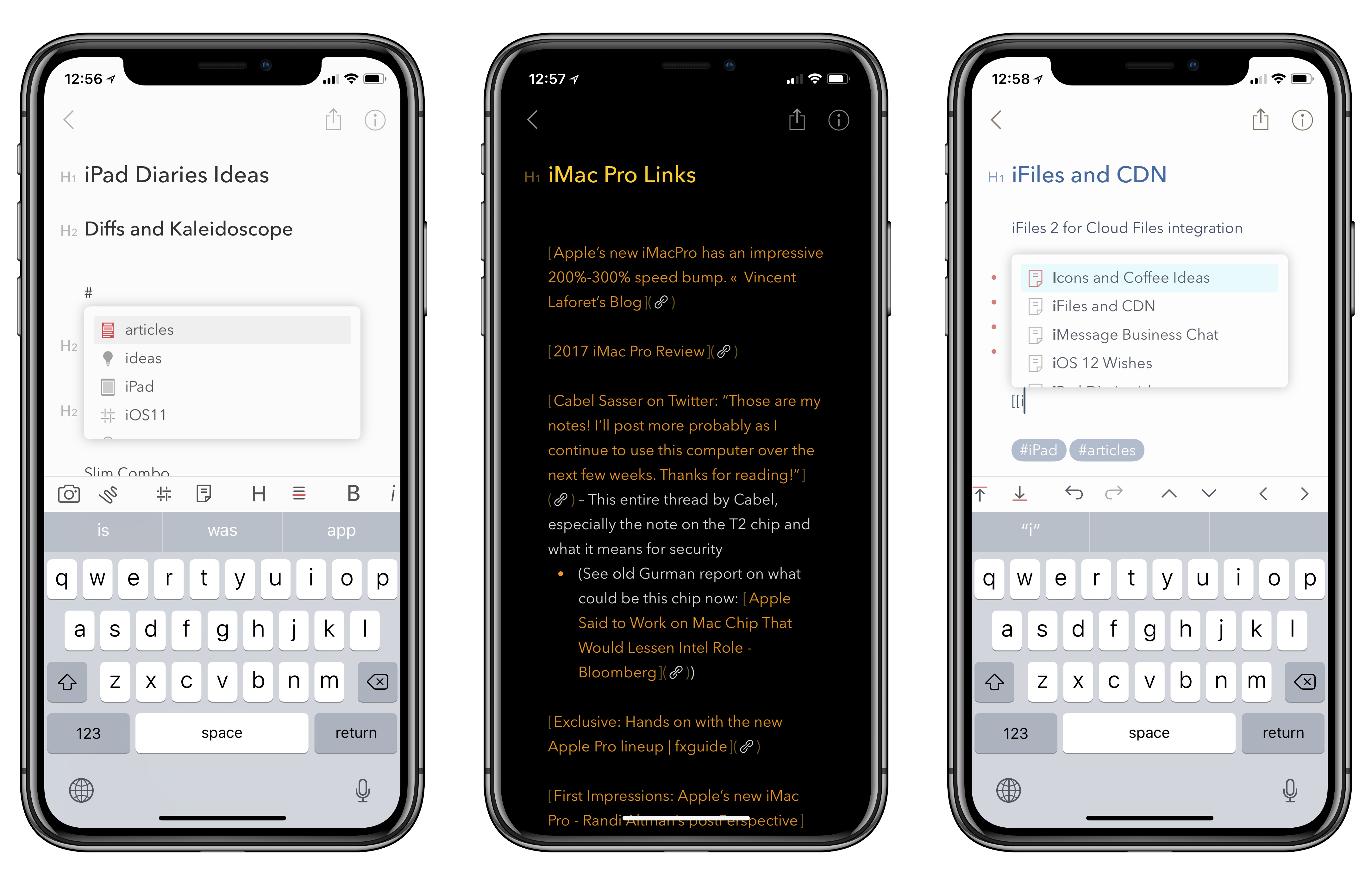
As I noted last month in my iPad Diaries column, I’ve started using Bear in addition to Apple Notes to research articles in Markdown and later convert them to drafts in Ulysses. I was impressed with Shiny Frog’s work on iOS 11 and how they brought advanced drag and drop to Bear, but I’m even more positively surprised by the improvements to tagging they released today as part of Bear’s 1.4 update.
Great analysis by Sebastiaan de With on how they redesigned Halide for the iPhone X (the app indeed turned out to be one of the best iPhone X app updates we’ve seen so far):
Design for ergonomics. On regular iPhones, you have to do much less as a designer to optimize ergonomics. The iPhone X requires you to think about comfortable button placement and usability. Ergonomics is more than just tapping, but also swiping and other gestures. Lay out your UI so all actions are accessible and as comfortably usable as possible.
It’s a whole new device: Design for it. Everyone can stretch an app out to a larger screen, but just like the iPad, a fresh approach is not only welcomed but helps you stand out in the App Store. This is a great time to validate your current design. Are your approaches still valid? Is there a better solution possible? You might come to some valuable insights that you can apply to all your designs, not just the ones for the shiny new device.
If you’re a developer working on iPhone X UI updates, don’t miss Sebastiaan’s map visualization of the device’s display.
Twitter’s latest feature – which is rolling out “in the coming weeks” – is another that’s been inspired by something users have been doing for a few years now: threads.
From the Twitter blog:
At Twitter, we have a history of studying how people use our service and then creating features to make what they’re doing easier. The Retweet, ‘@reply’, and hashtag are examples of this. A few years ago we noticed people creatively stitching Tweets together to share more information or tell a longer story – like this. We saw this approach (which we call “threading”) as an innovative way to present a train of thought, made up of connected but individual elements.
Now, hundreds of thousands of threads are Tweeted every day! But this method of Tweeting, while effective and popular, can be tricky for some to create and it’s often tough to read or discover all the Tweets in a thread. That’s why we’re thrilled to share that we’re making it simpler to thread Tweets together, and to find threads, so it’s easier to express yourself on Twitter and stay informed.
We’ve made it easy to create a thread by adding a plus button in the composer, so you can connect your thoughts and publish your threaded Tweets all at the same time. You can continue adding more Tweets to your published thread at any time with the new “Add another Tweet” button. Additionally, it’s now simpler to spot a thread – we’ve added an obvious “Show this thread” label.
As far as I can tell, this is a prettier interface for the original method of creating a thread by replying to yourself. Twitter has integrated a multi-post feature into the app’s compose box, and there doesn’t seem to be a new API endpoint for threading. It seems like a nice workflow with a ‘Tweet All’ button at the end. In theory, popular third-party clients could replicate the same behavior (and design) in their own compose UIs – just like various tweetstorm utilities create “threads” by posting multiple replies in a row.
Cultured Code, makers of Things for iOS and macOS, today released Mail to Things, a feature that enables Things users to save new tasks directly into the app’s inbox through a dedicated Things Cloud email address.
I first linked to Louis D’hauwe’s pixel art editor for iOS, Pixure, in March, when he introduced PanelKit in the iPad version of the app. If you’ve never played around with Pixure and PanelKit, imagine the ability to grab iPad popovers or sidebar panels and detach them so they’re floating onscreen like tool palettes would on macOS. I was skeptical of this idea initially – I feared it would overcomplicate the iPad’s UI – but it works surprisingly well on the 12.9-inch iPad Pro. I know that after using PanelKit months ago, I tried a few times to grab popovers in iPad apps like Omni’s, realizing that they didn’t support PanelKit.
D’hauwe is back today with Pixure 3.0, another excellent update that, among various enhancements, brings a version browser (a feature more apps should offer on iOS), drag and drop, and advanced export options. With today’s release, Pixure also includes PanelKit 2.0, a major update of the framework that now supports pinning multiple panels to the side of the screen as well as resizing them. Plus, your custom panel configuration is now saved across multiple app launches, so once you set up your workspace in Pixure, the app always remembers it.
Even if you’re not interested in editing pixel art graphics, I recommend checking out Pixure 3.0 just to play around with PanelKit 2.0. Support for multiple panels on the side is particularly impressive – try, for instance, to resize and stack the Color Picker and Layers panels on top of each other. It’s fun and intuitive, and I bet you’re going to wish more pro iPad apps offered this kind of flexible, customizable UI. You can find Pixure 3.0 on the App Store and read more about PanelKit 2.0 here.
 An Interview with Christian Selig, Creator of Reddit Client Apollo
Federico and John interview Christian Selig, the creator of the popular iOS Reddit client Apollo about the development and design of the app, incorporating Redditors’ feedback, the complexities inherent in building a Reddit app, and working in Swift.

 John
John