
Federico Viticci

10804 posts on MacStories since April 2009

Federico is the founder and Editor-in-Chief of MacStories, where he writes about Apple with a focus on apps, developers, iPad, and iOS productivity. He founded MacStories in April 2009 and has been writing about Apple since. Federico is also the co-host of AppStories, a weekly podcast exploring the world of apps, Unwind, a fun exploration of media and more, and NPC: Next Portable Console, a show about portable gaming and the handheld revolution.

Instagram Rolls Out Private Stories Archive

Two important updates to Instagram’s Stories feature announced today – here’s Casey Newton, writing at The Verge:

Instagram is rolling out a private archive of the ephemeral stories you have posted in the app. Starting today, Instagram will begin to add your expired stories to the archive feature, which until now has been used only to house photos and videos you no longer want to display on your public profile. The stories archive, which you will be able to opt out of, is being introduced globally on Android and iOS.

The stories archive represents another feature copied from Snapchat, which introduced its own version of the archive, called Memories, last year. But the archive differs from Snap’s version in one key respect: Instagram will let you post old stories to your profile in a feature the company is calling Highlights. You’ll be able to package old stories together in the archive, give them a name, and share them to your profile, where they will appear above your other posts.

I don’t use Instagram Stories as frequently as my friends (all their social updates start via Stories these days), but with an automatic archive feature combined with Highlights, it may be time for me to start posting puppy videos more often.
Permalink

iPhone X: A New Frontier

For a radically redesigned iPhone launching on the tenth anniversary of the first model, it seems reasonable to lead a review of the device with a retrospective on the original iPhone and how, over the course of a decade, its vision matured into the iPhone X. But today, I want to begin with the iPhone 4.

Read more


    Gboard Adds Automatic Theme Switching

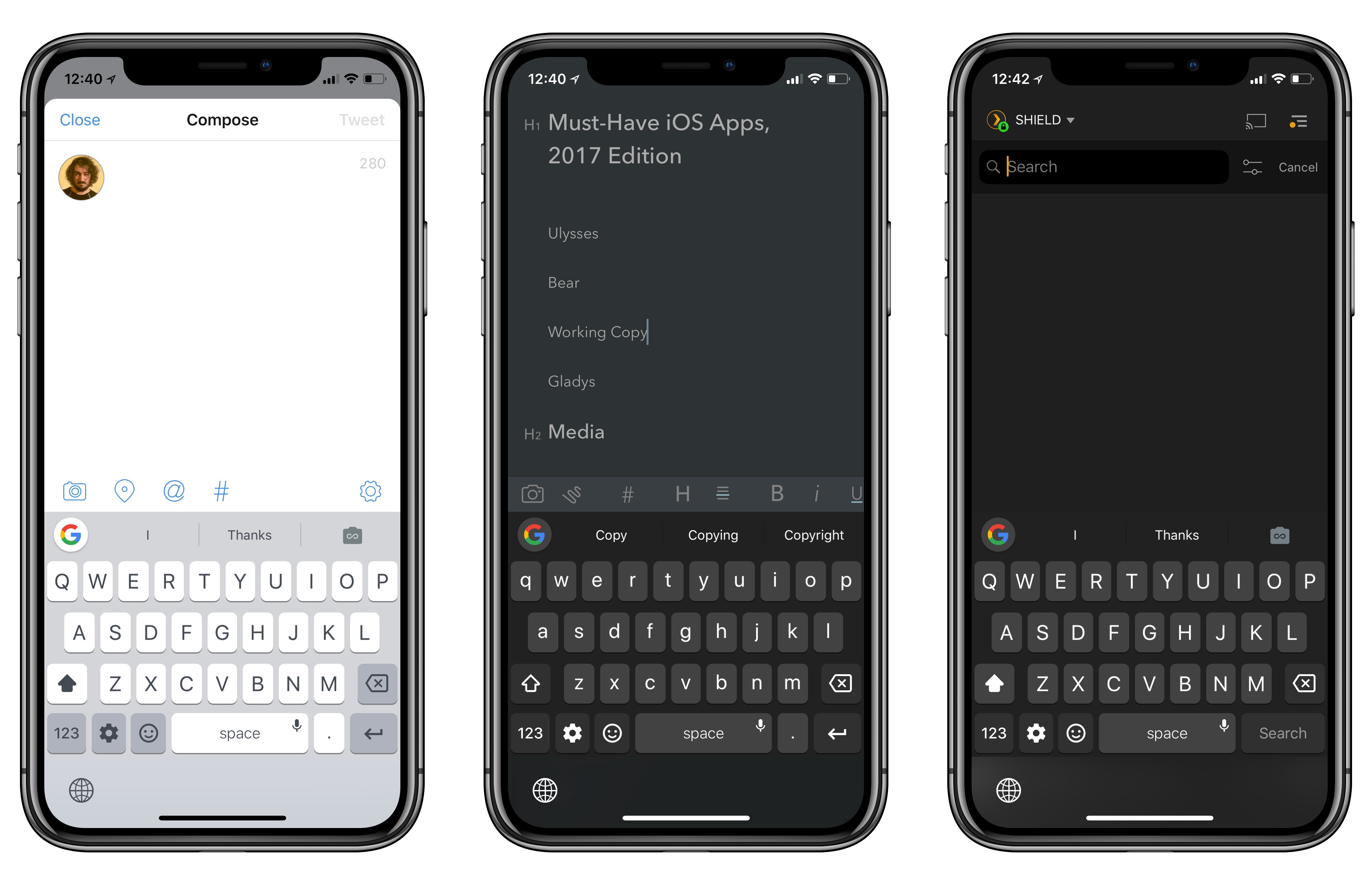
    Gboard in Tweetbot, Bear, and Plex.

    Gboard in Tweetbot, Bear, and Plex.

    I’ve always liked Gboard, Google’s alternative keyboard for iOS. Gboard combines Google’s intelligence (with accurate and personalized autocorrect, emoji and GIF suggestions) with handy features such as glide typing. However, as I mentioned before, I couldn’t use Gboard as my primary keyboard on the iPhone for a variety of reasons: it lacked iOS’ native dictation mode, couldn’t automatically switch light and dark themes depending on the context of the current app, and, worst of all, it didn’t support multi-language typing without manually picking a different keyboard layout.

    Siri dictation and simultaneous multi-language support are still missing (the former will likely never be added), but today’s update is an important step towards making Gboard feel more integrated with iOS. Gboard can now switch its default theme between light and dark based on the app you’re using. I’m not sure how Google pulled this off, but I tested Gboard with the dark modes in Apollo, Tweetbot, Copied, and Bear, and the keyboard always used the dark theme instead of the light version. Conversely, in Safari, App Store, and other light-themed apps, Gboard used the light mode instead.

    This was one of my complaints about the old Gboard: its default light theme looked garish in dark apps; on the other hand, if you persistently enabled Gboard’s dark theme, then it would look out of place in apps like Messages or Mail. With automatic theme switch, changing Gboard’s default appearance is no longer a concern because it adapts to the app you’re using.

    I’ve found a couple of apps where Gboard doesn’t correctly apply the dark theme (Overcast is one of them), but I’m impressed overall; Gboard even switches to the dark theme when you swipe down on the Home screen to open Spotlight. I’d be curious to know which iOS API Google is using to implement this option, and if third-party developers can optimize for Gboard in any way.


    Pick 2: Pixelmator Pro and Things 3

    AppStories+ Deeper into the world of apps

    AppStories Episode 34 - Pick 2: Pixelmator Pro and Things 3

    0:00
    37:37

    AppStories+ Deeper into the world of apps

    Federico and John pick two apps they’ve been experimenting with recently and discuss how it’s going so far. In this installment of Pick 2, John covers macOS image editor Pixelmator Pro, which was released last week, and Federico explains how he’s integrated Things 3 for iOS into recent projects.

    Read more


    Connected, Episode 170: Playing Chicken with Jony Ive

    Myke returns with many comments about last week’s show and a surprise Black Friday purchase. Meanwhile, Stephen has installed Windows 10.

    I wasn’t on the show this week, but I enjoyed the discussion about voice assistants and icons for professional task managers, among other topics. You can listen here.

    Sponsored by:

    • Pingdom: Start monitoring your websites and servers today. Use offer code CONNECTED to get 30% off.
    • Ting: A smarter way to do mobile. Save $25 on selected devices or keep it as Ting credit.
    • Incapsula: Secure and accelerate your website. Connected listeners get one month free.
    Permalink

    macOS High Sierra’s Root Access Bug

    Greg Barbosa, writing for 9to5Mac:

    A newly discovered macOS High Sierra flaw is potentially leaving your personal data at risk. Developer Lemi Orhan Ergin publicly contacted Apple Support to ask about the vulnerability he discovered. In the vulnerability he found, someone with physical access to a macOS machine can access and change personal files on the system without needing any admin credentials.

    Users who haven’t disabled guest user account access or changed their root passwords (likely most) are currently open to this vulnerability. We’ve included instructions on how to protect yourself in the meantime until an official fix from Apple is released.

    Incredibly embarrassing and dangerous screwup for a company as devoted to security as Apple. They’re working on a fix, and in the meantime you should follow these steps to change your root password (thankfully, I had guest user access disabled, so the bug didn’t affect my machine).

    See also: Rene Ritchie’s explainer.

    Permalink

    Don’t Lock Yourself Out of Your Smart Home

    A cautionary tale by Serenity Caldwell on smart home devices and having physical backups:

    Two days after I installed my latest smart lock experiment, I jokingly said to my husband “We’re going to be in trouble if our internet goes down. I don’t know where the key is to this lock anymore.”

    “Worst case, we’ll get our parkour on and break a window,” he responded.

    As I sit at my kitchen table writing this story after having to crawl through said window, I find his reply far less funny.

    I’d like the moral of the story I’m about to tell you to be “Don’t joke about things you don’t want to happen.” In reality, it is this: Your smart home devices can fail or make mistakes, and when they do, you better have an alternative.

    I locked myself out of my apartment a couple of times (I’m terrible at remembering keys), but we have no smart locks installed. While the idea of Siri unlocking the door for me is tempting, I’m afraid I’d end up in a worse situation than Serenity somehow.

    Permalink

