Federico Viticci

10804 posts on MacStories since April 2009

Federico is the founder and Editor-in-Chief of MacStories, where he writes about Apple with a focus on apps, developers, iPad, and iOS productivity. He founded MacStories in April 2009 and has been writing about Apple since. Federico is also the co-host of AppStories, a weekly podcast exploring the world of apps, Unwind, a fun exploration of media and more, and NPC: Next Portable Console, a show about portable gaming and the handheld revolution.

Khoi Vinh on iPhone X’s Portrait Mode

Fair and balanced take on the iPhone’s Portrait mode by Khoi Vinh, who generally prefers a DSLR to capture special moments:

More to the point, quibbling over the finer points of photographic effects is somewhat (though not entirely) pointless. What really matters here is that there will be tens if not hundreds of millions of these cameras in the hands of countless people everywhere before too long, and those people will take billions of pictures with them. Only a vanishingly small number of these people will ever object to the details I’ve listed here; most will be incredibly pleased with how portrait mode performs and will share the fruits of their labors avidly.

Just on the merits of sheer volume alone, portrait mode will become a part of our collective visual vocabulary.

Permalink

What’s on Our Apple Watches

AppStories+ Deeper into the world of apps

AppStories Episode 33 - What’s on Our Apple Watches

0:00
30:16

AppStories+ Deeper into the world of apps

Federico and John talk about the Apple Watch apps they use and how their use of the Watch has changed as the product has evolved.

Read more


Canvas, Episode 49: Long-Form Editors – Honorable Mentions

In this episode, we wrap up our look at long-form editors with a look at the honourable mentions for other interesting apps on iOS.

In the final episode of our long-form writing mini-series on Canvas, we take a look at Editorial, 1Writer, Pages, and more. You can listen here.

Sponsored by:

  • Balance Open: Find out more about Balance Open and get $2 in Ethereum.
  • Sanebox: Clean up your inbox in minutes. Sign up for a two-week free trial and a $20 credit.
Permalink

In Search of the Perfect Writing Font

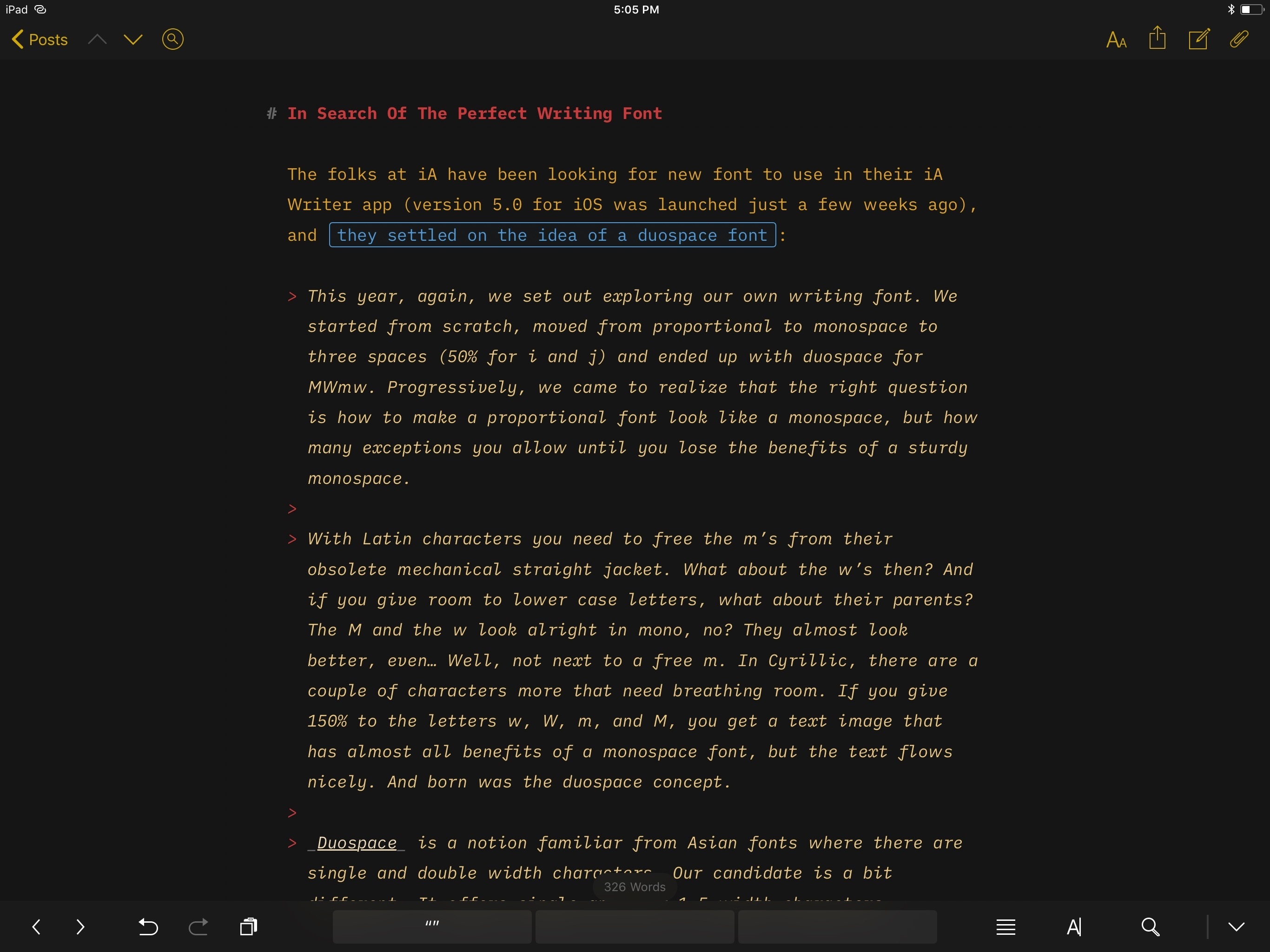
The folks at iA have been looking for new font to use in their iA Writer app (version 5.0 for iOS was launched just a couple of weeks ago), and they settled on the idea of a duospace font:

This year, again, we set out exploring our own writing font. We started from scratch, moved from proportional to monospace to three spaces (50% for i and j) and ended up with duospace for MWmw. Progressively, we came to realize that the right question is how to make a proportional font look like a monospace, but how many exceptions you allow until you lose the benefits of a sturdy monospace.

With Latin characters you need to free the m’s from their obsolete mechanical straight jacket. What about the w’s then? And if you give room to lower case letters, what about their parents? The M and the w look alright in mono, no? They almost look better, even… Well, not next to a free m. In Cyrillic, there are a couple of characters more that need breathing room. If you give 150% to the letters w, W, m, and M, you get a text image that has almost all benefits of a monospace font, but the text flows nicely. And born was the duospace concept.

Duospace is a notion familiar from Asian fonts where there are single and double width characters. Our candidate is a bit different. It offers single and four 1.5 width characters.

I’ve always loved the thought and care that goes into iA Writer’s typography. In fact, I like iA Writer’s approach so much, I bought the Nitti family last year and have been using it as my writing font in Ulysses since. Standard Nitti looks terrific in Ulysses, but the new iA Writer Duospace (which is based off the recently released IBM Plex) is gorgeous as well. I mean, just take a look at this.

I’m going to experiment with iA Writer Duospace as my writing font in Ulysses for a few weeks. Installing custom fonts in Ulysses for iOS is easy: go to the GitHub page, download each one, and open them in Ulysses (with the share sheet) to install them. Alternatively, I recommend using AnyFont to make custom fonts available system-wide in any native font picker for iOS.

Permalink

Dual Lens Switching on iPhone X

Dan Provost of Studio Neat (makers of the excellent Glif) ran some tests to analyze the low-light performance of the iPhone X’s telephoto lens:

Last year, when the iPhone 7 Plus was released, Glenn Fleishman wrote a terrific piece for Macworld about how the dual lens camera system works. In short, when you zoom-in to 2X, the camera does not always switch to the telephoto lens. In some cases (typically in low light scenarios), you will be presented with a cropped image from the wide angle lens instead. This was sacrilege to camera nerds, but Apple would argue that if the cropped image looks better in those low light situations, then that is the correct approach.

Results are impressive:

As you can see, the iPhone X required very little light before it decided to use the telephoto lens. The iPhone 7 Plus required quite a bit more. I used the app Light Meter to measure the light at each interval, which I denote in the video. The app measures the lux, which is a measure of illuminance equal to one lumen per square meter. (I measured from both devices and averaged the results, as the readings were slightly different. I wouldn’t expect an app to function as well as a true light meter, but this probably gets us in the ball park).

Make sure to check out the video to see the lens switching in action. The difference between the iPhone 7 Plus and the X is substantial when it comes to the amount of light required for the system to pick the telephoto lens.

Permalink