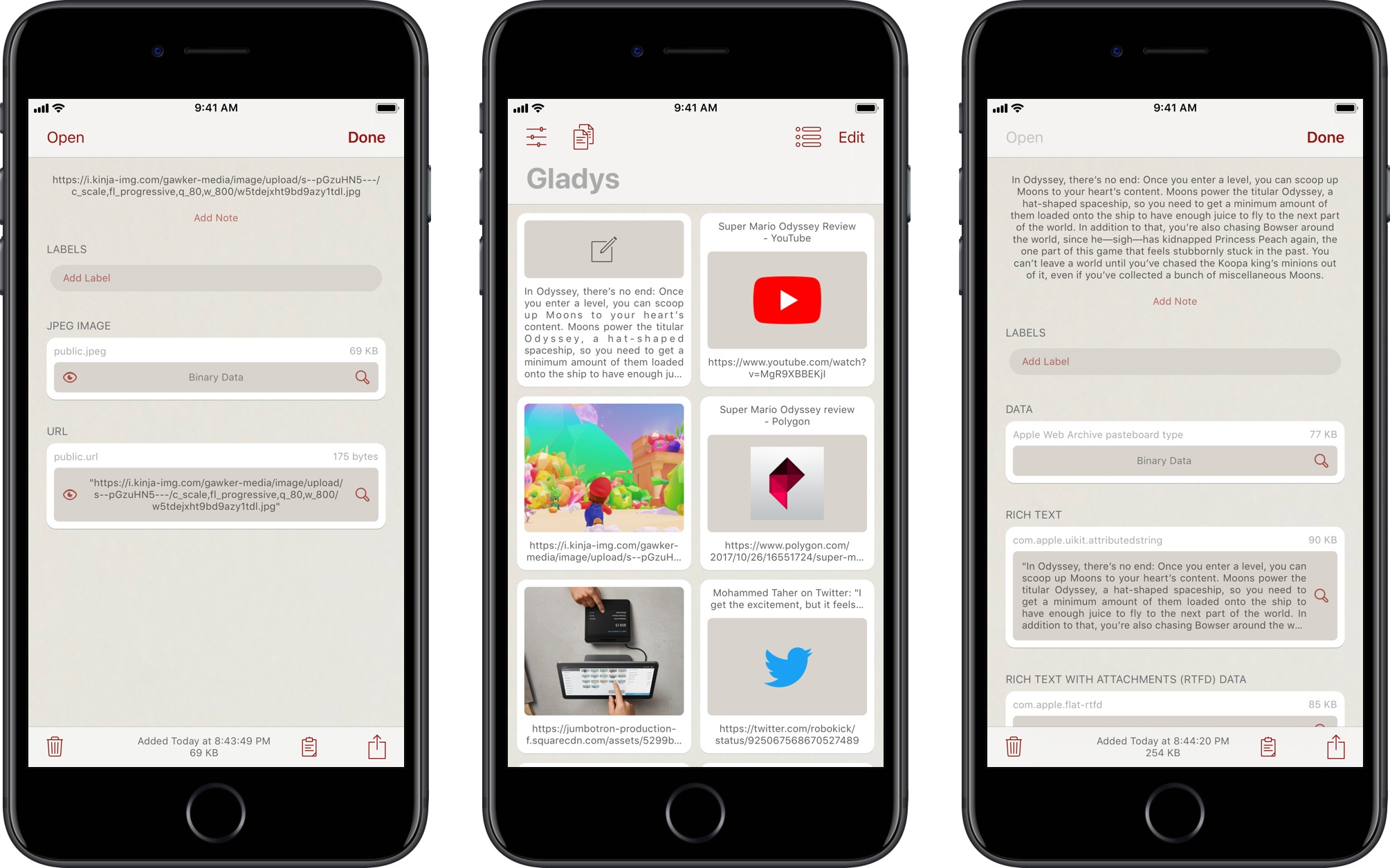
Gladys, developed by Pavlos Tsochantaris, is one of the shelf apps we’ve been covering on MacStories since the release of iOS 11 and, as I wrote last week, the one I’ve been using on my two iPad Pros. Not only does Gladys implement many of the ideas I would have liked to see in a native shelf for iOS 11, but the app has gone beyond my expectations with the ability to save multiple data types for dropped items, as well as a file provider extension to view all your saved items in iOS 11’s Files app.
With today’s version 1.1, Gladys is also gaining a permanent spot on my iPhone’s Home screen (which I shared in Issue 100 of MacStories Weekly for Club MacStories members). Gladys is now a universal app for the iPhone and iPad, and it can sync items across devices thanks to built-in iCloud integration. In my early tests with the app, everything worked as expected: CloudKit-based sync is fast and reliable, with changes made on one device (such as a link dragged from Safari into Gladys on the iPad) propagating in less than two seconds to the other.
Read more
Federico and John dig into their favorite geeky macOS apps that they use for work and play.
Read more
In this first episode of a mini-series on long-form writing on iOS, Fraser and Federico go deep on one of their favourite applications: Ulysses.
On this week’s Canvas, we talk about Ulysses for iOS and explain its unique take on Markdown, library organization, writing tools, and more. You can listen here.
Sponsored by:
- Balance Open: Find out more about Balance Open and get $2 in Ethereum.
At the Money 20/20 conference earlier this week, Jennifer Bailey, Apple’s VP of Apple Pay, revealed some new stats about the service and announced an expansion to four new major markets. Ingrid Lunden has the full story at TechCrunch, but this part about Apple Pay Cash (the peer-to-peer payment feature announced at WWDC that hasn’t launched yet) stood out to me:
When Apple Pay Cash is turned on, for example, it will operate like Venmo, allowing users to transfer money quickly to each other via iMessage, Siri and other channels — a service that “thousands” of Apple employees are now already using in a closed beta before the service is turned on more widely later this year in an iOS 11 update.
But in addition to that, users will also be able to take that money and spend it directly at retailers and others that accept Apple Pay.
So you’ll not only be able to send money to other people over iMessage, but Apple Pay Cash will effectively be its own card that can be used at any physical store or website that supports Apple Pay (like our own Club). I’m intrigued.
Jannis Hermanns:
In the summer of 2017, I wanted to know what it would be like to use an iPad Pro as my main computer. I found out that it can actually work, thanks to an iOS app called Blink, an SSH replacement called Mosh, iOS 11 and running stuff on a server.
As is tradition, I will first explain myself and tell you about the why.
This is a technical, fascinating look at turning the iPad Pro into the primary computer for a web backend engineer. It’s always interesting to read how other people with different needs are taking advantage of iOS and the iPad’s app ecosystem.
Back in their respective countries, the boys gather around Skype to discuss an Italian mystery, another failing keyboard, the Pixel 2 XL and iPhone X pre-orders.
Some fun surprises on this week’s episode of Connected, including a few questions for next week. You can listen here.
Sponsored by:
- PDFpen Family, from Smile: Everything you need for more powerful PDF editing
- Pingdom: Start monitoring your websites and servers today. Use offer code CONNECTED to get 30% off.
- Ting: A smarter way to do mobile. Save $25 on selected devices or keep it as Ting credit.




 John
John