Federico Viticci

10804 posts on MacStories since April 2009

Federico is the founder and Editor-in-Chief of MacStories, where he writes about Apple with a focus on apps, developers, iPad, and iOS productivity. He founded MacStories in April 2009 and has been writing about Apple since. Federico is also the co-host of AppStories, a weekly podcast exploring the world of apps, Unwind, a fun exploration of media and more, and NPC: Next Portable Console, a show about portable gaming and the handheld revolution.


Copied 2.0

There’s a great update to Copied, my favorite clipboard manager for iOS, released on the App Store today.

I’ve been using Copied since version 1.0 and it’s a good example of an iCloud-based app that has always worked reliably (same with Ulysses). I use Copied to store bits of text and images and keep them synced across devices. Just this past week, I stored several shortcode templates in Copied for the special formatting of my iOS 10 review. I love the app.

I haven’t had time to properly test the new version yet, but based on a few minutes of playing around with it, I think it has some terrific enhancements. The widget has been redesigned for iOS 10 and it can show more clippings at once. You can now create text formatters (with templates or JavaScript) to reformat text in specific ways before pasting it. There are rules to save clippings into lists based on text matches. There’s a built-in Safari View Controller browser and both extensions (action and custom keyboard) have been rewritten with text formatter integration.

There’s a lot to try in the latest Copied, and I’m already considering some text formatter scripts for my Markdown workflows. Copied 2.0 is a free update on the App Store.

Permalink

Connected, Episode 108: Confusion as a Discovery Mechanism

iOS 10 is here, and Federico has written the definitive review of it.

On the latest episode of Connected, we talk about the launch of iOS 10 and how my review was finalized. You can listen here.

Sponsored by:

  • Casper: Because everyone deserves a great night sleep. Get $50 off with the code ‘CONNECTED’
  • Hover: Simplified domain management. Use code TEN to get 10% off your first purchase.
  • Braintree: Code for easy online payments.
Permalink

How RAW Changes iPhone Photography

Ben McCarthy, writing for iMore:

Editing RAW files feels like a huge leap forward in terms of mobile photography: With iOS 10, the iPhone is evolving from a great camera for taking casual photos with into a capable professional tool. It still has plenty of limitations, but I suspect we’ve passed a tipping point.

But shooting while out and about is one thing. What about using the iPhone in a studio? I gathered together a couple of friends to do a little impromptu photoshoot to see how the iPhone would hold up.

Ben is the developer of Obscura, which I featured in my review yesterday because of its native RAW support on iOS 10. He makes some good points on the limitations and advantages of shooting RAW on iPhone.

Permalink

Austin Mann’s iPhone 7 Plus Camera Review in Rwanda

I consider the iPhone a computer with a camera more than a computer that makes phone calls. Therefore, Austin Mann’s annual iPhone camera review is my favorite of the bunch. I’ve been linking them for the past couple of years, and I find Austin’s approach always fascinating and well-presented.

This time, Austin has outdone himself. To properly test the iPhone 7 Plus’ camera with optical zoom, they’ve flown to Rwanda in collaboration with Nat Geo Travel and Nat Geo Adventure to track gorillas and take close-up pictures, timelapses, test wide-color gamut photos, and more.

He writes:

As many of you know, in the past I’ve created this review in Iceland twice, Patagonia and Switzerland, but this year I wanted to really change things up. With indicators pointing toward possibilities of optical zoom I asked myself: where’s the best place in the world to test optical zoom? Africa of course.

So this year, in collaboration with Nat Geo Travel + Nat Geo Adventure we’ve set out to get you the answers. I’m writing you from deep in the Nyungwe rain forest in southwest Rwanda… we’ve been tracking gorillas in the north, boating Lake Kivu in the west and running through tea plantations in the south… all with the iPhone 7 Plus in hand.

I’ve had a blast playing with the wide spectrum of new features and tech but as always, our mission is to find out the answer to one question:

How does all this new tech make my pictures (and videos) better than before?

The result is beautiful. The video “review” is a mini-documentary/short film about tracking down mountain gorillas, and it’s 9 minutes long. Seeing how they found the gorillas brought a big smile on my face, and you can notice how the zoom interface of the iPhone 7 Plus was useful for that purpose.

Watch it below, and go check out Austin’s photos and summary of the experience here.

Permalink

WhatsApp Adds Siri and CallKit Integration for iOS 10

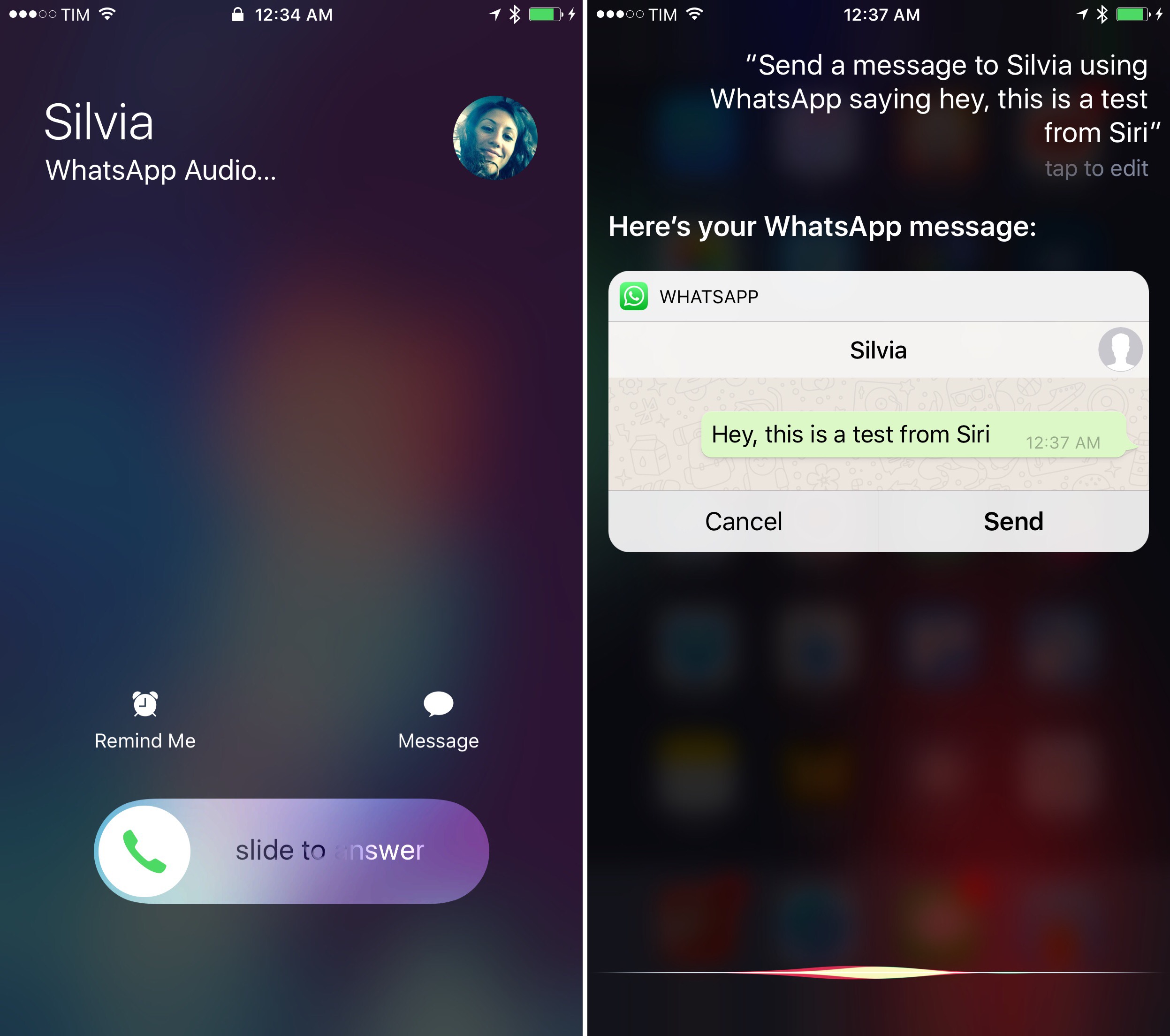
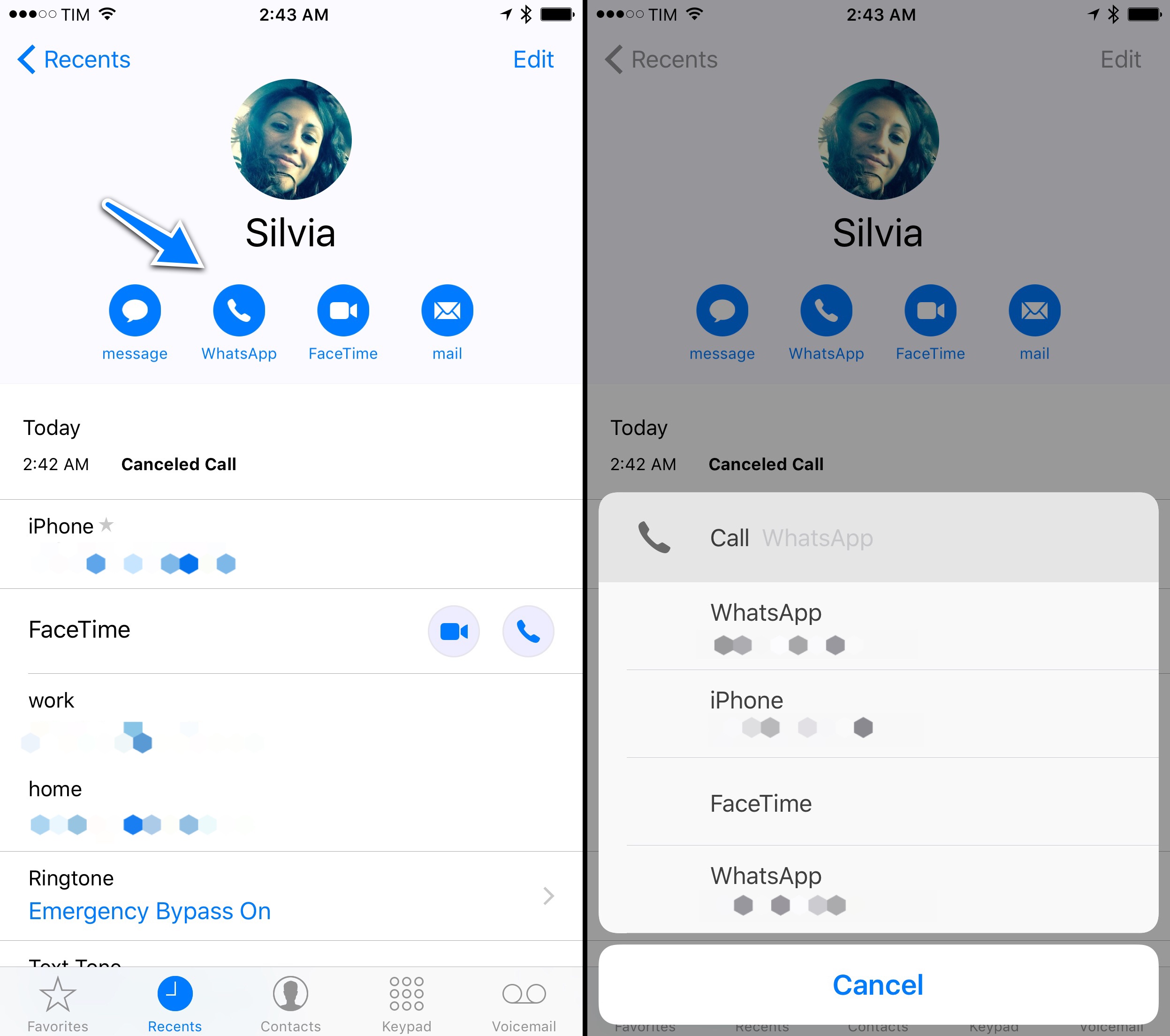
CallKit and Siri in the latest WhatsApp update.

CallKit and Siri in the latest WhatsApp update.

There are two iOS 10 features I wish I could have covered with more examples in my review: SiriKit and CallKit. It was tricky to get my hands on Siri-enabled apps this summer (I only tested one); I couldn’t try any CallKit app.

WhatsApp didn’t miss the opportunity to support the latest version of iOS with new features ready at launch this time. With an update released today, WhatsApp has brought Siri integration to send messages and CallKit support to elevate VoIP calls to a native experience on iOS 10.

I’ve been playing with both features tonight, and they work just as well as Apple advertised. You can ask Siri to send messages on WhatsApp and it’ll show you a preview of the message with WhatsApp’s UI before sending it. It’s fast and it works from anywhere. Same for CallKit: WhatsApp calls take over the Home screen and Lock screen with the regular interface of phone calls on the iPhone – they’re not basic push notifications anymore.

You can even add a button to start a WhatsApp call to a person’s contact card (try to long-tap the ‘Call’ button and you’ll see) or to your Phone’s Favorites. WhatsApp calls feel like part of iOS now thanks to CallKit and Intents – and other VoIP services can take advantage of the framework, too.

I had a rough idea of how Siri would work in everyday scenarios (I think it’s going to be a great addition to messaging apps on iOS), but I’ve been genuinely impressed by CallKit and contact extensibility so far.