Posts tagged with "iOS"

MacStories Preview: Screens, New VNC Client for iPhone and iPad

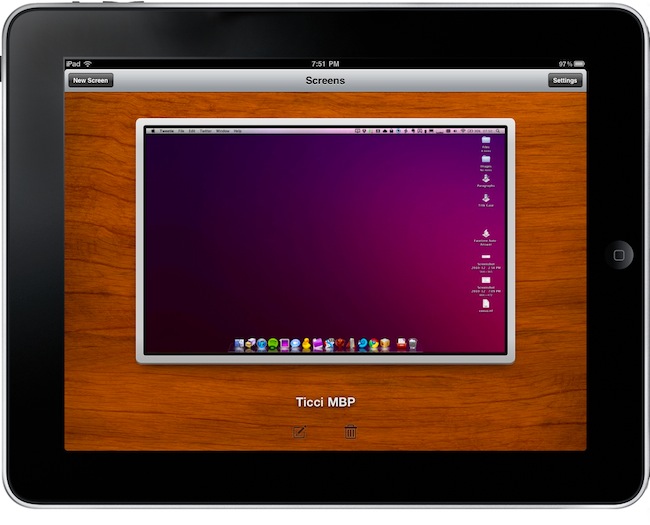
When the iPad came out in April, there was a category of apps I was looking forward to trying on the tablet: VNC clients. Those apps that allow you to connect to your Mac using OS X default sharing capabilities, enabling you to mirror your computer’s screen on an external device – such as the iPad, indeed. I got my iPad, and soon after that I installed iTeleport on it.

I’ve been using iTeleport on a daily basis since then to check on my computer when using the iPad in another room – usually the living room –  to change songs in iTunes, quickly move files to Dropbox and stuff like that. iTeleport is a fast and stable application, and it also comes with a feature that lets you connect over 3G routing the computer through a Google Account. Using a computer remotely over 3G isn’t the best experience you can get, but it works fairly well to start downloads and trigger actions on the go.

A few weeks ago Luc Vandal from Edovia contacted me and asked me if I’d be interested in trying a new VNC client they had been working on for months. I said yes, and now the app is basically ready for App Store submission. I’m running a final version of the app, the same that Edovia will submit to the App Store.

Screens by Edovia has become the best VNC app I’ve ever run on my iPhone and iPad. Read more

Air Video Update: Retina Graphics, Multitasking - Still A Must-Have

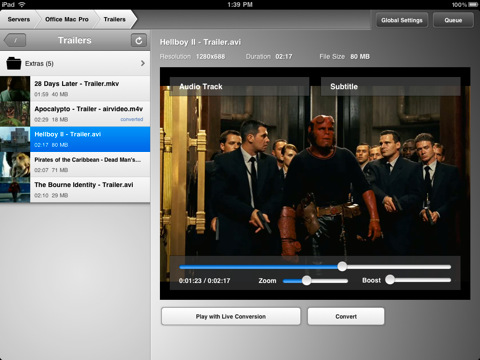
Air Video is one of our favorite iOS apps here at MacStories. Not only does the app come with a nice icon and polished interface, the real deal’s about the functionality: Air Video allows you to effortlessly stream any video from your computer to the iPhone or iPad – even with live conversion. No matter the format, no matter how big the file is (seriously, you can try with music videos or 3GB movie files), Air Video will stream to iOS just fine.

An update to the app was released yesterday, and it’s a pretty sweet update: Air Video 2.4.2 now comes with Retina Display-ready graphics, support for iOS 4.2 multitasking, performance improvements and enhanced file sorting capabilities.

An already must-have app basically got a lot better with these new features, so if you still don’t own Air Video, go buy it right now in the App Store at $2.99. Also, check out a video below of Erica Sadun from TUAW demoing a custom version of Air Video with AirPlay support. We can’t wait for Apple to open up its APIs and allow third-party apps like Air Video to stream to the Apple TV. Read more


iTunes Connect “Sales & Trends” Down For Developers

We received several tips from developers this morning informing us that “iTunes Connect was down”. We just checked, iTunes Connect works just fine but the “Sales and Trends” section (where developers can check on detailed reports of their app sales in the Store) is down.

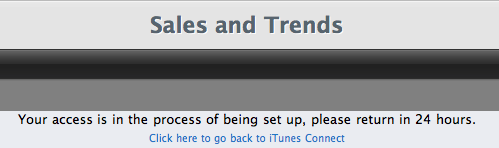
When trying to access it (link), iTC returns the following error:

Your access is in the process of being set up, please return in 24 hours.

It seems like a maintenance routine that will be finished by tomorrow or later today, but we can speculate Apple will also roll out smaller improvements to the Sales interface once it goes back online. Anyway, developers, don’t worry: it’s not just you. It’s down for everyone, you just have to wait.

The Sales and Trends page is also unaccessible from the iTC mobile application.

Update: many developers are reporting Sales and Trends are back up. It sure is for us now.


OpenFeint X: Sell New Content Without Updates

After Apple released Game Center, OpenFeint’s survival plan was to provide even more services on top of the Game Center functionality, now OpenFeint X hopes to cash in on this. It’s a service that allows iOS developers (plus other mobile platforms) to add over-the-air purchasable content to their games on top of Apple’s already popular in-app purchasing. OpenFeint X works outside of Apple’s store, and allows devs to quickly add in-app content without going through Apple’s approval system. Only a few devs have worked with it so far, but it’s new and more will surely follow soon, especially after their “Million Dollar Challenge” announcement.

Read more


The Incident 1.3 Goes Live. Finally, An iPhone Game I Can Play On My TV.

We love The Incident for iPhone and iPad. In fact, Big Bucket’s retro-style platform is easily one of my favorite iOS games of all times. It features incredible pixel graphics, an addictive gameplay and a catchy soundtrack. If you read MS, you know we’re totally into The Incident.

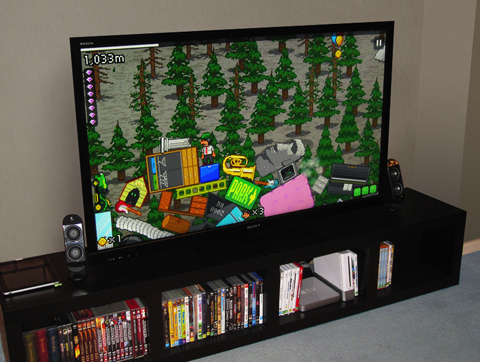
A few weeks ago we reported the developers were working on an update to let users play The Incident on their TVs while controlling it with an iPhone. Sounded like magic back then. It turns out, all you need is a VGA Adapter or Composite AV Cable to mirror the game on your TV and start jumping with Frank, the main character. That’s it. No complex pairing process – although we’re already thinking about a future AirPlay feature to beam games from your iOS device to your TV.

This feature of The Incident 1.3 is something we’ll remember in the months to come. It marks the arrival of iOS as a gaming platform on our living rooms, and we’re sure other developers will implement it in several other games. We’re waiting.

In the meantime, The Incident 1.3 is available here and it rocks. Strongly recommended.


John Carmack On iOS Performances

John Carmack On iOS Performances

From Ars Technica’s interview with John Carmack:

Whether the iOS devices will reach that same level of performance before the next console generation ships is quite an interesting question. There are some very different designs for power consumption considerations that go into their hardware design, and cranking things up to give that level of power but gets burning hot in your hands and uses up the battery in 30 minutes is absolutely possible with the form factor right now, but it’s probably not the right decision from the standpoint of what the device really is and is supposed to be. But even at the same power draw, they’re going to be doubling and doubling again the performance level.

In the not-too-distant future, we’re going to be seeing multicore on mobiles, and I’m very interested in when the transition to 64-bit addresses is going to come in the mobile space.

If there’s one thing that’s holding developers from creating full-featured game experiences on iOS, that would be battery life.

Permalink

Unreal Development Kit Coming to iOS

Unreal Development Kit Coming to iOS

When it ships, the UDK iOS will include the same editors and code used to create a number of blockbuster games, and will be available to anyone wishing to publish games via the App Store. Toolsets of this quality generally cost developers anywhere from $500 to tens of thousands of dollars, so by releasing the UDK for free, Epic is drastically lowering the barrier of entry for iOS developers wishing to create graphically impressive games.

We can’t wait for Infinity Blade to show up on December 9th. It’s a taste of great things coming to iOS gaming in the future.

Permalink

Apple Posts New iPad Ad To Showcase iOS 4.2 Features

A few minutes ago Apple posted a new iPad commercial on its website called “iPad is amazing”, aimed at showcasing the new features of iOS 4.2. Everything’s in there: AirPlay, AirPrint (although limited to some HP printers), multitasking and the usual selection of apps.

Surprisingly enough, no folders are shown in the video. As for the apps that made an appearance in the commercial, it’s nice to see the official TED app developed by Matt Drance in there.

We’re working on getting a Youtube version up as quickly as possible. In the meantime, check out the video here.

Update: Youtube embed below.


iOS 4.2 Comes With Technology To Minimize Network Congestion

iOS 4.2 Comes With Technology To Minimize Network Congestion

With its latest iPhone iOs 4.2 software, it looks like Apple is joining efforts to cut smartphone signalling down to size. Tests by Nokia Siemens Networks have shown that iPhone iOs 4.2  supports a technology called Network Controlled Fast Dormancy, which we have already introduced into our networks. Basically, the technology makes the network and the handset work together to create the best conditions for smartphones to work quickly, yet have a long battery life and minimize network congestion.

Nice.

Permalink