

While iOS devices are hardened with DEP (Data Execution Prevention) and application sandboxing to aid in preventing malicious code from touching running processes, you find it combination with ASLR (Address Space Layout Randomization) which makes it difficult for attackers to find where processes are located in the first place. ASLR isn’t currently implemented in iOS devices, but a German hacker has developed a new Jailbreaking method which may provide Jailbreakers with some additional peace of mind.
Posts tagged with "iPad"
New “antid0te” Jailbreak Hack to Bring ASLR to iOS Devices
Google Docs Desktop Editing Comes To The iPad
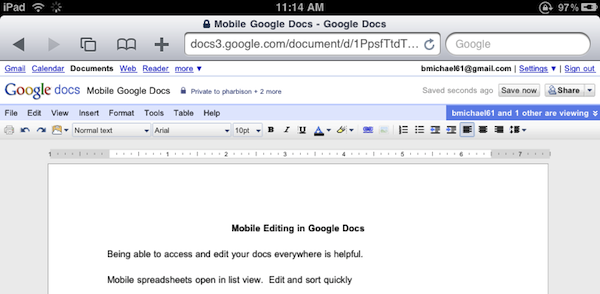
Great news for Google Docs users and iPad owners this evening: Google has announced that they have extended compatibility of the Docs desktop editor to include support for iPad. If you’re running an iPad, you can now switch from the mobile version to the desktop one with just a tap.
The desktop editor is the Google Docs you know and love, allowing you to modify fonts and alignments, paragraphs and font styles. It’s the usual Google Docs, running on a tablet.
As simple as it sounds, Google just made a great move towards ensuring millions of iPad users out there a desktop-class Docs experience without the need of a dedicated mobile client. Google announced a Docs Viewer in June, and released a mobile version for iOS and Android users with editing enabled a few weeks ago.
Once again, Mobile Safari wins.
Helping Developers, For Free→
Helping Developers, For Free
Robert Scoble on how he helped the Flipboard developers in the early stages of the app:
Why do I do it for free? Because I love this stuff and want the best possible apps to use myself. Flipboard without Twitter list support would have been totally worthless for me. It isn’t obvious that Twitter list support is important. After all, how many people use Twitter lists. But for Flipboard it was a must have.
I’m passionate about seeing things early and work hard at adding value back to entrepreneurs for that honor.
See, it’s not about the “cool factor” of having access to stuff other people don’t know about. Maybe it’s that, too. I don’t want to call this a “mission” but, really – for some it’s just about helping people build better, innovative products.
iFiles: Now With S3 Support, AirPrint and Text Editing In The Cloud
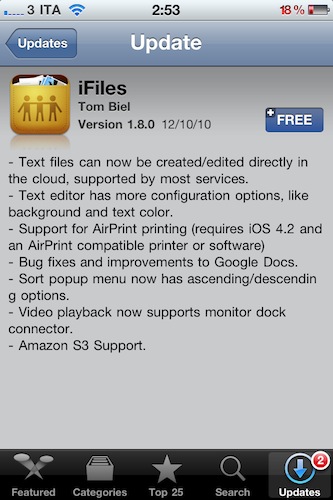
iFiles is one of my all-time favorite iOS apps for iPhone and iPad. I use it on a daily basis to get files in the devices and out of them, thanks to the app’s powerful sharing capabilities that allow it to get recognized on your local network as a web server. Plus, as I wrote in my review, iFiles was meant for a cloud-based workflow, for all those users who daily play around with items stored on Google Docs, Flickr, Rackspace, and so forth.
The latest 1.8 update, which showed up in iTunes a few minutes ago and I’ve installed on my iPhone, doesn’t come with a huge set of new features – but the ones that are there make this app a must-have, again. Read more
An iPad Rear Camera: Practical or Impractical?

Earlier today we learned some Chinese accessory makers are already producing cases for an alleged “iPad 2”. Those cases clearly show a hole in the upper left corner for a rear-facing camera in the next iteration of Apple’s tablet.
“A rear-facing camera? On the iPad? How are you supposed to take pictures holding the iPad like a camera?” These are the questions going around today, the same we heard when the iPad was first unveiled and, well, lacked a camera.
iLounge posted a follow-up to their iPad 2 case story, with some predictions / hope about a possible rear camera in the iPad 2:
One thing that Apple really enjoys doing, particularly when adding a new feature to an established product, is rethinking things that competitors have attempted and gotten wrong.
[…]
Picture the iPad in an advertisement looking out at a landscape, snapping a picture, and having the landscape appear on the iPad’s screen looking just like what your eyes were seeing. Or taking a picture of a group of people, then becoming the picture frame for the family photo. It sounds so simple, but with the lens on the back of the Galaxy Tab (or, say, the iPod touch) right now, that’s not happening.
Apple and Costco: It’s (Officially) Over

You may remember there was a time when retail chain Costco was selling iPods. Everything was fine and cool back then, until the day Apple got bigger and started giving iPads away to other retail chains such as Target, WalMart and Sam’s Club – cutting out the old partner Costco. The iPad started appearing everywhere, but not at Costco.
Soon after that, and we’re talking October 2010, Costco started dropping the iPods they had because they were left out of the iPad distribution game. Several reports pointed out that Apple products had gone missing at Costco. Today, the end of the relationship between Apple and Costco is official. Read more
A Beautiful TV Guide For Your iPhone and iPad
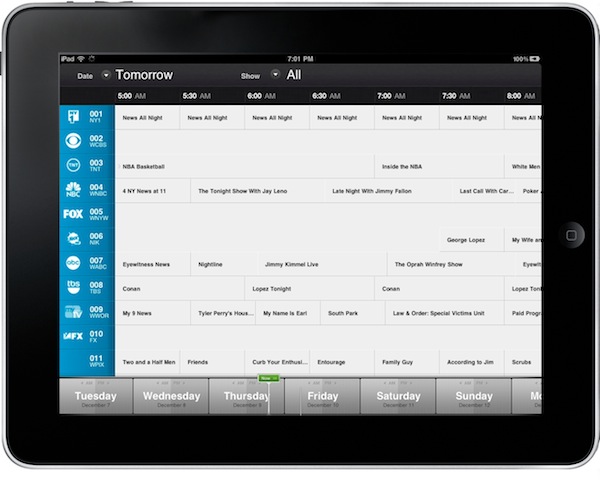
I’m thankful for the possibilities offered by today’s technologies, which allow me to ditch the old ways of doing…stuff for more pleasant, rich, interactive and beautiful experiences. Apple’s devices and apps in the App Store surely played a great role in this digital revolution: we don’t buy specific items anymore because there’s an app for that. The last time you bought a radio player? An actual map? A point & shoot camera? Exactly.
Still, there was no “last time” for me when it comes to TV guides. I never bought those magazines that offered monthly and weekly views and summaries of what would be in television – I just checked TV programming on the internet. Or on my local newspaper. But now I’m ready to step my game up, with an app simply called “TV” and available at .99 cents in the App Store for iPhone and iPad. It’s uncluttered, beautiful, elegant and, finally, it’s something that deeply integrates a TV guide with the information coming from the internet. Read more
Apple Posts The Best iPhone & iPad Apps of 2010
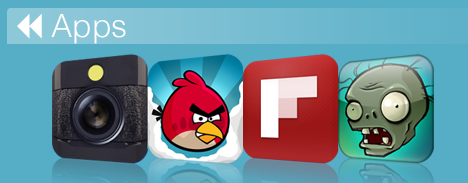
Just like every year, the iTunes Rewind section in the iTunes Store lists the best music, movies, TV shows, podcasts and audiobooks of 2010. This year’s iTunes Rewind is available here, and it includes a huge selection of apps, too.
As you can see in the screenshot above, Apple is showcasing Hipstamatic, Angry Birds, Flipboard and Plants Vs. Zombies in the iTunes Rewind 2010 main page. As you click through, you can check out the “Hot Trends” in iPhone and iPad apps in 2010 – and many more apps are listed there.
The “Hot Trends” contains other sub-sections, such as “Shoot, Edit, Share” (iTunes) which features apps like Instagram and Path. Read more
“iBand” Plays Christmas Songs With iPhones and iPads [Video]

Here we are again, featuring a band that doesn’t make music with actual instruments, but decided to go the iOS way instead. The “iBand” from the North Point Community Church (website), indeed, played 3 Christmas songs (Carol of the Bells, Rockin’ Around the Christmas Tree and Feliz Navidad) using only iPhone and iPad apps.
The result, as you can see in the video embedded below, is fantastic. The songs turned out great when played through the apps, and the members of the iBand actually had fun when performing on stage all together. Crowd was cheering, the video is going viral on Youtube – all thanks to the power of quality music making apps released in the App Store these past two years.
Reid Greven from North Point writes on his personal blog:
Jared arranged “Rockin’ Around the Christmas Tree” and “Feliz Navidad” using the apps, and creating a demo by multitracking them in Apple’s Logic software (though any Digital Audio Workstation would do the trick).
Jared, Eddie Kirkland and I arranged the first song, “Carol of the Bells“. It’s amazing what you come up with when you sit in a room, hook 3 iPhones up to some speakers, and get adventurous!
The apps used in the performance include SoundGrid, Guitarist, iGog, Pianist and Percussions. Back in October we featured New York-based band Atomic Tom, performing a song using only iPhone apps.
Once again, I’m amazed by the results some people can accomplish by solely relying on modern Apple devices and applications. Check out the video below, then tweet it. It has to go viral.