This Week's Sponsor:

Turbulence Forecast

Know before you go. Get detailed turbulence forecasts for your exact route, now available 5 days in advance.


Posts tagged with "iPad"

Why Developers Create Apps for iOS

Why Developers Create Apps for iOS

Marco Arment:

The problem is that hardware manufacturers and tech journalists assume that the hardware just needs to exist, and developers will flock to it because it’s possible to write software for it. But that’s not why we’re making iPhone and iPad software, yet those are the basis for the theory.

We’re making iPhone software primarily for three reasons:

Dogfooding: We use iPhones ourselves.
Installed base: A ton of other people already have iPhones.
Profitability: There’s potentially a lot of money in iPhone apps.

With this in mind, think about the installed based of Macs.
Permalink

iPad Guesswork One Year Later

iPad Guesswork One Year Later

The answer is just the same for the iPad. What is it for? Well, I use mine to browse the Internet, cook in the kitchen, play games, manage my finances, earn a living, entertain the children, look at photos and so on. In other words, it’s a computer and that’s how I use it. The novelty of its appearance, functioning and so on seems to require re-categorization or a some highly-specialized usage scenario. Of course in many ways my iPad is significancy different than my MacBook Pro, but in others it’s quite the same.

Here’s what I’m going to do this weekend: find old articles about “Apple’s tablet” speculations and see how many got it right.

Permalink

Simplepedia Is A Minimal Wikipedia Reader For Your iPad

I don’t know how I missed this in June. Maybe I was too busy shooting pictures with my iPhone 4. Remember when we first saw the Retina Display? Yeah, good times.

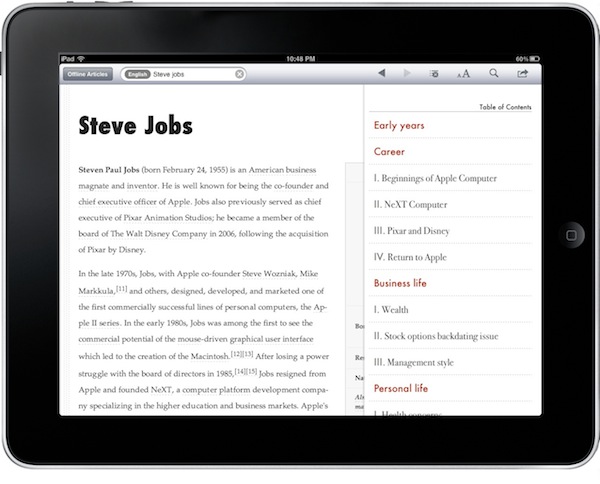
Simplepedia, developed by the same guy behind PDFMate, is a minimal and, well, simple Wikipedia reader for iPad. It comes with a standalone iPhone version, too, but I haven’t tried that one. On the iPad, the app can do two things: search for Wikipedia articles and save them for offline reading. That’s really it, folks. Read more


Note Hub: Notes, Drawings, Maps, Calculator, Tasks and a Browser…In A Single App

Some apps do one thing exceptionally well and some try too much just to miserably fail in the end. Either you’re a great note taking application or you’re a sketching software, but surely you can’t aim at doing both just fine. Note Hub wants to break this convention by being the app you come back to for anything related to…well, a pretty huge amount of things: notes, maps, browsing, drawings, tasks. It’s even got a calculator.

Note Hub wants to be the app you use for your note taking needs, but after some tests I have to say it’s more an app geared towards “visual” people who need to work with rich media on a daily basis and would like to organize content in a user-friendly interface. Read more


IMDb Releases Improved iPhone and iPad App

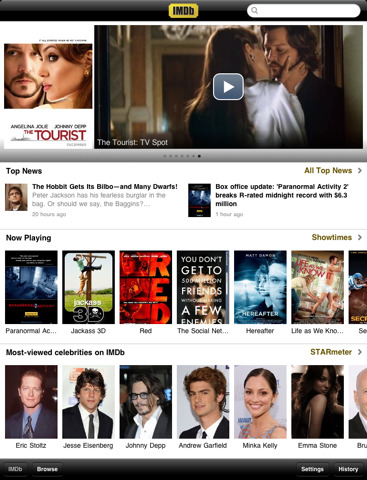
Movie, TV and celebrity database IMDb released earlier today a brand new version of its official iOS app for iPhone and iPad.

Version 2.0 of IMDb for iOS brings a lot of bug fixes and overall performance improvements, a redesigned dashboard with the latest news from a variety of media sources, support for movie showtimes in 13 more countries including Canada and UK, possibility to rate movies and TV shows using your IMDb account.

As TechCrunch reports, IMDb released an iPad app shortly after the iPad came out and it was very successful. The 2.0 update (universal for iPhone and iPad) anticipates the major redesign the website is undergoing at the moment.

IMDb for iPhone and iPad is available for free here. Check out the full 2.0 changelog below. Read more


Zuckerberg Is Right, The iPad Isn’t Mobile

Mark Zuckerberg, at Facebook’s mobile event today in Palo Alto when asked if Facebook was building an iPad app:

I don’t want to be rude to Apple – we all love Apple products – but this is a mobile event and we want to stay focused on that. The iPad isn’t mobile in the same way.

This can mean quite a few things, so instead of opening Tweetie for Mac to write that the Zuck’s an asshole, let’s just think about the nature of the iPad as a device. We often refer to it as a “mobile device”; now I’m asking you to think of that 10-inch piece of aluminum and glass as a “device”.

Is it mobile? Read more


Elements 1.5: Sub-folders, Markdown Preview, Better File Saving

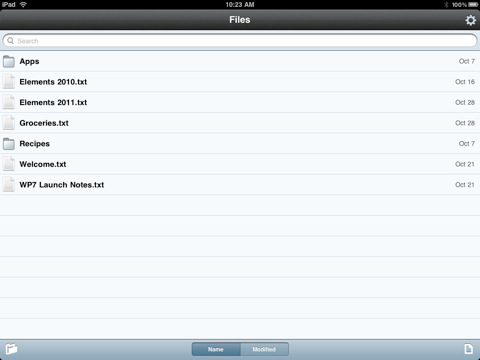
Second Gear’s Elements for iPhone and iPad has been updated to version 1.5 today, a major revision of the popular Dropbox-based text editor that adds lot of new (and much requested) features together with a plethora of bug fixes. We previously covered Elements here and here.

First off, Elements now supports sub-folders and Markdown previews. Sub-folders are really a huge deal for many users out there, as now you’ll be able to hook Elements up with other Dropbox-based apps that organize their documents with a similar structure, such as Plaintext. The family of Dropbox text editors keeps on getting more connected and better integrated.

For me, however, the really huge deal is the improved Markdown support: the app can now view Markdown formatted files (.md, .markdown, .mdown, .mdwn) and open Markdown files from external applications that support the “Open in…” feature. Similarly to Second Gear’s own MarkdownMail, Elements can now generate a live HTML preview of Markdown formatted text for you to instantly check on. Read more


Newsday’s New iPad Ad Doesn’t Really Impress

This is what happens when Apple legal forces you to take a genius commercial down and release a more “normal” one. In case you missed Newsday’s story, they once released a clever commercial in which a man killed a fly using an iPad instead of a regular newspaper. The iPad, of course, was shattered.

That ad was aimed at proving that tablets are anything like old media, and you shouldn’t think of them in that way. Like I said, a clever advertisement that went viral. But Apple didn’t like and Newsday was forced to take the ad down (copies can still be found on Youtube, though).

Now Newsday is coming back with a new ad, but it doesn’t really impress much. There are some trippy animations here and there, as RazorianFly also notices, but the style and cleverness of the first attempt is far, far away.

This is exactly what happens when Apple legal messes up with your stuff. We’ve embedded the old ad below. Read more