Posts tagged with "mac"

Kickstarter Project - Tweet Land: Playing With Reality

I hope you don’t get tired of reading about Kickstarter projects because I enjoy writing posts about very cool ideas. A new project I found today is called Tweet Land. Tweet Land is the idea of six Costa Ricans that believe it’s “possible to reinvent the way video games are created. We believe in opportunity, that’s why we believe in Tweet Land.” Tweet Land is one of the world’s first video game platforms that plays with reality, or “Real Time Gaming.”

What would happen if people’s social networks effected what happens in a video game? If you like the idea of the twittersphere becoming a virtual universe, this is for you.

Video after the break. Read more


#MacStoriesDeals - Tuesday

If you didn’t already know, we’ve set up a new twitter account for Deals, it’s @MacStoriesDeals. We’ll tweet the daily deals there as well as exclusive weekend deals too. Help spread the word! Here are today’s deals on iOS, Mac, and Mac App Store apps that are on sale for a limited time, so get ‘em while they’re hot!

Read more


MailTabs Brings Safari-like Tabs to Mail.app

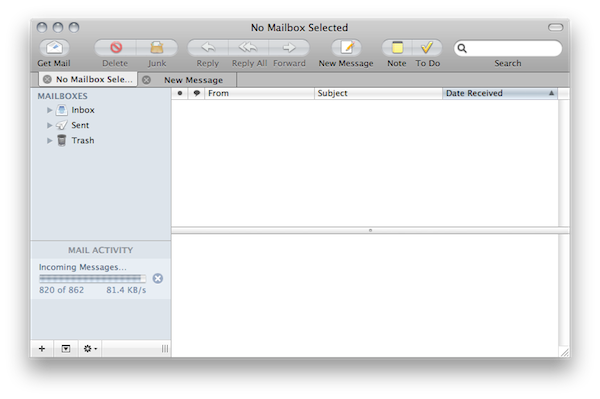
If you use Mail.app on your Mac desktop to stay on top of your inboxes and messages and you’re that kind of user who opens a lot of Mail windows to navigate between accounts, folders and new messages, perhaps you’ve thought about getting a new email client with support for tabs. In web browsers, tabs are the best way to open multiple links at once without being forced to clutter your screen with dozens of standalone windows (although some people still prefer to keep separate sets of tabs organized in different windows); furthermore, new solutions like Mozilla’s Panorama for Firefox enable us to literally open hundreds of tabs and visually switch between them retaining some free space in the toolbar. Tabs have basically changed the way we browse. How about enabling them in Mail.app now?

That’s what a new plugin called MailTabs does. Available for free and supporting auto-updates (that means you won’t have to download a new version every time), once installed MailTabs will put Safari-like tabs in Mail for OS X. New messages, conversations and inboxes will open in a new tab sitting below the top toolbar instead of a new Mail window. The UI is far from perfect in this first release, but tabs really work and sessions are even restored when you close Mail.app and open it again. When you send a new message from within a tab, the tab is automatically closed as soon as you hit Send. The plugin has no other configuration options available in the Settings, and I’m hoping the developers will add further customization possibilities in the future updates. MailTabs also seems to have a small footprint on CPU resources and RAM.

If you’re a fan of plugins like TotalFinder and, overall, tabs for web browsers, you should try MailTabs. It’s a free download here.


Prycast: Pandora Radio Player Review & Giveaway

While I don’t think Pandora itself needs any introduction, you may not be familiar with one of the latest Mac Apps to bring your Pandora account to your desktop. Pyrcast is a menu bar radio player for your Pandora stations, allotting access to all of your favorite music and controls that can be tucked away into a standalone player, or via a drop-down menu. Pyrcast allows for global keyboard shortcuts for restarting the song, liking and disliking the current track, and for play/pausing. Additionally accessibility has been added with Growl support, though I found the Rate Up and Rate Down icons to be unintuitive in the player (just bring over the thumbs up and thumbs down guys). Pyrcast looks similar to Ecoute in terms of navigation, though you can just quickly jump to another station by clicking “Stations” at any time. Pyrcast is $4.99 in the App Store, and we’re giving away three copies in a quick giveaway to a few lucky readers. Jump past the break for contest rules.

Read more


#MacStoriesDeals - Monday

If you didn’t already know, we’ve set up a new twitter account for Deals, it’s @MacStoriesDeals. We’ll tweet the daily deals there as well as exclusive weekend deals too. Help spread the word! Here are today’s deals on iOS, Mac, and Mac App Store apps that are on sale for a limited time, so get ‘em while they’re hot!

Read more


The Spotify Box

Spotify Box: Package Contents

Spotify Box: Package Contents

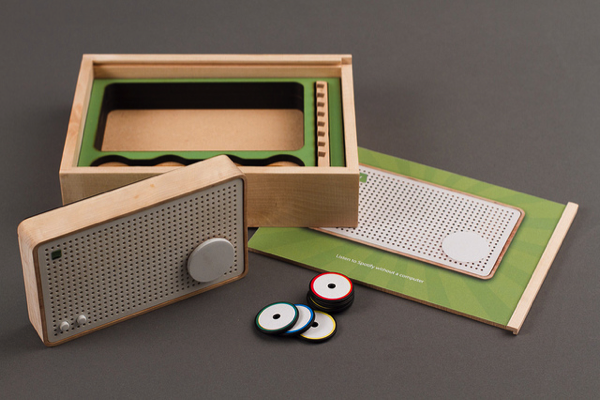
Occasionally minds more creative than mine combine technologies physical and virtual to create delightful products that make radio nerds like me ooze with excitement. If the fat grin on my face isn’t enough to show you just how much I enjoy this particular concept, then you must clearly be an American (at least we still have Rdio) or perhaps you can’t appreciate the simpler times when wood vinyl FM/AM radios played fuzzy music from our bedroom dressers. The concept – evolved through research and development from Jordi Parra – bonds RFID tags (which look kind of like poker chips) with a Spotify URL that when attached to the radio playback a playlist or radio station over WiFi. While the radio itself stores the information you assign from Spotify over USB, the RFID tags are nothing more than the “on switches” that relate to the stored playlists. These playlists are associated with colors, thus to play a particular sample of songs you’d simply attach a red RFID tag to the radio for example. The beauty of a concept like this is that it maintains the simplicity of a manual radio, while introducing and integrating with modern and intuitive technologies. The world may be going digital, but there’s still something about being able to touch music with your fingers that emotionally makes the analog experience so much more palatable and personal. Parra’s prototype doesn’t have a name, but the Spotify Box as it’s dubbed on Vimeo is a great reminder that good design doesn’t always have to have a touchscreen, or even an LCD display. It’s a return to the basics, and while I understand a student project such as this would take a considerable amount of effort to produce, I do wish Jordi and his team all the best if something like this gets off the ground. If you do start a Kickstarter, you’ve got my support.

Past the break we’ve embedded the concept video, and you can also check out the project in it’s entirety on Zenona. There’s a Flickr group if you want to see the project from draft to inception, but I have to say: having this much access to the workings of the prototype Spotify Box can drive an author to be a little too giddy, don’t you think?

[Zenona via TNW]

Read more


Instadesk: The First Instagram Client for Mac

Thanks to Instagram’s huge success and the release of an API that allows third-party developers to plug into the service to fetch images, user information and much more, in the past weeks we’ve seen the quick rise of dedicated Instagram clients for iOS that don’t focus on shooting and uploading new images (the API doesn’t allow that, yet) but instead turn Instagram’s social aspect into a central part of the experience. Apps like Instagallery for iPad or the popular Flipboard make great use of Instagram’s API and third-party tools by letting you browse popular photos and read comments directly from the tablet’s larger screen; they also let you like and comment on pictures, see your own photos and profile or follow other people. Photo taking capabilities aside, these apps are proving that there’s a whole world of social interactions and media behind “a simple iPhone app” that deserves to be studied and implemented through native software for iPhones and iPad. Not to mention other clever experiments with the Instagram API we have covered on MacStories, such as printed photos and web apps.

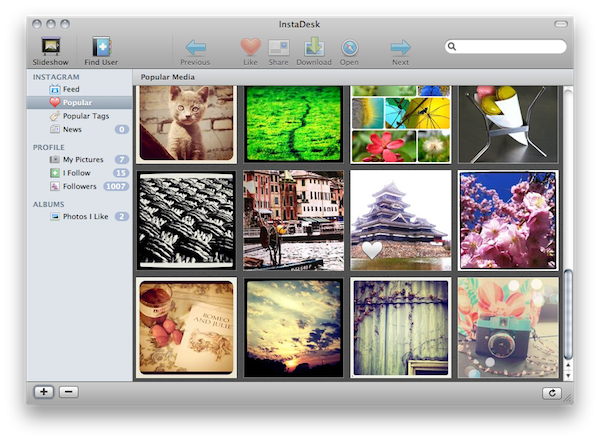
But what about the Mac? When you follow a link to an Instagram picture from, say, your Twitter client of choice, the photo will open into the web browser. Instagram’s website lets you see the photo at higher resolution and check out the author’s details, but there’s no “social backend” to browse photos and people just yet. Instadesk, a new app available in the Mac App Store, wants to bring Instagram’s full experience to the desktop. The app has a clean and nice design with thumbnail previews and beautiful icons in the top toolbar; it enables you to create local “albums” to save photos for later; it lets you share photos from you or others through a variety of social networks supported by Instagram.

Instadesk is a full-featured Instagram client built specifically for the Mac. Once you’ve authorized the app with your credentials and granted permission to access your account through the API, Instadesk will place a link to your profile in the sidebar, right below links to the feed, most popular photos and tags, and status updates. In the profile tab you can check out all your photos, people you follow and your followers. As you click on a thumbnail in Instadesk, the photo is automatically brought in the foreground with a slick animation and a new screen that shows the author on the right (with buttons to follow / unfollow) as well as comments and likes,  and a box to leave a new comment yourself. You can like a photo or open it in the web browser, download it locally on your computer or hit the Share button to share the instagr.am link with your Facebook friends, Twitter followers and email contacts.

The popular section offers a selection of the most viewed photos and tags, whilst the Feed displays items posted by you and the people you follow. Instadesk also comes with a slideshow functionality and a “find user” option to manually search for a person on Instagram.

Instadesk provides a nice way to browse Instagram from your Mac. At $1.99 in the Mac App Store, it’s not a bad deal if you’re a loyal (and addicted) Instagram user. More screenshots below. Read more



OS X 10.6.7 Introduces OpenType Text Bug (You’re Not Alone)

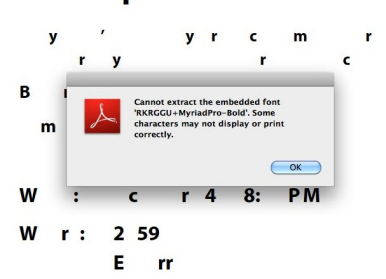
If you find yourself scratching your head over jumbled text in (commonly) PDF files after the 10.6.7 update, it’s an issue that’s cropped up and found its way on Apple’s Discussion boards according to the folks over at Macworld. The text bug occurs with OpenType Postscript fonts, which aren’t included by default with your new Mac but can be later added with the installation of third party software (Adobe is noted). The problem seems to only occur in apps utilizing OS X’s rendering engine outside of the Preview application, displaying jumbled text that’s impossible to read. Upon printing, you may encounter an “invalid font error” in rare cases. The bug only crops up if you’re using software such as Adobe Reader, and the PDF you’re reading utilizes the aforementioned fonts. By using Preview or opening documents that use a common font such as Helvetica for example, it’s possible you’ll never see the word scramble in action.

[via Macworld]

Image credit Macworld


#MacStoriesDeals - Friday

Happy birthday Apple! If you didn’t already know, we’ve set up a new twitter account for Deals, it’s @MacStoriesDeals. We’ll tweet the daily deals there as well as exclusive weekend deals too. Help spread the word! Here are today’s deals on iOS, Mac, and Mac App Store apps that are on sale for a limited time, so get ‘em while they’re hot!

Read more