This Week's Sponsor:

LookAway

It helps you take regular breaks from your Mac to rest your eyes, without breaking your flow.


Posts tagged with "mac"

HazeOver Lets You Concentrate By Fading Inactive Apps

Sometimes it’s hard to concentrate on a Mac and get things done. With all those open windows – the Twitter client, the browser, music from iTunes, Google Reader – it’s easy to get lost in the information stream and distractions and lose focus on what you were doing. HazeOver, a free Mac app by Maxim Ananov, wants to provide a solution to this problem by offering a simple way to eliminate the visual clutter: fading the background application windows you’re not looking at.

The idea is very simple: the app in the foreground stays untouched, the inactive windows are slightly dimmed to create an effect that will let you concentrate on a single app. So say I have to get an article done in the browser but tweets keep coming in the background through the Twitter app, chances are I won’t look at it like I always do because HazeOver generates this “dimmed background” that will help me stay focused on Chrome.

I don’t know how well the system will work for you, but the app certainly behaves as advertised. Once installed and opened, it will automatically fade inactive windows as an app comes in the foreground. But what if you’re that kind of user who keeps multiple apps running side-by-side for multitasking? You might be out of luck due to HazeOver’s lack of customization settings.

Still, the app is a free download and you can try it out here. Check out the demo video below. Read more


MacUpdate Bundle: 1Password, Parallels, Divvy, App Tamer and More→

MacUpdate Bundle: 1Password, Parallels, Divvy, App Tamer and More

The latest MacUpdate Bundle is a must-have for any serious Mac user: at $49 (that’s 87% off the total value of the apps included) you get gems like Parallels, 1Password, App Tamer, Divvy and TechTool Pro 5. These are apps we highly recommend and especially 1Password and Parallels should be installed on every Mac.

The bundle also includes MacUpdate Desktop, DVDRemaster Pro 7, MacDVDRipper 2, Hands Off, Civilization IV, and A Better Finder Rename.

Save money and get some great apps at the same time. Go buy the bundle here.

Permalink


Eighth Beta of 10.6.7 Seeded to Developers

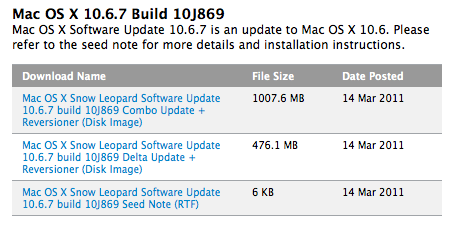
As noted by MacRumors, Apple has seeded a new build of OS X 10.6.7 to developers earlier today. Build 10J869 doesn’t list known issues and, according to developers, Apple keeps asking to focus on Safari, Mac App Store, AirPort, Bonjour, SMB, and Graphics Drivers testing.

The seventh beta of 10.6.7 was seeded last week. This leads us to think the final release of the OS update is nearing completion, also considering the small increment in build version number from last week’s beta.


Apple To Sell Around 3.6 Million Macs This Quarter

At the Q1 2011 earnings call in January, Apple posted record revenue of $26.74 billion with 4.13 million Macs sold. That was a new record for the company, which sold 3.36 million Macs in the Q1 2010 quarter. Piper Jaffray’s analyst Gene Munster believes, basing on data from research market firm NPD, that in the fiscal quarter ending this month Apple will sell between 3.5 and 3.7 million Macs – somewhere below the expectations following last quarter’s results.

For January and February, Apple is trending up 16 percent over the year-ago quarter. That would put Apple at about 3.6 million Macs for the quarter. The street consensus is for Macs to be up in the 22 percent range year over year. The 16 percent gain would put Apple within, but at the low end, of Munster’s expectations of 15 percent to 25 percent.

The fact that Apple was readying its new line of MacBook Pros in February might reflect in slowdowns in sales as consumers were anticipating the new products. But, then again, that could lead to an increase in sales in March – although the figure won’t be included in this fiscal quarter’s results.

One thing is for sure: in the past quarters, Apple usually surpassed analysts’ general consensus on unit sales and revenue, especially thanks to the explosion of iOS devices outside and in the US. Whether the new MacBook Pros and Airs could lead to similar surprises is still to be seen.


Byword: Distraction-less Writing App For Mac

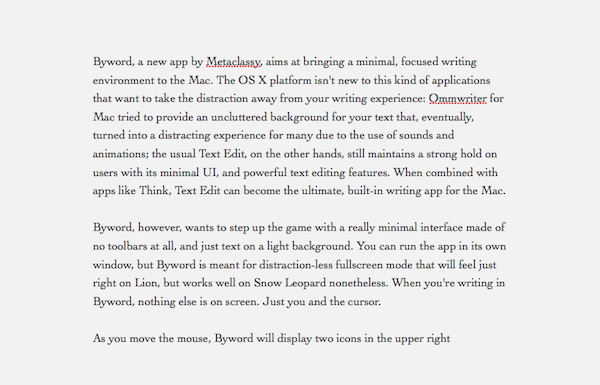
Byword, a new app by Metaclassy, aims at bringing a minimal, focused writing environment to the Mac. The OS X platform isn’t new to this kind of applications that want to take the distraction away from your writing experience: Ommwriter for Mac tried to provide an uncluttered background for your text that, eventually, turned into a distracting experience for many due to the use of sounds and animations; the usual Text Edit, on the other hand, still maintains a strong hold on users with its minimal UI and powerful text editing features. When combined with apps like Think, Text Edit can become the ultimate writing app for the Mac.

Byword, however, wants to step up the game with a really minimal interface made of no toolbars, and just text on a light background. You can run the app in its own window, but Byword is meant for distraction-less fullscreen mode that will feel just right on Lion, but works well on Snow Leopard as well. When you’re writing in Byword, nothing else is on screen. Just you and the cursor. Read more


ScreenFloat: A Better Way To Capture Information with Screenshots

ScreenFloat by Eternal Storms Software – the same developer behind Flickery for Mac – is a new app released in the Mac App Store last night that allows you to take screenshots that will float above other windows on your Mac. Why would you want to do that, instead of the classic CMD + Shift + 4? Because sometimes information can’t be copied & pasted, and a screenshot is the best you can do to have the information you need a few clicks away. With OS X’ default screenshot-taking capabilities, you’ll still be forced to switch between the main app you’re using (say, the browser or a text editor) and the screenshot you just took, perhaps opened with Preview or Quick Look. So Eternal Storms thought that, when screenshots are the best way to quickly capture information, your Mac should be able to let you easily and quickly take a look at the image. Read more


#MacStoriesDeals - HUGE Friday

We’re sending thoughts and prayers to the people of Japan today. Also, today is iPad 2 day! Here are today’s deals on iOS, Mac, and Mac App Store apps that are on sale for a limited time, so get ‘em while they’re hot!

Read more