Posts tagged with "mac"

Skype 5 Out Of Beta, Group Calling Part Of Premium Package

Skype 5 is official this morning, delivering an enhanced interface and group video calling, which is part of a paid premium package and available with a seven day trial. Otherwise, expect to pay $4.99 a day or $8.99 a month for access to the bandwidth hogging feature. Video calls are also seeing the return of the much requested full screen mode. Trimming down the interface, Skype has reduced whitespace and tightened visual accessibility, and have plans to launch a contest where Skype users can design the perfect interface for the Mac.

You can download the latest update by visiting the announcement post on Skype.com, or by visiting this direct link.
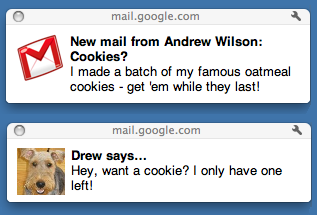

Gmail Notifications Come To The Desktop with Chrome

A few minutes ago Google rolled out a new feature for Gmail and Chrome users: native Gmail notifications. These notifications are only available to Google Chrome users for now, and they’re very similar to Growl in the way they appear on your computer on top of any window you’re currently on. Unlike Growl, though, it all runs natively within Chrome and Gmail.

These notifications, however, seem to be in need of some serious tweaking. Testing them briefly, I’ve noticed that they stick on the desktop, there’s no timeout option (Growl offers this functionality in its preferences) and they’re definitely slower then Growl associated to, say, Mailplane. Also, they don’t work in Safari and Firefox – just Chrome. They work both with new email messages, new “important” messages (in Priority Inbox) and IMs.

To activate Gmail notifications, head over your inbox, then Settings and enable as you can see in the screenshot below.


Reminder: Macworld 2011 Kicks Off Today

Apple may have stopped attending Macworld and announcing new products there, but the expo is doing well. So well that, according to stats provided by CultOfMac, more than 25,000 attendees are expected to walk around booths at the Moscone Center where 230 exhibitors will launch 100 new products. The show’s numbers are up from last year, when they dramatically dropped since Apple confirmed they wouldn’t go to Macworld anymore.

The show is shaping up good,” Macworld general manager Paul Kent told CultofMac.com. “If the numbers go right, we’re going to have about a 25% increase in attendance.

It’s a really fun time,” said Kent. “Macworld is a celebration. There’s a high joy quotient. It’s a fun place to be. There’s not a lot of places were people can do this any more.

We won’t be at Macworld, but we will try to aggregate, starting today through Saturday, the best new accessories, apps and Mac software we’ll be notified of. For all the details about the expo and the schedule of events, go here.


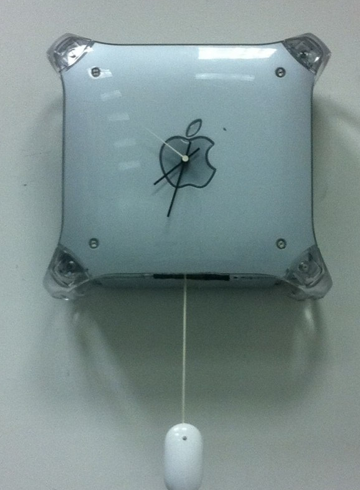
Power Mac Wall Clock & The Mighty Pendulum

No, what you’re reading above isn’t the title of a new movie or a web comic, it’s an actual mod realized by Justin Tyler Moore. He took a Power  Mac G4, cut it down on the side, place a “cheap clock mechanism” inside and made it all work together with a “Mighty Pendulum” – that is, a Mighty Mouse becoming a pendulum.

Full album can be viewed here. Now somebody please make me a Magic Clock. [Engadget via Justin Tyler Moore]


The Finder’s Legendary Selections

The Finder’s Legendary Selections

Terrific post by Mike Lee on the Finder’s selection behavior. Lots of things I didn’t know in there:

If you’re not a software engineer building apps for the Mac, none of this really matters. It’s just an interesting bit of trivia you can use to not really impress anyone.

If you are a software engineer building apps for the Mac, buckle up, because like Past Me, you have no fucking idea how these selections work, which is a real problem, because one day you are going to implement selection behavior in your app and completely fuck it up.

I say go read it no matter if you’re a software engineer or not.

Permalink