Posts tagged with "mac"

FolderWatch Monitors and Syncs Folders On Your Mac

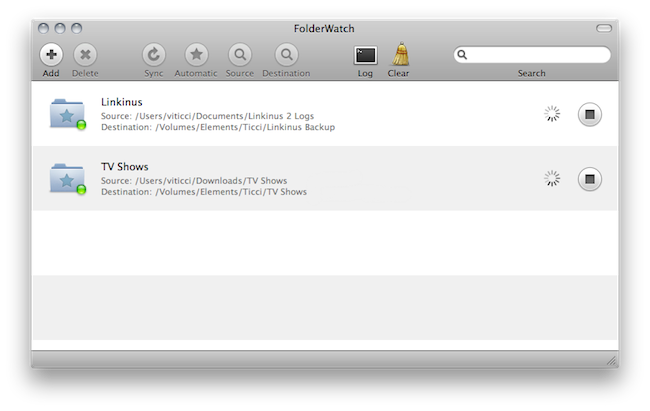
Available at $2.99 in the Mac App Store, FolderWatch is an easy-to-use yet powerful utility that can monitor any folder on your Mac and sync it back to a different location. In FolderWatch, you can specify an unlimited amount of “sources” (e.g. folders) that the app will monitor for changes, like new files or folders within them. Once a “destination” is set, FolderWatch will run in the background and make a carbon copy of the source to the other folder, server or external drive you have set.

FolderWatch, indeed, can copy files to any location that can be added to your Mac’s Finder. Any networked drive, local server, FTP location mounted in the Finder can be selected as a destination. Personally, I am sending backups of media and Linkinus chat logs on to an external USB drive connected to the AirPort Extreme that powers my home network. Everything happens automatically, in the background;  you can choose to make these copy sessions persistent on each change in the destination (backup will start as soon as a new or updated file is recognized) or trigger them manually with the “Sync” button.

The app can also skip files through filters you can create / delete when adding a new rule, and delete files in the destination folder that do not exist in the source. This will let you easily achieve some sort of sync between folders on your OS X machine that’s quite handy. It’s not as complex and feature-rich like FileSorter and Hazel, but it all works smoothly and requires  a very few clicks to be set up.

FolderWatch is available at $2.99 here. More screenshots below. Read more


Toggle Any Twitter Client On Your Mac

Toggle Twitter is a simple and useful script created by Daniel Jalkut of Red Sweater Software which can toggle and make visible most any Twitter client for OS X. Well, at least it comes with built-in support for the most popular ones. The concept behind the script goes like this: we try a lot of Twitter clients every week, or month. Many of us even use multiple clients throughout the day. The problem is, not every client has support for a general hotkey to toggle the visibility of the app.

So if you’re using Twitterrific or Twitter for Mac and you assigned the same keyboard shortcut to both the apps to show them when active, you’d be disappointed to find that other Twitter clients don’t allow you to assign a hotkey. This script comes with a list of popular Twitter apps, but you can add your favorite ones manually with a bit of AppleScript Editor. The ones supported “out of the box” are:  Twitter, Tweetie, Kiwi, Ostrich, Twitterrific, Hibari and YoruFukurou. Read more


Sending Emails From @mac.com Accounts Will Soon Be Impossible

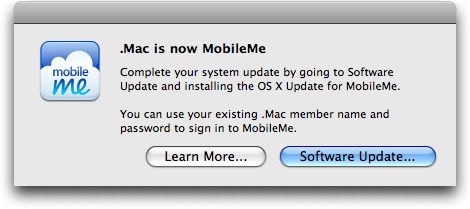
According to a recent thread on Apple’s Discussion boards and a support document on Apple’s website, users of @mac.com email addresses who upgraded to iOS 4.2 are no longer able to send email messages through a @mac.com account unless it was setup prior to updating to iOS 4.2. Alternatively, the @mac.com account details can be synced through iTunes on the desktop, but this won’t enable push for emails.

A user on Apple Discussions explains:

Because of this unannounced development, I had a sneaking suspicion that Apple may be planning to do the same in the future for sending email from @mac.com addresses via www.me.com and a desktop email client.

It appears my suspicion was true. Here are the relevant sections from a Chat Session I’ve just finished with a very nice MobileMe Support agent.

Read more


FileSorter for OS X Applies Rules To Files, Folders

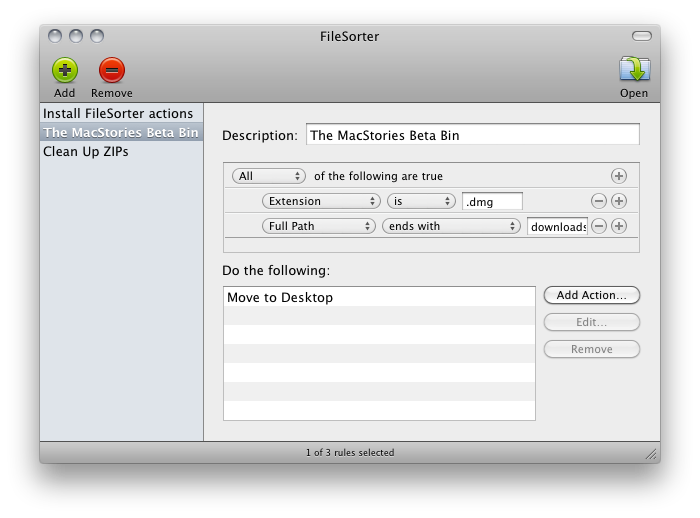
If you’re constantly struggling to manage or automate simple tasks like moving files out of your downloads folder, keeping files in your documents folder organized, or simply need an extra hand to batch automate certain tasks, FileSorter may be of some help. While it’s not as powerful as Hazel, it provides a decent middle ground for users who don’t need Hazel’s background automation. FileSorter applies rules to files much like how you’d apply rules to e-mail: simply specific what kinds of files (by name or extension for example) you’d like to manage, then apply rules to move, copy, or even delete files. After your rules are created, you can simply open the folder you’d like to manage to apply the rules you’ve created – I open my home folder and use rules to specify where FileSorter should look instead of opening everything individually. DMGs get moved to the desktop, folders SpeedDownload creates get removed, and instantly processes are tidied up thanks to the custom rules I’ve created. It’s $7.99 in the App Store, and its manual functionality will be the deciding factor of whether this app is right for you.


Apple Seeds Mac OS X 10.6.7 To Developers

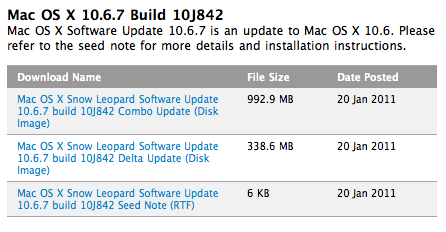
Looks like 10.6.6 wasn’t the last version of Snow Leopard, after all. Earlier today Apple seeded a new version of OS X to developers, 10.6.7. Build number is 10J842. From the release notes, the focus areas are:

  • AirPort
  • Bonjour
  • SMB
  • Graphics Drivers

Mac OS X 10.6.6 was released two weeks ago with support for the Mac App Store. No word yet whether or not support for AirPrint through shared printers will find its way back into this new version of OS X once it’s released.


The AppSumo Do Work Bundle Giveaway

Productivity shouldn’t have to be so hard ya know? Twitter for Mac is the desktop wasteland for lost productivity, iTunes is eating away at my soul thanks to those dozen or so unplayed podcasts, and those sticky notes cluttering the desktop aren’t exactly great for organizing meaningful information. What if we threw out all the distractions, handed you a proper notepad, and even backed up all those juicy documents you’re now furiously creating with the power of the cloud? AppSumo clearly has a thing for picking out all the right apps for the job, and we’re giving away five bundles just in case reading MacStories isn’t productive enough.

Read more