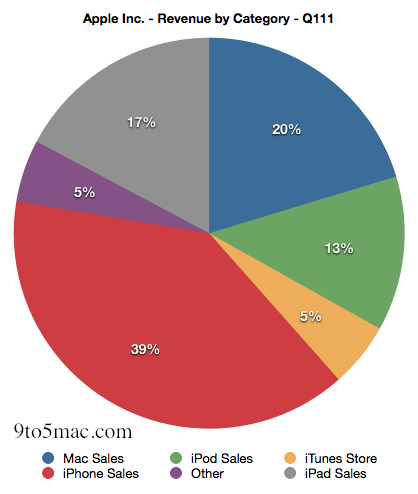
So you’ve probably heard or read about Apple’s gangbusters performance in their Q1 2011 financial results, if not head over here for a full rundown of the data. However for all those that prefer seeing numerical data in graphics or want to truly grasp how significant Apple’s results have been, stick around.
Posts tagged with "mac"
Graphical Analysis of Apple’s Q1 2011 Financial Report
Apple Releases MacBook Air Software Update 2.0, iDVD 7.1.1
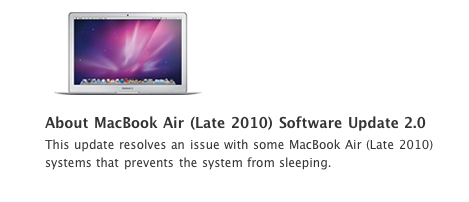
Earlier today Apple released a Software Update for the MacBook Air (late 2010 model) which resolves an issue with some units that prevents system from sleeping. The update is available in Software Update or on Apple’s website. In November, several new MacBook Air owners reported of graphic issues and kernel panics when using the machine.
Apple also released a minor update to iDVD:
This update improves overall stability and ensures compatibility when sending slideshows from iPhoto ‘11 to iDVD.
This update is recommended for all users of iDVD 7.
iDVD 7.1.1 is available here, or in Software Update.
Window Cleaner Hides Inactive Apps To Prevent Desktop Clutter
The desktop isn’t iOS. On our Macs, we tend to open lots of apps and create new windows every minute, and we rarely remember to close them once we’re done with them. Unless you’re a serious window management geek who has installed scripts and utilities to keep your Mac’s screen elegant and neatly organized, free of useless and inactive windows, then I guess you’re looking for a simple, automated way to prevent “window clutter” from taking over your machine.
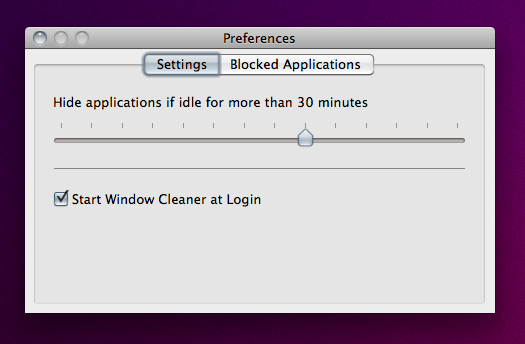
Window Cleaner, a $0.99 utility available in the App Store, does one thing very well: it hides app windows that have been inactive for a certain amount of time. The app, which lives in the menubar, comes with a Preferences panel that allows you to set an amount of minutes after which inactive windows will be hidden. You can opt to start the app at login (recommended) and “whitelist” applications that you want to be open all the time, like DVD Player or Movist, for instance.
This app just works, and even though I guess it’s possible to achieve similar results with a bit of Applescript – the average user will appreciate the advantages offered by a user interface and automatic Mac App Store updates. One thing that I would like to see in Window Cleaner is the possibility to set per-app expiration times, instead of a single amount of time to hide all apps.
Go get Window Cleaner here.
#MacStoriesDeals - Tuesday

Let’s hope Steve Jobs’ health improves quickly! Here’s today’s deals on iOS, Mac, and Mac App Store apps that are on sale for a limited time, so get ‘em while they’re hot! Read more
#MacStoriesDeals - Monday

Let’s hope Steve Job’s health improves quickly! Here’s today’s deals on iOS, Mac, and Mac App Store apps that are on sale for a limited time, so get ‘em while they’re hot! Read more
The AppSumo Supercharge OS X Bundle Giveaway

It might be a brand new year, but that doesn’t mean your brand new Mac has to be left app empty. So we want to supercharge your OS X experience with four applications for a powerful Finder experience, smarter windows, and only the fastest downloader on your side of the MacStories Internet. We’re going to supercharge your Snow Leopard, and all you have to do is enter our giveaway for a chance at one of five bundles.
Handoff Pushes Web Pages From Your Computer to Any iOS Device

One of the features many users wish Apple implemented by default on OS X is the possibility to easily and quickly send any kind of content to iOS over the air. Through the Internet, in seconds, from a computer to the iPhone or iPad. We’re not talking “sync” here: I’m talking about web links, images, maps, phone numbers, Youtube videos “pushed” instantly to an iOS device. The other way around, from iOS to the Mac, would be welcome as well: instead of relying on third-party apps, one could save content and information to consume later on a Mac. Like a video you don’t want to watch while you’re out because, honestly, Instapaper wasn’t meant for video.
Luckily for us, a number of apps that enable OS X to iOS communication over the air have surfaced in the past years, and today we’re taking a look at a new one. The app / service is called Handoff, and it’s probably the simplest I’ve stumbled upon so far. It allows you send web links from your browser to the iPhone or iPad (the iOS app is universal) through a bookmarklet or extension. Read more
#MacStoriesDeals - Friday

Pew Pew Pew! Here’s today’s deals on iOS, Mac, and Mac App Store apps that are on sale for a limited time, so get ‘em while they’re hot! Read more
Twitter for Mac: ‘Tweet’ from Anywhere in OS X
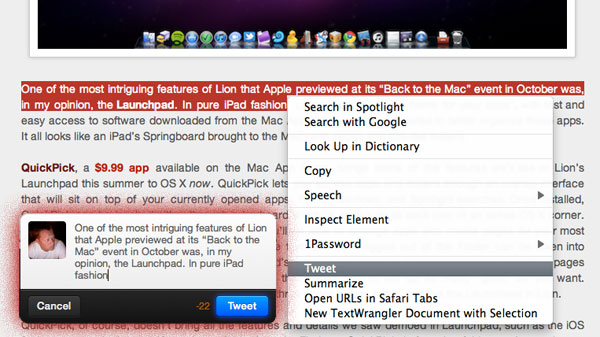
Just a few days ago everyone (including us) was talking about a simple bookmarklet for Safari that sends the site title and link to Twitter for Mac (Tweetie 2). Last night, I even found a Safari extension that did the same thing but also adds a tweet option in the contextual menu (right click) within Safari. Right after I tweeted the link, @SebastienPeek told me “who needs that when you can highlight anything, right click and it’ll show Tweet?” I had no idea what he was talking about, do you? I asked him if it was Safari only and he went one step more and said that it’s system wide, you can do it with a right click and highlight of any text. @BoltClock is credited with pointing me to this discovery. It’s system-wide for all apps that support Mac OS X’s contextual menu item additions. Here’s some visual goodness: