Posts tagged with "mac"

Evernote 3.0 for Mac Released: New Lion-only Features and Redesigned Interface

Following the release of a new Evernote app for iOS earlier today that brought a completely redesigned iPad interface, rich text editing and support for viewing shared notebooks, the Evernote team has followed up with the release of Evernote 3.0 for Mac, a major update to the desktop app that aims at enhancing the experience for new OS X Lion users, as well as introducing several fixes and improvements under the hood for both 10.7 and older OS X versions.

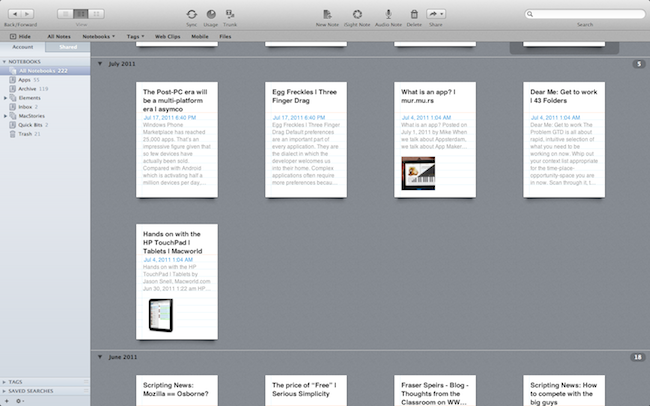
Like Evernote 4.1 for iPad, Evernote 3.0 for Mac brings a new design for the “all notes” view, which, however, unlike the tablet version is not really enabled “by default” and requires users an extra click to be accessed. The Evernote developers, in fact, have decided to unify the Mac and iOS experience by bringing the iPad’s interface back to the Mac only in full-screen mode, which is fully supported on Lion. As I previously teased in my MacBook Air review, the new Evernote for Mac doesn’t simply scale up content when entering full-screen mode (which can be activated from the upper right corner of the application’s window): rather, Evernote changes the standard List, Snippet or Thumbnail views to a new “full-screen Snippet” one that looks exactly like its iPad counterpart. Bigger snippets offer a broader view of text and images within notes, and they also provide a way to check out a note’s creation date and time. Full-screen mode in Evernote also features the same month headers seen on the iPad, it allows you to close them at any time, and it displays a note counter next to each month. Read more




Marked 1.2: Rewritten from the Ground Up

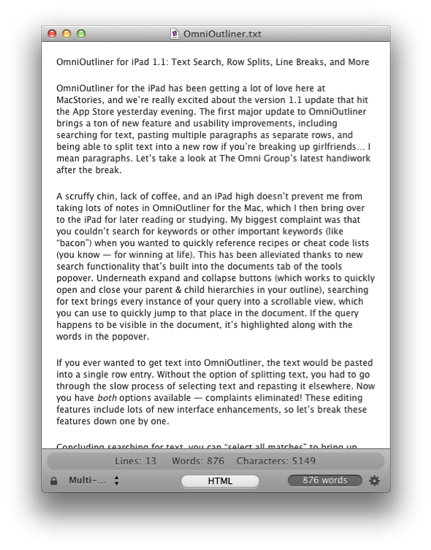
This one goes out to all the Markdown nerds out there (I’m one of them). Marked 1.2 is out, and it’s packed with tons of new features. The interface should be pretty familiar, although you have to like the new persistant word count that you can toggle on and off. CSS styles have been changed up a bit (if you’re not using your own — I used Horizon which is similar to the multi-column style), but asides from the tweaks on the surface of Marked, we have some usability improvements that should make everyone really happy.

Directly interact with the preview and source code using standard highlighting and copy shortcuts to grab text and quickly paste it in the application or web service of your choice. Bundled inside is a new MultiMarkdown 3 binary that’s efficient and better handles big files (for those writing another “Hitchhikers Guide to Markdown” manual), along with web document presentation and compatibility for everything from HTML and ERB (that’s Ruby shenanigans for those wondering). Hit command+E to edit text in your favorite editor, or find where you put down the Master Sword with command+R to bring the file into view from the Finder. Not geeky enough? Marked does a better job of knowing where you are in the document, and will even follow along if you’ve reached the bottom of the page. You can limit text width in the preview, supress link highlighting if you’re going to print (yes, printers till exist), and opening new preview windows can be opened to float on the desktop.

That’s just scratching the surface of what’s available in Marked if you write in Markdown — I use it on a daily basis here at MacStories, and I’m sure you fellow Geekstorians will find it just as useful. Check out the changelog to Marked (it is MASSIVE), read Brett Terpstra’s update, and check it out on the Mac App Store (it’s only $2.99).


Archiving Thoughts with Day One

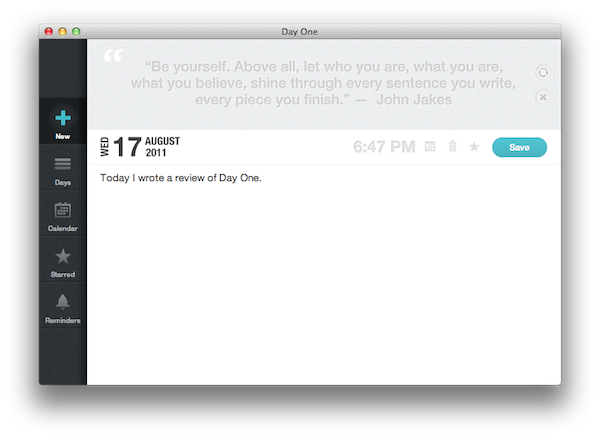
For me, the best way to remember things has always been to write them down somewhere. When I was in high school, I was that kind of student always taking notes on his notebook - furiously jotting down stuff fearing I might forget some important detail. With MacStories today, I try to keep my to-do list neatly organized in OmniFocus by quickly entering anything I have to do at any given time of the day or the week – OmniFocus makes it incredibly easy to enter tasks with a few keystrokes, and I “trust” the system to remember, collect and sort tasks for me so my brain can focus on getting those tasks done or something else entirely. I try to keep my memory in good shape, but when information becomes too much to handle I know I can rely on OmniFocus, Evernote and Dropbox to store all my tasks, notes and documents – the great thing about apps nowadays is that I’m not forced to exercise my brain for this kind of activity.

There’s one thing I never really considered storing in a digital archiving app – memories. I’m talking about things like “what did I enjoy doing today” or “I decided to take a walk with my girlfriend” – specific moments that matter in life, that are important, but which our brains often blur and forget after some time to make room for new data to process and maintain. Let’s be honest: do you remember the exact day and context when you ate that fantastic Italian pizza seven months ago? You probably have a vague recollection of what it tasted like and maybe you even remember the restaurant owner’s Italian accent, but you can’t quite get your mind around every single detail that made that moment so special. Either that, or you were busy tweeting a photo of your pizza while you were eating it.

I try to enjoy every moment, but there’s so much the human brain can remember and it’s perfectly normal something will get lost in the process of assimilating thoughts and processing them to turn them into memories and experiences. Read more