


Here are today’s @MacStoriesDeals on iOS, Mac, and Mac App Store apps that are on sale for a limited time, so get them before they end!
Posts tagged with "mac"
#MacStoriesDeals - Friday
#MacStoriesDeals - Thursday

Here are today’s @MacStoriesDeals on iOS, Mac, and Mac App Store apps that are on sale for a limited time, so get them before they end!
#MacStoriesDeals - Wednesday

Here are today’s @MacStoriesDeals on iOS, Mac, and Mac App Store apps that are on sale for a limited time, so get them before they end!
#MacStoriesDeals - Tuesday

Here are today’s @MacStoriesDeals on iOS, Mac, and Mac App Store apps that are on sale for a limited time, so get them before they end!
Pulp for Mac 2.1: Instant Resume, Push Sync, and Ready for Lion
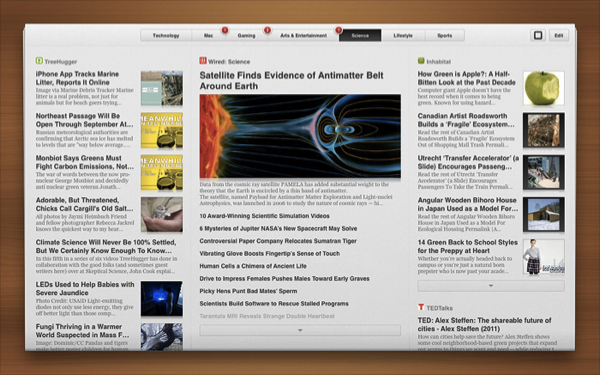
Among all of the changes for the latest version of Pulp for Mac (it hit 2.1 today), we’re really excited about Instant Resume and Push Sync. If you use Pulp across multiple Macs (or between your desktop and the iPad), Push Sync will instantly update your newspaper whenever you make a change on another device. On top of always being right where you left off with Push Sync, Instant Resume will let you return to the exact point you were reading when you leave Pulp and return to the app at a later time. So with reading taken care of, what else do we have in store?
Pulp for Mac 2.1 is a big Lion update that integrates Lion gestures with the newspaper itself — as you move your fingers, the pages will curl (just like directly manipulating the interface on the iPad). Pulp for Mac 2.1 also brings full-screen mode — it’s realistic interface is a great fit for 11- and 13-inch MacBook Airs.
Pulp for Mac is ready for OS X Lion, and available in the Mac App Store for $9.99. See the Acrylic Software blog for more information.
Sparrow 1.3.2: Drag & Drop to Labels, Conversation & Reply Redesigns, and Gradients!
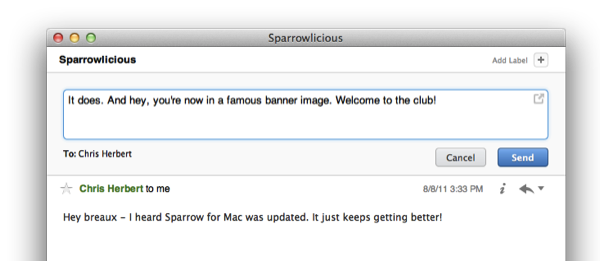
Sparrow has a really sweet Mac update available this afternoon from the Mac App Store, bringing lots of new features and tons of bug fixes to improve its game and interface on Lion. The last update brought full-screen support and a redesigned sidebar that’s significantly improved my workflow, and now that sidebar is getting some additional use thanks to drag & drop. Whether you’re on an IMAP account or using Gmail, you can drag and drop emails into a folder or label to quickly move and archive messages. That alone makes us really happy, but check out what else Sparrow has added past the break.
#MacStoriesDeals - Monday

Here are today’s @MacStoriesDeals on iOS, Mac, and Mac App Store apps that are on sale for a limited time, so get them before they end!
Skype for Mac Gets HD Video Calling with 5.3 Update

Have a Mac with a FaceTime camera or own an external HD video cam? Following Skype’s iPad launch, the latest update for Skype for OS X brings it up to speed with OS X Lion (don’t worry — Skype is still compatible with Leopard and Snow Leopard) while giving you HD camera support for those who have 1.5 Mbps of bandwidth available on the upstream. The latest Skype update can be downloaded here — you can expect to find subtle interface improvements and a boost in stability according to The Big Blog announcement at Skype.
[The Big Blog via The Loop]
Apple Introduces $999 iMac For Educational Institutions
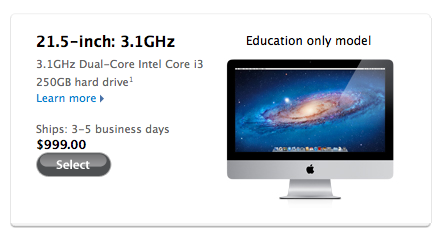
We reported a few hours ago on reports that Apple was set to launch a new iMac model for educational institutions later this month for a sub-$1000 price. Surprisingly we only needed to wait a few more hours for this new model as it turns out that Apple has decided to launch this new educational iMac today — meaning that for educational institutions they can purchase this new iMac model now.
This new iMac model is available for $999 and is directly targeted at educational institutions — individuals are not able to purchase this model. The specifications of this new iMac model are in line with what was stated in the 9to5 Mac report this morning with a 3.1GHz Core i3 processor, 2 GB RAM, 250 GB of hard drive storage and an AMD HD 6750 with 512 MB. This knowledge base article contains all the specifications of this new iMac but interestingly this model (which is dubbed a ‘Late 2011’ iMac) does not have Thunderbolt, that makes this iMac the first new Mac from Apple in 2011 that doesn’t support Thunderbolt.
- 3.1GHz Intel Core i3 Dual-Core
- 21.5-inch LCD
- AMD Radeon HD 6750 with 256 MB
- 2GB RAM
- 250GB Hard Drive
- SuperDrive
- OS X Lion
Updated to include link to specifications page.
[Via MacRumors]