Posts tagged with "mac"

Apple Set To Introduce Education-Focused iMac Model For Less Than $1000?

Apple may be preparing to launch an education-focused iMac later this month according to a report in 9to5 Mac today. The “new” iMac would be less powerful than the current generation of iMacs available to consumers but would be priced at a lower level that is geared towards volume and educational customers.

9to5 Mac claims that this ‘education’ iMac will include a previous generation 3.1GHz dual core processor, 2 GB of RAM, 250 GB of hard drive storage and an AMD Radeon HD 6750M graphics processor with 256 MB dedicated memory — the article doesn’t rule in or rule out the inclusion of a Thunderbolt port. No price is attributed to this machine in the article but they suspect it would be sub-$1000 and cite the example of a previous education-focused iMac being sold for $899 and a similar refurbished model selling for $929 now.

This ‘education’ iMac is expected to silently launch on August 16th, but there is potential for that date to change if Apple wishes — there isn’t any real rush to get this product out as soon as possible. Whilst this rumoured new iMac model is a bit odd and out of the blue, the specificity that 9to5 Mac has in terms of specifications (despite the lack of a concrete price) suggests that it is likely that this is indeed a product about to launch.

[Via 9to5 Mac]


Latest Chrome Canary Build Has Fullscreen for Lion Built In

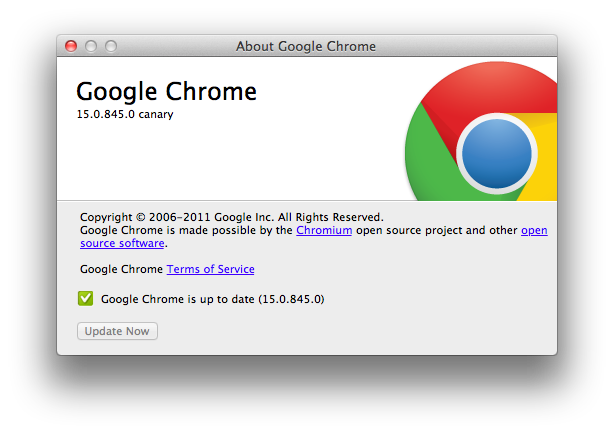
Want native Lion support in Google Chrome? The fast updating browser has an early Canary build out with native Lion support, including native fullscreen mode you’ve always wanted. Sure you can use fullscreen right now in Chrome, but it overtakes your current desktop and doesn’t show up as a fullscreen app in Mission Control. With native integration on its way, we’ve got plenty of screenshots past the break.

Read more


Firm Behind MacDefender Malware Likely Busted in Russian Raid

If you run an organization that runs a rogue pharmacy business and provides malicious support for fake anti-virus programs, then it’s likely you’re going to get caught. Such is the case with ChronoPay, whose offices were raided by Russian authorities at the end of July after the co-founder was arressted for allegedly launching denial-of-service attacks against payment processing firms in an attempt to undercut his competitors. The firm under inspection, ChronoPay, has been found with “mountains of evidence” that show the company running illegal anti-virus scams including MacDefender, which plauged Mac users earlier this year with fake pop-ups that scared users into thinking they had viruses, and even tricked users into supplying their credit card information via registration through the fake virus-removal app. MacDefender was crticized by Ed Bott as the start of something big, although security and malware news has been quiet last month, and the MacDefender threat itself could be diminished after this recent raid.

MacRumors writes,

The last release of MacDefender occurred on June 18. ChronoPay’s offices are raided June 23. A coincidence perhaps, or Russian law enforcement saving Mac users from fake antivirus software.

Companies in the business of writing and supporting malware such as MacDefender can rake in a lot of money in a short period of time. It’s an incredibly profitable business, feeding off the fear of individuals whom become victims to the scare tactics malware and phishing scams employ. While the takedown of ChronoPay will have a significant negative impact in revenues against cyber criminals in the black market, these raids are only short-term wins.

Given fake AV’s status as a reliable cash cow, the industry is likely to bounce back rapidly. Fake AV is extremely profitable, in large part because it is easily franchised.

Individual affiliates can quickly make a lot of money. Fake AV distribution networks pay affiliates between $25 and $35 each time a victim provides a credit card to pay for the junk software.

To spread malware, companies like ChronoPay can hire affiliates who can deploy malware and get paid based on how many systems are infected (how many programs are installed). The end result is that business is profitable for all the parties involved: fake anti-virus programs can offer “malware-removal” at the same market prices as legitimate anti-malware programs (the victim doesn’t know the difference), the distributors of malware are also paid wealthy amounts based on how successful that malware is, and you can begin to see how and why these types of businesses function in black markets. MacDefender was efficient since it preyed on Windows-to-Mac converts who are unfamiliar with legitimate solutions available, and thus fell for its tricks. MacDefender, while it garnered a lot of attention, has seemingly died down and is hopefully squashed for good with ChronoPay out of the picture.

MacDefender wasn’t some malware written by a couple young adults in their basement as we’d expect — this was a rare case of serious malware backed by a company (with a lot of money and mal-intent) and its affiliates. Hopefully, if evidence against ChronoPay turns out to be the real-deal, it’ll lead to more arrests and a safer Internet. The battle is far from won when it comes ot malware, but its always comforting knowing that there’s one less threat to deal with.

[Krebs on Security via MacRumors, (Image via ZDNet)]



Iomega’s “Mac Companion Hard Drive” Combines USB, FireWire, and iPad Charger

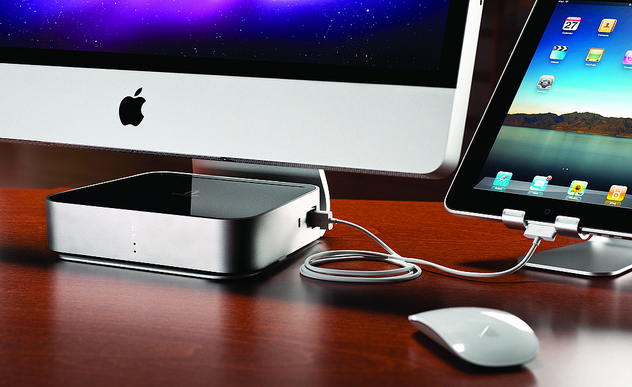
Iomega today announced a new Mac Companion Hard Drive which incorporates a large capacity desktop hard drive (2 TB or 3 TB models are available) with two USB ports to connect a printer or another external drive, two FireWire ports and an additional high-powered USB charging port for an iPad or iPhone.

With the new Iomega Mac Companion Hard Drive, Mac users now have a convenient and stylish way to quickly charge their iPads with the bonus of plenty of new storage capacity for their Mac computer,” said Jonathan Huberman, president of Iomega Corporation. “With more than nine million iPads sold in the last quarter alone, the new Mac Companion Hard Drive is the perfect complement for all those iPad owners.

Iomega has made special effort to make a device that matches and suits Macs, which is most notable in the design and stylings of the device – not only is it sleek with its metal enclosure but the very shape of the Mac Companion Hard Drive has been sculpted so that it sits perfectly on the iMac or Thunderbolt Display stand, tapering out at the back. The whole device is fairly simplistic but stylish in design and it hides all but the high-powered USB port at the back of the device. Iomega has left the three visible sides with nothing but the high-powered port on the right hand side of the device and four LED lights on the front panel of the device to indicate HDD capacity.

The charging port is a high-powered 2.1 Amp hookup that makes it easy and convenient to charge your iPad and other portable Apple devices so they’re ready to go when you are.

The hard drives are also pre-formatted as HFS+ so that they are compatible out of the box with Mac OS X, and whilst the lack of Thunderbolt is a little disappointing, this device looks like a solid option for anyone looking for an external hard drive for their Macs. The Iomega Mac Companion Hard Drive will initially be exclusive to Apple online and retail stores at a cost of $195 for the 2 TB model and $295 for the 3 TB model.

Jump past the break for some more pictures of the device.

Read more


Mockups Show Lion Inspired Changes For Future Firefox

Like Google’s Chrome browser, Mozilla announced earlier this year its intention to move to a fast release cycle for new major versions of its popular browser for Windows, Linux and Mac, Firefox. Following the launch of Firefox 4 in March – which brought major design changes from Firefox 3 – Mozilla moved up its schedule and released Firefox 5 in June, just three months after the previous upgrade, adding a “Do not track” feature for all browsers and platforms, as well as other HTML5 and CSS improvements, although the UI design remained largely unchanged from Firefox 4. As part of Mozilla’s new channel-based alpha and beta testing, Firefox 6.0 is already available as beta, whilst Firefox 7.0 has been made available as early developer preview (or alpha) in the Aurora channel. You can read more about Mozilla’s new “every six weeks” policy here.

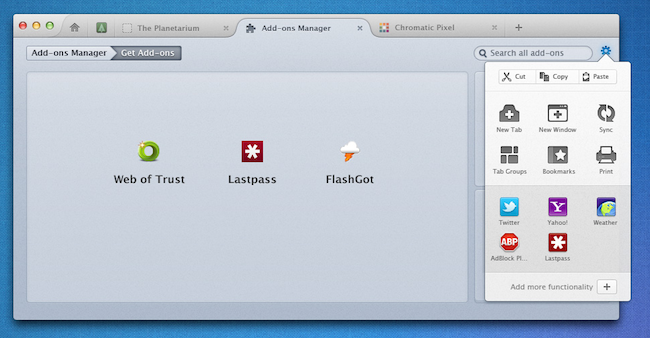
While waiting for the future Firefox 6.0 and 7.0, Mozilla’s Product Visual Designer with the Firefox team, Stephen Horlander, has posted some mockups of what the future Firefox could look like on Windows and OS X machines. The images, posted as a presentation on Mozilla’s website, don’t necessarily reflect any upcoming feature in the next versions of Firefox, but they provide some kind of insight into the kind of discussions the team is having in regards of what could come next.

As you can see from the image above (more here), the proposed solution unifies Firefox’s top bar to accomodate tabs, a Home button, a new tab button, as well as integrated add-on manager that has its own tab (much like Google Chrome opens its settings in new tabs, rather than windows). The mockups have been built on top of OS X Lion, as you can tell from the window texture and the traffic lights in the upper left corner. Speaking of which, Horlander has also played around with Lion’s monochrome and popovers, implementing monochromatic icons for cut/copy/paste, bookmarks and tab controls inside a settings popover accessible from a gear icon next to the address bar. Another screenshot shows native full-screen support with minimal chrome when browsing a website. On the PC side, the proposed changes are similar, but based on Windows’ default theme.

It’ll be interesting to see whether these Lion-inspired changes for Firefox on the Mac will evolve into an actual release in the coming months. Meanwhile, Windows users can install this fan-made theme that takes some of Horlander’s UI elements, and applies them to the current version of Firefox.