Posts tagged with "mac"

Munster: NPD Data Suggests Slow Mac Sales in April

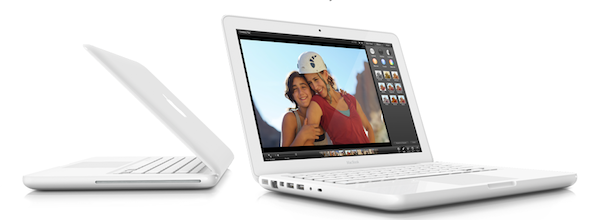
Citing data compiled by the NPD, Piper Jaffray’s Gene Munster says [via Barron’s] Mac sales in April have been slow, mainly due to the MacBook refreshed last year that “set the bar high”, but is still nowhere to be seen in 2011. Indeed, speculation in the past months had pegged Apple’s white MacBook to be headed towards discontinuation, leaving room for the popular MacBook Airs as the new Mac OS X entry line.

Piper Jaffray’s Gene Munster this afternoon offers an update on how Apple (AAPL) computer sales are trending: It was slow in April, he writes, according to U.S. sales data compiled by NPD, thanks to a MacBook refresh a year ago that set the bar high for Apple’s year-over-year comparison.

Apple shipped 9% more units in April than a year earlier, while the Street is modeling the entire June quarter to see an increase of 22%, to 4.2 million units.

NPD data posted in February revealed a 20% increase in year-over-year Mac sales, with Apple set to sell 3.6 million Macs in the quarter – as announced at the Q2 2011 earnings call, Apple eventually sold 3.76 million units. Munster is confident that, in spite of slow sales in April, Apple will hit the Street consensus of 22% growth for the entire June quarter; on the other side of the product line, iPod sales are also expected to be better than the 10-15% drop Munster initially projected.


Cloud Connect for iOS Gets 3.0 Update, Brings Finder Integration

When it comes to remotely accessing your computer, AirPort Extreme station, FTP, Dropbox or WebDAV servers, Cloud Connect Pro is a staff favorite here at MacStories. Not only the app provides a full-featured solution to connect to all kinds of machines, servers and online services, it also offers a neat way to browse files and media in a Finder-like view for iPhones, iPod touches and iPads. We have covered the app a few times in the past, and I was impressed when Antacea managed to port the whole tablet experience to the iPhone.

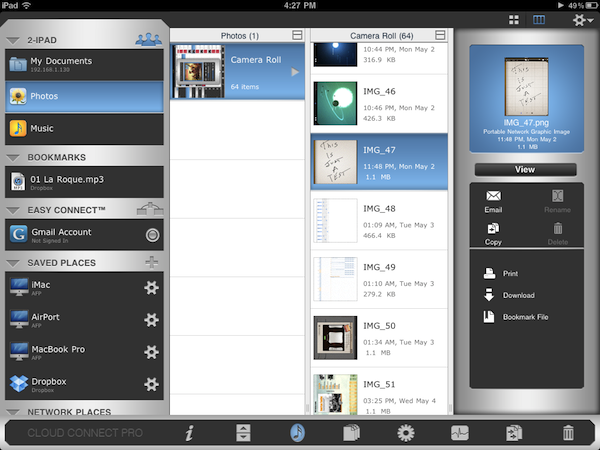
The latest 3.0 update, however, makes things look much better with some UI refinements, a new audio player, a proper PDF viewer and some stability enhancements. The app retains all the functionalities of the previous versions, but introduces some welcome features and little touches throughout the whole package that add a new layer of accessibility, communication with iOS built-in tools, and more. For example, Cloud Connect 3.0 can directly play music stored in the iPod.app library, or visualize photos and videos from the camera roll. Songs can be sent to the new audio player’s playlist, which sits at the bottom of the app and displays album artwork, a list of songs waiting in the queue, as well as an AirPlay button to beam music to external speakers. Speaking of which, gone is the hideous Mac-like dock, leaving room for a more minimal bar of icons. Browsing files and folders in Cloud Connect has been improved, too: alongside the (great) column view, the developers have implemented icon-based navigation to tap your way around the filesystem. What’s cool is that you can switch between views with a tap in the toolbar, and a new button in the column view allows you to bookmark, copy, download & compress or delete any file or folder. On top of that, this new version allows you to browse songs and media from the camera roll using your Mac’s Finder by connecting to the “iPad” device under the Shared tab once Cloud Connect is running. This is by far the easiest way to import photos and music off an iOS device and onto an OS X machine I’ve tried, with Cloud Connect acting as a bridge between the two. It works great.

The app could still use some UI polish (I personally can’t stand those blue and grey tones), but I can see why Antacea decided to focus on adding and refining features for now. The lack of a serious PDF viewer, for example, was a major disappointment in Cloud Connect 1.0: the new PDF viewer introduced in version 3.0 is quite fast and responsive, lets you create bookmarks and search for text within a document.

Other features in Cloud Connect 3.0 include Google Picasa support, possibility to use a Mac or PC as a gateway to connect to other Easy Connect computers, and RDP for HP printers only. At $24.99 in the App Store, Cloud Connect doesn’t come cheap but it’s powerful, easy to use and works both on the iPhone and iPad. The app keeps getting better on each release, and I’m looking forward to some serious design improvements in the next version. For now though, Cloud Connect surely is one of the best ways to manage your remote and local connections. Read more


Apple Releases Lion Developer Preview 3

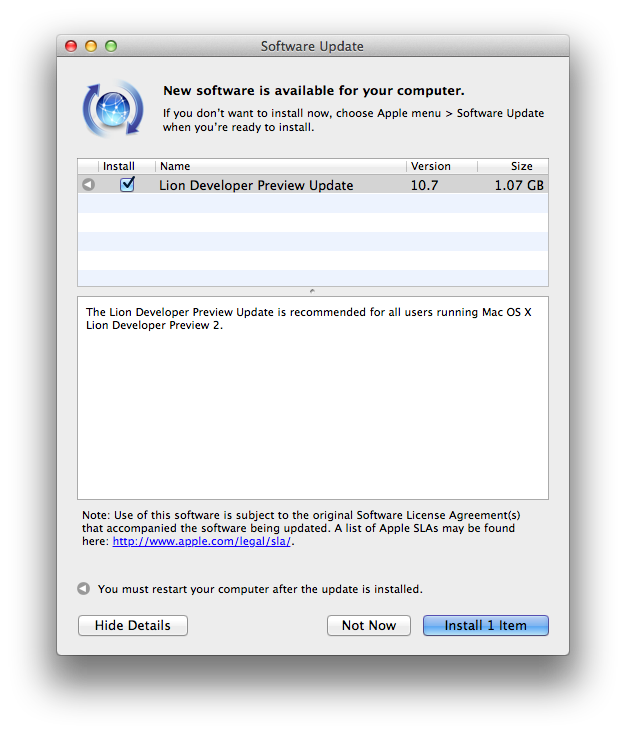
Apple just released a new OS X Lion Developer Preview. The update weighs at around 1.07 GB and it’s available now in the Software Update control panel. It is recommended for all users running Lion DP 2, and Apple’s Mac Dev Center seems to confirm the new build is indeed Lion Developer Preview 3, although the direct link on the Dev Center still goes back to Lion Developer Preview 2. It appears Apple is now seeding Lion DP update only via Software Update.

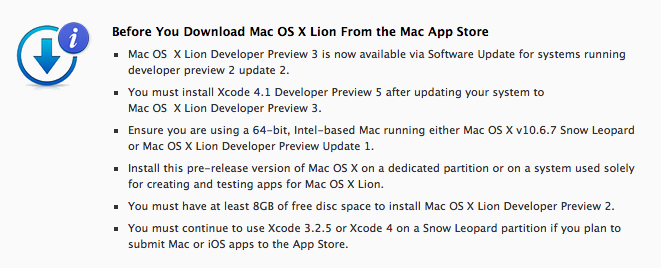
Mac OS  X Lion Developer Preview 3 is now available via Software Update for systems running developer preview 2 update 2.


In the past weeks, Apple released via Software Update two updates for Lion Developer Preview 2; these latest updates to Lion DP 2 are needed in order to install Developer Preview 3 through Software Update. Read more


First Build of Mac OS X 10.6.8 Seeded to Developers

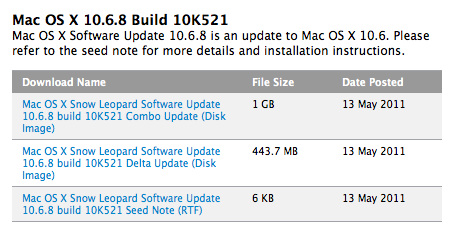
As noted by MacRumors, Apple has seeded the first build of Mac OS X 10.6.8 to developers. The new build, which carries number 10K521, confirms there’s room for at least one more Snow Leopard update before the release of 10.7 Lion, scheduled for this summer.

According to people familiar with the new build, focus areas for 10.6.8 are AirPort, Graphics Drivers, Mac App Store, Networking, QuickTime and VPN. Apple released the last public version of Snow Leopard, Mac OS X 10.6.7, on March 21, including fixes for Mac App Store, SMB servers and Back to my Mac.


Alfred for Mac Adds Sync, Launches AppleScripts with Keyboard Shortcuts

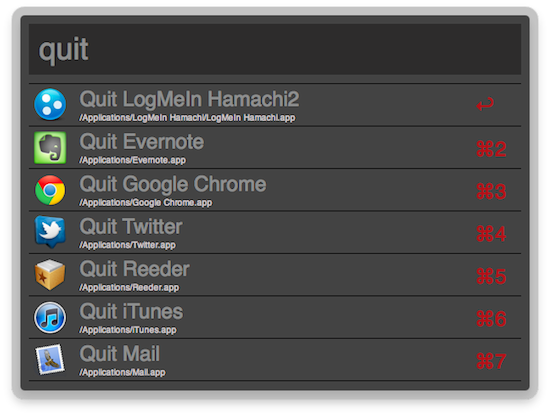
We’re huge fans of Alfred here at MacStories. The minimal launcher for Mac that was released as an alternative to Launchbar and Spotlight quickly evolved into a full-featured solution to browse files, play music from iTunes, manage your system clipboard and check on dictionary definitions. Alfred hasn’t officially reached the 1.0 status, yet the developers iterated so fast in the past months that Alfred has turned into a powerful application launcher packed with functionalities aimed at getting things done using only the keyboard. Looking back at previous Alfred releases, it’s amazing to see how the app went from being a simple way to launch apps to a tool tailored to both casual and power users, thanks to the possibility of creating custom searches, shortening links, browsing the filesystem, and more. The latest stable release of Alfred, 0.9, adds a number of improvements that greatly enhance the feature set of the app.

Alfred 0.9 can now launch any AppleScript on your Mac with a keyboard shortcut. Similarly to how the excellent FastScripts enables you to assign commands to scripts saved locally, the new Global Hotkeys section in the app’s preferences lets you assign a shortcut to a specific script, and run it when Alfred is open without seeing Alfred’s actual window. Just hit the shortcut anywhere on your Mac, and the script will execute. This is true for AppleScripts, files, and apps; being able to run AppleScripts through the app you’re already using for many other things is a very welcome addition, but it’s exclusive to those who bought the Powerpack, which is highly recommended if you want to get the most out of Alfred.

Version 0.9 also comes with Dropbox and iDisk sync, meaning you’ll finally be able to keep Alfred’s settings in sync between different Macs. The app can sync themes, snippets, scripts and custom sites. Alongside iTunes Mini Player improvements, a redesigned Preferences window and several performance enhancements, Alfred 0.9 also introduces new Terminal functionalities: you can run your Terminal commands “silently behind the scenes”, as well as add your own icons to make Terminal commands look like native Alfred actions.

Overall, it’s undeniable Alfred keeps getting better on each release. We don’t know what’s coming in the final 1.0 version, but if previous updates are of any indication I guess the developers are working on something big for the major 1.0 milestone. In the meantime, you can get Alfred here for free, and buy the Powerpack for £12 ($20). Check out more screenshots and the full 0.9 changelog below. Read more


Twitter for Mac 2.1 Released: Updated UI, Lots Of Fixes

Ever since I reviewed Twitter for Mac back in January, the long anticipated sequel to popular Twitter client Tweetie by Loren Brichter, I couldn’t switch to any other app. I tried other Twitter clients for the desktop and I even thought that the web app would be the best fit for me (to keep everything in the browser), but in the end I always kept coming back to Twitter for Mac. For me, the app is just so good, for a number of reasons: live stream allows me to stay on top with the latest tweets and news; direct messages have their own section and they don’t appear in my main timeline; gestures let me quickly switch between sections without lifting my fingers off the trackpad, and most of all they’re fast. Twitter for Mac already had a great feature set, but some people criticized the app when it came out for some design choices implemented by Twitter and Brichter that didn’t make the app behave as “normally” as other apps on the Mac. With Twitter for Mac 2.1, released a few hours ago, the application gets a facelift to finally feature a more native Mac look (just when we were getting used to the old one, but I guess it’s better this way), as well as several interface changes, bug fixes and performance improvements.

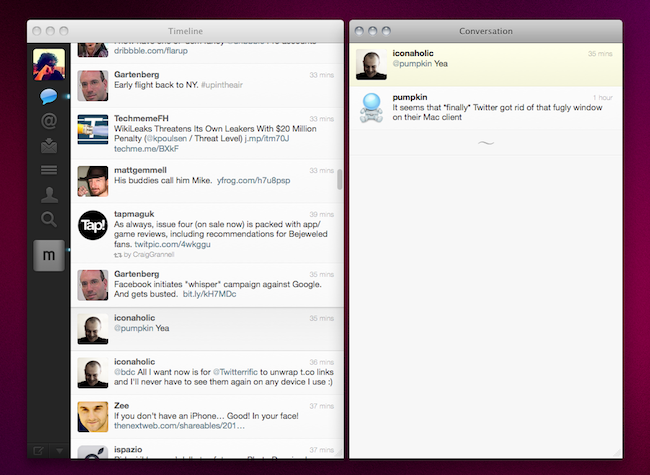
In Twitter for Mac, the main window has been redesigned to sport a native top toolbar with breadcrumb navigation for every time you dig into a conversation view, a profile, or a search. Just like in Tweetie 1 for Mac, you can click on the native toolbar to go back to where you were previously. Embracing a more native look apparently brought some welcome fixes as well, such as the fact that Twitter for Mac doesn’t follow you from space to space anymore. In the 2.1 changelog, the developers mention “bug fixes, enhancements and performance improvements” together with the addition of a console in the preferences for registered Twitter devs.

The biggest change in 2.1 is the possibility to “clone” any view in a separate window. By hitting the triangle icon in the bottom left or the Shift + Cmd + T keyboard shortcut, you’ll be able to open a conversation in a separate view, or your direct messages, a profile view, a search - anything can be cloned in multiple windows that will sit alongside your main timeline. This allows you to have multiple timelines on screen at the same time, multiple searches - I’m pretty sure Twitter power users who need to keep an eye on lots of things at the same time will appreciate this. Speaking of updated views, Twitter 2.1 also gets an updated profile window (with new tabs on top) and a refreshed DM view featuring the popular “chat bubbles” also seen on many iPhone apps.

Other changes have found their way in Twitter for Mac 2.1, too. AppleScript support has been implemented, as well as font size preferences; username and hashtag autocomplete enables you to tweet or mention someone faster from the compose window; t.co links now work much like the iPhone and iPad apps, being displayed as the domain they belong to (example: mcstr.net) without http:// before them. These links are still clickable, but when you copy them you’ll notice they won’t automatically append http:// to the link. I hope Twitter will change this, as it’s something that’s always bothered me on the iPhone and iPad too. For those who know how to unlock secret features in Twitter for Mac (it was possible in the first version with a MacHeist trick), we’re hearing the app features some neat things like pull to refresh and Classic mode.

From what I’ve seen so far, Twitter for Mac 2.1 is definitely an improvement over the last version, and the interface changes will be much easier to get used to this time. Bugs have been fixed, the app feels more responsive overall, the clone functionality to open multiple windows is just great. You can download Twitter for Mac for free in the App Store. Check out more screenshots below. Read more


Wunderlist for Mac Gets Updated to 1.2

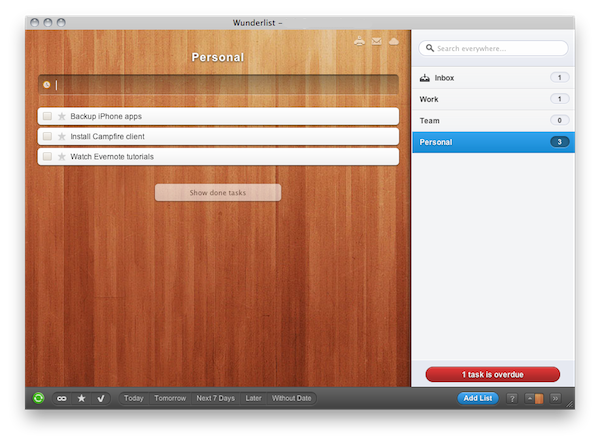
Wunderlist, the excellent task / list manager that works on the web, iOS, Mac and Android that we’ve reviewed several times in the past, got a nice update to 1.2 on OS X earlier today, bringing many features of the popular web application to the desktop. For those unfamiliar with Wunderlist, it’s a little app that leverages the power of cloud sync to make your lists and tasks always available on all your mobile devices, computers, and web browsers. Wunderlist comes with a variety of themes to choose from, and it’s clearly not oriented to OmniFocus power users that fiddle every day with large projects, AppleScripts and complex workflow. Instead, Wunderlist tries to be very simple, but always connected.

The Mac app (review here) was criticized by many for being not so “native” on the Mac platform, and I guess that’s because of the “accelerator” installer package that manages the installation process on OS X - admittedly, the app still doesn’t feel as native as OmniFocus or Things with their AppleScript integration and fancy Cocoa tricks, but version 1.2 is definitely an improvement. The app’s window can finally be closed with a CMD+W shortcut, and the sidebar can be moved on the left or right. The desktop app heavily resembles its web counterpart – more so that it even looks like the entire web app has been built into a Mac package. You can now drag files into the “notes” section of a task and have the path to the file saved in a clickable format; similarly, web links are now correctly recognized and synced to the cloud. Alongside bug fixes, real time search, speed improvements and better filters, the app comes with a shiny new icon and login screen.

Wunderlist may not be the ideal solution for OmniFocus geeks, but the team behind it is surely building a reliable solution that works anywhere at anytime, and it’s perfect for keeping lists of tasks always synced across different platforms and devices. Get Wunderlist here, for free.