Posts tagged with "mac"

Mac Sales Up 27% In First Quarter of 2011

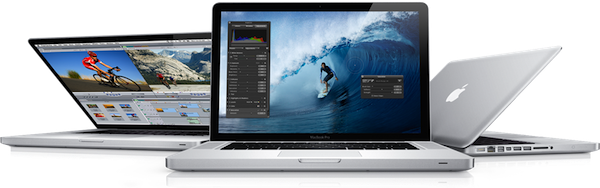
Quoting a research note issued by Piper Jaffray’s Gene Munster to clients this morning, BusinessInsider reports the Mac platform has seen a terrific rise in sales during the first quarter of 2011 in the United States. By summarizing data from NPD, the report details how the release of the new MacBook Pros in late February drove a 47% increase in sales year-over-year in the month of March, with an average 27% growth in the first quarter.

That 47% uptick followed growth of 20% in January and 12% in February, for average of 27% over the first quarter of 2011. That stands in stark contrast to the 3.2% drop in worldwide sales reported last week by IDC.

Bottom line: Munster expects Apple (AAPL) to report Mac unit sales in the range of 3.6 to 3.7 million, ahead of the Street’s consensus of 3.6 million.

So while the worldwide PC industry was seeing a serious decrease in sales in Q1 2011, Apple apparently managed to achieve a 27% growth with (allegedly) high Mac sales in the US. Like previous reports suggested, however, overall iPod sales should be down from last year – quite possibly because of the media playback capabilities of iPhones and iPads.

Analysts polled by Fortune two weeks ago claimed Apple could have sold nearly 4 million Macs in the second fiscal quarter of 2011 (which ended on March 26). Apple is set to announce the Q2 2011 financial results on April 20th.


#MacStoriesDeals - Monday

We’ll tweet the daily deals at @MacStoriesDeals as well as exclusive weekend deals too, so please follow! Here are today’s deals on iOS, Mac, and Mac App Store apps that are on sale for a limited time, so get ‘em while they’re hot!

Read more


Access Recent Apps, Volumes, Servers and Documents From Your OS X Dock

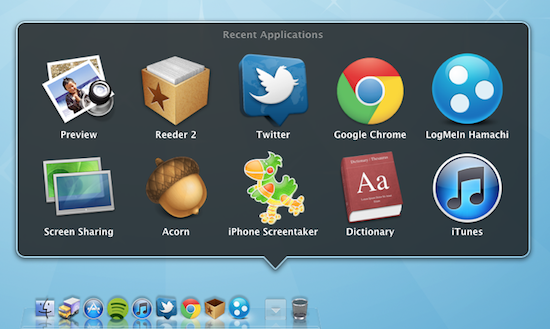
Here’s an interesting tip about the OS X dock I absolutely didn’t know about, which was brought to our attention by OS X Daily. With a simple Terminal command, you can create a new “smart” stack item in your dock that will automatically collect your most recent applications, servers you’ve connected to, documents, volumes and Favorite items. The stack – which needs to be manually enabled – comes in handy if you’re looking for a quick way to re-open items you’ve recently launched – and especially for Servers and Volumes, this means the stack is collecting my most used items, not just the recent ones.

To enable the recents menu, type this in the Terminal:

defaults write com.apple.dock persistent-others -array-add ‘{ “tile-data” = { “list-type” = 1; }; “tile-type” = “recents-tile”; }’

Then, to relaunch the Dock:

killall Dock

The new stack will automatically be placed in the rightmost section, next to the Trash. To remove it, simply drag it out of the Dock. I like this menu because it’s making me save lots of time that would have been spent into the Finder otherwise (the method above worked just fine for me on Snow Leopard 10.6.7). Check out more screenshots below.

Update: if the Terminal command throws you a syntax error, make sure to copy the plain text from OS X Daily.

Read more


#MacStoriesDeals - Friday

We’ll tweet the daily deals at @MacStoriesDeals as well as exclusive weekend deals too, so please follow! Here are today’s deals on iOS, Mac, and Mac App Store apps that are on sale for a limited time, so get ‘em while they’re hot!

Read more


Printopia 2.0: AirPrint From iOS To Your Mac Apps

When I first reviewed Printopia by Ecamm back in November, I was impressed by how easily the app allowed me to send documents from an iOS device to a shared printer on OS X via AirPrint. The problem with AirPrint we discussed in November – which Apple hasn’t fixed yet – is that unlike the first betas of OS X 10.6.5 and iOS 4.2, the final versions of these OSes didn’t ship with AirPrint support for shared printers. AirPrint works out of the box with a bunch of HP printers, but Apple promised last year that it would also work with any printer previously configured and shared on a Mac. No need to install additional drivers on iOS: as long as a printer was shared on OS X, it would show up in AirPrint. With 10.6.5 final, that wasn’t the case. AirPrint support for shared printers was pulled at the last minute, and a series of unofficial hacks surfaced to re-enable it without reverting back to a beta of 10.6.5 (Mac OS X has reached version 10.6.7 since then). Among those hacks and apps, Printopia was without the doubt the most elegant one because it provided a GUI in System Preferences to manage shared printers, and allowed you to print a document to a virtual location on your Mac or Dropbox.

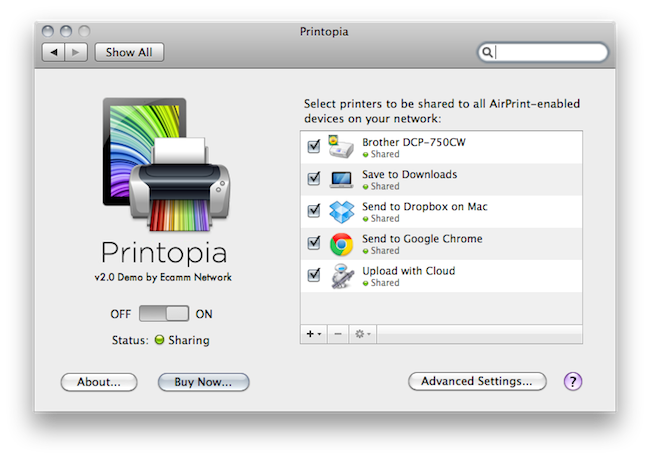
Version 2.0 of Printopia, released yesterday, builds on the great virtual printing functionality by adding support for unlimited printers in any location (could be your Downloads folder, the Desktop – you name it) and PDF workflows and applications as well. The feature is more exciting than it sounds on the changelog: with Printopia 2.0, you can send a document from your iOS device (through AirPrint) to any app on your Mac that can preview, say, PDFs. Example: I’m on my iPhone, and I find a PDF I want to read on my computer. Both devices are on the same local network (but it should work with this kind of VPN setup as well), and Printopia is running on my Mac. I take the PDF, and “print it” to Evernote. The document will automatically open in the Evernote app on my desktop. I tested this with Google Chrome, Preview, DEVONthink, Yojimbo, Numbers, Pages – it works really well. But there’s more. Not only you can print to applications, you can also print a document to an Automator workflow that supports the file type. Here’s another example: last night, I sent a PDF document to CloudApp’s own “Upload with Cloud” workflow, and AirPrint sent the document to CloudApp, automatically returning the file’s URL on my desktop.

Printopia 2.0 opens the door to a lot of possibilities for virtually printing documents anywhere on your computer, and of course support for physical shared printers is still there. Printopia 2.0 also introduces support for passwords you can assign to any virtual or real printer and settings for paper size / tray and colors.

If you want to get the most out of AirPrint and you have a Mac, Printopia is the utility to install. With support for real and virtual printers and system-wide integration with apps and Automator, Printopia is a full-featured solution to get any document from iOS on to the desktop. A demo version is available, and a full license can be purchased at $19.95. More screenshots below. Read more


#MacStoriesDeals - Thursday

We’ll tweet the daily deals at @MacStoriesDeals as well as exclusive weekend deals too, so please follow! Here are today’s deals on iOS, Mac, and Mac App Store apps that are on sale for a limited time, so get ‘em while they’re hot!

Read more


#MacStoriesDeals - Wednesday

We’ll tweet the daily deals at @MacStoriesDeals as well as exclusive weekend deals too, so please follow! Here are today’s deals on iOS, Mac, and Mac App Store apps that are on sale for a limited time, so get ‘em while they’re hot!

Read more


Charity: The Humble Frozenbyte Bundle

Want to support cool charities like the Electronic Frontier Foundation, or the Child’s Play while paying what you want for five DRM free games that works on Windows, Mac, and Linux? The Humble Frozenbyte Bundle offers five titles (one prototype title available on Windows only), the first three of which include the games’ original soundtrack with purchase. Trine and Shadowgrounds are the two big names, both consisting of frantic gameplay between a challenging platform and top-down shooter. The other bonus titles, Splot and Jack Claw, are development games; Splot is available for pre-order, while Jack Claw (halted in development) is a Windows only title that requires an Xbox 360 controller to play. You can grab these five titles at any price, but we ask that you guys be fair and toss in a little extra to support a great cause (and the Humble Bundle folks themselves). You can adjust how much you want to donate to each charity at checkout, paying via Paypal, a credit card, or Google Checkout.

For more information and to donate visit: The Humble Frozenbyte Bundle

Read more


#MacStoriesDeals - Tuesday

We’ll tweet the daily deals at @MacStoriesDeals as well as exclusive weekend deals too, so please follow! Here are today’s deals on iOS, Mac, and Mac App Store apps that are on sale for a limited time, so get ‘em while they’re hot!

Read more