Posts tagged with "mac"

Opera 11.10 Released With Smarter Speed Dials, Improved Turbo

Alternative web browser Opera has always been the one that experimented with features and user interface schemes before the “big players” like Firefox and Chrome implemented them. This is true for tabs, tab groups, speed dials, and many other little touches the Opera developers played with over the years. The browser failed to gain a massive traction among average users, but it’s got a loyal userbase willing to test the latest beta or alpha version. Opera released today a new stable build for Mac, Windows and Linux – initially codenamed Barracuda and now available for download with version number 11.10.

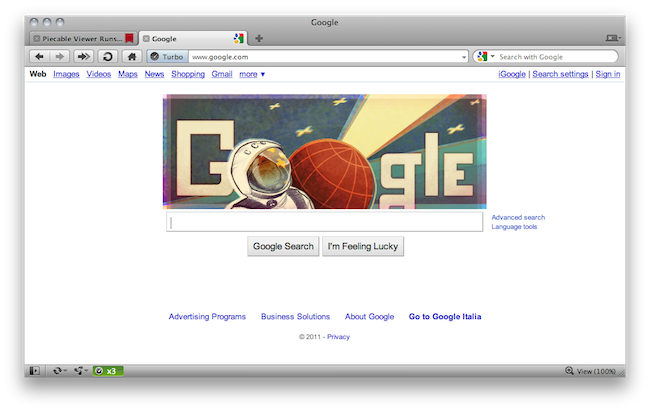
Opera 11.10 builds on the features introduced in Opera 11 such as tab stacking and extended HTML5 support by further refining the interface, improving support for CSS3 and HTML5 standards, and introducing a tweaked version of Opera Turbo that works through Google’s WebP engine. First off, Speed Dials have been slightly redesign to feature a “flow layout” that allows users to decide the numbers of columns to display and the size of thumbnails – which, by the way, should offer crisper graphics. You can add as many Dials as you want without limitations.

A Mac-specific tweak involves the browser tabs that now have a closing animation on OS X machines. More importantly, the Turbo functionality that’s aimed at speeding up browsing on slow connections like tethered phones and public hotspots has been improved in the way it handles compressions using WebP. Images should be compressed more, better and faster than before, but we’ve noticed some issues with heavy compression cutting off parts of an image or graphics from websites.

Check out the full 11.10 changelog here. The new version of Opera is available here, and there’s a demo video embedded below. Read more


The iPhone Goes Where No Mac Has Gone Before

The iPhone Goes Where No Mac Has Gone Before

Francois Fortier shares his experience with using Macs and iOS devices in a corporate environment:

However, the iPhones and iPads seemed to have crept into most Enterprise class companies from the top floor boardrooms as well as the server rooms in the basements. Not only does the current version of iOS 4.3.1 play nicer with Exchange Activesync than Windows Phone 7 and even Android but its extra management features provide comparable security to BlackBerry Enterprise Server managed BlackBerry’s. In fact, the iPhone comes out tops on this fight too since it doesn’t require a Client Access License for it to be managed. Apple has even released a free tool to allow Exchange Admins to lock out other iPhone features if the need be. Here is a table explaining the current state of the mobile OS landscape.

It is no secret that Apple has managed to capture the heart of corporate America with the latest Enterprise additions to iOS for iPhones and iPads. As several Fortune 500 companies deploy or pilot iOS devices instead of BlackBerrys, there’s a trend among IT departments and employees: why would you need to use a separate “corporate device” when you can just activate the enterprise features and switch between your personal and business-related apps on a single iPhone or iPad? Sure BlackBerrys still have a couple more functionalities than iPhones or iPads, but the 400,000+ apps available in Apple’s App Store are the key factor here. Employees don’t want to swap devices anymore.

Fortier also writes:

So there I was in between floors checking the location of the next meeting while lugging my colleague asked me to review the notes from the last for one of the action items, and this is when it occurred to me. No one was looking at me weird because I wasn’t using a BlackBerry or trying to wake a HP EliteBook from Vista Sleep of death mode. In fact it seemed perfectly acceptable for me to checking my iDevices, getting the info out quickly and move along

You know something has changed when people are writing books on how to use the iPad in corporate with apps available from the App Store. Macs might as well be growing fast in enterprise, but iOS devices have done in 36 months what OS X couldn’t in 35 years. [via Forkbombr]

Permalink

#MacStoriesDeals - Monday

If you didn’t already know, we’ve set up a new twitter account for Deals, it’s @MacStoriesDeals. We’ll tweet the daily deals there as well as exclusive weekend deals too. Help spread the word! Here are today’s deals on iOS, Mac, and Mac App Store apps that are on sale for a limited time, so get ‘em while they’re hot!

Read more


“Post PC” Doesn’t Mean “Sans PC”

“Post PC” Doesn’t Mean “Sans PC”

Michael Gartenberg weighs in on the “post PC” argument started by Steve Jobs at the iPad 2 media event, when he said devices like the iPad are the perfect example of the “post PC” technology era we’re living in:

The iPad and other devices are not here to displace the PC (by which I mean all personal computers, whether they’re Macs or PCs running Windows). In fact, post PC means after PC, a new generation of products that build on the PC. What it doesn’t mean is sans PC, that is, without PC. The personal computer will no doubt be with us for a very long time… but that doesn’t mean we’re not in the post-PC world.

Gartenberg is right, I don’t think Steve Jobs meant “iPads will replace desktop computers in the next 12 months” – rather, something more like “We’ve seen the numbers, and the iPad is clearly a device different from computers that average users actually want to buy”.

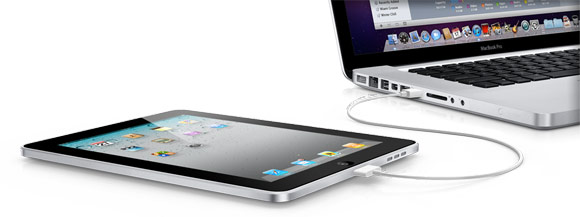
Think about it: iPads can’t “replace” Macs yet if only because a Mac is needed to develop iOS apps. And of course, hundreds of other tasks iOS devices still can’t perform. For this reason I think associating “post PC” with “replacing” is a wrong assumption. It’s obvious the iPad can’t replace a desktop Mac – and yes, also because of the cable that’s needed to sync content. But are we seeing a trend? Yes. And what about 10 years from now – what will the average PC sold at Best Buy look like?

“Post” doesn’t mean “sans”, but the post-PC era has definitely started.

Permalink

How many Macs did Apple sell last quarter?

How many Macs did Apple sell last quarter?

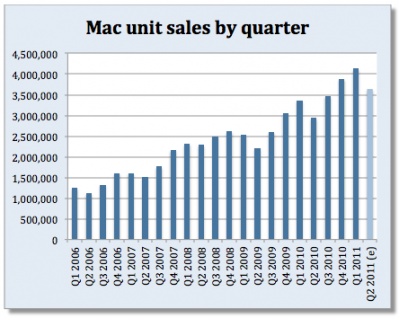
None of the 43 analysts we polled – professional or amateur – think Apple sold more than 4 million Macs in the quarter that ended two weeks ago. But as a group they expect unit sales grew even faster – nearly 24% year over year. The high estimate of 3.865 million – submitted by both Traderhood’s Nicolae Mihalache and Apple’s Gold’s Dennis Hildebrand – represents more than 31% growth year over year.

For Apple’s first quarter fiscal results for the new year, Apple reported 4.13 million Macs sold following a strong demand for the MacBook Air. While we have seen updates in the MacBook Pro which include Sandy Bridge and Thunderbolt, analysts are predicting that Macs will see a decreased demand this quarter, which is in line with the sales trends from 2006. Analysts are also predicting that Apple will sell 19 million iPhones for the second quarter according to Fortune.

Permalink

#MacStoriesDeals - Friday

If you didn’t already know, we’ve set up a new twitter account for Deals, it’s @MacStoriesDeals. We’ll tweet the daily deals there as well as exclusive weekend deals too. Help spread the word! Here are today’s deals on iOS, Mac, and Mac App Store apps that are on sale for a limited time, so get ‘em while they’re hot!

Read more


Witness Remotely Locks Your Mac, Detects Motion, Sends You Mugshots

Developed by Orbicule, the creators of computer-tracking utility Undercover, Witness is a new application that’s aimed at remotely locking your Mac, and detecting motion in front of your computer’s camera. Let’s face it: every time we’re away from our Macs, we think about what could ever happen if someone broke into our house or office and stole them. Whilst data protection is essential and there many things you can do to hide critical information stored on your machine (such as disabling automatic login, choose a strong system password or keep everything safe into 1Password, possibly synced with Dropbox), knowing the identity of the person that actually took possession of your computer – or entered your office without authorization – is a whole different story. Unless you’re planning on setting up a relatively expensive home monitoring security system (even with DIY sets, you’re still going to spend a couple of hundred bucks + software to monitor everything) or just carrying your MacBook away with you all the time, there’s no easy to know what’s happening in front of your computer’s screen, and take action at the same time. Orbicule wants to provide an easy and powerful solution to remotely lock a Mac from virtually anywhere, detect motion and be notified with photos and video of who’s doing what in your house.

There are many tweaks and hacks available online to turn your iSight into a security system, as well as utilities to lock your Mac from an iPhone or iPad while on the go. I bet many of you have heard of these methods or at least tried to follow one of those tutorials once. Witness, however, does exactly what a great app has to do: it combines multiple functionalities into a beautiful, easy to use and full-featured package that requires minimal setup and just works. Witness can lock and unlock your Mac from an iPhone, an iPad or the web browser thanks to a system that’s based on an account you’ll have to create on Orbicule’s website. Once authenticated with the account on your Mac, iOS devices and browser, you’ll be ready to start using Witness and be alerted of activity in front of your Mac’s iSight. Witness also requires a desktop companion app that comes as an installer and will restart your computer upon successful installation. The Mac app handles the location of your computer, your account’s credentials, and also lets you decide whether Witness itself or the screensaver should be used to lock OS X. If you choose Witness, a panel will come in the foreground asking for your system’s password. If you don’t want to use the iSight and you have configured other cameras with your Mac, you can choose a different capturing device from the Preferences.

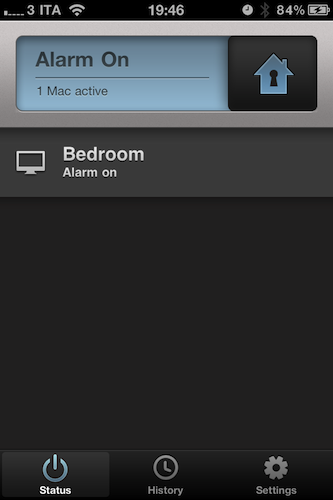
On the iOS side of things, Witness comes with a free remote app that runs universally on iPhones and iPads. The UI is gorgeous, and the app provides a set of functionalities to lock a Mac with a simple swipe, monitor your various machines associated with a Witness account, and browse the history of alerts you’ve received. Being heavily based on the cloud, Witness for iOS will constantly check for updates, pulling images and videos from the Internet if they’re available (meaning: you’ve locked your Mac and something’s going on). If an alert comes in via push notification, you’ll be able to see pictures and videos recorded by your iSight (audio is supported, too). You can email photos directly within the app, and delete alerts you’re no longer interested in. All these features are available on the web counterpart as well.

In my tests, Witness has been very reliable and quite fast both on WiFi and 3G. I was able to lock / unlock my iMac in seconds, receive push notifications moments after motion was detected and download full sets of photos and videos shot through my iSight. A Witness account will cost you $39 as a one-time fee (student licenses available) and gives you access to OS X, iOS and web tools. I highly recommend Witness not only because of the beautiful interface approach and usability – it’s the “just works” factor that combines a utility to lock a computer and turn it into a home alarm system that truly impressed me. You can create a Witness account here, and check out more screenshots below. Read more


#MacStoriesDeals - Thursday

If you didn’t already know, we’ve set up a new twitter account for Deals, it’s @MacStoriesDeals. We’ll tweet the daily deals there as well as exclusive weekend deals too. Help spread the word! Here are today’s deals on iOS, Mac, and Mac App Store apps that are on sale for a limited time, so get ‘em while they’re hot!

Read more


#MacStoriesDeals - Wednesday

If you didn’t already know, we’ve set up a new twitter account for Deals, it’s @MacStoriesDeals. We’ll tweet the daily deals there as well as exclusive weekend deals too. Help spread the word! Here are today’s deals on iOS, Mac, and Mac App Store apps that are on sale for a limited time, so get ‘em while they’re hot!

Read more