

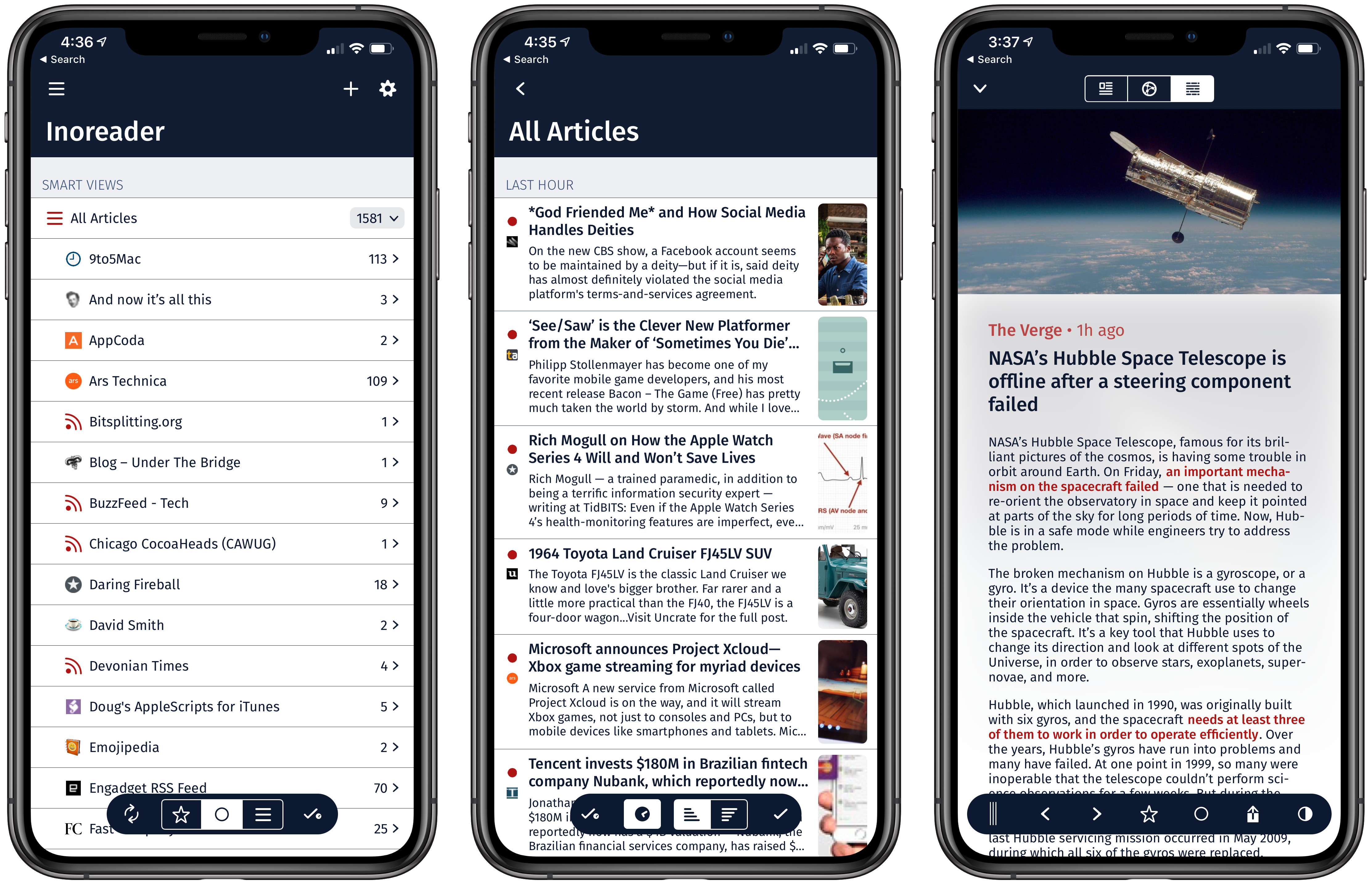
There are a lot of good RSS readers on iOS that are continually being updated with new features and other improvements. It’s a competitive category, and Fiery Feeds, which is one of my favorites, was just updated with a focus on design and new ways to filter the feeds you follow.
Apple Releases Bug Fix Update to iOS 12
Apple has released iOS 12.0.1, which fixes several bugs that affected users after upgrading to iOS 12.
One of the highest profile issues affected the iPhone XS, which sometimes failed to begin charging when connected to a Lightning cable. Other users reported that after the iOS 12 update, their iPhones would connect to WiFi networks at 2.4 GHz instead of 5.0 GHz even when both were available. Apple’s release notes say both issues have been fixed. The update also addresses a Bluetooth connectivity issue and a problem where subtitles sometimes didn’t appear in video apps.
iOS 12.0.1 includes a small design change on the iPad too. With the iOS 12 update, the ‘.?123’ key was moved. With version 12.0.1, that key has been restored to its previous position on the software keyboard.
 Our Apple Watch Faces, Complications, and Docks
 Federico
AppStories Episode 82 - Our Apple Watch Faces, Complications, and Docks
0:00
38:25
38:25
This week, Federico and John talk about how they’ve set up their new Series 4 Apple Watches including the complications they use, new apps they are trying, and what’s in their Watch docks.
Review: Yoink Adds Support for Latest Mojave and iOS 12 Features
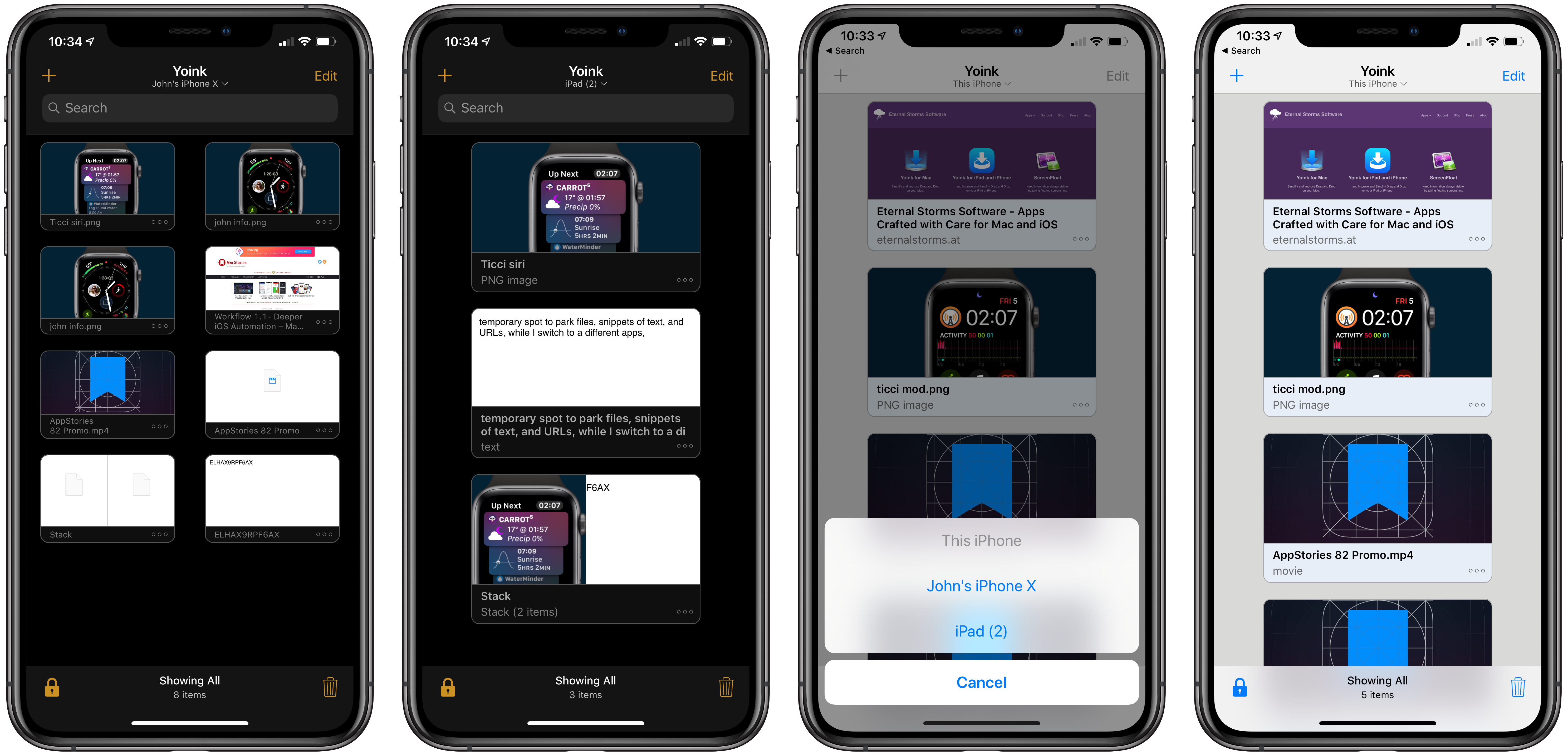
Yoink is the app I use on my Mac every day as a temporary spot to park files, snippets of text, images, and URLs. By itself, Yoink for Mac has been a fantastic time-saver. The latest updates to Yoink for iOS and the Mac, however, have been transformative. There’s more that can be done to support the cross-platform use of Yoink, but Handoff support, which makes it simple to move data between my Mac and iOS devices, and several other new features have already added a new dimension to the way I use the app and embedded it deeper into my day-to-day workflow than ever before.
 Overcast
...
App Debuts
...
Q&A
...
Apple Strongly Refutes Bloomberg Report That Its Servers Were Compromised by Malicious Chips
Earlier today, Bloomberg published a story claiming that Apple and Amazon discovered tiny, malicious chips on Elemental network servers built by Super Micro. According to the story, the chips were the work of Chinese spies and designed to infiltrate the tech companies’ networks. Shortly after publication, Apple responded in an email statement strongly refuting Bloomberg’s account.
Amazon’s chief information security officer similarly discredited the claims saying in part:
There are so many inaccuracies in this article as it relates to Amazon that they’re hard to count.
A short time ago, Apple elaborated on its initial statement to Bloomberg on its Newsroom website:
In response to Bloomberg’s latest version of the narrative, we present the following facts: Siri and Topsy never shared servers; Siri has never been deployed on servers sold to us by Super Micro; and Topsy data was limited to approximately 2,000 Super Micro servers, not 7,000. None of those servers have ever been found to hold malicious chips.
Topsy is a startup that Apple acquired in 2013.
For over 12 months, Apple says it repeatedly told Bloomberg reporters and editors that they and their sources were incorrect.
We are deeply disappointed that in their dealings with us, Bloomberg’s reporters have not been open to the possibility that they or their sources might be wrong or misinformed. Our best guess is that they are confusing their story with a previously-reported 2016 incident in which we discovered an infected driver on a single Super Micro server in one of our labs. That one-time event was determined to be accidental and not a targeted attack against Apple.
Security and privacy are cornerstones of Apple’s business that it uses to differentiate the company’s products from competitors’, so the fact that the company takes this sort of claim seriously isn’t unusual. This also isn’t the first time Apple has taken Bloomberg to task on the veracity of its reporting. However, the forcefulness of the responses from Apple and Amazon, followed by Apple’s press release on its Newsroom site is something that is unprecedented. It will be interesting to see whether Bloomberg responds.
Philips Hue App Adds Siri Shortcuts Support
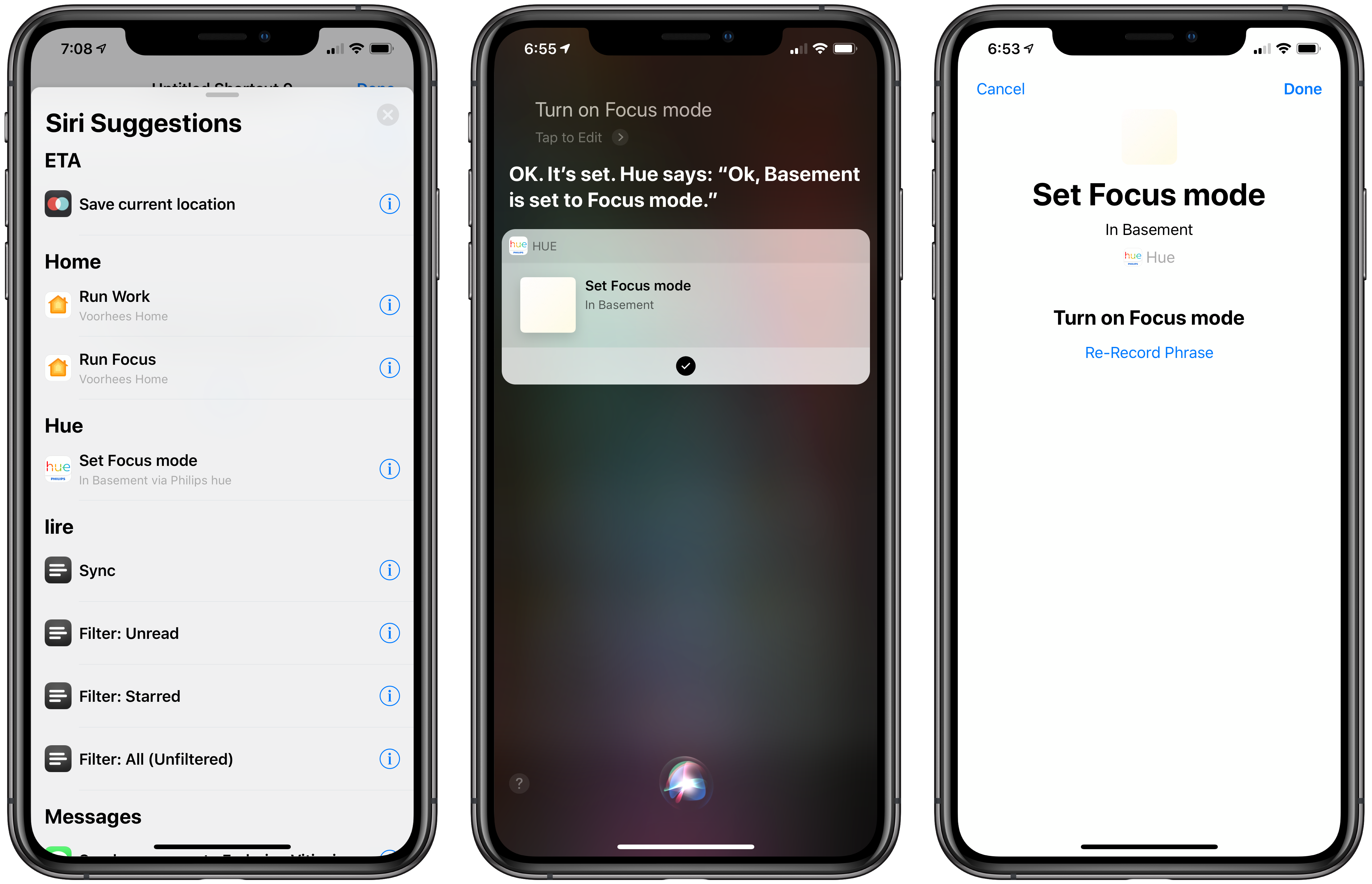
Promised earlier this year, the Philips Hue app now supports Siri Shortcuts allowing users to trigger scenes created in the app.
The Hue app received a major update earlier this year, which significantly improved the creation of scenes. Users can pick from pre-built scenes created by designers to evoke a particular mood or create their own using photos or a color picker to control the color and brightness of a group of Hue bulbs.
With the new Siri Shortcut support, those scenes can be triggered using Siri and incorporated as actions in custom shortcuts using Apple’s Shortcuts app. I have several Hue bulbs in my studio. They aren’t the kind that supports a wide range of colors, but I can adjust the brightness and warmth of each bulb. To test the Hue’s new shortcut functionality, I created a scene called Focus Mode that turns the brightness up to 100% with a cool blue cast.
After using the scene, the Siri & Search section of the Settings app suggested I add my new scene as a Siri shortcut, which is how many apps approach Siri shortcuts. Frequently-used scenes will also be suggested on the lock screen, Siri watch face, and search.
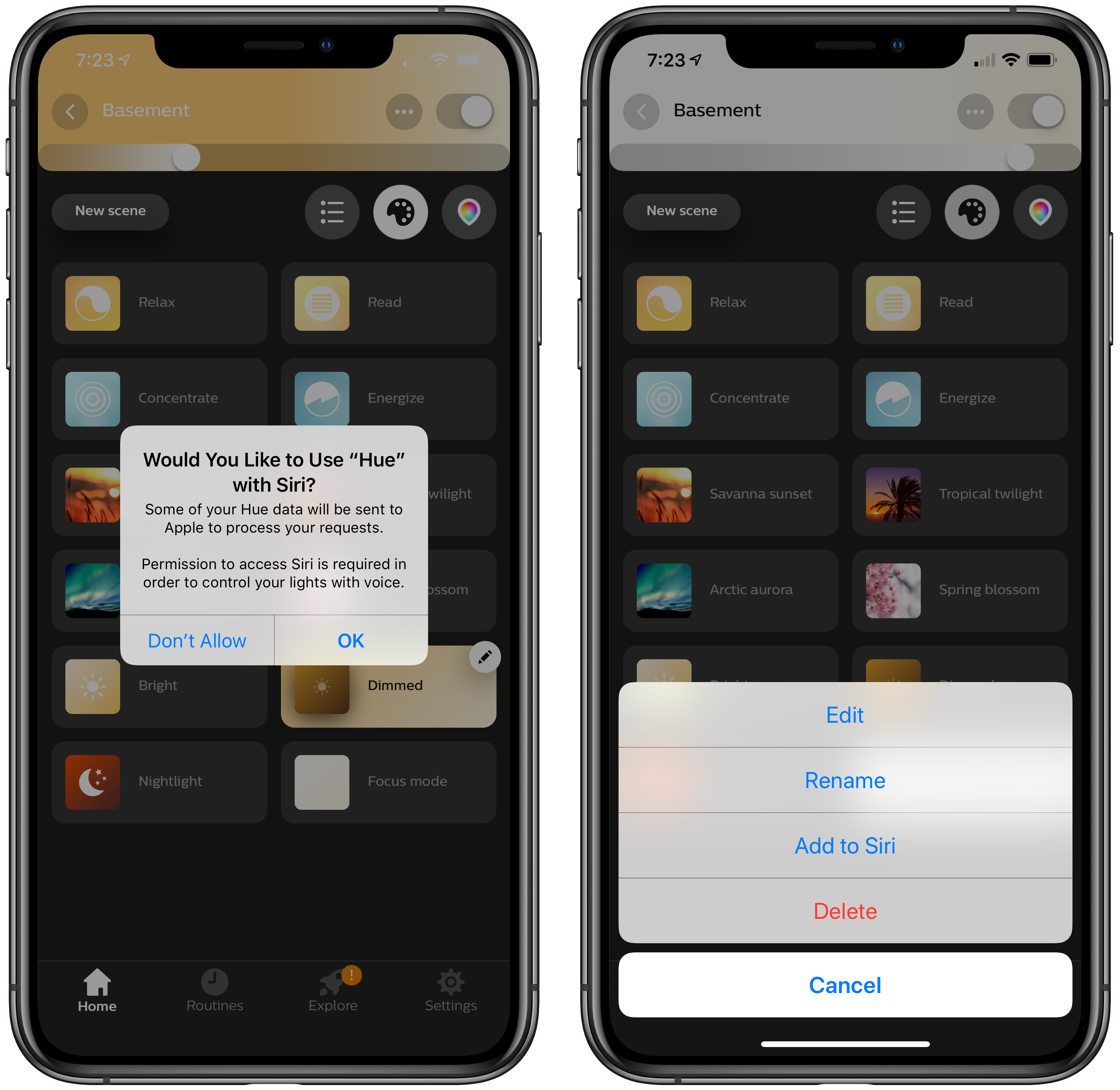
There’s an alternate, better route to setting up a Hue shortcut though. Inside the app, if you tap on a scene, a pencil icon appears in the corner. Tapping on it gives you the option to add the scene to Siri, as well as edit, rename, or delete it. Other developers have added the ability to add Siri shortcuts in their app’s settings, but I especially like Hue’s approach. If you’re in the Hue app creating a scene, that’s the natural spot to add it as a Siri shortcut too.
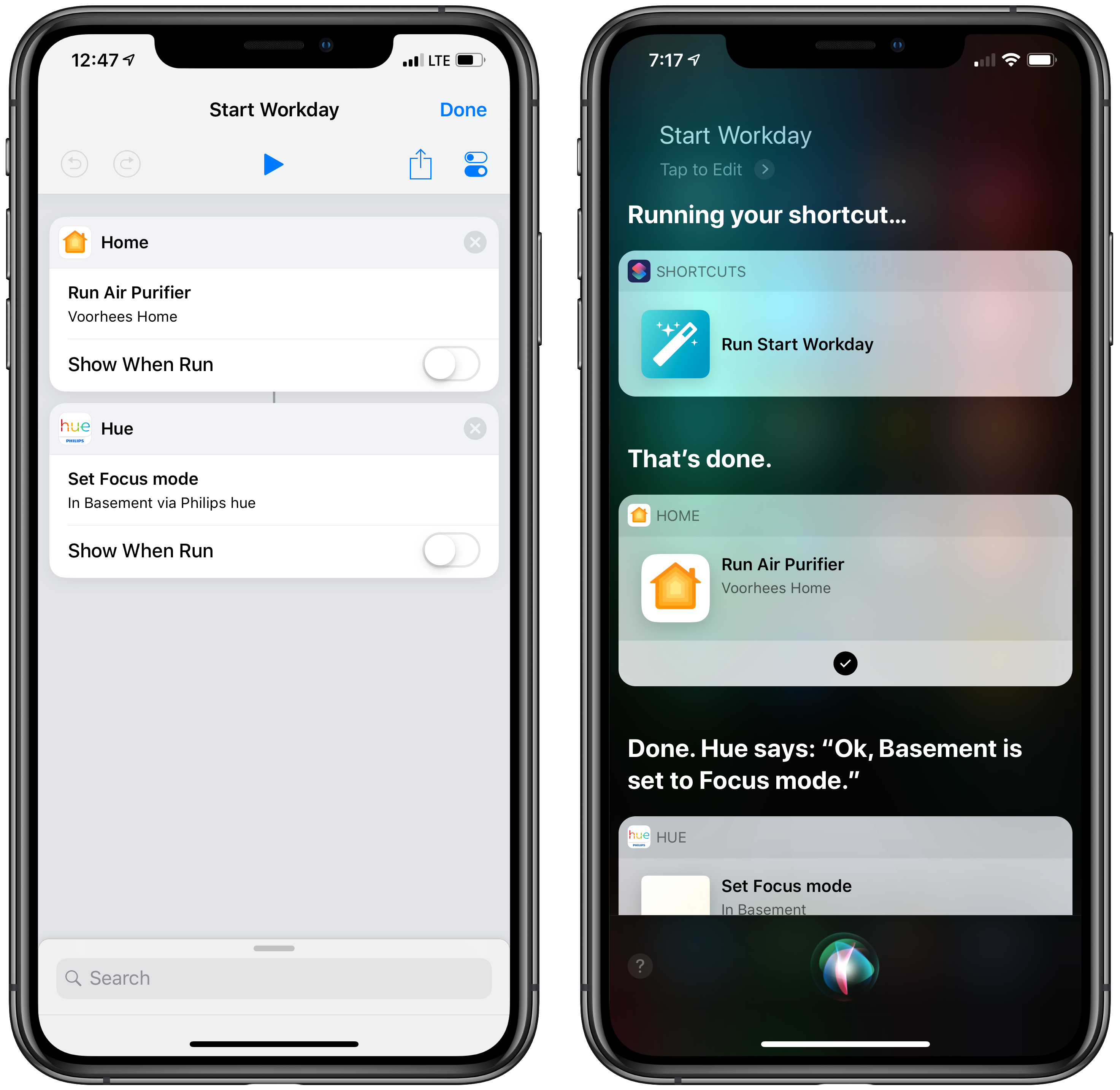
With a Hue Siri shortcut in place, you can also use it as an action in custom shortcuts you create in Apple’s Shortcuts app. I set up a simple shortcut that turns on the lights in my studio and enables a smart electrical outlet that controls an air filter. Now, as I finish my morning coffee, I can say ‘Hey Siri, start Workday’ and the lights and filter come on as I head downstairs. The same sort of shortcut can be created to control lights using Shortcuts’ HomeKit support added with iOS 12, but having similar functionality built into the Hue app is a useful alternative if that’s where you’ve set up your scenes.
The Hue app is available as a free download on the App Store.