John Voorhees

5429 posts on MacStories since November 2015

John is MacStories' Managing Editor, has been writing about Apple and apps since joining the team in 2015, and today, runs the site alongside Federico. John also co-hosts four MacStories podcasts: AppStories, which covers the world of apps, MacStories Unwind, which explores the fun differences between American and Italian culture and recommends media to listeners, Ruminate, a show about the weird web and unusual snacks, and NPC: Next Portable Console, a show about the games we take with us.

Qwiki and Wonder: No-Nonsense Wikipedia Research

There was a time, before Twitter implemented restrictive API limitations, when Twitter clients were a playground where app developers tried new ideas. It felt like there was a new Twitter client released every week. Today, that role seems to have been taken over by Wikipedia apps.

There are a lot of good Wikipedia apps. Some, like Wikipedia’s own client that I reviewed earlier this year, are designed to optimize the reading and browsing experience, while others, like Curiosity, focus on location-based discovery. Those are great approaches to Wikipedia, but often I use Wikipedia for quick research and just want to get in and out of Wikipedia quickly without being distracted from writing. For those times, I’ve found two apps I like – Qwiki, a menu bar app for the Mac, and Wonder, an iOS app. Both apps are fast, no-frills utilities that help you find and browse what you need, copy a link, and share it quickly.

Read more


Jumping in with Both Feet

The tagline for my MacStories Weekly column, Ongoing Development, is: Trying new things, seeing what works, and discarding what doesn’t. The description captures Ongoing Development well and I like that it’s short, but if I were to add anything to it, I’d expand the middle bit to ‘seeing what works and where it leads’...


Amazon Kindle Devices and Apps Add Page Flip Navigation

Amazon has introduced the digital equivalent of saving your place in a book as you flip to another page. The feature, called ‘Page Flip,’ lets you pin the current page in the corner of the screen while you scroll through an eBook. While you browse through a compatible book in the Kindle iOS app or on Android devices, Fire tablets, and Kindle devices, a small thumbnail of the page where you started is displayed in the corner of the screen. To return to where you started, you simply tap the thumbnail.

Amazon has posted a video to YouTube that does a good job comparing the feature to doing the same thing in a paper book:

Permalink

Twitter Launches Dashboard App for Small Businesses

Last week saw Twitter introduce Engage, a business-oriented analytics app for iOS. Twitter continued the roll-out of new features and products today with Twitter Dashboard, a free iOS account management app (US only) aimed at businesses that can also be accessed on the web. Dashboard, is designed to address the needs of small business in particular. According to The Twitter Small Business Blog,

Dashboard offers a single destination to get things done. It gives business owners a clear picture of what’s being said about their businesses, lets them schedule Tweets, and offers insights about their Tweet performance.

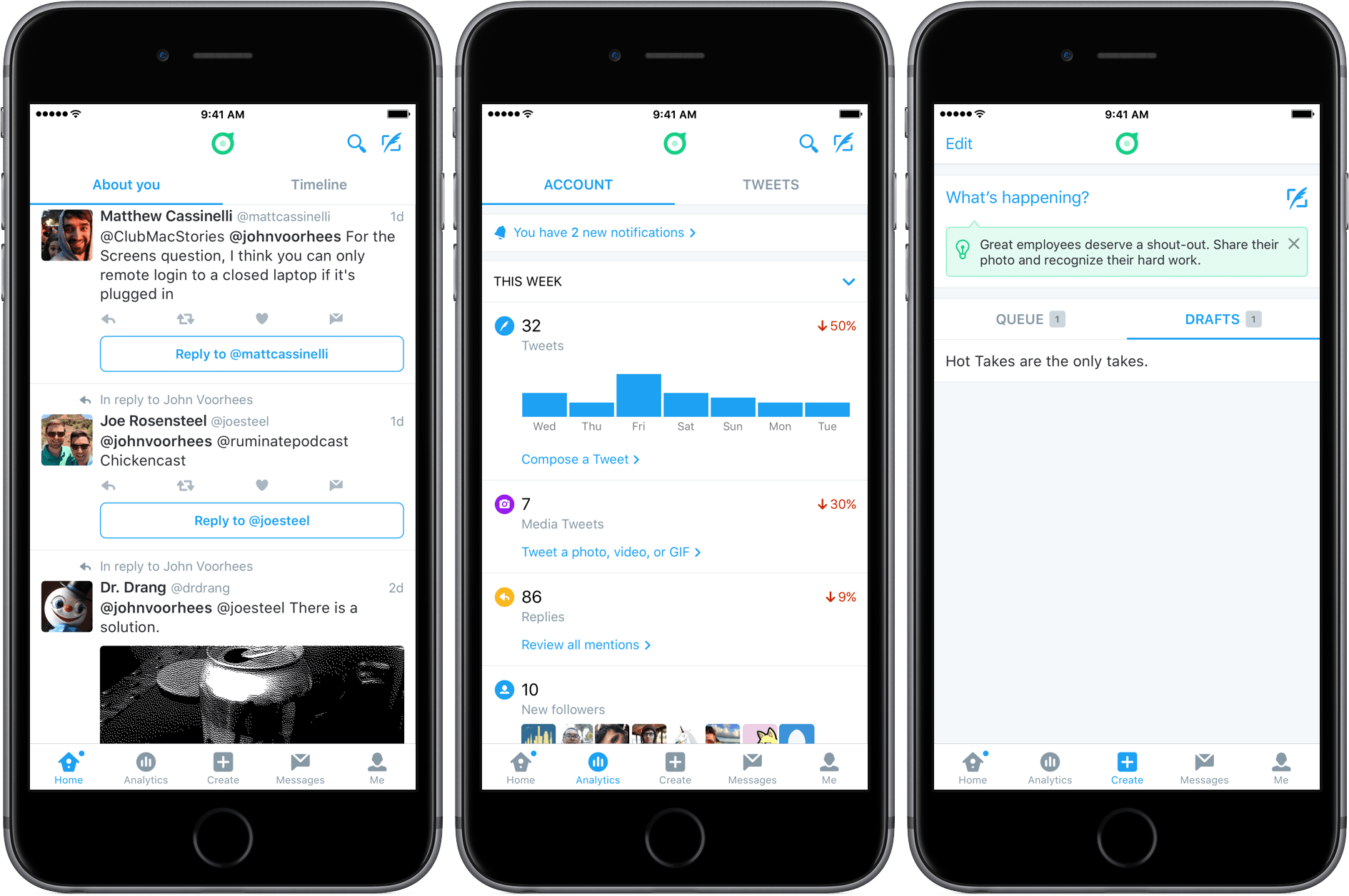
Dashboard will be familiar to anyone who has used the official Twitter client, with some interesting differences. The ‘Home’ tab defaults to a view called ‘About You’ instead of your timeline. ‘About You’ includes things like mentions, replies, tweets that use of your account name, and tweets with any other keywords that you add because you want to surface them in Dashboard. A second tab within the ‘Home’ view takes you to your timeline.

Dashboard also includes two unique tabs called ’Analytics’ and ‘Create.’ ‘Analytics’ includes some of the same information provided by Engage, but presented in a more summary fashion than in Engage. ‘Create’ serves the same purpose as a service like Buffer, allowing you to schedule tweets and save multiple drafts.

If you have used Twitter account management tools in the past, you’ll find that there is nothing revolutionary about the tools included in Dashboard. The benefit, however, is having these tools all in one place with a design that focuses on what people are saying about your business, which should make it easier for business owners to monitor what people are saying about their businesses on Twitter and also promote their businesses with Twitter.


Apple’s iOS Icon Templates Are a Little Off

Update 2016-06-28: The iOS icon templates provided by Apple as part of the iOS Human Interface Guidelines section of its developer website have been updated to the correct shape.


Last week Apple posted templates for iOS icons on its developer website. Designer Michael Flarup noticed something was a little off about the templates. It turns out that the templates aren’t the ‘squircle’ icon shape that is created when developers submit an app to the App Store. Instead, the templates are rounded rectangles. The difference is small, but as Flarup explains with a neat GIF that highlights the difference between the two shapes:

using the wrong canvas can have consequences for your design. Apple will crop your icon in the squircle shape, so you’d better not try to do anything precise in the templates they provide.

Fortunately, Flarup and others have created their own squircle templates that are linked in his article.

Permalink

Twitter Adds Stickers

Virtual stickers are all the rage on social networks and in messaging apps. Just two weeks ago, Apple jumped on the sticker bandwagon at WWDC with the upcoming version of the Messages app that will ship with iOS 10. This is not something particularly new (remember Gowalla?), but the pace of adoption seems to have accelerated in the past year with the growing popularity of apps like Snapchat and Facebook Messenger.

Adding stickers to photos in Twitter.

Adding stickers to photos in Twitter.

Now Twitter is going all-in with hundreds of custom stickers and rotating seasonal sticker packs you can use to decorate photos. As reported by the The Verge this morning, Twitter will be rolling out stickers to all users in its official app over the next few weeks.

Twitter has its own special take on stickers. From within the official Twitter client, you will be able to

search them like hashtags. Tap on a sticker inside a tweet and you’ll be taken to a new timeline that shows you how it’s being used around the world.

It appears that stickers will be available through Twitter’s official client only, which undoubtedly will be viewed by some people as yet another advantage of third-party Twitter clients, but I can’t help but wonder if sticker-mania will have a net negative impact on third-party clients like Tweetbot and Twitterrific.

Permalink

Game Day: SEQ

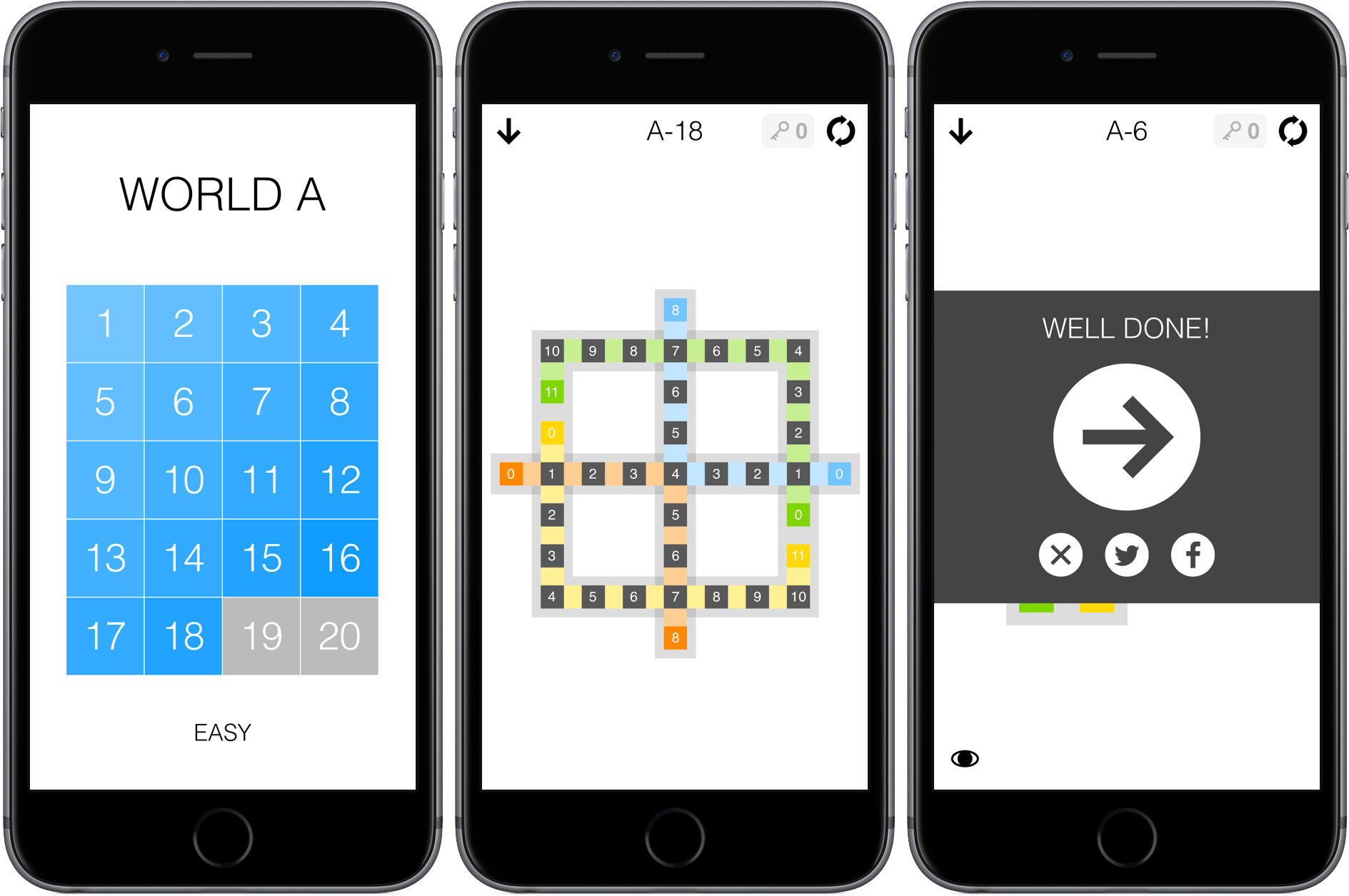
SEQ is a number sequencing puzzle game from 1Button with 280 levels. The premise is simple – each level is a series of squares laid out in a pattern. There are colored squares with numbers in them and grey squares with zeros in them. Your job is to trace a path from the colored squares to the grey squares. Each square along your path is given a number that is one less than the square before it. For example, if you start with a colored square with a ‘5’ in it, you need to fill squares with 4 - 3 - 2 - 1 before landing on a grey zero square. If you have multiple number sequences to complete in a single puzzle, things get trickier. One sequence cannot cross the path of another unless the number in the earlier sequence where the two cross matches what you need to advance the current sequence. It’s easiest to understand by watching 1Button’s video:

SEQ starts with very simple puzzles that gradually get more complex. You cannot skip around, except among the puzzles you have completed or ahead if you have purchased keys to bypass puzzles you cannot solve. SEQ works well on iOS with its simple path tracing and the ability to play for short periods of time. SEQ is also the sort of game that I like to play while I’m listening to a podcast or music, and fortunately the sound effects, which can be disruptive when you are simultaneously listening to something else, can be turned off by swiping to the view to the left of the puzzles.

SEQ is $1.99 on the App Store with a $0.99 in-app purchase to buy five keys that allow you to bypass puzzles you cannot complete.


Ongoing Development

iOS has matured. With over two million apps in the App Store, it’s a safe bet that just about any category of app you can imagine already exists. But once a year, Apple presents a bunch of new APIs to developers that have the potential to create whole new categories of apps. This year was...


Twitter Releases Tweet Analytics App Engage

It’s easy to make fun of Engage, the analytics app launched by Twitter today. Using terminology like engagement, influencers, and verified users, Twitter isn’t doing itself any favors. But here’s the thing, Twitter is different things to different people. For some it’s a public forum for chatting with friends. For others, Twitter is a broadcast medium. For still others, Twitter is all about marketing. Engage is designed to help you maximize the reach of your tweets through analytics. If that’s not your thing, you may view the app as useless, but that doesn’t mean it should be dismissed out of hand.

What Engage does, it does well. This is not a replacement for your Twitter client, including because it pops up an alert offering to track your tweet stats in real-time after every post. Engage is more akin to a tool like Google Analytics.

Read more